On 15 November 2026 Debian shipped linux 6.1.192-1 to bookworm as DLA 4906-1, and it can freeze an ext4 machine within minutes of boot. The package behind it is linux-image-6.1.0-55-amd64. The Debian 6.1.0-55 freeze is a kernel NULL pointer dereference in ext4_mb_load_buddy_gfp, tracked as Debian bug #1154101 with critical severity. It hit bare metal, Xen, Hyper-V and KVM guests on amd64, arm64 and i686.
The fix is short. Boot 6.1.0-54 from GRUB’s Advanced options, save it as the default, and hold linux-image-amd64 so unattended-upgrades can’t bring -55 back. Then remove the hold once Debian uploads the patched build. We reproduced the crash on a Debian 12 KVM guest and ran every rollback step on that same machine. All of it was tested in November 2026 on the stock signed amd64 kernels, so every step keeps the Debian-signed boot chain intact.
Systems hit by the 6.1.0-55 regression
Any bookworm machine that boots 6.1.0-55 with an ext4 filesystem is exposed. The bug log has reports from an ASUS desktop board, Xen domUs, Hyper-V VMs and five KVM guests at Hetzner and OVH, both amd64 and arm64. The cloud flavour crashes too: one reporter’s 6.1.0-55-cloud-amd64 host went down the same way.
The cause sits in a stable backport. In 6.1, __filemap_get_folio() returns NULL when a page is not cached, but the backported folio conversion of the ext4 block allocator still tests the result with IS_ERR(). Once a group’s bitmap or buddy page has been evicted, whether by memory pressure or drop_caches, the next block allocation for that group dereferences NULL. That explains the timing in the bug log: one admin saw crashes anywhere from 25 seconds to about 5 hours after boot.
Start by confirming which kernel is running and which images are still on disk. The second answer decides every step that follows, because a rollback needs the -54 image present:
uname -r
dpkg -l 'linux-image-6.1*' | grep ^ii
Our lab guest had taken the update and still kept the previous image, which is what a default bookworm install looks like the day after DLA 4906-1:
6.1.0-55-amd64
ii  linux-image-6.1.0-54-amd64          6.1.190-1    amd64        Linux 6.1 for 64-bit PCs (signed)
ii  linux-image-6.1.0-55-amd64          6.1.192-1    amd64        Linux 6.1 for 64-bit PCs (signed)
If only the -55 line shows, skip ahead to the troubleshooting section on a purged -54 before you reboot anything. For more ways to read the running kernel and distribution, see checking the Linux version and kernel from the command line.
The oops signature
The trace below came from our KVM guest on 6.1.0-55, 350 seconds after boot. We trimmed the hardware line, the Code: bytes, the register dump and the unreliable ? frames, and marked each cut with [...]. Match three lines against your own logs: the BUG: kernel NULL pointer dereference header, the RIP in ext4_mb_load_buddy_gfp, and a call trace that runs through ext4_mb_regular_allocator and ext4_mb_new_blocks:
[  350.703216] BUG: kernel NULL pointer dereference, address: 0000000000000000
[  350.711194] #PF: supervisor read access in kernel mode
[  350.717947] #PF: error_code(0x0000) - not-present page
[  350.723221] PGD 0 P4D 0
[  350.725968] Oops: 0000 [#1] PREEMPT SMP NOPTI
[  350.730559] CPU: 0 PID: 84028 Comm: fallocate Not tainted 6.1.0-55-amd64 #1  Debian 6.1.192-1
[...]
[  350.748647] RIP: 0010:ext4_mb_load_buddy_gfp+0xbc/0x380 [ext4]
[...]
[  350.841323] Call Trace:
[  350.843922]  <TASK>
[  350.846139]  ext4_mb_regular_allocator+0x29e/0xce0 [ext4]
[  350.853234]  ext4_mb_new_blocks+0x820/0x1240 [ext4]
[...]
[  350.877514]  ext4_ext_map_blocks+0x3c7/0x1990 [ext4]
[  350.884001]  ext4_map_blocks+0x1b6/0x5f0 [ext4]
[  350.890040]  ext4_alloc_file_blocks.isra.0+0x11c/0x340 [ext4]
[...]
[  350.901249]  ext4_fallocate+0x160/0x1200 [ext4]
[...]
[  350.911684]  vfs_fallocate+0x131/0x340
[  350.917195]  __x64_sys_fallocate+0x40/0x70
[  350.921416]  do_syscall_64+0x5d/0xb0
[...]
[  350.943788]  entry_SYSCALL_64_after_hwframe+0x6e/0xd8
[...]
[  351.097044] ---[ end trace 0000000000000000 ]---
[...]
[  351.349043] note: fallocate[84028] exited with irqs disabled
The Comm: field will differ on your system. Ours was fallocate from the test workload, the first report in the bug log was a process called local, and an arm64 guest died in syncthing through unlinkat. Whatever writes to ext4 when an evicted group gets allocated from is the process that trips it.
Where the trace actually lands
Do not trust an empty journalctl -k -b -1. After the freeze, our previous boot’s journal stopped six minutes in and held no oops at all, and kern.log and syslog held nothing either. The box hung before journald could flush. The trace survived in two places: the serial console and the EFI pstore, which systemd copies to disk on the next boot. Check in this order. The first line needs a persistent journal (/var/log/journal present), and the second only finds files where rsyslog is installed:
sudo journalctl -k -b -1 --no-pager | grep -A3 'BUG: kernel NULL'
sudo grep -c ext4_mb_load_buddy_gfp /var/log/kern.log /var/log/syslog
sudo ls /var/lib/systemd/pstore/
Each pstore record is a numbered directory. Ours was 179482455, and yours will have its own number, so substitute it in the grep:
sudo grep -hE 'BUG: kernel NULL|RIP: 0010|Comm:' /var/lib/systemd/pstore/179482455/dmesg.txt | head -3The journal count is zero while pstore has the full header. Remember this before you close a ticket as “no evidence”:

The efi_pstore backend only works on UEFI boots, so on a BIOS boot the directory stays empty. There the provider’s serial console log or a netconsole target is your only record of the oops.
The previous kernel from GRUB Advanced options
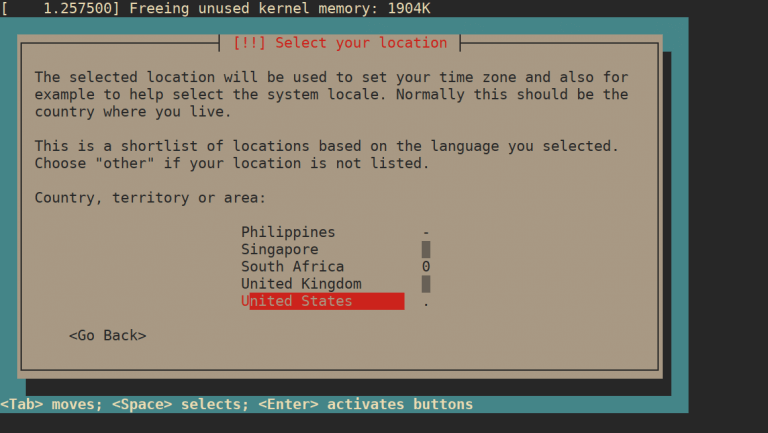
A frozen box needs a hard reset, and the next boot will pick 6.1.0-55 again because it’s the newest entry and GRUB’s default is the first one. Catch the menu before the countdown runs out. Open Advanced options for Debian GNU/Linux, then choose Debian GNU/Linux, with Linux 6.1.0-54-amd64, not the recovery mode line under it. The capture below is our lab guest’s menu after the next section’s saved default was set, which is why the asterisk sits on Advanced options rather than the first line.

- 1Advanced options for Debian GNU/Linux
- 2Countdown
The submenu lists every installed kernel, newest first, and each one has a recovery mode twin. Ours read like this in /boot/grub/grub.cfg on the lab guest:
Debian GNU/Linux
Advanced options for Debian GNU/Linux
Debian GNU/Linux, with Linux 6.1.0-55-amd64
Debian GNU/Linux, with Linux 6.1.0-55-amd64 (recovery mode)
Debian GNU/Linux, with Linux 6.1.0-54-amd64
Debian GNU/Linux, with Linux 6.1.0-54-amd64 (recovery mode)
UEFI Firmware Settings
Cloud images can hide this menu completely. The Google Compute Engine image we started from ships a zero GRUB_TIMEOUT in a drop-in under /etc/default/grub.d/ and sends the terminal to serial, so a reset there boots straight back into -55 (we added a lab-only drop-in to show the menu for the capture). On those machines skip the menu and set the default from a shell, as the next section does. Fedora handles the same problem differently through grubby, which our guide to booting an older kernel on Fedora covers.
A saved GRUB default on 6.1.0-54
Picking -54 once by hand does not stick. The next unattended reboot, a power cut or a kernel postinst will land you on -55 again. Pin the older kernel as the saved default instead. Switch GRUB_DEFAULT to saved and regenerate the config:
sudo sed -i 's/^GRUB_DEFAULT=.*/GRUB_DEFAULT=saved/' /etc/default/grub
grep '^GRUB_DEFAULT' /etc/default/grub
sudo update-grub
Now write the entry into GRUB’s environment block. The name is the submenu title and the entry title joined by >, copied exactly as the menu prints them:
sudo grub-set-default 'Advanced options for Debian GNU/Linux>Debian GNU/Linux, with Linux 6.1.0-54-amd64'
sudo grub-editenv list
The saved_entry line must match the menu text character for character. A typo here does not raise an error: GRUB falls back to the first entry, which is -55. That is the one failure in this procedure that looks like success.

Reboot and check what came up. On our guest the saved default brought back the older kernel with no console interaction:
uname -rThe answer should be the -54 image and nothing else:
6.1.0-54-amd64If you want to test -54 once before committing to it, sudo grub-reboot with the same entry name boots it for a single start and then reverts. It still needs GRUB_DEFAULT=saved to work.
Holds that keep 6.1.0-55 out
The package that drags -55 onto a clean -54 machine is the metapackage linux-image-amd64, which depends on whichever ABI is current. Plain apt-get upgrade refuses to install new packages, so it keeps the metapackage back on its own. apt upgrade and full-upgrade don’t hold back. Our lab guest showed the difference before any hold was set:

So “I only ran apt-get upgrade” is not protection. One apt upgrade from a colleague or one unattended-upgrades run installs -55. We tested two holds on that machine to see which one actually stops it:
sudo apt-mark hold linux-image-amd64
apt-mark showhold
sudo apt-get -s full-upgrade
Both holds stopped the simulated full-upgrade. Holding the versioned package linux-image-6.1.0-55-amd64, even before it was installed, kept the metapackage back because its dependency could not be met. Holding the metapackage alone gave the same result:

Hold the metapackage, not the versioned package. Either hold blocks the fix as well as the broken build, so either one needs an unhold step later. The fix merged into Debian’s kernel repository is changelogged as 6.1.192-2 with no ABI bump, so as merged it would ship under the same name, linux-image-6.1.0-55-amd64. If Debian bumps the ABI instead, a hold on the versioned name stays behind on a package nothing uses. A hold on linux-image-amd64 covers both cases and leaves one package for the unhold step to release.
Know what the metapackage hold does not stop. It does nothing against an explicit sudo apt install linux-image-6.1.0-55-amd64, which names the broken image directly. It also covers only linux-image-amd64, so linux-image-cloud-amd64 and linux-image-arm64 need holds of their own. Neither case was run in our lab; both follow from how apt-mark holds work on named packages.
The hold must also stop unattended-upgrades, because that is how most bookworm servers picked -55 up overnight. Debian’s own unattended-upgrades honours dpkg holds. Our dry runs showed it unpacking -55 with no hold and leaving it alone once the metapackage was held:
sudo unattended-upgrade --dry-run -v | grep -E 'will be upgraded|unpack'The first run is the unheld machine, the second the same machine after apt-mark hold linux-image-amd64. The other security updates (parted, rsyslog) still go through:

Which hold you set depends on where the machine stands right now:
- A machine still on -54 with no -55 image has
linux-image-amd64held before the next upgrade run. - A machine that already has -55 installed boots -54 from the saved GRUB default, and the held metapackage keeps -55 at 6.1.192-1 until the unhold.
- No machine carries a hold on
linux-image-6.1.0-55-amd64, because that hold is left behind if the fix arrives under a new ABI. - No script or configuration management run uses
--allow-change-held-packageswhile the hold is in place.
Treat the hold as a temporary exception and write it down where your team will see it. A hold nobody remembers is how a server ends up on a 2026 kernel in 2028.
Removing 6.1.0-55, and what it takes with it
Removing the broken image is optional. The saved default already keeps it from booting. It does give you a second guard, though: if the GRUB environment block is ever reset, the newest kernel left on disk is -54. Run the dpkg -l check from the first section first. Removing -55 from a machine that has no other kernel leaves it unbootable.
sudo apt-get remove linux-image-6.1.0-55-amd64Read the removal list before you confirm. apt removes the metapackage along with -55, because linux-image-amd64 6.1.192-1 depends on exactly that image. If you set the hold from the previous section, apt lists the metapackage under held packages to be changed; we released the hold with sudo apt-mark unhold linux-image-amd64 before this run, and the hold goes away with the package either way:

Afterwards apt list --upgradable showed no kernel at all. That looks tidy, but it means this machine will never receive another kernel update until someone reinstalls linux-image-amd64. That is a worse position than a hold, because no hold shows up in apt-mark showhold to remind anyone. If you remove -55, put the reinstall into the same ticket that tracks the fix.
Lab result on a KVM guest
We started from a Debian 12 guest on 6.1.0-54 (2 vCPUs, ext4 root on virtio-scsi) and upgraded it to 6.1.0-55. Then we ran a write workload: six shell workers looping over dd, fallocate, truncate and rm on a ring of 400 files each, plus an fstrim every minute. About five minutes into the workload, at 350 seconds of uptime, the oops above hit inside a fallocate call. SSH sessions then hung, new logins failed, and the guest needed a hard stop. Ours came back clean, but one reporter in the bug log had to restore a system disk from backup after the freeze, so check your backups and watch the next boot’s fsck output on any machine that crashed.
The same guest, pinned to 6.1.0-54 with the saved GRUB default, booted cleanly and stayed up through the rest of the hold, unattended-upgrades and removal tests. That matches the bug log, where the reporters who rolled back describe -54 (6.1.190-1) as stable. We did not run the unsigned 6.1.192-1a~test1 build the kernel team posted for testers. Three reporters confirm it stops the crash, but it is amd64 only and unsigned, so Secure Boot machines will refuse it.
One point matters for remote servers. The machine booted fine on -55 and ran for minutes before dying. That window is enough to SSH in right after a reset, run grub-set-default and reboot, without ever reaching a console.
Unholding once the fixed kernel ships
Holding forever is its own vulnerability. DLA 4906-1 exists because 6.1.192-1 fixed a batch of kernel CVEs, and every one of them is still open on a machine pinned to -54. Check daily, and unhold the day the fix lands. Both possible release shapes bump the metapackage’s version past 6.1.192-1, whether Debian ships 6.1.192-2 under the same -55 ABI or bumps to a new ABI, so compare against that:
sudo apt-get update
apt-cache policy linux-image-amd64 linux-image-6.1.0-55-amd64 | grep -E '^linux|Installed|Candidate'
dpkg --compare-versions "$(apt-cache policy linux-image-amd64 | awk '/Candidate:/{print $2}')" gt 6.1.192-1 && echo "fixed build available" || echo "still 6.1.192-1, keep the hold"
On 16 November 2026 the candidate was still the broken build. The output below is from our lab run of a slightly different variant, which fed the linux-image-6.1.0-55-amd64 candidate to dpkg --compare-versions instead of the metapackage’s. Both candidates were 6.1.192-1, so it said to keep the hold:
linux-image-amd64:
  Installed: 6.1.192-1
  Candidate: 6.1.192-1
linux-image-6.1.0-55-amd64:
  Installed: 6.1.192-1
  Candidate: 6.1.192-1
still 6.1.192-1, keep the hold
When it prints fixed build available, check that bug #1154101 shows a “Fixed in” version matching the candidate, then release the hold and upgrade. If you removed -55 earlier, the install line brings the metapackage back:
sudo apt-mark unhold linux-image-amd64
sudo apt-get install linux-image-amd64
sudo apt-get full-upgrade
Last, give GRUB its normal default back so the newest kernel boots again. Leaving saved_entry pointing at -54 would quietly keep you on the old kernel after the fix is installed:
sudo sed -i 's/^GRUB_DEFAULT=.*/GRUB_DEFAULT=0/' /etc/default/grub
sudo update-grub
Reboot and confirm with uname -v that the running build is no longer 6.1.192-1. Keep -54 installed for a few days in case the patched kernel surprises you. Our walkthrough on installing a newer Linux kernel on Debian covers the backports route if you want to move bookworm to 6.12. For comparison, the Ubuntu procedure lives in Install or Update the Latest Linux Kernel on Ubuntu.
Troubleshooting
These are the three situations where the main procedure does not apply as written.
6.1.0-54 is already purged
An apt autoremove run, or a small /boot cleaned by hand, can leave -55 as the only kernel. The bookworm-security index only carries the current 6.1.192-1 build, so a plain apt install of the -54 image has nothing to fetch. Debian’s snapshot archive still serves it. Add a temporary source pinned to a date before DLA 4906-1, for example 8 November 2026:
echo 'deb [check-valid-until=no] https://snapshot.debian.org/archive/debian-security/20261108T000000Z bookworm-security main' | sudo tee /etc/apt/sources.list.d/snapshot-54.list
sudo apt-get update
sudo apt-get install linux-image-6.1.0-54-amd64
That snapshot’s pool carries the signed linux-image-6.1.0-54-amd64 6.1.190-1 package alongside the matching metapackage. Delete snapshot-54.list and run apt-get update right after. A frozen source left in place will keep offering old packages long after this incident is over.
Cloud and arm64 kernel flavours
Every command above uses the generic amd64 names. Cloud images run linux-image-cloud-amd64 and linux-image-6.1.0-55-cloud-amd64, arm64 machines use linux-image-arm64, and 32-bit x86 uses linux-image-686-pae. The bug log has crash reports for all of them. Run dpkg -l 'linux-image*' to see your flavour, then substitute it in the hold, the GRUB entry name and the unhold check. The GRUB entry then reads Debian GNU/Linux, with Linux 6.1.0-54-cloud-amd64.
Remote servers without a console
Use the window after boot. A -55 machine usually answers SSH for a while before the oops, so the whole fix can be done without a console if you work in this order:
- Reset the server from the provider panel and SSH in as soon as it answers.
- Stop the write-heavy services (databases, sync agents, backup jobs), because block allocation is what triggers the oops.
- Run the
GRUB_DEFAULT=saved,update-grubandgrub-set-defaultsteps in one go, checkgrub-editenv list, then reboot. - If the box still dies first, boot the provider’s rescue system, chroot into the root filesystem and run the same commands there.
For a broader view of patching kernels under pressure, our write-up of the NoisyTCP kernel CVE walks through checking, mitigating and patching in that order.
Post-rollback audit checklist
Run through this on every bookworm machine before you call the incident closed. Each line is a condition you can check from a shell:
uname -rprints6.1.0-54-amd64(or the -54 image of your flavour).dpkg -l 'linux-image-6.1*'lists the -54 image as installed.grub-editenv listshowssaved_entrynaming the -54 entry exactly, andGRUB_DEFAULT=savedis set.apt-mark showholdlistslinux-image-amd64and does not listlinux-image-6.1.0-55-amd64.unattended-upgrade --dry-run -vno longer nameslinux-image-amd64in its upgrade list.- Any pstore or serial-console oops from the incident has been saved off the machine for the bug report.
- A daily check of
apt-cache policy linux-image-amd64is scheduled, with the unhold and GRUB reset steps attached to it.
Item 7 is the one that gets skipped. Every day the hold stays past the fixed upload is a day the CVEs from DLA 4906-1 stay open on that machine. Follow bug #1154101 for the upload notice.