Git

Disable User Creation (Signup) on GitLab welcome page

So you have a freshly installed GitLab server and would like to Disable user creation (Signup) on GitLab welcome page?. If so, then this guide is for you. By default, GitLab CE installation has Signup page enabled, this can pose as a risk if the GitLab login page is available on a public IP address.

Original content from computingforgeeks.com - post 5202

To limit user creation and access, you may need to disable the Signup page. It is simple to  Disable user creation (Signup) on GitLab welcome page. All you need to do is Login as a rootuser.

install gitlab ubuntu 18.04 debian 9 root login

Navigate to Admin area by clicking the Menu.

gitlab admin section

Then click on the “Settings > General” page at the bottom of the left navigation pane.
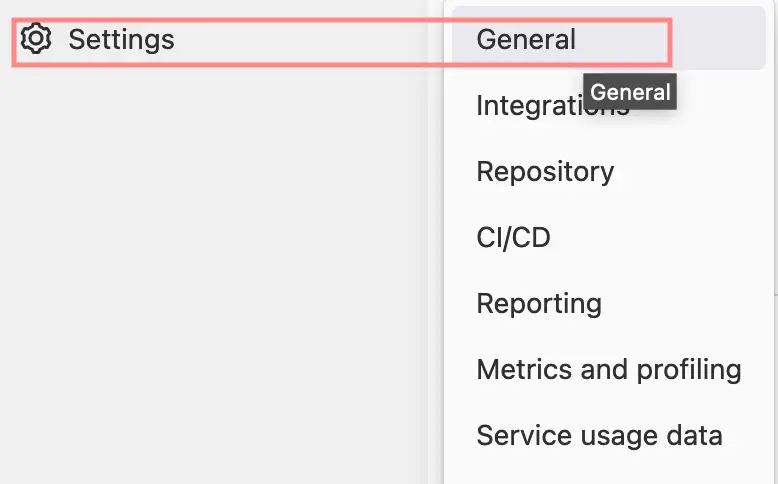
gitlab admin settings general

Now expand the Sign-up restrictions section to configure the way a user creates a new account.

gitlab disable signup page 03

Uncheck Sign-up enabled button to disable User registration on GitLab welcome page.
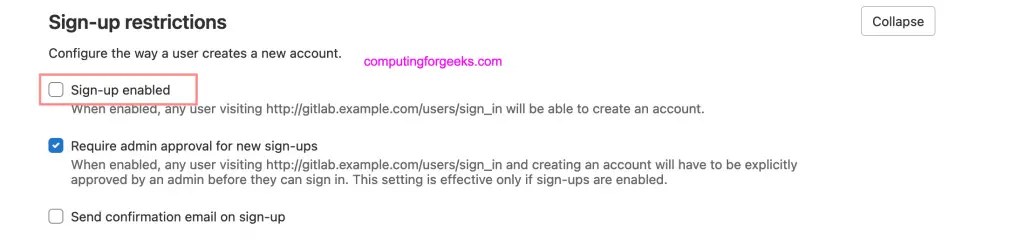
gitlab disable signup

Save the changes

gitlab save changes

Logout of your GitLab to confirm the changes.

gitlab disable signup page 06

As seen on the screenshot above, the tab for “Register” is now missing. You have successfully disabled User Register/Signup on GitLab welcome page.

Similar articles:

How to Configure GitLab FreeIPA Authentication

How To Secure GitLab Server with SSL Certificate

Keep reading

How to Upgrade Fedora 44 to Fedora 45 (GUI, CLI and Rollback) Fedora How to Upgrade Fedora 44 to Fedora 45 (GUI, CLI and Rollback) Upgrade Ubuntu 24.04 to Ubuntu 26.04 LTS (Step by Step) Ubuntu Upgrade Ubuntu 24.04 to Ubuntu 26.04 LTS (Step by Step) UFW Firewall Commands with Examples on Ubuntu 26.04 / 24.04 Security UFW Firewall Commands with Examples on Ubuntu 26.04 / 24.04 Git CVE-2026-111760: Check and Patch the Recursive Clone RCE Git Git CVE-2026-111760: Check and Patch the Recursive Clone RCE Deploy Collabora Online Office on Ubuntu with Let’s Encrypt SSL Cloud Deploy Collabora Online Office on Ubuntu with Let’s Encrypt SSL Install Vivaldi Web Browser on Ubuntu 22.04/20.04 Desktop Install Vivaldi Web Browser on Ubuntu 22.04/20.04

Leave a Comment

Press ESC to close