DecisionTune 1.0 is a 395M decision model. It runs on your computer. It routes messages, answers yes/no questions, selects tools and gives ratings. On a Mac with Apple silicon, a short decision takes approximately 10 ms. It works offline, and it is free under Apache-2.0.
m.choose("The order arrived broken.",
"Which team should handle this customer message?",
{"billing": "Billing: charges, refunds, invoices",
"shipping": "Shipping: delivery, lost or damaged packages",
"tech": "Tech support: bugs, crashes, login problems"})
This is real output from DecisionTune 1.0. We recorded it on a laptop CPU (361 ms).
9.6 ms*The median time for a short decision on a Mac (MLX).
1.7 GB*The GPU memory that it uses on a Mac. 395M parameters.
$0The cost of each decision. The model runs on your computer.
OfflineAfter the first download, it works without the internet.
* We measured on an M5 Pro Mac with the MLX backend. On a CPU only, a short decision takes approximately 65 ms and uses up to 4.5 GB of memory. Over the full Decision Index run, the median time for one decision was 25.9 ms.
Get started in 60 seconds
Up and running in 3 steps
No coding. You paste one line, and DecisionTune opens in your browser. It runs on your computer, and your data stays there.
1
Open Terminal
Press ⌘Space, type Terminal, then press Return.
Spotlight
🔍 Terminal
Open PowerShell
Press the Windows key, type PowerShell, then press Enter.
Start
🔍 PowerShell
Open Terminal
Open your terminal app. On many desktops, press CtrlAltT.
Terminal
$ _
2
Paste this line
Copy it, paste it into Terminal, then press Return. It installs DecisionTune. Before it downloads the model (1.58 GB, one time), it asks you.
curl -LsSf https://decisiontune.com/install.sh | sh
Copy this line, paste it into PowerShell, then press Enter. It installs uv, a small helper.
Open a new PowerShell window. Then paste this line and press Enter. It installs DecisionTune.
uv tool install decision-tune
3
Try it in your browser
DecisionTune opens at 127.0.0.1:8000. Type a message and your options. Or drop in a spreadsheet to sort every row.
Type decisiontune app and press Enter. It asks before it downloads the model, then opens at 127.0.0.1:8000. Type a message and your options. Or drop in a spreadsheet to sort every row.
127.0.0.1:8000 · DecisionTune
Billing7.9%
Shipping71.2%
Tech support20.9%
Next time, open TerminalPowerShell and type decisiontune app. It works offline after the first download. If the command is not found, run uv tool update-shell, then open a new window.
Plug it into what you already use
The app shows the exact setup for each one, with a Copy button.
Sort a spreadsheetExcel, Numbers or Google Sheets. Export a CSV, drop it in the app, and download it with a new column of decisions.No code
Claude Desktop and CursorAdd DecisionTune as a tool. Your AI assistant sends routing and yes/no checks to your own computer.Copy one setting
Automationsn8n, Apple Shortcuts, Raycast and Power Automate can call the app on your computer. Route each new email or ticket.Low code
Python and AI agentsThree lines of Python. Pick the tool for each request in your agent.Developers
Private documentsSort a folder of medical, legal or financial files. Nothing goes to a cloud API.No code
Your own appSend a request to 127.0.0.1:8000/decide from any language.Developers
For developers: pip, uvx, HTTP, MCP and Hugging Face
DecisionTune 1.0 is on PyPI, Hugging Face and GitHub, free under Apache-2.0. Before the first download of the weights (1.58 GB), the package asks for your approval. Before it loads the model, it checks each file against a SHA-256 manifest.
Command line, without installation
uvx decision-tune ask "Is the customer asking for a refund?" --state "The order arrived broken. I want my money back."
Python
pip install "decision-tune[mlx]"    # Mac with Apple silicon: uses the GPU
pip install decision-tune           # other computers: CPU
from decision_tune import DecisionModel

m = DecisionModel.from_pretrained("decision-tune/decisiontune-1.0")
m.choose("The order arrived broken.", "Which team should handle this customer message?",
         {"billing": "Billing: charges, refunds, invoices",
          "shipping": "Shipping: delivery, lost or damaged packages",
          "tech": "Tech support: bugs, crashes, login problems"})
m.yes_no("The order arrived broken. I want my money back.", "Is the customer asking for a refund?")
Local HTTP endpoint
decision-tune serve
curl -s http://127.0.0.1:8000/decide -H 'Content-Type: application/json' -d '{"state": "What is the weather tomorrow in Paris?", "question": "Which tool should be called?", "options": ["get_weather", "send_email", "create_calendar_event"]}'
Recipes on a spreadsheet
Run a recipe on every row of a .csv or .xlsx file. The result goes to a new file next to the input.
decisiontune run support-triage tickets.csv # writes tickets-decided.csv
MCP server
Run decisiontune download once. Then add this to the MCP settings of Claude Desktop, Cursor or another MCP client.
MLX on Apple silicon, the fastest on a Mac (the package selects it automatically): pip install "decision-tune[mlx]"
ONNX Runtime: install pip install "decision-tune[onnx]", then use --backend onnx
Short descriptions of the options give better results than labels only. Links: GitHub, model card, PyPI.
What it does well
You supply
A state (text or JSON), a question and options. Or a yes/no question.
→
DecisionTune 1.0
A 395M encoder and a 4 KB scoring head. One forward pass. It does not generate text.
→
You receive
The selected option, a probability for each option and a confidence value. Or P(yes).
DecisionTune 1.0 reads a question and its options. Then it gives a score to each option. Many small decisions in an app work this way.
Routing. Send a support ticket to billing, shipping or tech support.
Refunds and policy checks. Find if a request meets the policy. Describe the options in plain words.
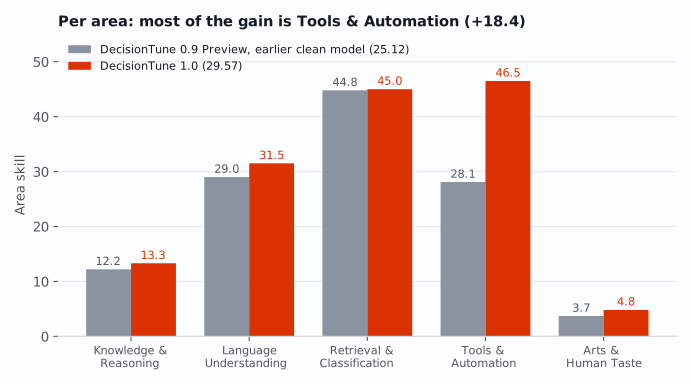
Tool selection. Select the correct tool for a request from a list of tools. This is its strongest area. The Tools & Automation score is 46.5. DecisionTune 0.9 Preview scored 28.1.
Yes/no questions. Does this reply answer the question? Does this message ask for a refund?
Ratings. Rate a review from "very negative" to "very positive". The model selects the level text that is the best fit.
Use case: RealStop
You asked for tests. Your agent writes the code, then asks, “Want me to add the tests?” RealStop checks endings like this for work the agent could still do.
Claude Code can use DecisionTune on your Mac to judge the stop. Codex CLI uses local phrase rules and starts in shadow mode: it counts matching offers and lets the turn end. You can enable one continuation per turn.
"The requested tests are still missing. Want me to add them?"
→
DecisionTune, local
One yes/no question. About 27 ms per answer, about 190 ms per stop including the hook. No prompt or reply text goes to an outside judge.
→
RealStop
Back to work, or let a stop that needs you through. The block message states the approval rule first: do not attempt a step that needs you.
In these sessions, the most common hand-back was a polite offer after finished work. We examined 3,640 model-labeled turn ends from 133 real Claude Code and Codex CLI sessions of one developer. We count a closing offer as a hand-back unless the offered step needs you. Offers and menus were 61% (764 of 1,253) of the hand-backs. Under a stricter definition, they were about 22%.
Claude Code judge results (offline replay)
Hand-backs caught and false interventions on the test split: 864 turn ends (289 hand-backs, 575 right stops) from 21 sessions. A false intervention is a right stop sent back to work. Both judges scored the same rows.
Judge
Hand-backs caught
False interventions
Leaves your computer
Phrase rules
56.7% (164 of 289)
14.6% (84 of 575)
no
DecisionTune (default, moderate)
67.5% (195 of 289)
15.8% (91 of 575)
no
On the same rows, the local DecisionTune classifier caught more hand-backs than the phrase rules: 67.5% (195 of 289) against 56.7% (164 of 289), a difference of +10.7 points (95% interval +4.4 to +14.9). False interventions were 15.8% (91 of 575) against 14.6% (84 of 575): +1.2 points (interval -3.3 to +5.4), no detectable difference.
Each strength setting trades hand-backs caught against false interventions. On the test split, light caught 53.6% (155 of 289) of hand-backs with 9.7% (56 of 575) false interventions. Moderate, the default, caught 67.5% with 15.8%. Hard caught 75.4% (218 of 289) with 22.8% (131 of 575). Light was tuned to wrongly block about 5% of right stops, and on test it blocked 9.7%.
In Claude Code, you choose the judge. The installer asks, and option 1 is the local model. For local or private use, we recommend the DecisionTune model with the RealStop hooks and skill. It is fast (about 190 ms per stop including the hook) and has no judge API fee. In local mode, RealStop sends no prompt or reply text to an outside judge. Claude Code itself still talks to its provider as usual. If you are fine with the cloud, you can pick the cloud decision model instead: run realstop judge jev (or --judge jev at install) and give your key when setup asks. It is paid per use. Each judged stop sends the end of your request, the start and end of the reply, the tool names and up to 8 learned examples to the cloud decision model's provider. This text is sent without redaction. We make no quality claim about it. The phrase rules and the skill are always on as the base and the backup.
The block message is approval-first: it states the approval rule before anything else. In two small retests with two revised message variants, attempts at approval-gated actions were 0 of 32, against 29 of 36 for the old message. In these retests, we sent the block message on purpose at stops where the agent was right to wait for you. Zero observed attempts is not a guarantee, so keep approval enforcement in your harness. After finished work, the current message still led to unrequested edits in 28% (5 of 18) of forks in the second retest, against 61% (11 of 18) for the old message.
In Claude Code, RealStop can also learn from your corrections. When you tell the agent "no" or "do this yourself", RealStop spots the common phrasings. It tells the agent to do the work in that same turn and logs the correction on your computer. Later, realstop learn lets you review the logged corrections one by one. Nothing is learned until you say yes. Confirming needs a terminal, and RealStop refuses when agent environment indicators are present. These checks are not proof that a person is present, and they are not a security boundary. With the local model, each confirm refits a personal copy of the model's small decision head. The copy stays close to the shipped model and is used only if it passes a check on the public synthetic pairs. With the local model, everything stays on your computer and can be undone. On the public synthetic set, where the model is weak, 5, 20 and 50 confirmed corrections raised hand-backs caught by about 2.5, 5.8 and 6.6 points, with false interventions unchanged. The learning settings were chosen on that same synthetic set, so these gains run high. Learning is not yet measured on real sessions.
Limits. In live runs, RealStop's main effect was removing closing offers. Two hook-on and hook-off pilots were too small to show whether it makes agents finish more work. RealStop's judge reads the request, the end of the reply, a tool-call count and a background-work flag, and the hook's rules read tool results for denials. It cannot check whether claimed work was done, so a bare "Done." can pass. All real data come from one developer's sessions. Claude models made the labels, and a blind human check agreed with 78% (21 of 27 decided items) of them. The test split guided development, and on a sealed held-out set an earlier version of the local model showed no detectable difference from the phrase rules.
RealStopBench preview
A preview of RealStopBench is released with RealStop: 229 synthetic matched pairs. In each pair, one reply is a hand-back and its twin is a right stop. The phrase rules and the local model both score low on it: reply text alone is weak evidence.
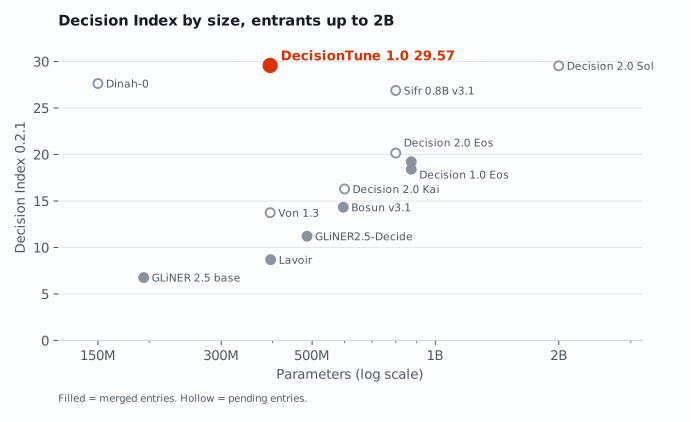
This is the score on the public set of Decision Index 0.3 from one complete run. On Decision Index 0.2.1, DecisionTune 1.0 scored 29.57. Most of the change comes from the rebuilt GSM8K math rows in 0.3. Our earlier model, DecisionTune 0.9 Preview, scored 25.12 on 0.2.1.
Decision Index 0.2.1 board as of 2026-10-03.
Per area (skill)
Source: our full runs on Decision Index 0.2.1.
Area
1.0
0.9 Preview
Change
Knowledge & Reasoning
13.3
12.2
+1.1
Language Understanding
31.5
29.0
+2.5
Retrieval & Classification
45.0
44.8
+0.2
Tools & Automation
46.5
28.1
+18.4
Arts & Human Taste
4.8
3.7
+1.1
Nine benchmarks score 0.0. Examples are ANLI, GPQA Diamond, ChessBench and HLE.
The source of the improvement
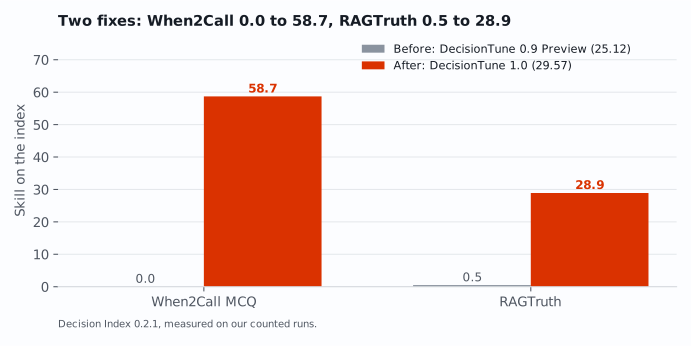
Two fixes caused most of the improvement. When2Call (when to call a tool) went from 0.0 to 58.7. RAGTruth (find a hallucinated answer) went from 0.5 to 28.9.
Make it yours
Train it on your decisions. Keep it forever.
Train DecisionTune on your own examples, on your own computer. Your data does not leave your machine. Training on a Mac takes longer than on a cloud GPU, but you do it once.
The result is a model file that you own. It works offline. There is no fee for each decision, and no API that can change its price or shut down.
Full run. One complete run of Decision Index 0.2.1. We did not truncate the data. We did not remove options.
Test-informed plan. We ran the full index eight times during development. We designed some fixes after we saw index results. We used no index rows, labels or option texts as training data.
Overlap check. Our overlap check removed 0 of 270,624 training rows.
GSM8K. In the index, the correct GSM8K answer is always the center option. If we set GSM8K to the score of our starting model, DecisionTune 1.0 scores 28.48. We report both numbers.
Seeds. We trained a second model with a different random seed. It scored 29.13 (raw 45.96). The two scores differ by 0.44 points.
Latency. We measured speed on our laptop, not on the hardware of the board.
The build story: two days, two Macs, some rented GPUs
The setup
One builder and a team of AI agents did the work. The agents checked the work every 10 minutes. They moved jobs to the machine that was free. A MacBook Pro did all the full Decision Index runs. A MacBook Air kept copies of the models and did other checks. Rented A100 GPUs did the training.
Start from the correct base
Our first general model scored 4.58. Then our license audit found two datasets that were not permissive. Thus we started again from ModernBERT-large. We kept only data that has a permissive license from its publisher.
Measure before you rent
A short test measured the training speed. One A100 trained at approximately 20k tokens per second. The laptop trained at 1.65k. Thus training moved to the cloud. The full index runs stayed on the MacBook.
Find the gaps, then close them
DecisionTune 0.9 Preview scored 25.12. We examined its result for each benchmark and found two problems. On When2Call it scored 0.0, because it learned a shortcut, not the task. On RAGTruth it identified the answer as hallucinated on 97.6% of index rows. New training data fixed both. When2Call went to 58.7, RAGTruth to 28.9 and the full index to 29.57.
What we learned, and the guards we added
An old script deleted a rented server during a run. Now one script does all deletes. First it checks the server label, the idle state and the model checksum.
Our practice scorer used the wrong chance level for RAGTruth. Now it uses the formula of the index.
A "free gain" came from the same error. We withdrew it and sent a correction on the same afternoon.
One time we read raw accuracy, not the native metric. Now we report no result before we have the native metric.
A scanner error sent overlap results to the wrong rows on a private research track. We fixed the scanner, cleaned that data again and did the run again. The result did not change.
The same answers do not mean the same speed. A GPU index run agreed on 99.85% of answers, but it was slower. We stopped it.
A spending limit read the balance of the shared account and stopped a run that was almost complete. Now the limit for each server comes from the billing of that server.
None of these problems showed an error message. We found each one because we checked. Then we audited the training data of DecisionTune 1.0 again. The audit removed 0 of 270,624 training rows.
The result
DecisionTune 1.0 scores 28.85 on the Decision Index 0.3 public set, and 29.57 on Decision Index 0.2.1.
Your data. Your model. Your computer.
DecisionTune Studio turns a spreadsheet of past decisions into a fast, private model that you own. You do not need ML experience.
 DecisionTune