

The cross-cloud data access feature lets you query data stored in other cloud providers directly from Google Cloud without migrating files or building complex ETL pipelines. Queries can route over the public internet or use Cross-Cloud Interconnect for private network transport.
Cross-cloud data access in Lakehouse unifies analytics and AI workloads across your distributed datasets through BigQuery, standalone Apache Spark environments, or Managed Service for Apache Spark.
In addition to running analytical queries, you can build conversational analytics agents grounded in your distributed tables—including cross-cloud sources—to analyze data across clouds from a single conversation. You can also use Knowledge Catalog for data profiling and insights across remote platforms.
When to use cross-cloud data access
The following are some common use cases:
- Query multi-cloud tables in place: run BigQuery SQL and Managed Service for Apache Spark analytics directly on external Apache Iceberg tables in Amazon Web Services (AWS) and Microsoft Azure without migrating files or maintaining ETL pipelines.
- Enforce private cross-cloud network isolation: route both query data reads and background metadata refresh over Cross-Cloud Interconnect to help meet security and compliance policies that restrict public internet traffic.
- Reduce recurring cross-cloud data transfer costs: combine predictable private interconnect egress rates with automatic local block caching in Google Cloud for repeated BI dashboards and analytical workloads.
- Unify cross-cloud governance and AI agents: ground conversational analytics agents in distributed tables and apply Knowledge Catalog discovery, profiling, and lineage across clouds.
Architecture
The following diagram illustrates the Lakehouse cross-cloud data access architecture:
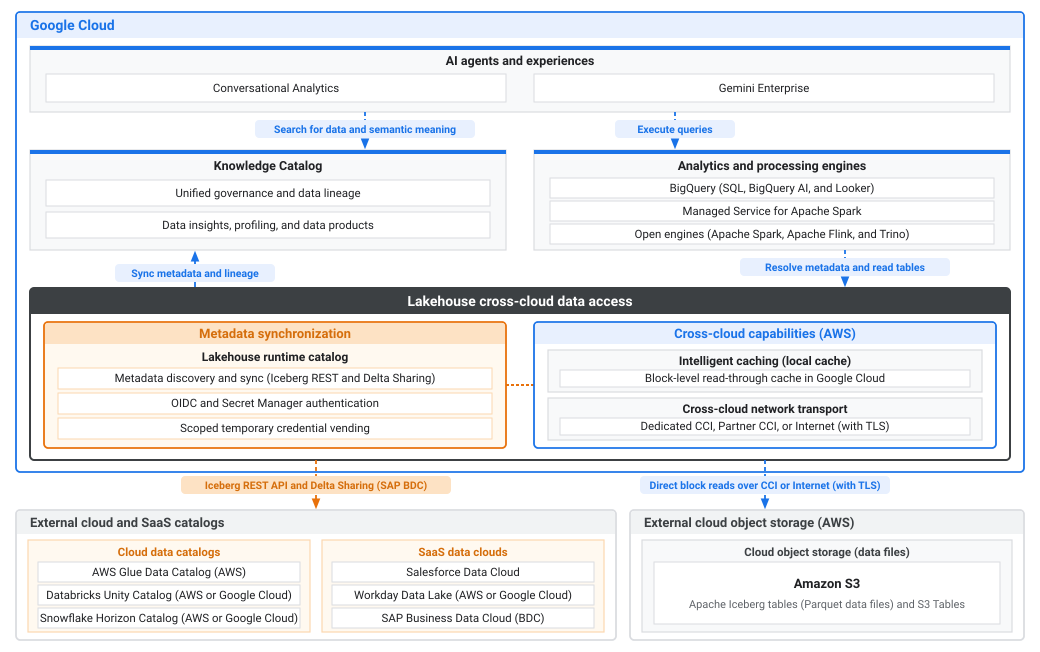
The preceding diagram illustrates the architecture across Google Cloud and external cloud and SaaS environments:
- Google Cloud: provides AI, governance, analytics, and cross-cloud
data access across remote datasets:
- AI agents and experiences: builds autonomous agents in Conversational Analytics and Gemini Enterprise that search for data and semantic meaning in Knowledge Catalog and execute queries through analytics and processing engines.
- Knowledge Catalog: delivers unified governance and data lineage, along with data insights, profiling, and data products, by syncing metadata and lineage from Lakehouse.
- Analytics and processing engines: runs BigQuery SQL, BigQuery AI, and Looker workloads, or processes remote data with Managed Service for Apache Spark and open engines (Apache Spark, Apache Flink, and Trino) by resolving metadata and reading tables through Lakehouse.
- Lakehouse cross-cloud data access: queries remote
data in place without file migration or ETL pipelines:
- Metadata synchronization: discovers and synchronizes table metadata over Apache Iceberg REST and Delta Sharing using the Lakehouse runtime catalog, authenticates through OpenID Connect (OIDC) or Secret Manager, and vends scoped temporary credentials.
- Cross-cloud capabilities (AWS): caches read data blocks in Google Cloud using a block-level read-through cache (Intelligent caching (local cache)), and routes traffic over Dedicated Cross-Cloud Interconnect (CCI), Partner Interconnect, or the internet (with TLS) using Cross-cloud network transport.
- External cloud and SaaS data sources: hosts the remote catalogs, SaaS
data clouds, and object storage:
- External cloud and SaaS catalogs: synchronizes metadata from Cloud data catalogs (AWS Glue Data Catalog on AWS, and Databricks Unity Catalog and Snowflake Horizon Catalog on AWS or Google Cloud) and SaaS data clouds (Salesforce Data Cloud, Workday Data Lake on AWS or Google Cloud, and SAP Business Data Cloud (BDC)) over the Iceberg REST API and Delta Sharing (for SAP BDC).
- External cloud object storage (AWS): stores Apache Iceberg tables (Parquet data files) and Amazon S3 Tables in Amazon S3 for direct block reads over CCI or the internet (with TLS).
How accessing cross-cloud data works
Lakehouse queries remote data using the following process:
- Metadata discovery: The Lakehouse runtime catalog connects to remote Apache Iceberg REST catalog endpoints, such as Databricks Unity Catalog, AWS Glue Data Catalog, or Snowflake Horizon Catalog, to discover table metadata without copying files. Depending on the remote catalog provider, Lakehouse authenticates through Secret Manager or OIDC token federation with Google as the identity provider.
- Secure transport: Choosing to route traffic over a private interconnect (for example, Dedicated CCI or Partner Interconnect) significantly reduces data transfer costs compared to the public internet and makes latency highly predictable.
- Optimized execution: When you enable cross-cloud caching on your federated catalog or connection, Lakehouse caches retrieved file blocks locally within the Google Cloud query execution region. Subsequent queries targeting the same file blocks read directly from the local cache instead of refetching the files from the remote cloud, which helps reduce cross-cloud egress costs and improves query performance.
Supported catalogs
Lakehouse supports querying data from the following remote catalog providers:
- Databricks Unity Catalog: Hosted on Amazon Web Services (AWS), Microsoft Azure, or Google Cloud.
- AWS Glue: Hosted on AWS.
- Snowflake Horizon Catalog: Hosted on AWS, Azure, or Google Cloud.
- Workday Data Lake: Hosted on AWS or Google Cloud.
- SAP Business Data Cloud (BDC): Hosted on AWS, Microsoft Azure, or Google Cloud using the SAP BDC connector.
Core concepts
Cross-cloud data access separates background metadata refresh from query data transport so you can route either or both traffic layers privately based on your security and cost requirements.
Metadata layer
The metadata layer in the Lakehouse runtime catalog connects to remote Apache Iceberg REST catalog endpoints to synchronize Apache Iceberg namespace and table metadata based on a refresh interval. Lakehouse authenticates using credentials stored in Secret Manager or OIDC token federation.
By default, background metadata refresh and authentication requests travel over the
public internet using TLS. When your remote catalog restricts public network
access or your security policy requires private control-plane traffic, you can
configure a metadata Service Directory service (--metadata-service-directory-name)
for AWS Glue Data Catalog (on AWS), Databricks Unity Catalog (on
AWS and Azure), and Snowflake Horizon Catalog (on
AWS and Azure). This configuration routes metadata
and authentication traffic privately over Dedicated
Cross-Cloud Interconnect or Partner
Cross-Cloud Interconnect (for AWS), independently
of or together with private query transport (--service-directory-name).
Transport layer
The transport layer lets BigQuery and open-source engines query remote table files using the synchronized metadata from the metadata layer. For supported remote catalogs, Lakehouse supports querying data over the public internet or a dedicated private interconnect.
Select the transport method that matches your architectural and security requirements:
Customer-owned (CCI)
You can configure BigQuery to query data stored in Amazon S3 buckets or Azure Data Lake Storage Gen2 (ADLS Gen2) containers over a private Cross-Cloud Interconnect using either Dedicated Cross-Cloud Interconnect or Partner Cross-Cloud Interconnect.
Using a private interconnect provides the following benefits:
- Enhanced security: Data travels across a private network connection between Google Cloud and AWS or Azure, avoiding the public internet.
- Reduced costs: Potentially lower egress charges from AWS or Azure compared to internet egress, especially when combined with your private interconnect capacity.
- Consistent performance: More predictable network latency and bandwidth compared to the public internet.
Architecture overview
To enable private querying, you configure a path from BigQuery to your Amazon S3 bucket or ADLS Gen2 container through your private interconnect. A key component in the Google Cloud Virtual Private Cloud (VPC) is an internal load balancer (ILB). The ILB distributes requests from BigQuery to the private endpoints for Amazon S3 within your AWS VPC (provisioned using AWS PrivateLink) or for ADLS Gen2 within your Azure Virtual Network (VNet), provisioned using Azure Private Link.
Using an ILB with multiple elastic network interfaces (ENIs) or network interface cards (NICs) as backends is essential for load balancing, scalability, and high availability. This applies whether you use Dedicated CCI or Partner Interconnect.
The private query workflow follows this process:
- BigQuery uses a connection configured with a Service Directory service.
- Service Directory resolves the service name to the internal IP address of the Google Cloud ILB.
- The ILB receives the requests from BigQuery and distributes them to configured backends.
- The ILB backends are Hybrid Connectivity Network Endpoint Groups (NEGs), each pointing to the private IP address of an ENI in your AWS VPC or a NIC in your Azure VNet.
- Traffic flows from the ILB, through the NEGs, across the private interconnect, to the AWS ENIs or Azure NICs.
- The AWS ENIs, part of an Amazon S3 VPC interface endpoint (AWS PrivateLink), or the Azure NICs, part of an ADLS Gen2 private endpoint (Azure Private Link), provide private access to the Amazon S3 or ADLS Gen2 service.
Public internet (no CCI)
If you do not configure a private interconnect, queries to your remote catalog travel over the public internet by default.
When querying data over the public internet, consider the following implications:
- Standard encryption: Data access requests and data transfers are encrypted in transit using standard TLS protocols across the public internet.
- Egress costs: Data transfer incurs standard internet egress charges from your remote cloud provider (for example, AWS or Azure), which are typically higher than private interconnect egress rates.
- Variable latency: Network performance, bandwidth, and latency depend on public internet routing and congestion, resulting in less predictable query execution times compared to a dedicated private interconnect.
- Simplified setup: Requires no additional networking infrastructure, VPC peering, or Service Directory configuration in Google Cloud or your remote cloud provider.
Architecture overview
When querying data over the public internet, Lakehouse connects directly to your remote catalog and object storage endpoints without requiring private Google Cloud or remote cloud networking infrastructure.
The public internet query workflow follows this process:
- BigQuery initiates a query against a remote table defined in your Lakehouse catalog.
- Lakehouse authenticates securely with your remote Apache Iceberg catalog using credentials stored in Secret Manager or OIDC token federation.
- Lakehouse retrieves the table metadata and manifest files across the public internet to identify the relevant underlying data files (for example, in Amazon S3 or ADLS Gen2).
- Data access requests for the underlying objects are sent directly from Google Cloud over the public internet using standard TLS encryption.
- The remote storage service verifies the request using temporary, scoped credentials vended by Lakehouse and returns the requested file blocks across the public internet to Google Cloud.
Intelligent caching
To help reduce cross-cloud egress costs and accelerate queries that read the same file blocks, you can enable cross-cloud caching on your Lakehouse federated catalogs and BigQuery cross-cloud connections at no additional charge.
When you enable cross-cloud caching, Lakehouse caches retrieved file blocks from Amazon S3 or Azure Blob Storage locally within the Google Cloud query execution region. Subsequent queries, including different queries targeting the same file blocks, read directly from the local cache instead of refetching the files from the remote cloud.
Google automatically manages cache capacity, retention, and eviction. Your actual egress cost savings depend on your query patterns, how frequently your source files change, and cache retention in the target Google Cloud region. Before serving cached data, every query verifies metadata and access permissions with the remote storage source so that you don't read stale data or bypass revoked permissions.
Cross-cloud caching is disabled by default. You can enable or disable caching when you create or update a Lakehouse federated catalog or a BigQuery cross-cloud connection. For configuration instructions, see the setup guide for your supported catalog provider or Create cross-cloud connections.
Verify cache usage and egress cost savings
To verify cache hit rates and measure your egress cost savings, inspect the job
details in the BigQuery console or check the objectStorageStats
(object_storage_stats) field in the BigQuery
JobStatistics2 query job statistics:
cloudProvider(cloud_provider): the cloud provider that hosts the object storage (for example,AWSorAZURE).cacheBytesRead(cache_bytes_read): the total bytes read from the local Google Cloud cache, avoiding a remote object storage read.objectStorageBytesRead(object_storage_bytes_read): the total bytes read directly from the cloud provider's object storage.
For instructions on retrieving these metrics using the bq command-line tool, see Monitor cache usage and egress cost savings.
Data residency and jurisdiction considerations
When you enable cross-cloud caching, Lakehouse temporarily stores
cached copies of your remote files at rest in the Google Cloud region
where the query runs. Before you enable caching for files located in another
geographic region or jurisdiction (for example, Amazon S3 or
Azure Blob Storage in the European Union queried from
us-east4), verify that storing temporary cached copies in the target
Google Cloud region meets your organization's data residency and
compliance requirements.
Encryption and CMEK support
Cached data is encrypted at rest using default Google-owned and Google-managed encryption keys. Customer-managed encryption keys (CMEK) aren't supported for cross-cloud caching.
If your organization enforces the Restrict Non-CMEK Services organization
policy constraint (constraints/gcp.restrictNonCmekServices),
Lakehouse automatically disables caching for queries that access
restricted tables. Your queries still run, but they read directly from remote
storage without caching file blocks.
Identity mode
Lakehouse supports two identity modes for cross-cloud data access:
- Service identity (default): Both background metadata refresh and queries execute using the catalog's service account, which may be configured with either OIDC (recommended) or Secret-based authentication.
User identity federation: Background metadata refresh executes using the catalog's service account, but queries execute using the end user's identity and are propagated to the remote catalog. This enables the remote catalog to attribute queries from Google Cloud to end users, allowing permission enforcement and audit log generation. Identity federation must be configured in the remote catalog.
What's next
- Set up a cross-cloud connection for AWS Glue, Databricks Unity Catalog, Snowflake Horizon Catalog, Workday Data Lake, or SAP Business Data Cloud.
- Use VPC Service Controls with federated catalog endpoints.
