This repository was archived by the owner on Jun 15, 2026. It is now read-only.
Repository navigation
Solution overview
Classroom Drop-in App Template is created using the Power Apps platform which leverages services such as Power Apps, Power Automate, and connectors such as SharePoint List, Office 365 Users, and Microsoft Teams.
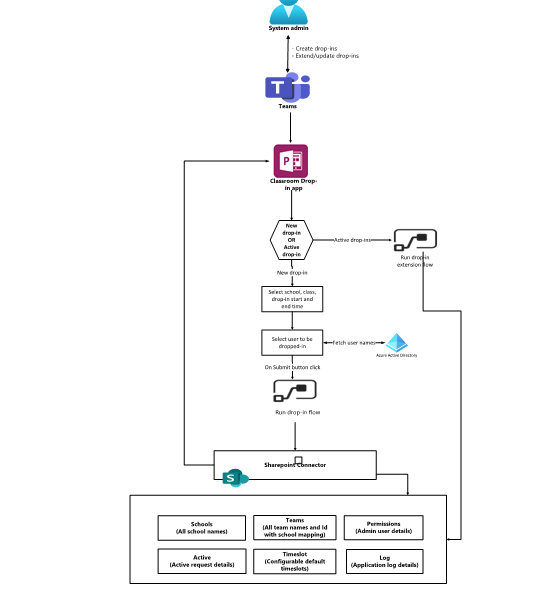
Power App
The app package contains the manifest JSON file, Power App configuration files which also include the .msapp file. During the first time sign-in, the user will be asked to provide consent to access the SharePoint site as configured in-app, Office 365 Users, Office 365 Groups, and Microsoft Teams.
Connectors
Classroom Drop-in app template is using the following connectors:
- SharePoint connector to save and read data from a SharePoint list.
- Office365Users connector to read the user's profile information.
- MicrosoftTeams connector to get team Id of the selected team.
- Power Automate flows to send adaptive card notifications to Microsoft Teams for drop-in updates.
