Compaction
Server-side context compaction for managing long conversations that approach context window limits.
Compaction extends the effective context length for long-running conversations and tasks by automatically summarizing older context when approaching the context window limit. It also keeps the active context small: as a conversation grows, response quality degrades, so compaction replaces older content with a concise summary.
This is ideal for:
- Chat-based, multi-turn conversations where you want users to use one chat for a long period of time
- Task-oriented prompts that require a lot of follow-up work (often tool use) that might exceed the context window
How compaction works
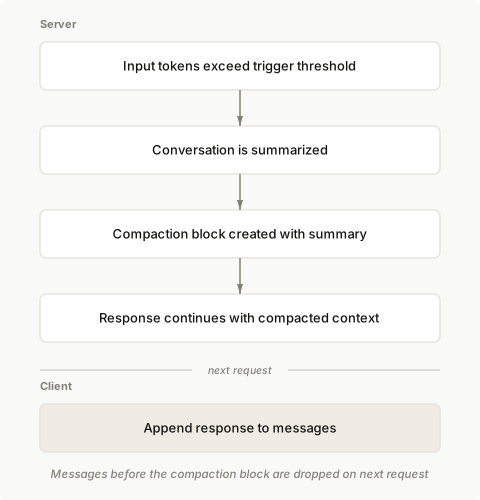
When compaction is enabled, Claude automatically summarizes your conversation when it reaches the configured token threshold. The API:
- Detects when input tokens reach your specified trigger threshold.
- Generates a summary of the current conversation.
- Creates a
compactionblock containing the summary. - Continues the response with the compacted context.
On subsequent requests, append the response to your messages. The API automatically drops all content blocks prior to the compaction block, continuing the conversation from the summary.
Basic usage
Enable compaction by adding the compact_20260112 strategy to context_management.edits in your Messages API request.
client = anthropic.Anthropic()

messages = [{"role": "user", "content": "Help me build a website"}]

response = client.beta.messages.create(
    betas=["compact-2026-01-12"],
    model="claude-opus-5",
    max_tokens=4096,
    messages=messages,
    context_management={"edits": [{"type": "compact_20260112"}]},
)

# Append the response (including any compaction block) to continue the conversation
messages.append({"role": "assistant", "content": response.content})
Parameters
| Parameter | Type | Default | Description |
|---|---|---|---|
type | string | Required | Must be "compact_20260112" |
trigger | object | {"type": "input_tokens", "value": 150000} | When to trigger compaction. input_tokens is the only supported trigger type. value must be at least 50,000 tokens. |
pause_after_compaction | boolean | false | Whether to pause after generating the compaction summary |
instructions | string | null | Custom summarization prompt. Completely replaces the default prompt when provided. |
Trigger configuration
Configure when compaction triggers using the trigger parameter:
client = anthropic.Anthropic()
messages = [{"role": "user", "content": "Hello, Claude"}]
response = client.beta.messages.create(
    betas=["compact-2026-01-12"],
    model="claude-opus-5",
    max_tokens=4096,
    messages=messages,
    context_management={
        "edits": [
            {
                "type": "compact_20260112",
                "trigger": {"type": "input_tokens", "value": 150000},
            }
        ]
    },
)
Custom summarization instructions
The default summarization prompt varies by model. Each default instructs Claude to write a summary inside <summary></summary> tags with the information needed to continue the task in a future context window. For example, some models use the following prompt:
You have written a partial transcript for the initial task above. Please write a summary of the transcript. The purpose of this summary is to provide continuity so you can continue to make progress towards solving the task in a future context, where the raw history above may not be accessible and will be replaced with this summary. Write down anything that would be helpful, including the state, next steps, learnings etc. You must wrap your summary in a <summary></summary> block.You can provide custom instructions through the instructions parameter. Custom instructions don't supplement the default prompt. They replace it completely:
client = anthropic.Anthropic()
messages = [{"role": "user", "content": "Hello, Claude"}]
response = client.beta.messages.create(
    betas=["compact-2026-01-12"],
    model="claude-opus-5",
    max_tokens=4096,
    messages=messages,
    context_management={
        "edits": [
            {
                "type": "compact_20260112",
                "instructions": "Focus on preserving code snippets, variable names, and technical decisions.",
            }
        ]
    },
)
On Claude Fable 5.1 and Claude Mythos 5.1, a request with custom instructions summarizes from the visible conversation only: earlier thinking blocks are not part of the summarizer's input.
Pausing after compaction
Use pause_after_compaction to pause the API after generating the compaction summary. This allows you to add additional content blocks (such as preserving recent messages or specific instruction-oriented messages) before the API continues with the response.
When enabled, the API returns a message with the compaction stop reason after generating the compaction block:
client = anthropic.Anthropic()
messages = [{"role": "user", "content": "Hello, Claude"}]
response = client.beta.messages.create(
    betas=["compact-2026-01-12"],
    model="claude-opus-5",
    max_tokens=4096,
    messages=messages,
    context_management={
        "edits": [{"type": "compact_20260112", "pause_after_compaction": True}]
    },
)

# Check if compaction triggered a pause
if response.stop_reason == "compaction":
    # Response contains only the compaction block
    messages.append({"role": "assistant", "content": response.content})

    # Continue the request
    response = client.beta.messages.create(
        betas=["compact-2026-01-12"],
        model="claude-opus-5",
        max_tokens=4096,
        messages=messages,
        context_management={"edits": [{"type": "compact_20260112"}]},
    )
Enforcing a total token budget
When a model works on long tasks with many tool-use iterations, total token consumption can grow significantly. You can combine pause_after_compaction with a compaction counter to estimate cumulative usage and gracefully wrap up the task once a budget is reached.
This example appears in the SDK languages only: its value is the budget-tracking logic around the request. The raw request combines the trigger from Trigger configuration with pause_after_compaction from Pausing after compaction.
client = anthropic.Anthropic()
messages = [{"role": "user", "content": "Hello, Claude"}]
TRIGGER_THRESHOLD = 100_000
TOTAL_TOKEN_BUDGET = 3_000_000
n_compactions = 0

response = client.beta.messages.create(
    betas=["compact-2026-01-12"],
    model="claude-opus-5",
    max_tokens=4096,
    messages=messages,
    context_management={
        "edits": [
            {
                "type": "compact_20260112",
                "trigger": {"type": "input_tokens", "value": TRIGGER_THRESHOLD},
                "pause_after_compaction": True,
            }
        ]
    },
)

if response.stop_reason == "compaction":
    n_compactions += 1
    messages.append({"role": "assistant", "content": response.content})

    # Estimate total tokens consumed; prompt wrap-up if over budget
    if n_compactions * TRIGGER_THRESHOLD >= TOTAL_TOKEN_BUDGET:
        messages.append(
            {
                "role": "user",
                "content": "Please wrap up your current work and summarize the final state.",
            }
        )
Working with compaction blocks
When compaction is triggered, the API returns a compaction block at the start of the assistant response.
A long-running conversation might result in multiple compactions. The last compaction block reflects the final state of the prompt, replacing content prior to it with the generated summary.
{
  "content": [
    {
      "type": "compaction",
      "content": "Summary of the conversation: The user requested help building a web scraper..."
    },
    {
      "type": "text",
      "text": "Based on our conversation so far..."
    }
  ]
}
Passing compaction blocks back
You must pass the compaction block back to the API on subsequent requests to continue the conversation with the shortened prompt. The simplest approach is to append the entire response content to your messages:
client = anthropic.Anthropic()
messages = [{"role": "user", "content": "Hello, Claude"}]
response = client.beta.messages.create(
    betas=["compact-2026-01-12"],
    model="claude-opus-5",
    max_tokens=4096,
    messages=messages,
    context_management={"edits": [{"type": "compact_20260112"}]},
)
# After receiving a response with a compaction block
messages.append({"role": "assistant", "content": response.content})

# Continue the conversation
messages.append({"role": "user", "content": "Now add error handling"})

response = client.beta.messages.create(
    betas=["compact-2026-01-12"],
    model="claude-opus-5",
    max_tokens=4096,
    messages=messages,
    context_management={"edits": [{"type": "compact_20260112"}]},
)
When the API receives a compaction block, all content blocks before it are ignored. You can either:
- Keep the original messages in your list and let the API handle removing the compacted content
- Manually drop the compacted messages and only include the compaction block onwards
On Claude Fable 5.1 and Claude Mythos 5.1, thinking blocks from before a compaction block aren't carried forward, so the summary is all the model has of that earlier work. If you write your own instructions, tell the model what the summary must retain; see Tell the model what to preserve in compaction summaries.
Streaming
The compaction block streams differently from text blocks. You receive a content_block_start event, followed by a single content_block_delta with the complete summary content (no intermediate streaming), and then a content_block_stop event.
client = anthropic.Anthropic()
messages = [{"role": "user", "content": "Hello, Claude"}]

with client.beta.messages.stream(
    betas=["compact-2026-01-12"],
    model="claude-opus-5",
    max_tokens=4096,
    messages=messages,
    context_management={"edits": [{"type": "compact_20260112"}]},
) as stream:
    for event in stream:
        if event.type == "content_block_start":
            if event.content_block.type == "compaction":
                print("Compaction started...")
            elif event.content_block.type == "text":
                print("Text response started...")

        elif event.type == "content_block_delta":
            if event.delta.type == "compaction_delta":
                print(f"Compaction complete: {len(event.delta.content or '')} chars")
            elif event.delta.type == "text_delta":
                print(event.delta.text, end="", flush=True)

    # Get the final accumulated message
    message = stream.get_final_message()
    messages.append({"role": "assistant", "content": message.content})
Prompt caching
Compaction works well with prompt caching. You can add a cache_control breakpoint on compaction blocks to cache the summarized content.
{
  "role": "assistant",
  "content": [
    {
      "type": "compaction",
      "content": "[summary text]",
      "cache_control": { "type": "ephemeral" }
    },
    {
      "type": "text",
      "text": "Based on our conversation..."
    }
  ]
}Maximizing cache hits with system prompts
When compaction occurs, the summary becomes new content that needs to be written to the cache. Without additional cache breakpoints, this would also invalidate any cached system prompt, requiring it to be re-cached along with the compaction summary.
To maximize cache hit rates, add a cache_control breakpoint at the end of your system prompt. This keeps the system prompt cached separately from the conversation, so when compaction occurs:
- The system prompt cache remains valid and is read from cache
- Only the compaction summary needs to be written as a new cache entry
client = anthropic.Anthropic()
messages = [{"role": "user", "content": "Hello, Claude"}]
response = client.beta.messages.create(
    betas=["compact-2026-01-12"],
    model="claude-opus-5",
    max_tokens=4096,
    system=[
        {
            "type": "text",
            "text": "You are a helpful coding assistant...",
            "cache_control": {
                "type": "ephemeral"
            },  # Cache the system prompt separately
        }
    ],
    messages=messages,
    context_management={"edits": [{"type": "compact_20260112"}]},
)
This keeps long system prompts cached across multiple compaction events throughout a conversation.
Understanding usage
Compaction requires an additional sampling step, which contributes to rate limits and billing. The API returns detailed usage information in the response:
{
  "usage": {
    "input_tokens": 23000,
    "output_tokens": 1000,
    "iterations": [
      {
        "type": "compaction",
        "input_tokens": 180000,
        "output_tokens": 3500
      },
      {
        "type": "message",
        "input_tokens": 23000,
        "output_tokens": 1000
      }
    ]
  }
}
The iterations array shows usage for each sampling iteration. When compaction occurs, you'll see a compaction iteration followed by the main message iteration. The top-level input_tokens and output_tokens match the message iteration exactly in this example because there is only one non-compaction iteration. The final iteration's token counts reflect the effective context size after compaction.
Combining with other features
Server tools
When using server tools (such as web search), the compaction trigger is checked at the start of each sampling iteration. Compaction might occur multiple times within a single request depending on your trigger threshold and the amount of output generated.
Token counting
The token counting endpoint (/v1/messages/count_tokens) applies existing compaction blocks in your prompt but does not trigger new compactions. Use it to check your effective token count after previous compactions:
client = anthropic.Anthropic()
messages = [{"role": "user", "content": "Hello, Claude"}]
count_response = client.beta.messages.count_tokens(
    betas=["compact-2026-01-12"],
    model="claude-opus-5",
    messages=messages,
    context_management={"edits": [{"type": "compact_20260112"}]},
)

print(f"Current tokens: {count_response.input_tokens}")
print(f"Original tokens: {count_response.context_management.original_input_tokens}")
Examples
Here's a complete example of a long-running conversation with compaction:
client = anthropic.Anthropic()

messages: list[dict] = []


def chat(user_message: str) -> str:
    messages.append({"role": "user", "content": user_message})

    response = client.beta.messages.create(
        betas=["compact-2026-01-12"],
        model="claude-opus-5",
        max_tokens=4096,
        messages=messages,
        context_management={
            "edits": [
                {
                    "type": "compact_20260112",
                    "trigger": {"type": "input_tokens", "value": 100000},
                }
            ]
        },
    )

    # Append response (compaction blocks are automatically included)
    messages.append({"role": "assistant", "content": response.content})

    # Return the text content
    return next(block.text for block in response.content if block.type == "text")


# Run a long conversation
print(chat("Help me build a Python web scraper"))
print(chat("Add support for JavaScript-rendered pages"))
print(chat("Now add rate limiting and error handling"))
# Continue calling chat() for as long as the conversation needs
On Claude Fable 5.1, remove the thinking and redacted_thinking blocks from any assistant turn you re-insert after the compaction block, or send thinking.block_binding.prefix_mismatch_behavior: "drop_block" with the thinking-binding-controls-2026-08-01 beta header. Those blocks were produced when the full history was present, so they no longer pass the conversation check. Where the check is enforced, the continuation request is rejected with a 400 error. The preserved text and tool blocks can stay as they are. Letting the API summarize everything, without re-inserting earlier turns, avoids this.
Here's an example that uses pause_after_compaction to preserve the prior exchange and the current user message (three messages total) verbatim instead of summarizing them:
from typing import Any

client = anthropic.Anthropic()

messages: list[dict[str, Any]] = []


def chat(user_message: str) -> str:
    messages.append({"role": "user", "content": user_message})

    response = client.beta.messages.create(
        betas=["compact-2026-01-12"],
        model="claude-opus-5",
        max_tokens=4096,
        messages=messages,
        context_management={
            "edits": [
                {
                    "type": "compact_20260112",
                    "trigger": {"type": "input_tokens", "value": 100000},
                    "pause_after_compaction": True,
                }
            ]
        },
    )

    # Check if compaction occurred and paused
    if response.stop_reason == "compaction":
        # Get the compaction block from the response
        compaction_block = response.content[0]

        # Preserve the prior exchange + current user message (3 messages)
        # by including them after the compaction block
        preserved_messages = messages[-3:] if len(messages) >= 3 else messages

        # Build new message list: compaction + preserved messages
        new_assistant_content = [compaction_block]
        messages_after_compaction = [
            {"role": "assistant", "content": new_assistant_content}
        ] + preserved_messages

        # Continue the request with the compacted context + preserved messages
        response = client.beta.messages.create(
            betas=["compact-2026-01-12"],
            model="claude-opus-5",
            max_tokens=4096,
            messages=messages_after_compaction,
            context_management={"edits": [{"type": "compact_20260112"}]},
        )

        # Update the message list to reflect the compaction
        messages.clear()
        messages.extend(messages_after_compaction)

    # Append the final response
    messages.append({"role": "assistant", "content": response.content})

    # Return the text content
    return next(block.text for block in response.content if block.type == "text")


# Run a long conversation
print(chat("Help me build a Python web scraper"))
print(chat("Add support for JavaScript-rendered pages"))
print(chat("Now add rate limiting and error handling"))
# Continue calling chat() for as long as the conversation needs
Current limitations
-
Same model for summarization: The model specified in your request is used for summarization. There is no option to use a different (for example, cheaper) model for the summary.
-
Compaction might fail when tools are defined: When your request includes
tools, the model occasionally calls a tool during the internal summarization step instead of writing a summary. When this occurs, the response contains acompactionblock withcontent: null. To prevent this, setinstructionsto a prompt that explicitly tells the model not to call tools, for example:Summarize the transcript inside <summary></summary> tags. Include relevant information in the summary for continuing the task in the next context window. Do not call any tools while writing this summary; respond with text only.
Next steps
Automatically manage conversation context as it grows with context editing.
Learn about context window sizes and management strategies.
Explore a practical implementation that manages long-running conversations with instant session memory compaction using background threading and prompt caching.
Compatibility
| Supported models |
|
|---|---|
| Supported platforms |
|
Was this page helpful?
