COVID-19 Vaccine - What's the Public Sentiment?
Step-by-step sentiment analysis with NLP (Stanza, NLTK Vader and TextBlob) on COVID-19 vaccine tweets

The COVID-19 pandemic has presented itself as one of the gravest global threats, and is still very much an ongoing menace. In equal measure, we are in the midst of the biggest vaccination campaign in human history. According to Bloomberg, a staggering 68.1 million doses in 56 countries have been administered so far (as of 26 Jan 2020).
While the vaccine has offered renewed hope in the fight against COVID-19, it has also ignited aggressive anti-vaccine movements. It would thus be interesting to gauge the public's perception towards the COVID-19 vaccine with sentiment analysis (in Python) on recent Twitter data.
TL:DR
TextBlob and NLTK Vader had similar sentiment proportion trends (Positive > Neutral > Negative), whereas Stanza's sentiment trends were opposite of that (Negative> Neutral > Positive)
From the results of an ensemble method, the general sentiment is mixed, with it leaning just slightly more to the positive side, based on the proportions of Positive (40.0%) and Negative (38.4%) sentiments
Link to GitHub repo
Contents
1. Setup of Twitter API 2. Extracting and Pre-Processing Tweets 3. Sentiment Analysis with NLTK Vader 4. Sentiment Analysis with TextBlob 5. Sentiment Analysis with Stanza 6. Insights from Sentiment Analyses 7. Composite Sentiment with Ensemble Method
1. Setup of Twitter API
To utilize Twitter API, we first need a Twitter Developer account:
Step 1: Head to the Twitter Developer application page to create a developer account
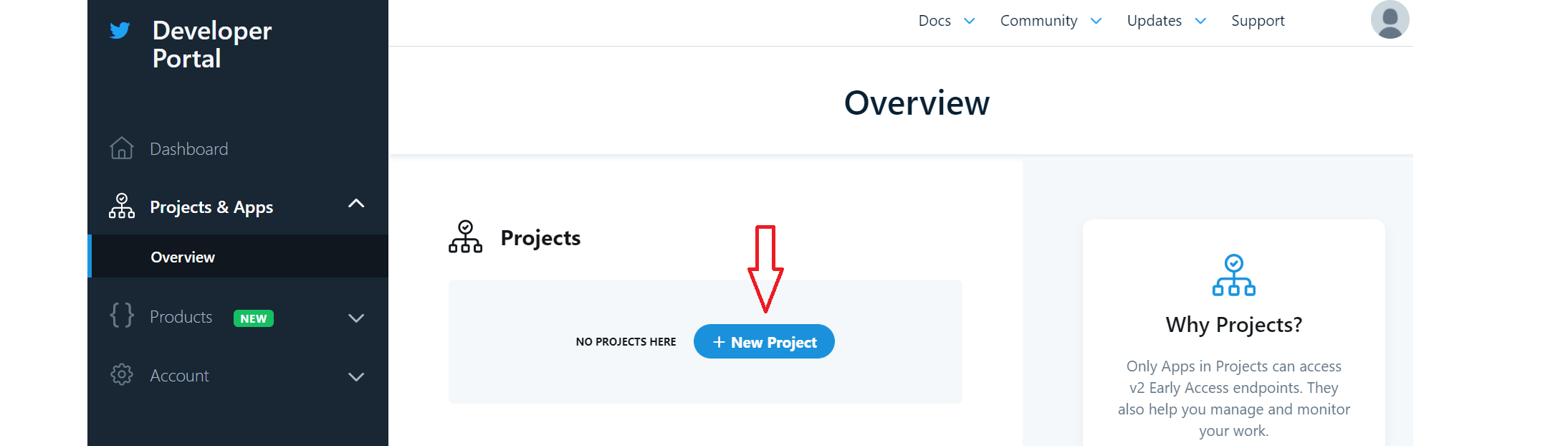
Step 2: After application is approved (this may take up to a day, but mine was approved immediately), head to the Developer dashboard. Click on 'Projects & Apps' > 'Overview' on the sidebar to access the Overview section. Click the 'New Project' button to create a new project.
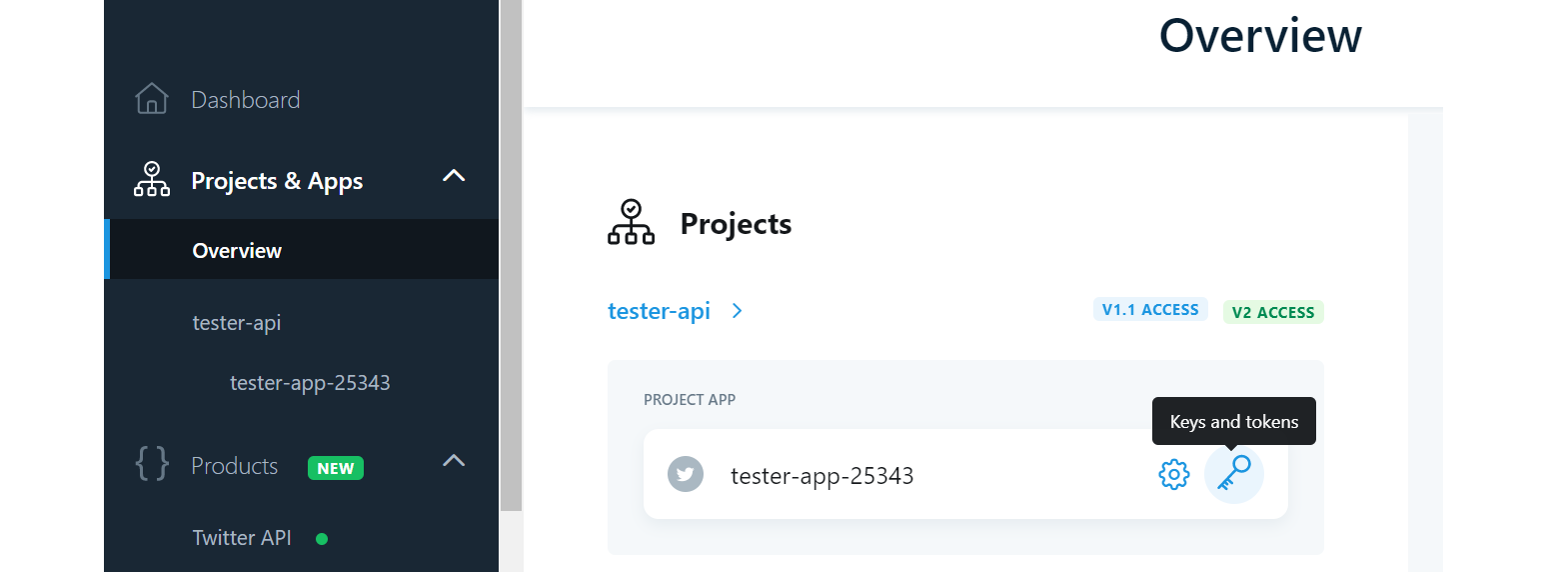
Step 3: Return to Overview and click on the Key icon to access the Keys and Tokens of the newly created Project.
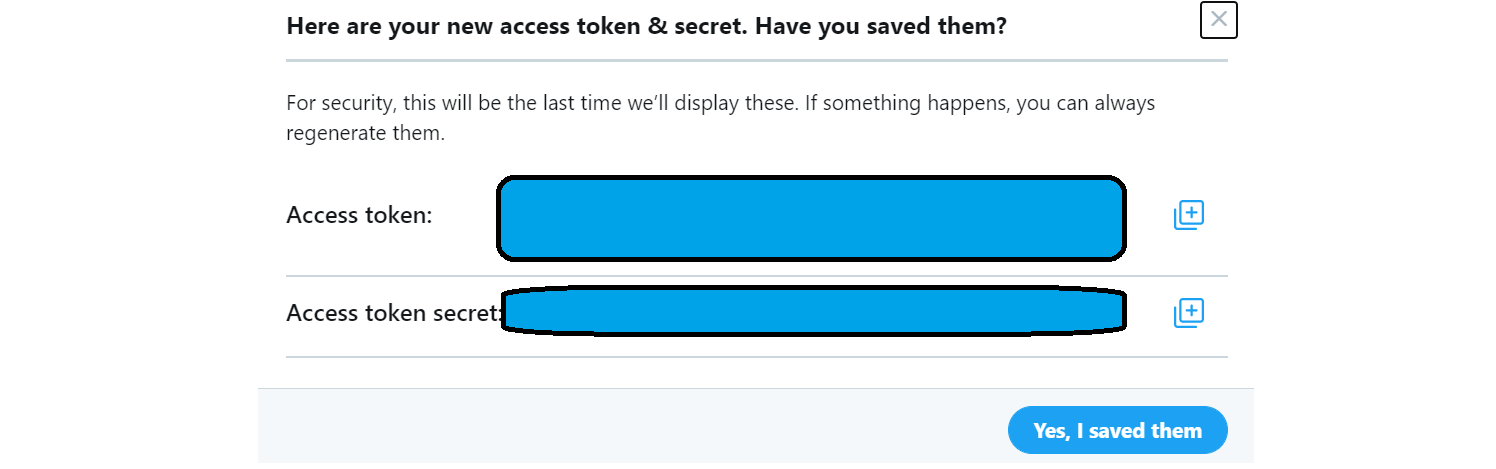
Step 4: Generate (or regenerate) these 4 codes: (1) API Key, (2) API Secret, (3) Access Token, (4) Access Token Secret. Remember to save these 4 codes as we will need them later.
2. Extracting and Pre-processing Tweets
Twitter API Authentication
We will be using the tweepy package to access the Twitter API. You can install the package with the following command: pip install tweepy
Using the access credentials (4 codes) saved earlier, we can setup the Twitter API authentication.
Tweet Extraction
Here are the key considerations for the tweet extraction code:
There is a rate limit of 900 API calls every 15 minutes, so we need to incorporate a
time.sleep(15 * 60)step in the codeI ran extraction for each day of the latest 7-day date range since Twitter API only allows for extraction of tweets up to 7 days ago
To get tweets specifically relating to COVID-19 vaccine, the search term used was 'covid19 covid vaccine'
Excluded tweets that were retweets or were not in English
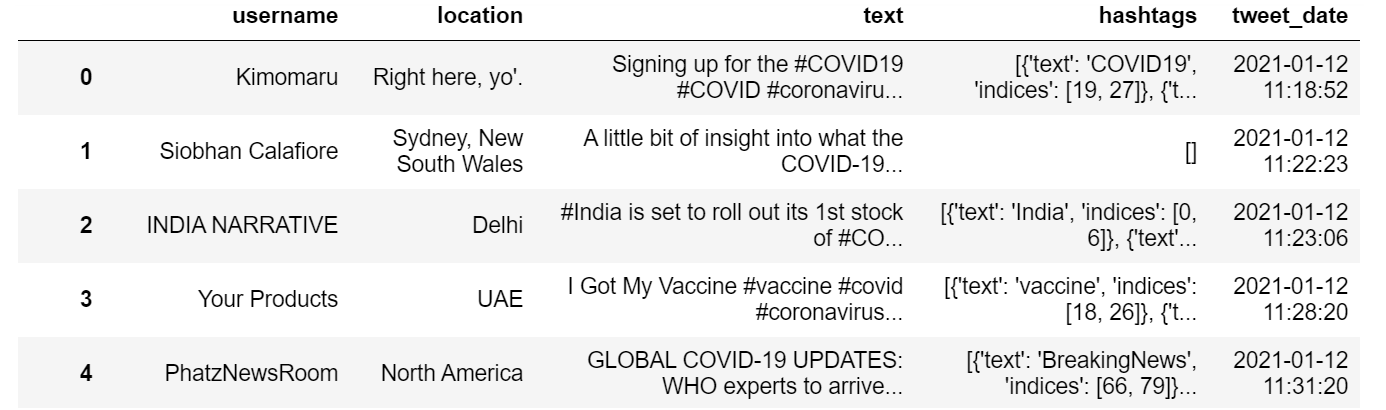
For this project, the following attributes were retrieved: username, location, tweet text, hashtags, and tweet date. With the extraction code I wrote, I was able to extract ~13,000 tweets in less than 2 hours.
Text Pre-Processing
As you would expect, the tweet texts can get really messy. Fortunately, we can use the tweet-preprocessor package to perform pre-processing efficiently. It can be installed with: pip install tweet-preprocessor
By default, tweet-preprocessor removes items such as URLs, hashtags, emojis, reserved words (e.g. RT), and mentions. If you wish to customize how the tweets are pre-processed, do check out their documentation. I used the default settings and here's what the code looks like:
Other pre-processing steps include:
Extract individual hashtags from dictionaries in original hashtags column
Keep only tweets with text or hashtags containing the string 'vacc'
Drop rows with duplicate tweet text
Our Twitter dataset is now ready for sentiment analysis, and we will be doing it with 3 separate packages. Let's get started!

3. Sentiment Analysis with NLTK Vader
Introduction
Natural Learning Toolkit (NLTK) is a Python package that offers programs supporting natural language processing (NLP), and comes with pre-trained models.
In particular, we will be using the Valence Aware Dictionary and sEntiment Reasoner (VADER) model, which is a lexicon and rule-based sentiment analysis tool aimed at sentiment analysis of social media text. It uses a bag of words approach with simple heuristics (e.g. increasing sentiment intensity in presence of certain words like "very").
Setup and Analysis
After installing NLTK with pip install nltk, we can run sentiment analysis using the Vader model:
Vader returns compound scores, which are single unidimensional sentiment measures for a given text. The score ranges from -1 (most negative) to +1 (most positive), and score for neutral sentiment is set arbitrarily between -0.05 and 0.05.
4. Sentiment Analysis with TextBlob
Introduction
TextBlob is a popular Python library used to process textual data and perform a range of NLP tasks including sentiment analysis. Similar to NLTK Vader, the TextBlob sentiment classifier is based on a bag of words approach. In fact, TextBlob is built upon the NLTK and pattern libraries.
Setup and Analysis
This is the command to install TextBlob: pip install textblob, and here's how to run TextBlob sentiment analysis:
TextBlob sentiment analyzer returns two scores, namely polarity and subjectivity. We look at the polarity score which, just like Vader, is a float in the range of -1 and 1, where -1 means most negative and +1 means most positive. Likewise with Vader, a neutral sentiment was arbitrarily defined as a score between -0.05 and 0.05.
5. Sentiment Analysis with Stanza
Introduction
Stanza is the official Python NLP library of Stanford NLP Group, replacing the Java-based CoreNLP. The modules are built on top of PyTorch, and its pre-built sentiment analyzer is based on a CNN classifier trained on datasets including Stanford Sentiment Treeback and Airline Twitter Sentiment.
Setup and Analysis
The Stanza library is installed with the command pip install stanza. We then download Stanza's English package, and run the sentiment analysis:
Stanza returns a sentiment score ranging from 0 to 2 with the mapping: 0:Negative, 1:Neutral, 2:Positive. As each tweet may contain numerous sentences, we take the mean score of the sentences for each tweet.
6. Insights from Sentiment Analyses
After generating sentiments with three different analyzers, it's time to visualize and interpret the results using the seaborn library.
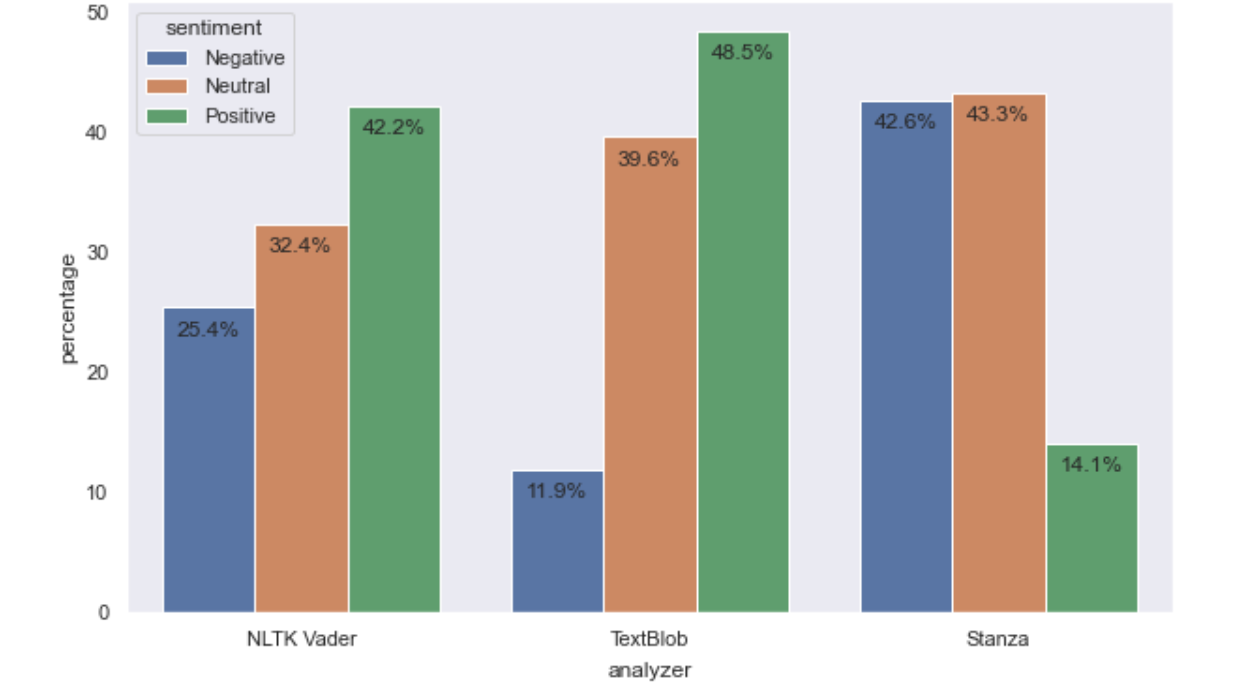
The sentiment proportions for NLTK Vader and TextBlob are relatively similar, with positive sentiments being the highest and negative sentiments the lowest. TextBlob was by far the most positive, returning 48.5% for positive sentiments. On the other hand, sentiments generated by Stanza were the most negative with the highest proportion of negative sentiments (42.6%).
Overall, TextBlob and NLTK Vader sentiment scores were higher (i.e. more positive) than that of Stanza. This finding corroborates with another analysis comparing TextBlob and Stanza sentiment analyses.
While TextBlob is the most popular sentiment analyzer for Twitter data, Stanza is certainly worth exploring as it was partly trained on a Twitter dataset. The results here are a great example of how different analyzers trained on different datasets and methods lead to varying results.
After manually reviewing a sample of 100 tweets, I discover that the most representative sentiment lies somewhere between TextBlob (which tends to be a bit overly positive) and Stanza (which tends to be a bit overly negative). Let's try to get sentiment results that is something in between.
7. Composite Sentiment with Ensemble Method
I exercised some creativity with the use of an ensemble method to create a composite score from the average of the 3 sentiment scores. All 3 scores were already in the range [-1,1], and were given equal weights when computing the mean.
As with previous steps, score ≥0.05 was defined as Positive, score ≤-0.05 was defined as Negative, and anything in between was set as Neutral. With the composite scores and classification system, this is what we obtain:
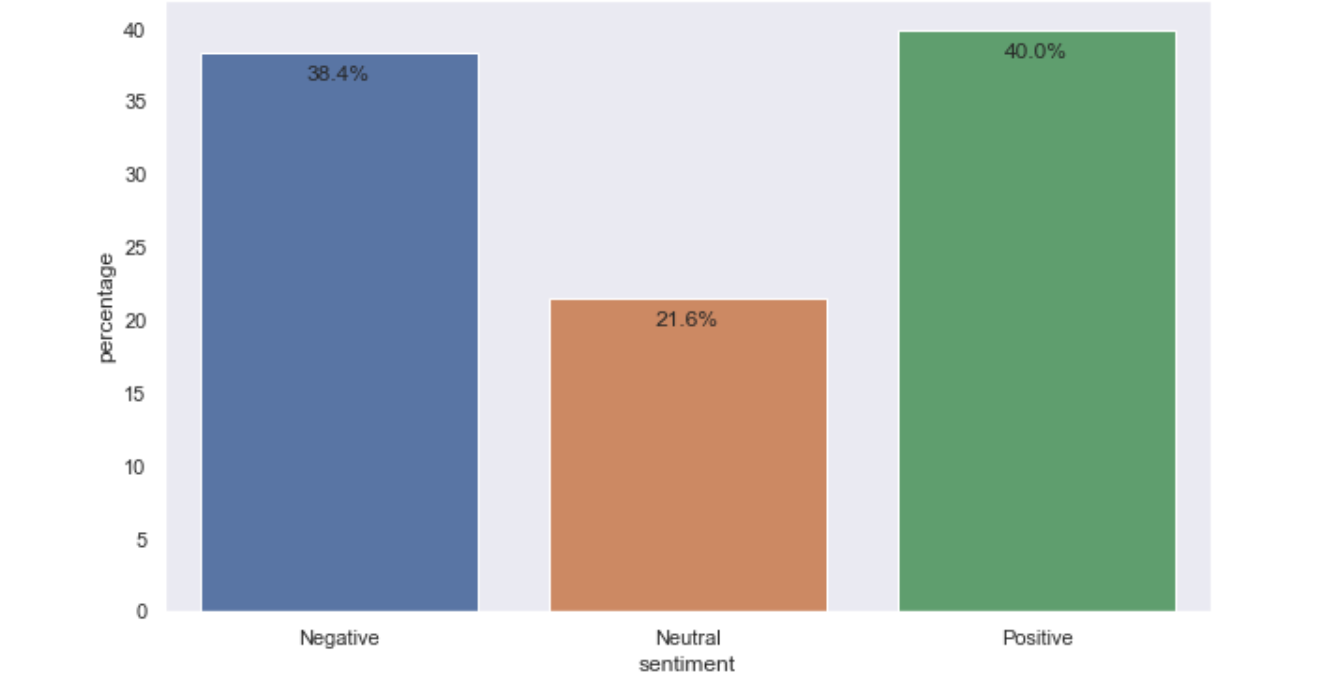
The proportion of positive sentiments (40.0%) is slightly greater that of negative sentiments (38.4%), but both proportions are considered similar. This suggests that the general sentiment towards COVID-19 vaccine at the point of analysis tend to be mixed, with it leaning only slightly more towards a positive sentiment.
Conclusion
In this article, I wrote about the extraction of tweets relating to COVID-19 vaccines via the Twitter API, and implementation of 3 different sentiment analyzers (NLTK Vader, TextBlob, Stanza) to evaluate these tweets.
Moving forward, there is still plenty of room for exploration e.g.
Trend sentiments over time based on tweet dates
Evaluate sentiments across different locations (e.g. countries)
Experiment with different score thresholds for Neutral sentiment
Assess subjectivity component returned by TextBlob
Looking forward to welcome you to join me on the data science learning journey! Please feel free to give this Medium page a follow to stay in the loop of more data science content, or to reach out to me on LinkedIn.