Nine Rules for Writing Python Extensions in Rust
Practical Lessons from Upgrading Bed-Reader, a Python Bioinformatics Package

Updated on 4/25/2023. For video version, see this YouTube from the PyData 2023 Conference in Seattle.
One year ago, I got fed up with our package's C++ extension. I rewrote it in Rust. The resulting extension was as fast a C/C++ but with better compatibility and safety. Along the way, I learned nine rules that can help you create better extension code:
Create a single repository containing both Rust and Python projects
Use maturin & PyO3 to create Python-callable translator functions in Rust
Have the Rust translator functions call "nice" Rust functions
Preallocate memory in Python
Translate nice Rust error handling into nice Python error handling
Multithread with Rayon and ndarray::parallel, returning any errors
Allow users to control the number of parallel threads
Translate nice dynamically-type Python functions into nice Rust generic functions
Create both Rust and Python tests
The word "nice" here means created with best practices and native types. In other words, the general strategy is this: At the top, write good Python code. In the middle, write a thin layer of translator code in Rust. At the bottom, write good Rust code.
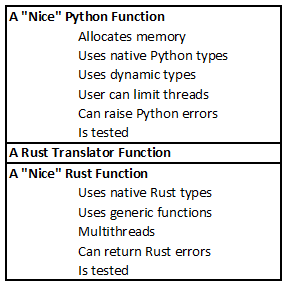
This strategy may seem obvious but following it can be tricky. This article gives practical advice and examples on how to follow each rule.
Bed-Reader is a Python package for reading and writing PLINK Bed Files, a binary format used in bioinformatics to store DNA data. Files in Bed format can be as large as a terabyte. Bed-Reader gives users fast, random access to large subsets of the data. It returns a NumPy array in the user's choice of int8, float32, or float64.
I wanted the Bed-Reader extension code to be:
Faster than Python
Compatible with NumPy
Fully data-parallel multithreading
Compatible with all other packages doing data-parallel multithreading
Safe
Our original C++ extension gave me speed, NumPy compatibility, and - with OpenMP - data-parallel multithreading. Sadly, OpenMP requires a runtime library and different Python packages can depend on different, incompatible, versions of that runtime library.
Rust gave me everything offered by C++. Beyond that, it solved the runtime-compatibility problem by providing data-parallel multithreading without a runtime library. Moreover, the Rust compiler guarantees thread safety. (It even uncovered a race condition in the original algorithm. In Rust, "Thread safety isn't just documentation; it's law".)
Creating a Python extension in Rust requires many design decisions. Based on my experience with Bed-Reader, here are the decisions I recommend. To avoid wishy-washiness, I'll express these recommendations as rules.
Rule 1: Create a single repository containing both Rust and Python projects
The table below shows how to layout files.
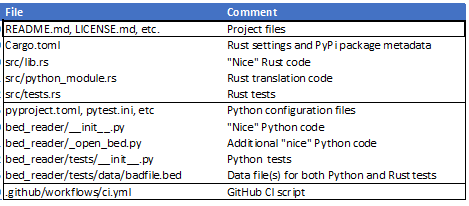
Create files [Cargo.toml](https://github.com/fastlmm/bed-reader/blob/mar2023/Cargo.toml) and [src/lib.rs](https://github.com/fastlmm/bed-reader/blob/mar2023/src/lib.rs) using Rust's usual 'cargo new' command. There is no setup.py file for Python. Instead, [[pyproject.toml](https://github.com/fastlmm/bed-reader/blob/rust/pyproject.toml)](https://github.com/fastlmm/bed-reader/blob/master/pyproject.toml) contains PyPi package information, such as the name of the package, its version number, the location of its README file, etc. To work without a setup.py, pyproject.toml must contain:
We'll talk about "maturin" and file [src/python_module.rs](https://github.com/fastlmm/bed-reader/blob/mar2023/src/python_module.rs) in Rule #2. We'll talk about testing ([src/tests.rs](https://github.com/fastlmm/bed-reader/blob/mar2023/src/tests.rs) and [bed_reader/tests](https://github.com/fastlmm/bed-reader/tree/mar2023/bed_reader/tests)) in Rule #9.
Python settings go in [pyproject.toml](https://github.com/fastlmm/bed-reader/blob/master/pyproject.toml) when possible (and in files such as a pytest.ini when not). Python code goes in its own subfolder, here [bed_reader](https://github.com/fastlmm/bed-reader/tree/mar2023/bed_reader).
Finally, we use GitHub actions to build, test, and ready deployment. That script lives in [.github/workflows/ci.yml](https://github.com/fastlmm/bed-reader/blob/mar2023/.github/workflows/ci.yml).
Rule 2: Use maturin & PyO3 to create Python-callable translator functions in Rust
Maturin is a PyPi package for (among other things) building and publishing Python extensions via PyO3. PyO3 is a Rust crate for (among other things) writing Python extensions in Rust.
In [Cargo.toml](https://github.com/fastlmm/bed-reader/blob/mar2023/Cargo.toml), include these Rust dependencies:
At the top of [src/lib.rs](https://github.com/fastlmm/bed-reader/blob/mar2023/src/lib.rs), include these two lines:
Create a src/build.rs containing:
Rule 3: Have the Rust translator functions call "nice" Rust functions
In [src/lib.rs](https://github.com/fastlmm/bed-reader/blob/mar2023/src/lib.rs) define "nice" Rust functions. These functions will do the core work of your package. They will input and output standard Rust types and try to follow Rust best practices. For example, for the Bed-Reader package, read_and_fill is the nice Rust method for reading and returning values from a PLINK Bed file.
Python, however, can't directly call these functions. So, in file [src/python_module.rs](https://github.com/fastlmm/bed-reader/blob/rust/src/python_module.rs) define Rust translator functions that Python can call. Here is an example translator function:
This function takes as input a file name, some integers related to the size of the file, and two 1-D NumPy arrays that tell which subset of the data to read. The function reads values from the file and fills in val, a preallocated 2-D NumPy array.
Notice that this function:
translates Python NumPy 1-D arrays into Rust slices, the standard Rust 1-D data structure, via:
let iid_index = iid_index.readonly(); let ii = &iid_index.as_slice()?;translates Python NumPy 2-D arrays into 2-D Rust ndarray objects, via:
// let mut val = unsafe { val.as_array_mut() } // update 12/23/2023 let mut val = val.readwrite(); let mut val = val.as_array_mut();
Doing the core work in a Rust function defined on standard Rust types lets us use Rust best practices for testing, generics, errors, etc. It also gives us a pathway to offer a Rust version of our package.
Rule 4: Preallocate memory in Python
Preallocating the memory for our results in Python simplifies the Rust code. On the Python side, in bed_reader/_open_bed.py, we import the Rust translator function:
Then, we define a nice Python function that allocates memory, calls the Rust translator function, and returns the result.
(Later rules will explain reader = read_f64 and num_threads=num_threads.)
Rule 5: Translate nice Rust error handling into nice Python error handling
To see how to handle errors, let's trace two possible errors in open_and_check (called by read_and_fill, our nice Rust method in [src/lib.rs](https://github.com/fastlmm/bed-reader/blob/mar2023/src/lib.rs)).
Example Error 1: An error from a standard function - What if Rust's standard File::open function can't find the file or can't open it? In that case, the question mark in this line:
will cause the function to return with some std::io::Error value. To define a function that can return these values, we give the function a return type of Result<(), BedErrorPlus>. We define BedErrorPlus to include all of std::io::Error like so:
This is nice Rust error handling, but Python doesn't understand it. So, in [src/python_module.rs](https://github.com/fastlmm/bed-reader/blob/mar2023/src/python_module.rs), we translate. First, we define our translator function read_f64 to return PyErr. Second, we implement a converter from BedErrorPlus to PyErr. The converter creates the right class of Python error (IOError, ValueError, or IndexError) with the right error message. It looks like:
Example Error 2: An error specific to our function - What if our nice function read_no_alloc can open the file but then realizes the file's format is wrong? It should raise a custom error like so:
The custom error of type BedError::IllFormed is defined in[src/lib.rs](https://github.com/fastlmm/bed-reader/blob/mar2023/src/lib.rs):
The rest of the error handling is the same as in Example Error #1.
In the end, for both Rust and Python, for both standard errors and custom errors, the result is a specific error type with an informative error message.
Rule 6: Multithread with Rayon and ndarray::parallel, returning any errors
The Rust Rayon crate provides easy and lightweight data-parallel multithreading. The ndarray::parallel module applies Rayon to arrays. The usual pattern is to parallelize across the columns (or rows) of one or more 2-D arrays. One challenge is to return any error message from the parallel threads. I'll highlight two approaches to parallelizing array operations with error handling. Both examples appear in Bed-Reader's [src/lib.rs](https://github.com/fastlmm/bed-reader/blob/mar2023/src/lib.rs) file.
Approach 1: par_bridge().try_for_each
Rayon's [par_bridge](https://doc.servo.org/rayon/iter/par_bridge/struct.IterBridge.html) turns a sequential iterator into a parallel iterator. Its [try_for_each](https://doc.servo.org/rayon/iter/trait.ParallelIterator.html#method.try_for_each) method will stop all processing as quickly as it can if an error is hit.
In this example, we iterate through two things zipped together:
a DNA location's binary data and
the columns of our output array.
We read the binary data sequentially but process each column's piece of that data in parallel. We stop on any errors.
Approach 2: par_azip!
The ndarray packages's [par_azip!](https://docs.rs/ndarray/latest/ndarray/macro.par_azip.html) macro lets one march through, in parallel, one or more zipped-together arrays (or array pieces). It is, in my opinion, very readable. It doesn't, however, directly support error handling. We can add error handling by saving any error to a results list.
Here is an example from a utility function. The full utility function computes statistics (mean and variance) from three arrays of counts and sums. It does its work in parallel. If it finds an error in the data, it records that error in a result list. After all processing, it checks the result list for errors.
Rayon and ndarray::parallel offer many other nice approaches to data-parallel processing. Feel free to use them, just be sure to gather and return any errors. (Do not just use Rust's "panic".)
Rule 7: Allow users to control the number of parallel threads
To play nicely with a user's other code, the user must be able to control the number of parallel threads each function will use.
In the nice Python read function, we give the user an optional num_threadsargument. If they don't set it, Python sets it via this function:
Next, on the Rust side, we define create_pool. This helper function constructs a Rayon ThreadPool object from num_threads.
Finally, in the Rust translator functionread_f64 eventually calls internal_read_no_alloc. We put that call inside a create_pool(num_threads)?.install(...). This limits all Rayon functions to the num_threads we set.
Rule 8: Translate nice dynamically-type Python functions into nice Rust generic functions
Users of the nice Python read function can specify the dtype of the returned NumPy array (int8, float32 or float64). From this choice, the function looks up the appropriate Rust translator function (read_i8, read_f32, or read_f64), which is then called.
The three Rust translator functions (in[src/python_module.rs](https://github.com/fastlmm/bed-reader/blob/mar2023/src/python_module.rs)) call the same nice Rust function, read_and_fill, defined in [src/lib.rs](https://github.com/fastlmm/bed-reader/blob/mar2023/src/lib.rs). Here are the relevant parts of translator function read_64:
We define the niceread_and_fill method generically in [src/lib.rs](https://github.com/fastlmm/bed-reader/blob/mar2023/src/lib.rs). That is, it will work on any type TVal with the right traits. The relevant parts of its code are here:
Organizing the code in these three levels (nice Python, translator Rust, nice Rust) lets us offer code with dynamic types to our Python users while still writing nice, generic code in Rust.
Rule 9: Create both Rust and Python tests
You might be tempted to write only Python tests that will call Rust. You should, however, also write Rust tests. The addition of Rust tests lets you run tests interactively and debug interactively. Rust tests also give you a path to later offering a Rust version of your package. In the example project, both sets of tests read test files from [bed_reader/tests/data](https://github.com/fastlmm/bed-reader/tree/rust/bed_reader/tests/data).
Where practical, I also recommend writing pure Python versions of your functions. You can then use these slow Python function to test the results of your fast Rust functions.
Here are my notes on how I run the Rust and Python tests:
Finally, your CI script, for example, [bed-reader/ci.yml](https://github.com/fastlmm/bed-reader/blob/mar2023/.github/workflows/ci.yml), should run both your Rust and Python tests.
So, there you have it: nine rules for writing Python extensions in Rust. Rust is a great language for writing Python extensions. It offers speed, safe data-parallel multithreading, and compatibility with NumPy arrays and other packages. Follow these nine rules to create great code in both Python and Rust.
Aside: If you're interested in future articles, please follow me on Medium. I write on scientific programming in Rust and Python, machine learning, and statistics. I tend to write about one article per month.