Shop SneakPeak
Buy Used : $129.99
FREE delivery Wednesday, October 28. Details
Used: Acceptable | Details
Sold by BuyFromUs2012
Condition: Used: Acceptable
Comment: Includes Router, Power supply, Network cable. Scratches on the body.
Only 1 left in stock - order soon.
Added to

Sorry, there was a problem.

There was an error retrieving your Wish Lists. Please try again.

Sorry, there was a problem.

List unavailable.
  • 4 VIDEOS
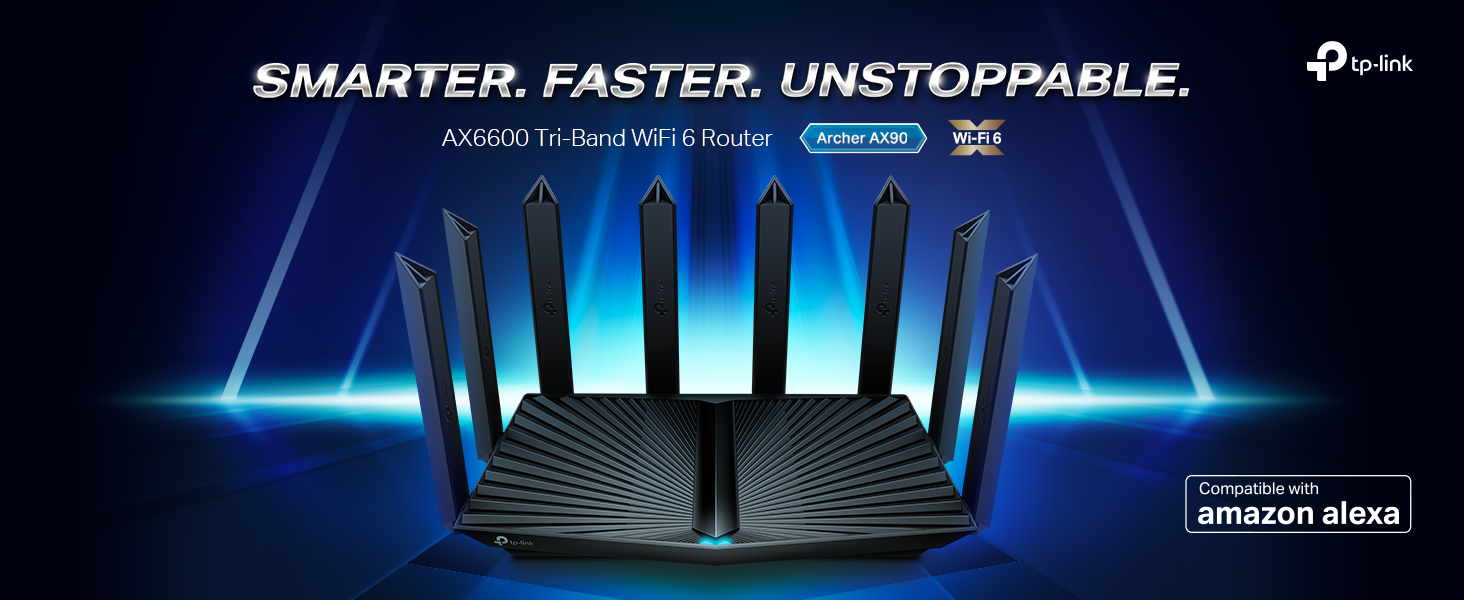
  • TP-Link AX6600 Tri-Band WiFi 6 Router (Archer AX90), 8-Stream Gigabit Router, VPN Router, MU-MIMO, 2.5G WAN Port, 1.5GHz Quad-Core CPU

TP-Link AX6600 Tri-Band WiFi 6 Router (Archer AX90), 8-Stream Gigabit Router, VPN Router, MU-MIMO, 2.5G WAN Port, 1.5GHz Quad-Core CPU

4.4 out of 5 stars (1,145)

$129.99
Brief content visible, double tap to read full content.
Full content visible, double tap to read brief content.
Style: AX6600, Tri-Band
This item is certified to work with Alexa
WORKS WITH ALEXA
Add voice control by combining with an Alexa device
  • This item
  • +
  • Required
Total Price: $219.98
See Less

About this item

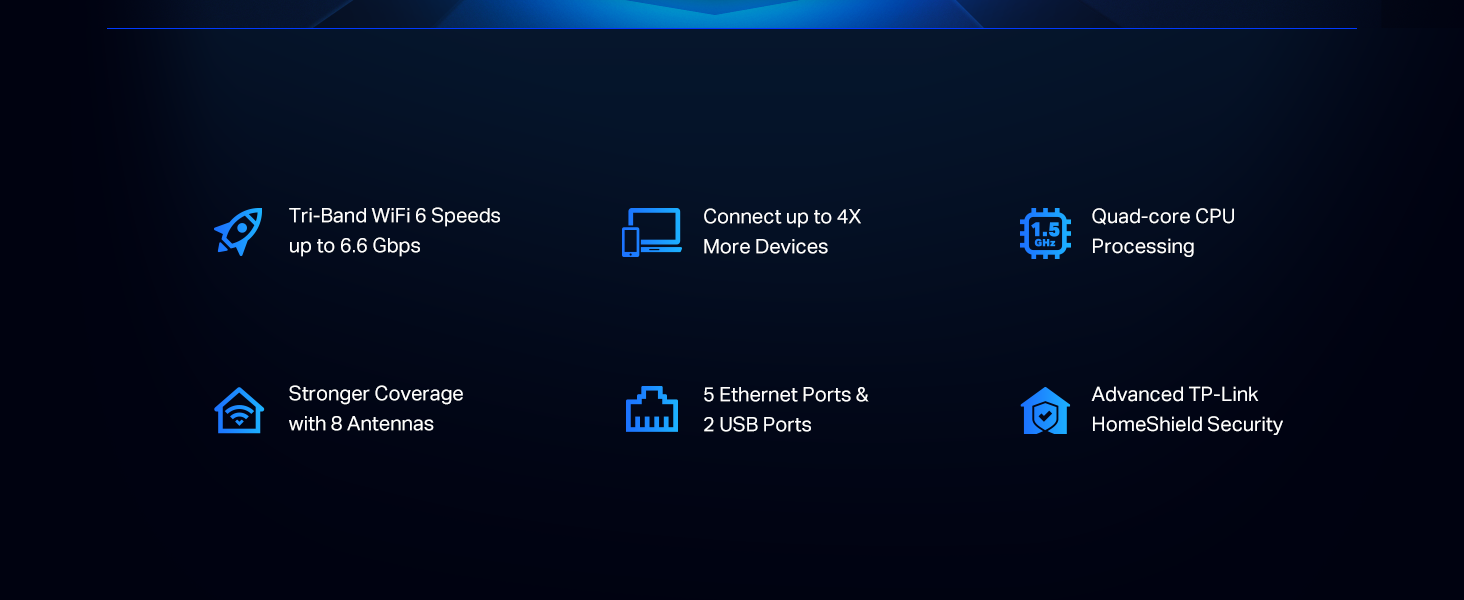
  • Faster AX6600 Tri-Band Wi-Fi - 4804 Mbps (5 GHz) plus 1201 Mbps (5 GHz) plus 574 Mbps (2.4 GHz)
  • Ultra Connectivity - 1× 2.5 Gbps WAN/LAN port plus 1× 1 Gbps WAN/LAN port plus 3× Gigabit LAN ports and two USB ports ensure max flexibility and boosted throughput; The 2.5 Gbps WAN or LAN port and 1 Gbps WAN, LAN port cannot be used as the WAN port at the same time
  • Maximized Coverage - Eight high-gain antennas equipped with Beamforming ensure long range coverage Operating Temperature: 0℃-40℃ (32℉ -104℉)
  • More Devices with Less Lag - OFDMA and MU-MIMO technology deliver data to multiple devices, simultaneously
  • TP-Link HomeShield – TP-Link's premium security services keep your home network safe with cutting-edge features for network and IoT protection, including free features 1. Network Security Scan 2. Parental Controls: basic features are free 3. QoS 4. Weekly or Monthly Reports 5. IoT Device Identification. Subscribe to HomeShield Pro if needed, dollar 5.99 per Month, 1-Month Free Trial.
  • Refined Security - WPA3 reinforces Wi-Fi encryption for improved security
  • TP-Link OneMesh Supported - Flexibly Create Whole Home WiFi with Archer AX90 by adding a OneMesh supported Range Extender, like RE505X
  • Works with all internet service providers, such as AT&T, Verizon, Xfinity, Spectrum, RCN, Cox, CenturyLink, Frontier, etc.( a modem is required for most internet service providers)

From the manufacturer

Wi-Fi Router Tri Band Gigabit - TP-Link AX6600 Archer AX90
Long Range Smart Router for Home Wireless Internet with 5GHz
AX Speed WiFi-6 with Tri Band

The Best WiFi Starts Here

WiFi 6 upgrades your home to new levels of speed, performance, and capacity. It manages all your data and devices in ways that were never possible before. Explore what the new era of WiFi can do for you. [1] [3]

Experience the Future of Speed and Performance

Ultra-fast speeds up to 6.6 Gbps and a powerful 1.5 GHz CPU results in the ultimate buffer-free 4K/8K streaming and gaming experience even with all your smart home, mobile, and other connected devices on your network. [2]

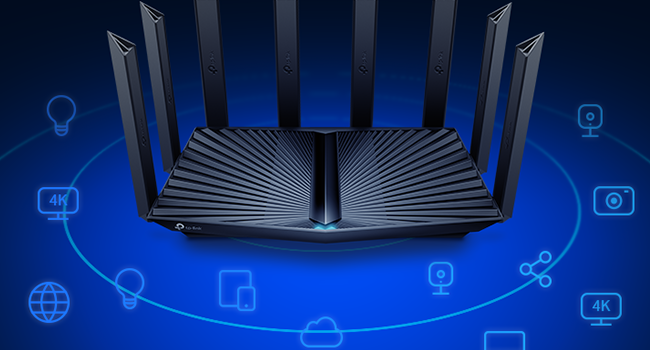
High Speed and Performance
Connect up to 4X More Devices Without Losing Speed

Connect up to 4X More Devices Without Losing Speed

Archer WiFi 6 router communicates data to multiple devices simultaneously with revolutionary OFDMA and MU-MIMO, allowing the whole family to connect more without slowing down. [5]
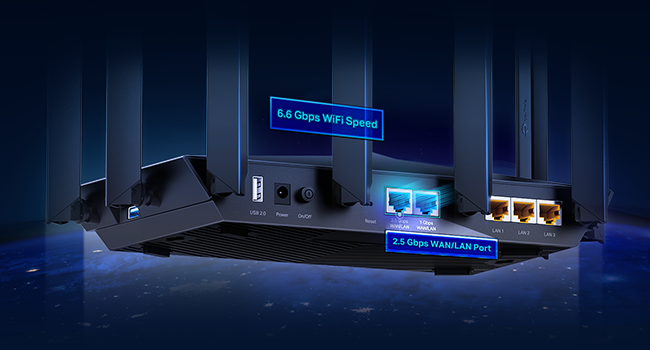
Go Faster. Go Reliable. Go Wired or Wireless.

Go Faster. Go Reliable. Go Wired or Wireless.

In addition to the stunning WiFi speeds, Archer AX6600 lets your devices reach peak performance. Take full advantage of internet plans up to 2.5 Gbps using 1x 2.5 Gbps WAN/LAN port, 1x Gigabit WAN/LAN port, and 3x Gigabit LAN ports.
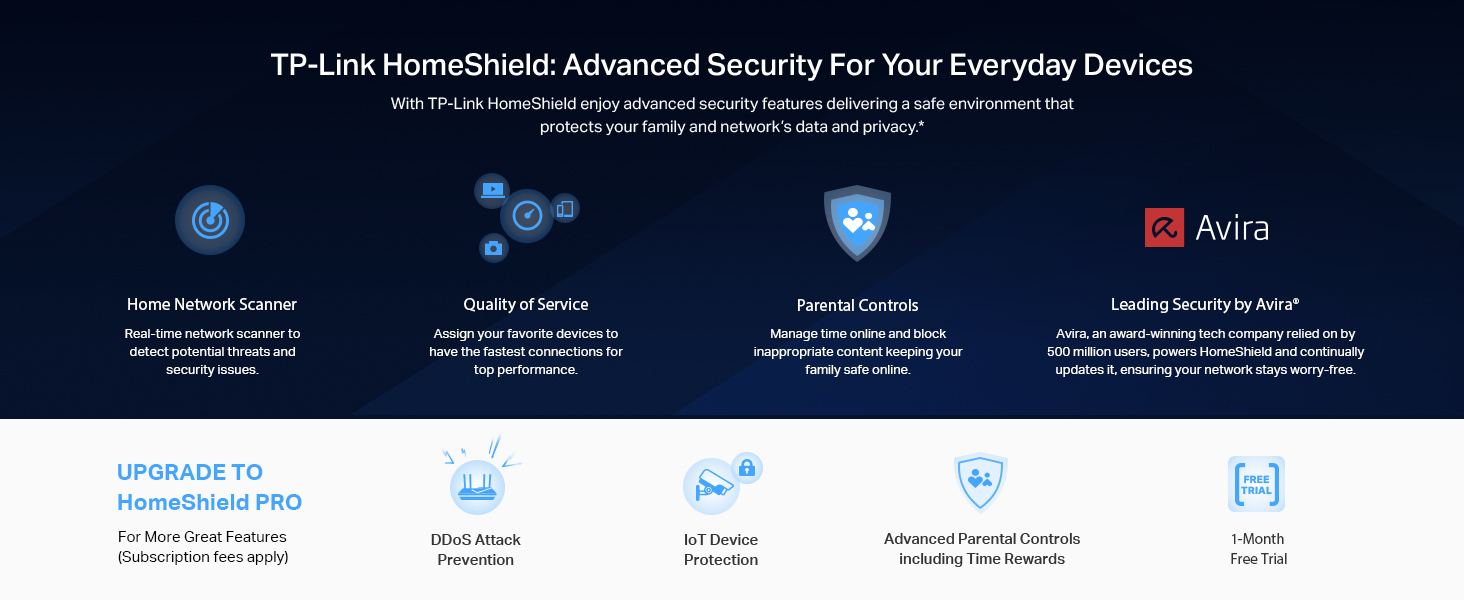
TP-Link HomeShield

TP-Link OneMesh – Create Your Own Mesh WiFi System

TP-Link OneMesh

OneMesh uses your compatible router and range extender to form a mesh WiFi network. This allows you to roam freely without connecting to a new network or dropping your connection and only requires one name and password to connect. [8]

Visit TP-Link’s official website for compatible models.

Product guides and documents

Product information

Warranty & Support

Amazon.com Return Policy:You may return any new computer purchased from Amazon.com that is "dead on arrival," arrives in damaged condition, or is still in unopened boxes, for a full refund within 30 days of purchase. Amazon.com reserves the right to test "dead on arrival" returns and impose a customer fee equal to 15 percent of the product sales price if the customer misrepresents the condition of the product. Any returned computer that is damaged through customer misuse, is missing parts, or is in unsellable condition due to customer tampering will result in the customer being charged a higher restocking fee based on the condition of the product. Amazon.com will not accept returns of any desktop or notebook computer more than 30 days after you receive the shipment. New, used, and refurbished products purchased from Marketplace vendors are subject to the returns policy of the individual vendor.
Product Warranty: For warranty information about this product, please click here

Feedback

TP-Link AX6600 Tri-Band WiFi 6 Router (Archer AX90), 8-Stream Gigabit Router, VPN Router, MU-MIMO, 2.5G WAN Port, 1.5GHz Quad-Core CPU


Found a lower price? Let us know. Although we can't match every price reported, we'll use your feedback to ensure that our prices remain competitive.

Where did you see a lower price?

Price Availability
/
/
/
/
Please sign in to provide feedback.

Product Description

The product is multiple voltage compatible, that voltage arrange is 100-240V.

Safety and product resources

What's in the box

  • Wi-Fi Router Archer AX90
  • Power Adapter
  • RJ45 Ethernet Cable
  • Top Brand: TP-Link

    Highly Rated
    100K+ customers rate items from this brand highly
    Trending
    100K+ orders for this brand in past 3 months
    Low Returns
    Customers usually keep items from this brand

    Important information

    Legal Disclaimer

    1.This device may not support all the mandatory features as ratified in Draft 3.0 of IEEE 802.11ax specification. Further software upgrades for feature availability may be required. 2. Maximum wireless transmission rates are the physical rates derived from IEEE Standard 802.11 specifications. Range and coverage specifications are based upon test results under normal usage conditions. Actual wireless transmission rate and wireless coverage are not guaranteed, and will vary as a result of 1) environmental factors, including building materials, physical objects and obstacles, 2) network conditions, including local interference, volume and density of traffic, product location, network complexity, and network overhead and 3) client limitations, including rated performance, location, connection quality, and client condition. 3. Claims about 802.11ax Wi-Fi technology are based on comparisons of the expected maximum theoretical data rates for one spatial stream using 802.11ax at 160 MHz (1201 Mbps) as opposed to one spatial stream using 802.11ac at 80 MHz (433 Mbps) as documented in IEEE 802.11ax draft 3.0 spec and IEEE 802.11-2016 wireless standard specifications, and require the use of similarly configured 802.11ax wireless network routers. Use of 802.11ax Wi-Fi standard requires clients to also support the 802.11ax Wi-Fi standard. 4. Use of DL/UL MU-MIMO, DL/UL OFDMA, TWT, WPA3 and 1024QAM requires clients to also support those functions. 5. Capacity refers to overall average throughput. This amendment defines standardized modifications to both the IEEE 802.11 physical layers (PHY) and the IEEE 802.11 Medium Access Control layer (MAC) that enable at least one mode of operation capable of supporting at least four times improvement in the average throughput per station (measured at the MAC data service access point) in a dense deployment scenario, while maintaining or improving the power efficiency per station. 6. 2.5 Gbps internet speeds require compatible service plans and equipment. 7. Saving clients' battery power requires clients to also support the 802.11ax Wi-Fi standard. Actual power reduction may vary as a result of network conditions, client limitations, and environmental factors. 8. Smart Roaming is designed for devices that support the 802.11k / v standard. 9. HomeShield includes the Free Basic Plan. Fees apply for the Pro Plan. Visit tp-link.com/homeshield for more information.

    Customer reviews

    4.4 out of 5 stars
    1,145 global ratings

    Customers say

    Customers praise the router's speed, achieving speeds close to 600mbps, and appreciate its strong signal and coverage, with one customer noting it covers up to 2500 sq ft. The interface is easy to use, and customers find the range impressive, with one mentioning it reaches the basement. While some customers say it works well and is worth the price, others report issues with the device dying and losing internet connection. Compatibility receives mixed feedback, with some saying it meets their needs while others note it doesn't support 2.5G WAN ports.
    AI Generated from the text of customer reviews

    Select to learn more

    64 customers mention speed, 48 positive, 16 negative
    Customers praise the router's performance, with speeds reaching up to 600mbps through WiFi, and one customer noting seamless switching between 2.4 GHz and 5 GHz bands.
    ...It took nearly 100 clients without issue, it was fast, and provided some truly insane client speeds with the proper hardware...Read more
    Greats signal coverage and speedRead more
    ...The only complaint I have is that this one does not have the built-in speed test feature that would apply its results to the QOS bandwidth setting....Read more
    I am very happy with this product very powerful 2.4 signal very fast and reliable.Read more
    46 customers mention signal strength, 35 positive, 11 negative
    Customers report positive experiences with the router's signal strength, noting improved coverage throughout their homes. One customer mentions that it adequately provides Wi-Fi to nine wireless devices.
    ...Now everything connects well with great signal strength, Wow! Now I finally have fully signal strength though out my house and garage....Read more
    ...for all of my wireless devices anywhere in the house with great signal no matter where I am in the house....Read more
    ...Had strong signal and great speeds for 3 hours. Then it lost internet. Nothing showed up in the logs. Then the router froze....Read more
    This thing would drop signal, and even the wired items would drop, and not reconnect. And seeing I Have ring alarm connected I could not have this....Read more
    32 customers mention range, 26 positive, 6 negative
    Customers are satisfied with the router's range, noting its excellent coverage and ability to reach outside areas, with one customer mentioning it covers up to 2500 sq ft.
    ...Wifi has been great, great speed, excellent range, easy to use interface....Read more
    Handles plenty of clients. I get the speed I pay for, with great range too.Read more
    This is a blazing fast router with excellent coverage. However, recently, the router will no longer turn on....Read more
    ...Covers the whole house and the years as well.Read more
    15 customers mention user interface, 11 positive, 4 negative
    Customers find the router's user interface easy to use, with one customer noting that the accompanying app walks you through the setup process.
    ...Wifi has been great, great speed, excellent range, easy to use interface....Read more
    ...Overall 2 stars because the interface is easy to use and it was easy to setup. However at this point it seems like false advertising.Read more
    ...forwarding, this might not concern you, but if the web interface lacks such a common feature, I wonder what other features that have carelessly...Read more
    ...Smooth streaming and video conferences. User interface is nice, similar, but a step up from the previous TP-link router I had....Read more
    149 customers mention reliability, 99 positive, 50 negative
    Customers have mixed experiences with the router's reliability, with some reporting that it works well and is excellent, while others mention that the device died on them.
    Been using it for a couple of years now and it is a great router. Covers the whole house and the years as well.Read more
    ...I can't recommend this router for anything but a very small home network with less then 20 devices....Read more
    Works great, teamed it up with a netgear cm1000 modem on Spectrum Charter. Appears to handle my network requirements.Read more
    ...It worked great for about 4 months then failed. Caught in a boot loop. Tp-Link was gracious enough to replace it with another one....Read more
    53 customers mention connectivity, 20 positive, 33 negative
    Customers have mixed experiences with the router's connectivity, with some reporting excellent connections and strong signals, while others mention losing internet access and not being able to reconnect with the modem.
    ...Would not connect to the internet.Read more
    ...I now have seamless connectivity for all of my wireless devices anywhere in the house with great signal no matter where I am in the house....Read more
    ...after 2 weeks it begins to degrade performance and lose connection with the internet which the router has to be rebooted to solve the problem....Read more
    ...Great speeds, but speed isn't great if you're connectivity is garbage. I have 30 or so diveces I connect...Read more
    33 customers mention value for money, 12 positive, 21 negative
    Customers have mixed opinions about the router's value for money, with some finding it worth every penny while others say it's not worth the $300 price tag.
    ...It’s easy af to set up. It’s expensive and some people might not think it’s necessary but it’s a game changer, worth every pennyRead more
    ...I am happy with this purchase and would do it again. 3rd, the interface is super friendly and easy to go through....Read more
    ...Now in just over a month, the router is dead. Do not buy.Read more
    The unit itself is junk and overpriced the signal only went 20ft from my house , I purchased it to increase distance of wifi signal , junk !Read more
    30 customers mention compatibility, 18 positive, 12 negative
    Customers have mixed experiences with the router's compatibility: while some say it meets their needs, others report it doesn't support 2.4GHz devices and doesn't work with Starlink ISP.
    Works great, just what I neededRead more
    ...NOT! The router does have USB 3 ports, but doesn't support any type of media center. I was unable to use my 14TB HD on any of my devices....Read more
    ...it's a pricey but very nice router with some cool features like Alexa integration, compatible mesh device integration, etc. BUT ......Read more
    ...It doesn’t play well with multiple devices, for example 2 Alexa’s playing the same song simultaneously never lasts long as I cannot set the Google...Read more
    Works better then Google Mesh on 1,500sqft House
    5 out of 5 stars
    Works better then Google Mesh on 1,500sqft House
    Update: Does not play well with 38 devices in my house. Constantly loses connection with smart bulbs, Alexa’s and conference calls go bad at times. I upgraded to a $550 ASUS router and now everything works flawlessly. Old review: I have Google Fiber 2 Gig Service. I had their Google Fiber Multi-gig Router with 1 range extender in a 1,500sqft home. After over a year of using that system I had enough. It doesn’t play well with multiple devices, for example 2 Alexa’s playing the same song simultaneously never lasts long as I cannot set the Google Multi-gig router to stream to multiple devices optimally. I decided the mesh setup might be good for a house double my size, so I wanted to at least buy a Wi-Fi router that has mesh capabilities in the future which lead me to the Tplink AX6600/Archer AX90. Setup was simple and it actually lead me to have Google Fiber install a small modem instead of the giant old Google Multi-gig router that you will see the new small modem on the wall in the picture I uploaded. The Wi-Fi can now handle me being on a Zoom call while my wife games or streams a work out video, etc… without the Zoom call lagging, and all of the Alexa’s work flawlessly with the OFDMA setting enabled so I can listen to music in the whole house without the Alexa’s turning off randomly while others still play. My wife even said playing call of duty is crisp and flawless. If I move into a larger house I will look into pairing this with a Tplink AX3000 Wi-Fi Extender (but they have 2 versions) to extend the signal to a second floor or larger foot print house.
    Thank you for your feedback
    Sorry, there was an error
    Sorry we couldn't load the review

    Top reviews from the United States

    • 5 out of 5 stars
      (Archer AX6600) Finally, a router that can get a 5ghz signal to more than just the room it's in!
      Reviewed in the United States on August 2, 2021
      Brief content visible, double tap to read full content.
      Full content visible, double tap to read brief content.

      Prior to this router, I was using another TP-Link product, the Archer C7. It worked just fine for connecting the various Ethernet connected things in the house, but the WiFi performance was lacking, as I could not get a solid enough signal on the 5ghz (high bandwidth, fast). The signal even in my bedroom (which is not even 20 feet from the router) was only usable on the 2.4 ghz band (aka the band that "Slow" WiFi works on). The 5 ghz band suffered constant issues with dropped packets, videos buffering, you know, the usual symptoms of a poor WiFi signal. Another reason for me to switch is that the C7 only supports the 802.11ac WiFi standard, and the new WiFi 6 standard came out a year or two back. I wanted to have equipment compatible with the newer standards, and be ready for a possible upgrade to gigabit internet speeds, so this TP-Link Archer AX90 router was the one I settled on since it has a 2.5gbps WAN port (The C7 only has a 1gbps WAN port, which is usually fine for most people).

      Now that I have the new Archer AX90 (aka AX6600) set up and configured similarly to the C7, right where the C7 used to be, my new tablet which supports WiFi 6 (aka 802.11AX) connects with a strong signal (not missing any bars) on both of the 5ghz bands this router offers (another improvement over the C7, it has 2x 5ghz bands which helps with reducing traffic congestion on any one band).

      Speed tests using my new Samsung Galaxy Tab S7 (Samsung's top-of-the-line tablet as of this review) show that on both of the 5ghz bands I'm getting the full 100mbps download and ~12mbps upload speeds I expect from my current internet service plan (that's what I pay for, my equipment can handle more than that but I can't afford the prices of the higher speed plans).

      I was surprised by how stable the round-trip message time (called "ping" in the IT industry) is compared to the "gold standard" of a wired Ethernet connection. Usually WiFi has a lot of "jitter" in the ping, which means that if your previous data packet had a ping of say 50 milliseconds (50 ms), the next packet might have a ping of 25 or it might have a ping of 75, or anywhere in between and even occasionally higher than that, and the next packet could be anywhere in that range as well. When you're gaming, what you need is a STABLE connection with as little jitter in the ping as possible, because the game is interpolating between the data points it gets to calculate critical things like where you are or where your shots are coming from in a first person shooter game.

      Now I don't know specifically how they did it, but this AX90 router is delivering a WiFi connection that has a lot less jitter than I was expecting from a WiFi connection. By "A lot less", I mean that the level of jitter is similar to a wired Ethernet connection (but still measurably higher by a few ms), meaning that if you're just gaming casually or playing turn-based multiplayer games you might be able to get away with using WiFi. I still say that you should always strive to get a wired internet connection to your gaming device whenever possible, but this WiFi 6 is coming very close to what I'd consider acceptable for hardcore gaming use (with only a few WiFi devices in the range of the AX90 at least).

      Speaking of the environment I tested the AX90 in, I have not tested the performance in a congested WiFi environment. I'm expecting that performance will degrade, but I don't know by how much, or if that degradation will result in a level of performance that is not acceptable to you should you be considering the purchase of this router (the latter is a matter of personal opinion).

      I have also not tested performance on the 2.4ghz band, but I imagine it is at least as good as the performance of the C7, which was "slow but acceptable". The lack of speed is due to the nature of 2.4ghz WiFi, and these days basically any router from any brand should be able to put out the most the 2.4 ghz band can offer.

      I doubt that the radios in the AX90 are any stronger than the ones in the C7, because there are FCC limitations on such things, so my theory about why I can now get a 5ghz signal when I couldn't with the C7 is that the AX90 has "beam-forming" technology. Beam forming is a technology taken from cell phone towers, and it is essentially a way to create an electronically steered directional beam of radio waves, or when receiving signals it can use related techniques to preferentially amplify signals coming from a given direction and cancel out signals coming from other directions. This helps it "punch thru" issues like multipath interference and make the same radio power output act as if it is a higher power radio transmitter, without consuming any more energy (instead of the radio signal going "everywhere", it mostly goes in one direction).

      Another advantage the AX90 has is OFDMA, which is supposed to help it serve large numbers of devices, however my house is in a suburb and there's only 3 people living here so I don't have many devices to worry about (and I'm the only one in the house with more than one device that connects via WiFi, meaning generally only one of my devices are active at any one time).

      I did leave the option enabled in the settings, because it wasn't causing me any issues, I just don't know if I'm getting any benefit from it.

      Setup of the new router was easy for me since I'm the designated "tech person" in the house and I always at least check the manual to make sure there aren't any "gotchas" to setting up something new.

      Setup should be easy for just about anyone capable of following technical instructions. Do NOT attempt to set this up without reading the quick start guide and the user guide, especially if you have internet service above 1gbps.

      Just interpret the instructions mostly literally and you'll be fine. If you have trouble, I'm sure that tutorials are available online (check YouTube or your preferred tech info source).

      Here are some setup tips:

      1. If your WiFi devices can't see your new AX90 router when searching for a WiFi network to connect to, and it's powered on (doesn't really even need to be connected to the internet) try going into the settings and un-checking the "Target Wake Time" box. On my router, this option was off from the factory, but I turned it on to see if it did anything, and all it did was make it impossible for my new tablet to detect the router (a Samsung Galaxy Tab S7, which supports WiFi 6 and is the device I used for testing WiFi connection speeds).

      2. You can set up a preferred time for the router to reboot, with options for "monthly", "weekly", and "daily" schedules. The option is in "advanced settings", almost all the way at the bottom. If you choose to do this, pick a time when you're either not at home or sleeping. This also applies to the router automatically checking for, downloading, and installing firmware updates.

      3. If the bright blue status light on the router is annoying due to where the router is placed (say in a bedroom), you can turn that off in the settings (in "advanced settings", all the way at the bottom). You can also set a time range for when you want the light to be off, if you don't mind it being on while you're awake (it will still turn on if something is out-of-the-ordinary, say if you lose internet connection).

      4. You don't "have" to sign up for TP-Link's "Homeshield" service to make the router work as "just a router" (I didn't). I'm not in a situation where I have need of a VPN, let alone things like DDoS protection. However, if you're operating a small business on the web, you might find such services attractive (I have no experience with operating a business, so I wouldn't know).

      65 people found this helpful
      Sending feedback...
      Thank you for your feedback.
      Sending feedback...
      Thanks, we'll investigate in the next few days.

      We'll check if this review meets our community guidelinesOpens in a new tab. If it doesn't, we'll remove it.

    • 5 out of 5 stars
      Works better then Google Mesh on 1,500sqft House
      Reviewed in the United States on January 21, 2023
      Brief content visible, double tap to read full content.
      Full content visible, double tap to read brief content.

      Update: Does not play well with 38 devices in my house. Constantly loses connection with smart bulbs, Alexa’s and conference calls go bad at times. I upgraded to a $550 ASUS router and now everything works flawlessly.

      Old review: I have Google Fiber 2 Gig Service. I had their Google Fiber Multi-gig Router with 1 range extender in a 1,500sqft home. After over a year of using that system I had enough. It doesn’t play well with multiple devices, for example 2 Alexa’s playing the same song simultaneously never lasts long as I cannot set the Google Multi-gig router to stream to multiple devices optimally. I decided the mesh setup might be good for a house double my size, so I wanted to at least buy a Wi-Fi router that has mesh capabilities in the future which lead me to the Tplink AX6600/Archer AX90.

      Setup was simple and it actually lead me to have Google Fiber install a small modem instead of the giant old Google Multi-gig router that you will see the new small modem on the wall in the picture I uploaded.

      The Wi-Fi can now handle me being on a Zoom call while my wife games or streams a work out video, etc… without the Zoom call lagging, and all of the Alexa’s work flawlessly with the OFDMA setting enabled so I can listen to music in the whole house without the Alexa’s turning off randomly while others still play. My wife even said playing call of duty is crisp and flawless.

      If I move into a larger house I will look into pairing this with a Tplink AX3000 Wi-Fi Extender (but they have 2 versions) to extend the signal to a second floor or larger foot print house.

      Works better then Google Mesh on 1,500sqft House
      5 out of 5 stars
      Works better then Google Mesh on 1,500sqft House
      Reviewed in the United States on January 21, 2023

      Update: Does not play well with 38 devices in my house. Constantly loses connection with smart bulbs, Alexa’s and conference calls go bad at times. I upgraded to a $550 ASUS router and now everything works flawlessly.

      Old review: I have Google Fiber 2 Gig Service. I had their Google Fiber Multi-gig Router with 1 range extender in a 1,500sqft home. After over a year of using that system I had enough. It doesn’t play well with multiple devices, for example 2 Alexa’s playing the same song simultaneously never lasts long as I cannot set the Google Multi-gig router to stream to multiple devices optimally. I decided the mesh setup might be good for a house double my size, so I wanted to at least buy a Wi-Fi router that has mesh capabilities in the future which lead me to the Tplink AX6600/Archer AX90.

      Setup was simple and it actually lead me to have Google Fiber install a small modem instead of the giant old Google Multi-gig router that you will see the new small modem on the wall in the picture I uploaded.

      The Wi-Fi can now handle me being on a Zoom call while my wife games or streams a work out video, etc… without the Zoom call lagging, and all of the Alexa’s work flawlessly with the OFDMA setting enabled so I can listen to music in the whole house without the Alexa’s turning off randomly while others still play. My wife even said playing call of duty is crisp and flawless.

      If I move into a larger house I will look into pairing this with a Tplink AX3000 Wi-Fi Extender (but they have 2 versions) to extend the signal to a second floor or larger foot print house.

      2 people found this helpful
      Sending feedback...
      Thank you for your feedback.
      Sending feedback...
      Thanks, we'll investigate in the next few days.

      We'll check if this review meets our community guidelinesOpens in a new tab. If it doesn't, we'll remove it.

    • 5 out of 5 stars
      AX 90 6600
      Reviewed in the United States on April 27, 2023
      Brief content visible, double tap to read full content.
      Full content visible, double tap to read brief content.

      It was time....Had an AC1750 for years. Great upgrade. Noticeable and immediate improvement. No longer need the extenders in our 2400sq foot single story home. Strong download speeds and signal throughout. I have it placed in the front corner wall of the house and still have a signal throughout our entire 1/2 acre lot and 300+ feet down the street. We're not gamers and just two of us in the house, but generally have 15-20 devices running on the router and streaming up to 4 TV's at a time. I also have a VoiP phone plugged in for work. We work from home and we're on video calls much of the day. We're on the cheap spectrum 500mbps/20mbps plan and we get close to 600 download and 23+ upload....That maybe partially due to the fact Google fiber is now in the neighborhood and spectrum needs to stay competitive. Easy setup. Like the ease of turning on/off the guest network when needed. Had an issue with one of the many laptops continuing to connect to the 2.4 network but turned out just needed to reset the laptop driver. I like the tether app for most settings, but just be aware there are some other sophisticated settings you need to log into network to set/adjust. I imagine we'll grow into this for years to come and works good for our lifestyle. Glad I bought it when it was only $200

      4 people found this helpful
      Sending feedback...
      Thank you for your feedback.
      Sending feedback...
      Thanks, we'll investigate in the next few days.

      We'll check if this review meets our community guidelinesOpens in a new tab. If it doesn't, we'll remove it.

    • 4 out of 5 stars
      Decent router & very easy to set up with a mobile app. However, there are better options..
      Reviewed in the United States on July 15, 2021
      Brief content visible, double tap to read full content.
      Full content visible, double tap to read brief content.

      - 1 star for Amazon sending me a returned product when I bought one new & the massive size

      Pros:

      - Smart Tri-band connection works pretty well and it seems like what TP-Link claims about optimizing & focusing the signal to the device in use is true. Amongst 3 different tri-band wi-fi 6 routers I've tested, the same smart connection feature seemed to be working the best on this particular device. This boosted the download/upload performance by 120Mbps compared to the other routers in the same category that I've tried

      - Stable signal

      - The mobile app makes it easy to install & manage the network

      Cons:

      - This thing is BIG. As for a size reference, it's bigger than my AT&T fiber optic modem.

      - Looks like a robot spider flipped upside down.

      7 people found this helpful
      Sending feedback...
      Thank you for your feedback.
      Sending feedback...
      Thanks, we'll investigate in the next few days.

      We'll check if this review meets our community guidelinesOpens in a new tab. If it doesn't, we'll remove it.

    • 5 out of 5 stars
      Amazing
      Reviewed in the United States on August 6, 2021
      Brief content visible, double tap to read full content.
      Full content visible, double tap to read brief content.

      I will be upfront, I am not t3ch savy. I do what I can or look stuff up online to try and fix the issue. With that out of the way, this router has been life changing. I came from a 2012 netgear to a beast of a router. I read some reviews where people said wifi 6 can give you issues with connecting iphones and ipads or other gadgets. I have never had those said issues. 2nd, this device is basically plug and play. It does cover most of the house but this one one room because of off the layers of wall and maybe interference it has to go through. Overall, it has done what it said it could do which is to increase my speeds and the range throughout the house. I was looking for a 3500sq coverage and it +or- gave me that. I am happy with this purchase and would do it again. 3rd, the interface is super friendly and easy to go through. There is a service for extra protection but ill hold off on that. That is it so far for review on my end.

      PS: you can also set yourself as a high priority making you the fastest user out of everyone. I have yet to try it so we’ll see if someone wants me to.

      Sending feedback...
      Thank you for your feedback.
      Sending feedback...
      Thanks, we'll investigate in the next few days.

      We'll check if this review meets our community guidelinesOpens in a new tab. If it doesn't, we'll remove it.

    • 5 out of 5 stars
      Nice upgrade from AC5400
      Reviewed in the United States on January 9, 2022
      Brief content visible, double tap to read full content.
      Full content visible, double tap to read brief content.

      I have used the TPLink AC5400 for several years with good results. It had good coverage for my 3600 sf home based in a second-floor corner office. Technology evolves and I felt it was time to upgrade to the next generation of wifi technology. The AX6600 offered both the upgrade to WiFi 6 and Mesh capabilities. I have lived with using wifi extenders around the house and they served their purpose, but the convenience of a mesh network was attractive.

      The AX6600 is very similar to the 5400 in its exterior footprint and appearance. I would say that it's wifi coverage is better than the 5400. The AX660 supports the TPLink OneMesh network technology so I purchased two AX1500 range extenders which are OneMesh compatible when you have a OneMesh compatible router. The setup was seamless and the AX1500 integrated into the AX6600 perfectly. I now have seamless connectivity for all of my wireless devices anywhere in the house with great signal no matter where I am in the house. The Mesh capability allows the wirless device to swithc between access points automatically with the need to manually reconnect to a new access point. Sooo nice!!!!

      I have seen a lot of negative reviews regarding the OneMesh devices, but I don't see any mention in the reviews of what routers they are trying to use the OneMesh with. OneMesh is only compatible with TPLink routers that support OneMesh. OneMesh is not compatible with any other brand of router.

      I could not be happier with my wifi network with this upgrade. I have coverage not only in my home but anywhere in my yard. I have 35 years of experience in IT as a professional at the enterprise level. I manage IT services for 13 corporation in 26 counties and have 35 years of experience with enterprise network equipment. TPLink has earned my respect in the residential environment.

      5 people found this helpful
      Sending feedback...
      Thank you for your feedback.
      Sending feedback...
      Thanks, we'll investigate in the next few days.

      We'll check if this review meets our community guidelinesOpens in a new tab. If it doesn't, we'll remove it.

    • 5 out of 5 stars
      Solid Performance. WiFi signal stronger than router it replaced
      Reviewed in the United States on September 24, 2021
      Brief content visible, double tap to read full content.
      Full content visible, double tap to read brief content.

      Replaced a SMC WiFi router that I had since 2007. When Comcast up'ed my service from 100MB/s to 200MB/s and it randomly started dropping connection (though it should have been able to handle it). The AX6600 has not dropped a single time in over three weeks. WiFi signal is stronger so I was able to remove the two pair of powerline adapters.

      In the Address Reservation DHCP service assignment list for all my peripherals the one complaint I had that would have made this easier to handle during setup and for monitoring later would be to be able to edit the 'Device Name' because if it could not determine what the device was it would assign 'unknown' or '---' which is no help.

      Update 10-10-2021: After playing around with the router setting I found you CAN edit the name of each client on your network that is not automatically discovered. After logging in click on "Network Map", than click on "Client" . There you will find a tiny edit symbol next to each client. Click on that and edit name with some limitations.

      This took awhile to find: If you find that when you check the Wireless Setting "Hide SSID" you lose network connection. Windows 10 has an option that needs to be checked that says connect even if the SSID is disabled. It is in the "Network and Sharing Center" under "Wireless Properties".

      I have an HP Notebook DV6500 that is more than 10 years old and would not connect when WPA2/WPA3-Personal security was selected but worked fine on WPA/WPA2-Personal setting. The Notebook uses WPA2 802.11g. I ran the "Intel Driver Support Assistant" and it reported it was up to date. After exchanging messages with TP-Link Support they say to avoid other compatibility issues some older WiFi adapters may not be supported when using WPA2/WPA3-Personal security. My solution was to move the Notebook from the main network to the guest network and select WPA/WPA2-Personal there.

      One person found this helpful
      Sending feedback...
      Thank you for your feedback.
      Sending feedback...
      Thanks, we'll investigate in the next few days.

      We'll check if this review meets our community guidelinesOpens in a new tab. If it doesn't, we'll remove it.

    • 1 out of 5 stars
      Good Speed/ Signal strength; glaring issues with Smart Connect, OneMesh, and customer service.
      Reviewed in the United States on December 11, 2021
      Brief content visible, double tap to read full content.
      Full content visible, double tap to read brief content.

      Original: Overall this router is not bad. I get good range vs my old router, was getting the full 2402 Gbps on a x2 Wifi 6 PCIE card with manual configuration, and overall the hardware isn't bad. Unfortunately, the bells and whistles features that come with it are for not. For my overall opinions, go to the last paragraph.

      Lets first talk about "Smart Connect". Smart Connect "Smart Connect allows each of the router's wireless bands to use the same wireless settings. The router can balance network demand and assign devices to the optimum band" (verbatim from the router firmware). However, wifi 6 devices do not connect at their optimum speed ( or even to wifi 6 sometimes) and often times devices that are 5 Ghz capable and WELL within range of the router connect at 2.4 Ghz. So far that I've found, there is NO way to override what the router decides to connect the device, so with "Smart Connect" activated, you're stuck with what the firmware thinks you should connect to. My work around this was to turn off Smart Connect and set up the 2.4 Ghz and the 5Ghz-1 bands with a single SSID and create a separate SSID for 5Ghz-2 for Wifi6 and devices that would not prioritize the 5G freq. And this worked fairly well, except that where my office (and thus the router) is, is on the opposite side of the house from our driveway/garage. I do a lot of projects/woodworking in the garage while listening to tv shows in the background and my wife listens to AM radio in her car while using her phone (weird, I know, but I still love her and it's irrelevant to the review, lol). Long story short, we needed home internet over there to keep our cell data usage down so I bought a TP-link RE500X range extender to fill in the dead spot. And that brings us to OneMesh.

      Overall, the OneMesh range extender connected very easy to the AX90 and well within 5 minutes was up and running. Software-wise, everything was operating as should be, however, no devices were connecting to the extender. TP-link totes that OneMesh is supposed to automatically switch devices between the strongest, and fastest signals, but straight up, I was not getting any device to connect to the extender and not seeing any extension in range as a result. I logged into both the router and extender firmwares and went through every single menu to no avail. Defeated, I finally contacted TP-link's tech support via online chat.

      Which brings us to tech support. While "Shirley" from tech support seemed nice, she seemed liked she had ABSOLUTELY no idea how ANY of this technology worked. It was very apparent that she was trying to read through manuals or talk to someone who actually knew something about networking. She constantly asked very basic questions after I explicitly explained exactly what was going on (even sending screen shots). After approx. 25 minutes of her being away, the chat timed out.

      Without Shirley from tech support's help, I kept troubleshooting. Eventually went to full circle back to the annoying little "Smart Connect" feature I turned off a while ago. With apprehension, I turned it back on, immediately seeing the extender's connected devices fill up with several smart devices. One Mesh's proper operation seems dependent on Smart Connect. However, it seems I have a choice between range or speed as, again, my wifi 6 devices no longer connect at the proper speed.

      I typically give very low ratings on my negative reviews as it balances out all the fake 5 star reviews. I do like this router overall, hence the 3 star rating, but these features that are supposed to take it to the next level fall flat and makes me question why I would I spent $300 on a router. If you're looking for a router with great range, there are cheaper models out there without wifi 6. And likewise, if you're looking for a router with wifi 6 and good speed, you're not going to get range and speed with this and you should look at maybe a mesh system. It appears, unless TP-link adds some additional abilities, you will not get both speed and range through their current setup, which would be rather easy with a simple override ability (or even proper software that actually prioritizes the best speed) . Don't get sucked into marketing blowharding; you can either have wifi 6's speed, or one mesh's range ability, but you will never have both.

      13 people found this helpful
      Sending feedback...
      Thank you for your feedback.
      Sending feedback...
      Thanks, we'll investigate in the next few days.

      We'll check if this review meets our community guidelinesOpens in a new tab. If it doesn't, we'll remove it.

    Top reviews from other countries

      Translated by Amazon
      See original
    • 5 out of 5 stars
      Perfeito
      Reviewed in Brazil on August 16, 2024
      Brief content visible, double tap to read full content.
      Full content visible, double tap to read brief content.
      Sending feedback...
      Thanks, we'll investigate in the next few days.

      We'll check if this review meets our community guidelinesOpens in a new tab. If it doesn't, we'll remove it.

      Translated from Portuguese by Amazon
      See original
    • 5 out of 5 stars
      Excellent WiFi Router
      Reviewed in Canada on December 10, 2022
      Brief content visible, double tap to read full content.
      Full content visible, double tap to read brief content.

      I was looking to upgrade my Linksys WRT1900AC that had been my workhorse for a home that uses numerous IoT, streaming devices, computers and tablets for many years and while I wish that I could have stuck with Linksys since I like their administration app and interface, after reading numerous reviews from the likes of PCMag and CNET I went with this model from TPLINK (Archer AX90 / AX6600)

      First, not sure why they have what seems like two different model numbers, AX90 or AX6600... pick one!

      Regardless, here is what is important to know:

      Opening the box it was obvious that it was packaged well to protect the 8(!!!) antennae and the smaller box included has the ethernet cable if you need it and the power supply. One thing to note is that the power supply instantly annoyed me compared to my Linksys since it is a model that has the plug combined with the power brick, this takes up WAY too much space on a modern power bar and TPLink should consider using a system like many others have where the small normal size plug plugs into the power brick which then feeds the router. Small extension cords exist but at this price point it is a feature that quite frankly should come standard and the length of the power cord could definitely cause some installations issues, particularly if you have a sit stand desk that you will be setting it on top of like I do.

      Once it is plugged in the setup is easy. I went the route of direct connect via a web browser and navigating to the home address which in this model's case is 192.168.0.1 and was asked to setup an admin password for the router. Don't be dumb here. Make the password something that hackers will not be able to easily guess.

      The interface is very straightforward and setup was a snap and easily allowed me to change my SSID so that it would instantly be recognized by existing network of devices and also allows for smart management of your bandwidths automatically determining for the devices connecting if the 2.4 or 5 GHz bands are fastest.

      You also have the option to set up a guest network for visitors so you don't have to give them the password keys to your computer empire and that option is off by default in the firmware version that I received.

      Once it was up and running I conducted SpeedTests via Ookla and this router blew the readings I got from my old Linksys WRT1900AC away by far. In the farthest room away from the office that I'd tested my iPhone on with the Linksys I got an average throuput Down of 3.4 MBPS and it jumped to 34MBPS with the new TPLINK.

      So far I'm very happy with this router both with its ease of installation (though I have experience doing my own network administration at home and am very familiar with getting into the "guts" of my routers) and the performance thus far. It's a very fast router especially at its midrange price point and the only thing that you might want to consider is that it has a pretty hefty footprint compared to some other units and those 8 antennae definitely make it larger still.

      Excellent WiFi Router
      5 out of 5 stars
      Excellent WiFi Router
      Reviewed in Canada on December 10, 2022

      I was looking to upgrade my Linksys WRT1900AC that had been my workhorse for a home that uses numerous IoT, streaming devices, computers and tablets for many years and while I wish that I could have stuck with Linksys since I like their administration app and interface, after reading numerous reviews from the likes of PCMag and CNET I went with this model from TPLINK (Archer AX90 / AX6600)

      First, not sure why they have what seems like two different model numbers, AX90 or AX6600... pick one!

      Regardless, here is what is important to know:

      Opening the box it was obvious that it was packaged well to protect the 8(!!!) antennae and the smaller box included has the ethernet cable if you need it and the power supply. One thing to note is that the power supply instantly annoyed me compared to my Linksys since it is a model that has the plug combined with the power brick, this takes up WAY too much space on a modern power bar and TPLink should consider using a system like many others have where the small normal size plug plugs into the power brick which then feeds the router. Small extension cords exist but at this price point it is a feature that quite frankly should come standard and the length of the power cord could definitely cause some installations issues, particularly if you have a sit stand desk that you will be setting it on top of like I do.

      Once it is plugged in the setup is easy. I went the route of direct connect via a web browser and navigating to the home address which in this model's case is 192.168.0.1 and was asked to setup an admin password for the router. Don't be dumb here. Make the password something that hackers will not be able to easily guess.

      The interface is very straightforward and setup was a snap and easily allowed me to change my SSID so that it would instantly be recognized by existing network of devices and also allows for smart management of your bandwidths automatically determining for the devices connecting if the 2.4 or 5 GHz bands are fastest.

      You also have the option to set up a guest network for visitors so you don't have to give them the password keys to your computer empire and that option is off by default in the firmware version that I received.

      Once it was up and running I conducted SpeedTests via Ookla and this router blew the readings I got from my old Linksys WRT1900AC away by far. In the farthest room away from the office that I'd tested my iPhone on with the Linksys I got an average throuput Down of 3.4 MBPS and it jumped to 34MBPS with the new TPLINK.

      So far I'm very happy with this router both with its ease of installation (though I have experience doing my own network administration at home and am very familiar with getting into the "guts" of my routers) and the performance thus far. It's a very fast router especially at its midrange price point and the only thing that you might want to consider is that it has a pretty hefty footprint compared to some other units and those 8 antennae definitely make it larger still.

      Sending feedback...
      Thanks, we'll investigate in the next few days.

      We'll check if this review meets our community guidelinesOpens in a new tab. If it doesn't, we'll remove it.

    • 5 out of 5 stars
      Fácil de instalar. Buen rango de señal. Bueno en general.
      Reviewed in Mexico on January 1, 2022
      Brief content visible, double tap to read full content.
      Full content visible, double tap to read brief content.

      Llegó antes de lo que ponía. Llegó sin ningún daño. La caja en la que viene es un poco grande pero llegó sin problemas. Fácil de instalar, eso sí, las instrucciones vienen en Inglés, de ahí en fuera todo bien. Funcionó a la primera. El tiempo que llevo con él no ha presentado problemas como desconexiones. Tiene buen rango de alcance de la señal y soporta los 10 dispositivos que le conecté (de manera inalámbrica). Hay que recordar que esto es un router, no hace milagros, solo le quita carga de trabajo al módem, hay que tomar eso en cuenta y lo recomendable es deshabilitar la señal WiFi del módem y dejar únicamente la del Router para evitar problemas de interferencia con las señales entre los dispositivos. Impresiones generales: BUEN PRODUCTO.

      Sending feedback...
      Thanks, we'll investigate in the next few days.

      We'll check if this review meets our community guidelinesOpens in a new tab. If it doesn't, we'll remove it.

      Translated from Spanish by Amazon
      See original
    • 5 out of 5 stars
      Excellent for multiple devices
      Reviewed in Canada on October 4, 2022
      Brief content visible, double tap to read full content.
      Full content visible, double tap to read brief content.

      I was using a Asus router, and was just barely getting by, mind you I have multiple devices and wifi hungry kids.The Asus was 5yrs old too, and we added several cameras and wifi dimmers as well.

      This new TP link router has greatly improved speed and more importantly has fixed all of our dead wifi spots in the house and garage.I highly recommend this router to a family with 25+ devices, works very well.

      Sending feedback...
      Thanks, we'll investigate in the next few days.

      We'll check if this review meets our community guidelinesOpens in a new tab. If it doesn't, we'll remove it.

    • 5 out of 5 stars
      Um excelente produto
      Reviewed in Brazil on August 13, 2023
      Brief content visible, double tap to read full content.
      Full content visible, double tap to read brief content.

      O AX 73 da mesma marca é menos caro e faz o mesmo trabalho.

      Sending feedback...
      Thanks, we'll investigate in the next few days.

      We'll check if this review meets our community guidelinesOpens in a new tab. If it doesn't, we'll remove it.

      Translated from Portuguese by Amazon
      See original

    Product Summary: TP-Link AX6600 Tri-Band WiFi 6 Router (Archer AX90), 8-Stream Gigabit Router, VPN Router, MU-MIMO, 2.5G WAN Port, 1.5GHz Quad-Core CPU

    From TP-Link

    4.4 out of 5 stars, 1,145 ratings

    Customer reviews

    About this Item

    • Faster AX6600 Tri-Band Wi-Fi - 4804 Mbps (5 GHz) plus 1201 Mbps (5 GHz) plus 574 Mbps (2.4 GHz)
    • Ultra Connectivity - 1× 2.5 Gbps WAN/LAN port plus 1× 1 Gbps WAN/LAN port plus 3× Gigabit LAN ports and two USB ports ensure max flexibility and boosted throughput; The 2.5 Gbps WAN or LAN port and 1 Gbps WAN, LAN port cannot be used as the WAN port at the same time
    • Maximized Coverage - Eight high-gain antennas equipped with Beamforming ensure long range coverage Operating Temperature: 0℃-40℃ (32℉ -104℉)
    • More Devices with Less Lag - OFDMA and MU-MIMO technology deliver data to multiple devices, simultaneously
    • TP-Link HomeShield – TP-Link's premium security services keep your home network safe with cutting-edge features for network and IoT protection, including free features 1. Network Security Scan 2. Parental Controls: basic features are free 3. QoS 4. Weekly or Monthly Reports 5. IoT Device Identification. Subscribe to HomeShield Pro if needed, dollar 5.99 per Month, 1-Month Free Trial.
    • Refined Security - WPA3 reinforces Wi-Fi encryption for improved security
    • TP-Link OneMesh Supported - Flexibly Create Whole Home WiFi with Archer AX90 by adding a OneMesh supported Range Extender, like RE505X
    • Works with all internet service providers, such as AT&T, Verizon, Xfinity, Spectrum, RCN, Cox, CenturyLink, Frontier, etc.( a modem is required for most internet service providers)

    Product Description

    The product is multiple voltage compatible, that voltage arrange is 100-240V.

    Options Available

    Style

    • AX6600, Tri-Band
    Browse all available options

    Important Information

    Legal Disclaimer

    1.This device may not support all the mandatory features as ratified in Draft 3.0 of IEEE 802.11ax specification. Further software upgrades for feature availability may be required. 2. Maximum wireless transmission rates are the physical rates derived from IEEE Standard 802.11 specifications. Range and coverage specifications are based upon test results under normal usage conditions. Actual wireless transmission rate and wireless coverage are not guaranteed, and will vary as a result of 1) environmental factors, including building materials, physical objects and obstacles, 2) network conditions, including local interference, volume and density of traffic, product location, network complexity, and network overhead and 3) client limitations, including rated performance, location, connection quality, and client condition. 3. Claims about 802.11ax Wi-Fi technology are based on comparisons of the expected maximum theoretical data rates for one spatial stream using 802.11ax at 160 MHz (1201 Mbps) as opposed to one spatial stream using 802.11ac at 80 MHz (433 Mbps) as documented in IEEE 802.11ax draft 3.0 spec and IEEE 802.11-2016 wireless standard specifications, and require the use of similarly configured 802.11ax wireless network routers. Use of 802.11ax Wi-Fi standard requires clients to also support the 802.11ax Wi-Fi standard. 4. Use of DL/UL MU-MIMO, DL/UL OFDMA, TWT, WPA3 and 1024QAM requires clients to also support those functions. 5. Capacity refers to overall average throughput. This amendment defines standardized modifications to both the IEEE 802.11 physical layers (PHY) and the IEEE 802.11 Medium Access Control layer (MAC) that enable at least one mode of operation capable of supporting at least four times improvement in the average throughput per station (measured at the MAC data service access point) in a dense deployment scenario, while maintaining or improving the power efficiency per station. 6. 2.5 Gbps internet speeds require compatible service plans and equipment. 7. Saving clients' battery power requires clients to also support the 802.11ax Wi-Fi standard. Actual power reduction may vary as a result of network conditions, client limitations, and environmental factors. 8. Smart Roaming is designed for devices that support the 802.11k / v standard. 9. HomeShield includes the Free Basic Plan. Fees apply for the Pro Plan. Visit tp-link.com/homeshield for more information.

    Product Guidance & Documents

    User Guide (PDF)

    User Manual (PDF)

    Feedback

    Did you find this product summary feature useful?

    Thank you for your feedback
    Thank you for your feedback. You selected "Yes, it is useful"
    Thank you for your feedback. You selected "No, it is not useful"
    Product summary presents key information. Close to see all product details.