1. Introduction
Since the introduction of Java 8, a lot of people started using the (new) stream functionality. Of course, there are moments when our stream operations don’t work as expected.
IntelliJ has, besides its normal debugging options, a dedicated stream debugging function. In this short tutorial, we’ll explore this great feature.
2. The Stream Trace Dialog
Let’s start by showing how to open the Stream Trace dialog. In the toolbar of the debug window, there’s a Trace Current Stream Chain option that’s only enabled when our application pauses on a breakpoint inside a stream API call:
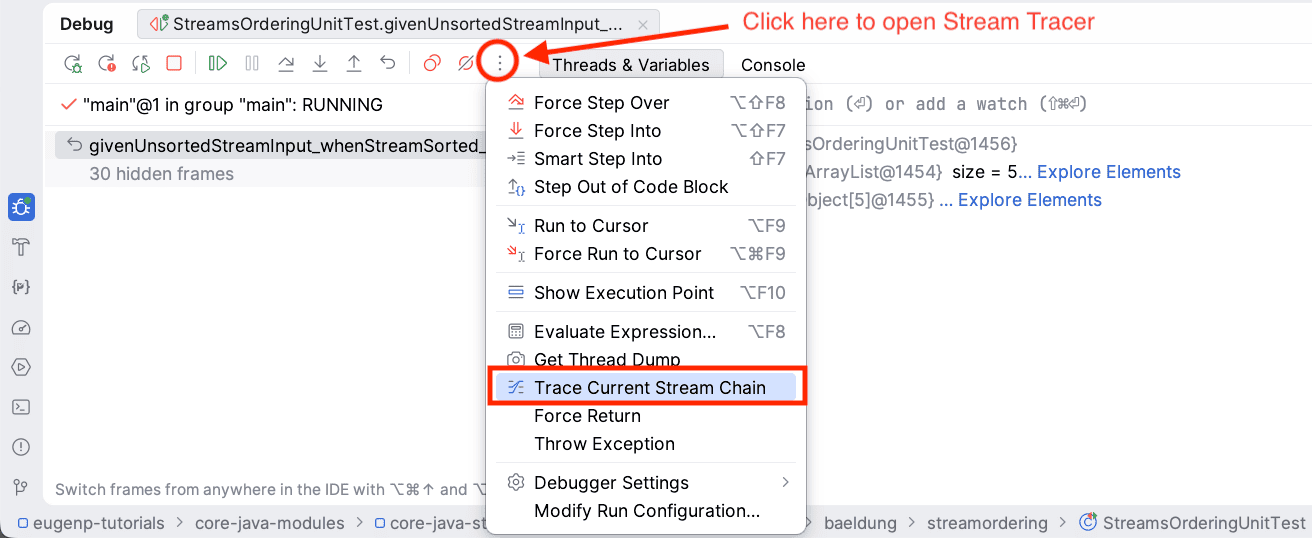
Clicking the option will open the Stream Trace dialog.
The dialog has two modes. We’ll take a look at Flat Mode in the first example. And, in the second example, we’ll show the default mode, which is Split Mode.
3. Examples
Now that we’ve introduced the stream debugging functionality in IntelliJ, it’s time to work with some code examples.
3.1. Basic Example with a Sorted Stream
Let’s start with a simple code fragment to get used to the Stream Trace dialog:
int[] listOutputSorted = IntStream.of(-3, 10, -4, 1, 3)
  .sorted()
  .toArray();
Initially. we have a stream of unordered int. Next, we sort that stream and convert it to an array.
When we view the Stream Trace in Flat Mode, it shows us an overview of the steps that occur:
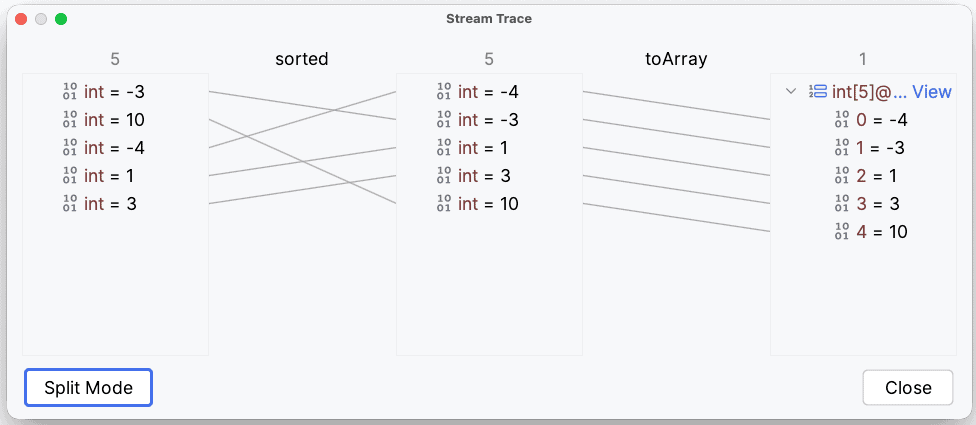
On the far left, we see the initial stream. It contains the ints in the order in which we wrote them.
The first set of arrows shows us the new location of all the elements after sorting. And at the far right, we see our output. All items appear there in sorted order.
Now that we’ve seen the basics, it’s time for a more complex example.
3.2. Example Using flatMap and filter
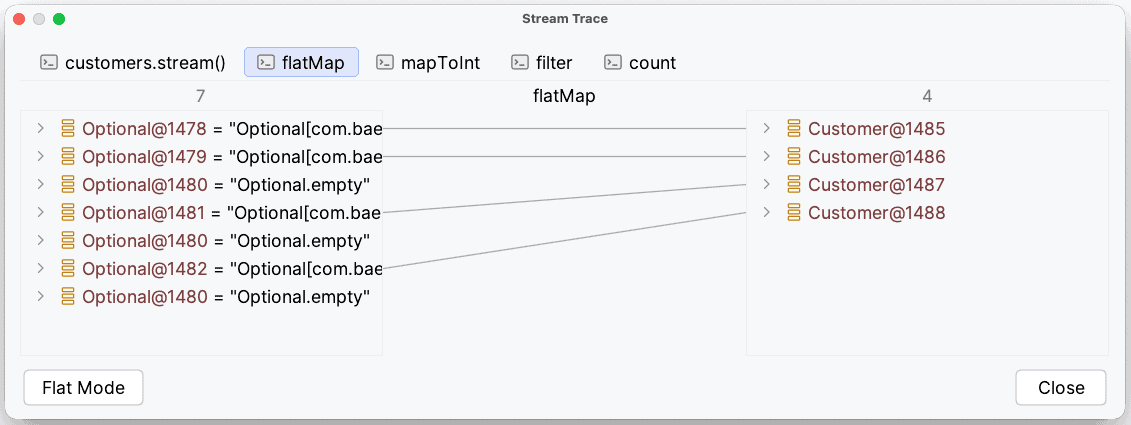
This next example uses flatMap. Stream.flatMap helps us, for example, to convert a list of Optionals to a normal list. In this next example, we start with a list of Optional Customers. We then map it to a list of Customers and apply some filtering:
List<Optional<Customer>> customers = Arrays.asList(
    Optional.of(new Customer("John P.", 15)),
    Optional.of(new Customer("Sarah M.", 78)),
    Optional.empty(),
    Optional.of(new Customer("Mary T.", 20)),
    Optional.empty(),
    Optional.of(new Customer("Florian G.", 89)),
    Optional.empty()
);

long numberOf65PlusCustomers = customers
  .stream()
  .flatMap(c -> c
    .map(Stream::of)
    .orElseGet(Stream::empty))
  .mapToInt(Customer::getAge)
  .filter(c -> c > 65)
  .count();
Next, let’s view the Stream Trace in Split Mode, which gives us a better overview of this stream.
On the left, we see the input stream. Next, we see the flat-mapping of the stream of Optional customers to the stream of actual present customers:
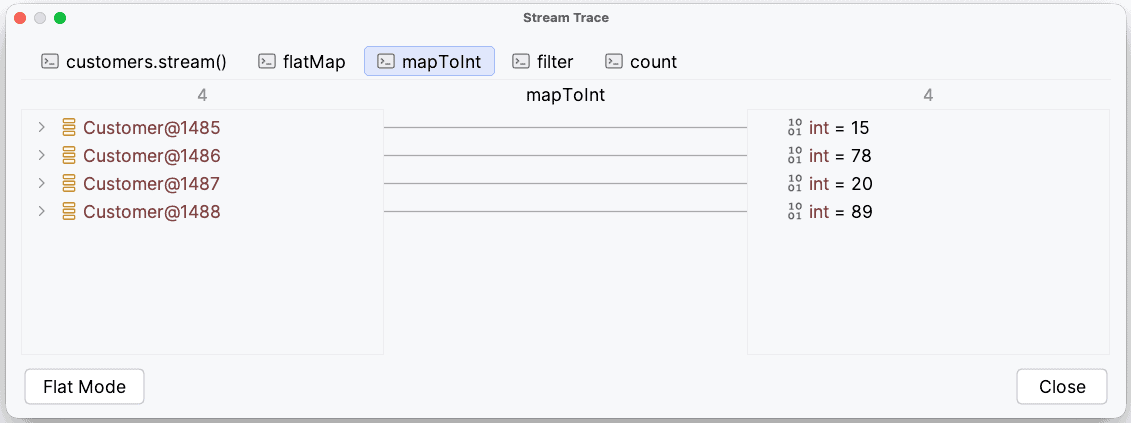
After that, we map our stream of customers to their ages:
The next step filters our stream of ages to a stream of ages greater than 65:
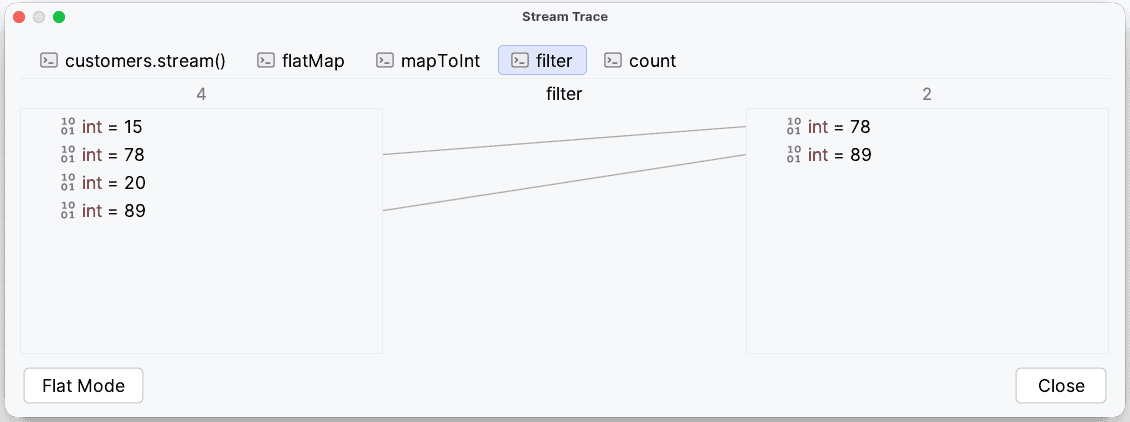
Finally, we count the number of items in our stream of ages:
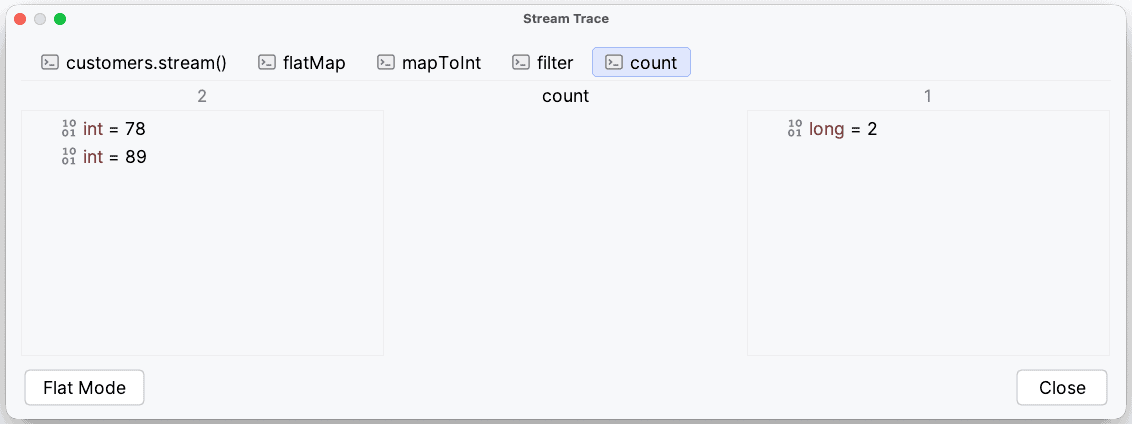
4. Caveats
In the examples above, we’ve seen some of the possibilities offered by the Stream Trace dialog. However, there are some important details to be aware of. Most of them are a direct consequence of how streams work.
Firstly, streams always need terminal operations to be executed. This is no different when using the Stream Trace dialog. Also, we must be aware of operations that do not consume the entire stream — for example, anyMatch. In this case, it will not show all elements — just the elements that are processed.
Secondly, be aware that the stream will be consumed. If we declare the Stream separately from its operations, we might run into the error “Stream has already been operated upon or closed”. We can prevent this error by joining the declaration of the stream with its usage.
5. Conclusion
In this quick tutorial, we’ve seen how to use IntelliJ’s Stream Trace dialog.
First, we looked at a simple case showing sorting and collecting. Then, we looked at a more complex scenario involving flat-mapping, mapping, filtering, and counting.
Finally, we looked into some caveats that we might bump into while using the stream debugging functionality.
The code backing this article is available on GitHub. Once you're
logged in as a Baeldung Pro Member, start learning and coding on the project.


