1. Introduction
Remote debugging gives developers the ability to diagnose unique bugs on a server or another process. It provides the means to track down those annoying runtime bugs and identify performance bottlenecks and resource sinks.
In this tutorial, we’ll take a look at remote debugging using JetBrains IntelliJ IDEA. Let’s prepare our sample application first by altering the JVM.
2. Configure the JVM
We’ll use a Spring scheduler sample application to easily connect and add breakpoints to a regularly scheduled task.
Furthermore, IntelliJ IDEA provides our JVM parameters as part of the configuration:
-agentlib:jdwp=transport=dt_socket,server=y,suspend=n,address=*:5005
2.1. JVM Parameters
Besides the Java Debug Wire Protocol (JDWP) configuration – jdwp=transport=dt_socket – we see the server, suspend, and address parameters.
The server parameter configures the JVM as the target for our debugger. The suspend parameter tells the JVM to wait for a debugger client to connect before startup. Finally, the address parameter uses a wildcard host and a declared port.
So, let’s build the scheduler application:
mvn clean package
And now let’s start up the application, including the -agentlib:jdwp parameter:
java -jar -agentlib:jdwp=transport=dt_socket,server=y,suspend=n,address=*:5005 \
  target/gs-scheduling-tasks-0.1.0.jar
Open up any terminal and run the command. With our application started up, let’s now switch over to IntelliJ.
3. Run Configuration in IntelliJ IDEA
Next, in IntelliJ, we create a new Run Configuration for remote debugging:
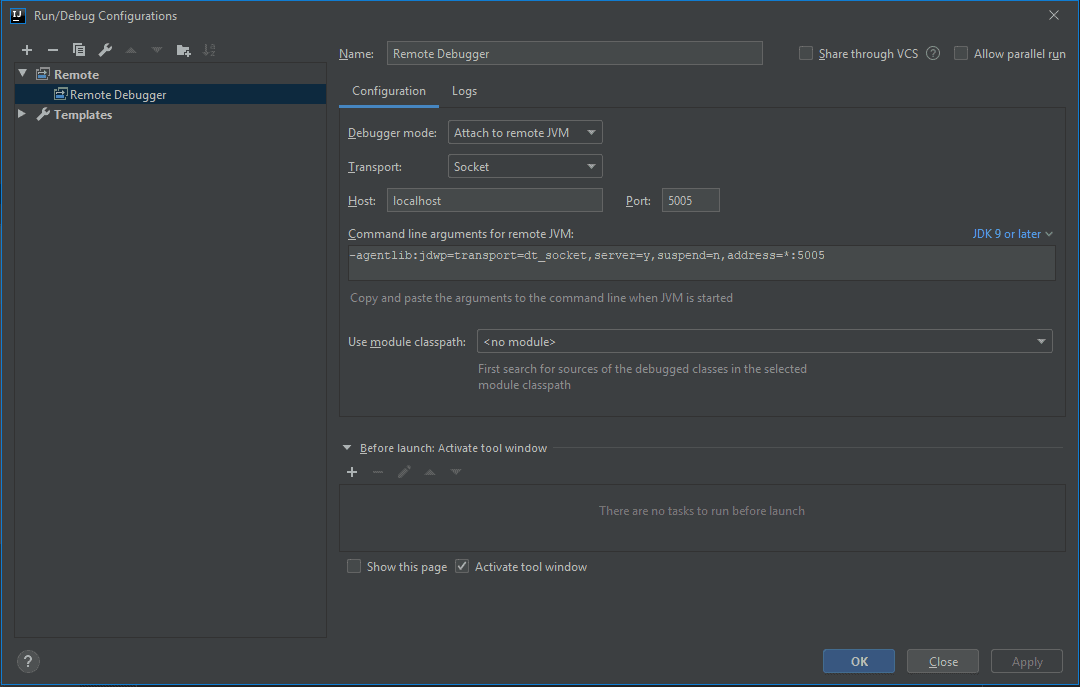
Now that our application is running, let’s start the remote debugging session by clicking the Debug button.
4. Remote Debugging
Next, we open the ScheduleTask file and place a breakpoint at line 36 shown here:
public void reportCurrentTime() {
  log.info("The time is now {}", dateFormat.format(new Date()));
}
Since the task executes every five seconds, it will stop soon after it’s added. As a result, we can now step through the entire application.
For application startup issues, we change the suspend flag to n and place a breakpoint in the main method of Application.
4.1. Limitations
Sometimes logging and output confuse us when remote debugging. The logs will not be sent to the IDE console, so an external log file can be used and mapped into the IDE for more robust debugging ability.
Also remember that while remote debugging is a very powerful tool, a production environment is not a suitable target for debugging.
5. Conclusion
As we covered in this article, remote debugging with IntelliJ is easy to set up and use in a few short steps.
We looked at how to configure our application JVM for debugging as well as some limitations of this important tool in our developer toolbox.
The code backing this article is available on GitHub. Once you're
logged in as a Baeldung Pro Member, start learning and coding on the project.