1. Overview
When we’re injecting runtime properties into our Spring applications, we may define bean classes for groups of custom properties.
IntelliJ provides help and auto-complete for the built-in properties beans. However, it needs a little help to provide these for custom properties.
In this short tutorial, we’ll look at how to expose these properties to IntelliJ to make the development process easier.
2. Custom Properties
Let’s have a look at the on-screen help IntelliJ can provide us regarding our application’s properties:
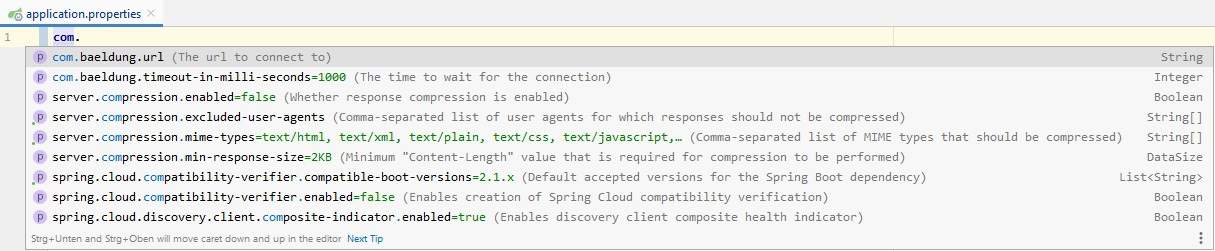
Here, the properties url and timeout-in-milliseconds are custom properties. We can see a description, type, and an optional default value.
But, if a property is unknown, IntelliJ will show us a warning:

This is because, without metadata, IntelliJ cannot help us.
Now let’s take a look at what we have to do to fix this.
3. Dependencies
First, we need to add the spring-boot-configuration-processor dependency to our pom.xml:
<dependency>
    <groupId>org.springframework.boot</groupId>
    <artifactId>spring-boot-configuration-processor</artifactId>
    <optional>true</optional>
</dependency>
The spring-boot-configuration-processor is invoked each time we build our project. It will create the metadata files in target/classes/META-INF/.
The dependency is marked as optional, which means that it is not inherited when somebody uses our project as a dependency.
Next, we’ll see where the spring-boot-configuration-processor gets the information used to create the metadata.
We define our properties in a class annotated with @ConfigurationProperties:
@Configuration
@ConfigurationProperties(prefix = "com.baeldung")
public class CustomProperties {

    /**
     * The url to connect to.
     */
    String url;

    /**
     * The time to wait for the connection.
     */
    private int timeoutInMilliSeconds = 1000;

    // Getters and Setters

}
Here, the class contains the property names, their types, and any defaults provided in the initializer list. Also, the Javadoc provides descriptions of each property.
During a build, the annotation processor searches for all classes that are annotated with @ConfigurationProperties. It generates custom property metadata for each instance variable of the class.
The metadata file that describes the custom properties drives the contextual help in IntelliJ, for example:
{
  "groups": [
    {
      "name": "com.baeldung",
      "type": "com.baeldung.configuration.processor.CustomProperties",
      "sourceType": "com.baeldung.configuration.processor.CustomProperties"
    }
  ],
  "properties": [
    {
      "name": "com.baeldung.url",
      "type": "java.lang.String",
      "description": "The url to connect to.",
      "sourceType": "com.baeldung.configuration.processor.CustomProperties"
    },
    {
      "name": "com.baeldung.timeout-in-milli-seconds",
      "type": "java.lang.Integer",
      "description": "The time to wait for the connection.",
      "sourceType": "com.baeldung.configuration.processor.CustomProperties",
      "defaultValue": 1000
    }
  ],
  "hints": []
}
As the annotation processor generates this file for us from our code, there’s no need to look at or edit this file directly.
If we have existing properties that are not introduced by a @ConfigurationProperties, but still want their metadata file, then IntelliJ can help.
Let’s take a closer look at the warning message from before:

Here we see a Define configuration key option, which we can use to create an additional-spring-configuration-metadata.json file. The created file will look like:
{
  "properties": [
    {
      "name": "com.baeldung.timeoutInMilliSeconds",
      "type": "java.lang.String",
      "description": "Description for com.baeldung.timeoutInMilliSeconds."
    }
  ]
}
As there’s no information about the property from anywhere else, we’ll have to manually edit the metadata inside it. The default type is always String.
Let’s put some extra information into the file:
{
  "properties": [
    {
      "name": "com.baeldung.timeout-in-milli-seconds",
      "type": "java.lang.Integer",
      "description": "The time to wait for the connection.",
      "sourceType": "com.baeldung.configuration.processor.CustomProperties",
      "defaultValue": 1000
    }
  ]
}
Note that we’ll need to rebuild the project to see the new property come up in auto-complete.
Also, we should note that the option to generate this metadata file is also available via IntelliJ’s Alt+ENTER shortcut over an unknown property.
6. Conclusion
In this article, we looked at how IntelliJ uses the configuration property metadata to provide help with our properties files.
We saw how to use Spring’s annotation processor to generate the metadata from custom classes. Then, we saw how to use a shortcut in IntelliJ to create a metadata file to edit manually.
The code backing this article is available on GitHub. Once you're
logged in as a Baeldung Pro Member, start learning and coding on the project.


