Customer story

5 million
AI agents running in customer business workflows each month


10x
faster to build production agents
Frontier models, harnesses, context management, and infrastructure designed to work together.



























For workloads that need to run in the US, US-only inference is available at 1.1x pricing for input and output tokens. Learn more.
Get up to 2.5x faster speeds with fast mode for Opus 5 at 2x standard pricing. Learn more.
Prompt caching pricing reflects 5-minute TTL. Learn about extended prompt caching.
Access Claude’s frontier models through the Messages API to build with full control and customization.
Code execution
Run Python code, create visualizations, and analyze data in API calls.
Structured outputs
Ensure Claude's responses conform to your JSON schema.
Tool use
Allow Claude to interact with hundreds of external tools and APIs so it can perform a wider range of tasks.
Computer use
Let Claude see and operate a browser or desktop to automate work in applications that have no API.
Citations
Ground responses in source documents.
Files
Upload and reference documents across conversations.
Context window
Run more comprehensive and data-intensive use cases with up to 1 million tokens of context.
Compaction
Automatically summarize older context when approaching token limits.
Context editing
Automatically clear tool calls and results.
Web search and fetch
Bring current data from the web into Claude.
AI agents running in customer business workflows each month
faster to build production agents
Build and deploy long-running agents at scale.
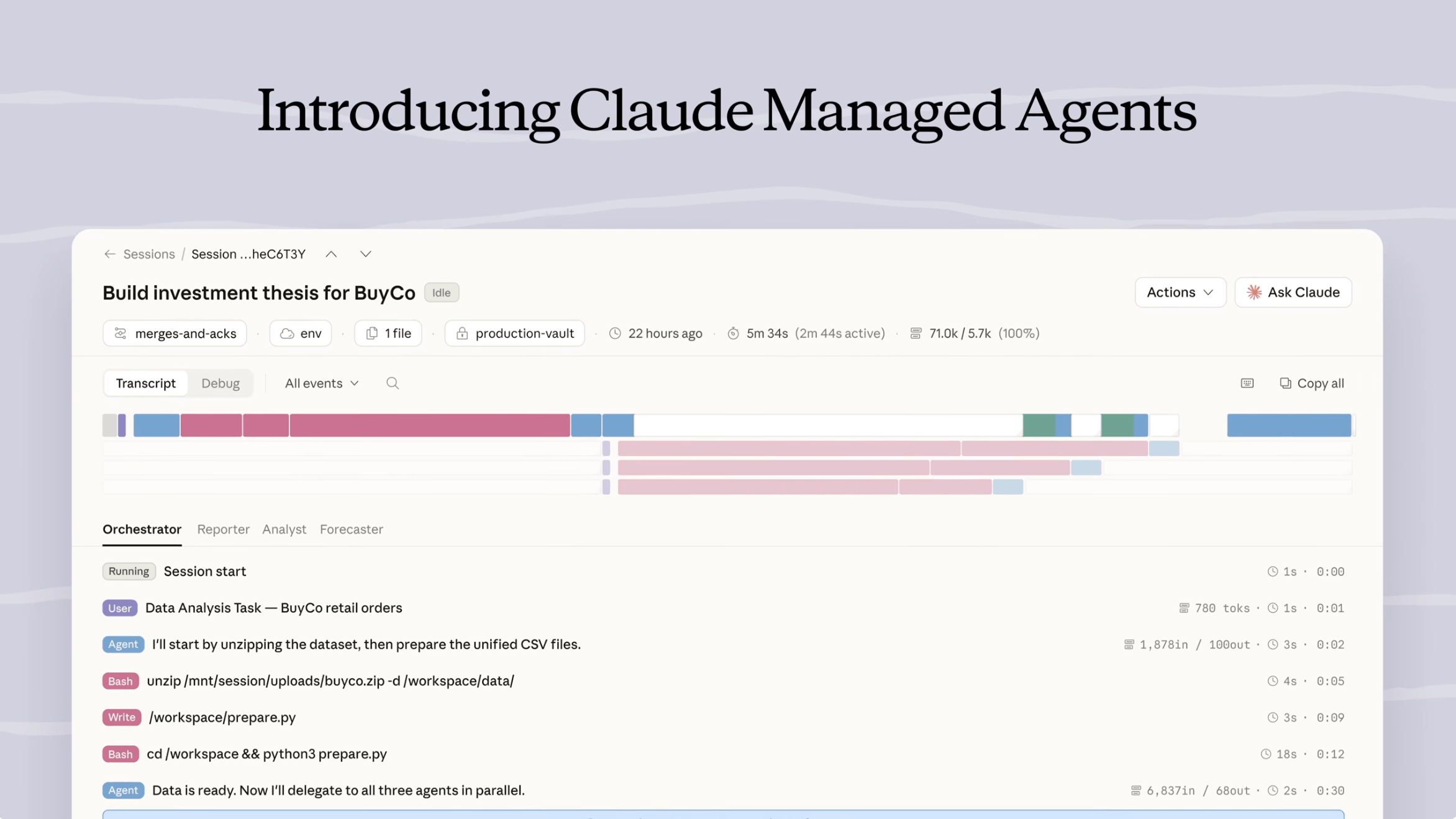
Credentials stay out of the sandbox, encryption is built in, and state persists automatically.
Session tracing records what every agent did and why, with built-in analytics to improve agent performance.
The underlying harness is optimized for Claude. As the model improves, your agents improve with it.
Extend and customize what Claude can do.
Connect Claude to your tools and data through the open standard for AI integrations.
Teach Claude your expertise, procedures, and best practices through pre-built or customizable skills.
Agents remember across sessions, keeping memory files on your infrastructure.
.svg)








Use your existing Anthropic commitment to pay for Claude-powered solutions from our partners.
Controls and safeguards for your data.
Gives eligible customers the privacy of zero data retention (ZDR) along with state-of-the-art safeguards for detecting misuse.
On your cloud provider, choose where your data is stored and where requests are processed, with regions in Asia-Pacific, Canada, Europe, and the United States.
By default, Anthropic does not use customer data from commercial deployments to train Claude.





.svg)
Build directly on the Claude Platform, with enterprise security and support built in. Or use Claude in the cloud you already use, including Amazon Web Services, Google Cloud, or Microsoft Foundry.
Process large volumes of requests asynchronously and save 50% on costs.
Give Claude background knowledge and examples to reduce costs by up to 90%.
Choose how hard Claude works on a task.
Faster, affordable models call more intelligent models to evaluate plans or work to improve performance.


For Quora, batch processing provides cost savings while also reducing the complexity of running a large number of queries that don't need to be processed in real time.
Your command center, with analytics and controls built in.
You are an AI assistant specialized in classifying customer support tickets. Your task is to analyze the content of a given ticket and assign it to the most appropriate category from a predefined list. You will also provide reasoning for your classification decision.
First, let's review the available categories:
<category_list>
{{CATEGORY_LIST}}
</category_list>
Now, here is the content of the support ticket you need to classify:
<ticket_content>
{{TICKET_CONTENT}}
</ticket_content>
Please follow these steps to complete the task:
– Carefully read and analyze the ticket content.
– Consider how the content relates to each of the available categories.
– Choose the most appropriate category for the ticket.
– Provide a detailed explanation of your reasoning process.
Use the following structure for your response:
<classification_analysis>
In this section, break down your thought process:
– Quote the most relevant parts of the ticket content.
– List each category and note how it relates to the ticket content.
– For each category, provide arguments for and against classifying the ticket into that category.
– Rank the top 3 most likely categories.
</classification_analysis>
<classification>
<category>Your chosen category goes here</category>
<reasoning>A concise summary of your reasoning for choosing this category</reasoning>
</classification>
Remember to be thorough in your analysis and clear in your explanation. Your goal is to provide an accurate classification with well-supported reasoning.
Prototype prompts, upload skills and files, configure your agents.
Run agents on hosted environments with vaults and memory.
Track usage, cost, caching, and rate limits by model and by API key.
Control API keys, members, token limits, and security per workspace.


“Claude Fable 5.1 is a leading model for our incident investigation evals, which use real production incidents to assess how effectively our agent, Bits Investigation, can produce root cause analyses. We evaluate our agent's output against root causes identified by our engineers. In these evaluations, it has demonstrated stronger reasoning than Opus 5 and has successfully diagnosed the most complex production incidents we've tested.”
“We're moving our Opus 5 traffic in Devin to Claude Fable 5.1 on launch day. It matched or edged out Fable 5 in our testing at a lower cost per task, and with the new cache read pricing a Fable-class model is finally economical for the workloads we'd kept on Opus, starting with code review.”
“We asked Claude Fable 5.1 to review a clinical research project for Rakuten Medical that three other frontier models had signed off on. It found a gap none of them had seen and insisted on testing it further. It then proposed a completely new hypothesis, turning a dataset we had written off into a new research direction in one afternoon. It's the first time a frontier model like Claude has empowered us to explore new research in this way.”


“The standout in Claude Fable 5.1 is the writing: more understandable, more meaningful, and it follows our writing guidance better. In blind tests against Fable 5, I preferred its writing and output. And in Canva Code it built a rhythm game with real music and on-beat gameplay matched to the level it generated, something no other model we tested delivered.”


“On our research suite, Claude Fable 5.1 set new best scores. On one task it came up with a novel solution along a completely different axis than we'd seen from other models or from human researchers in the past, which took its results well above the previous plateau. It's better at creative problem solving and getting that flash of insight you need to solve a difficult problem.”


“The decision to choose Claude was entirely data-driven. We tested multiple model providers side by side, and Claude consistently delivered the best results for case resolution rates and customer satisfaction scores.”
“The partnership with Anthropic has been exceptional—their guidance and support have helped our engineering teams maximize the models.”


“Claude Opus 5 delivers the industry intelligence and accuracy that is essential for the analysis of specialized enterprise content. Box found that Opus 5 outperforms Opus 4.8 by 8% and delivers notable performance gains in the data analysis (11% improvement) and due diligence (17% improvement) workflows that technology, healthcare, and public sector organizations rely on daily.”


“Claude Opus 5’s judgment is what stands out. Handing off a PR, it doesn’t rush to publish: it verifies the branches, checks the template, and thinks through test implications so the handoff is clean. The older models tended to jump ahead and get caught on our checks.”


“Claude Opus 5 topped Zapier’s AutomationBench leaderboard without spending more tokens than prior Claude models. It took a raw account-health workbook and ran a full churn-prevention sequence end to end: flagging at-risk accounts, alerting the right owner, and summarizing for retention ops. Previous models didn’t pass; Opus 5 hit 100%.”


“Claude Opus 5 is a clear step up in performance on legal agent work compared to prior Opus models, and we saw the biggest gains in practice areas like corporate governance and arbitration. We were also impressed with Opus 5’s ability to maintain quality at lower reasoning levels, achieving similar performance while generating 26% fewer tokens on average compared to Opus 4.8 at max reasoning.”
Get the developer newsletter
Product updates, how-tos, community spotlights, and more. Delivered monthly to your inbox.
