

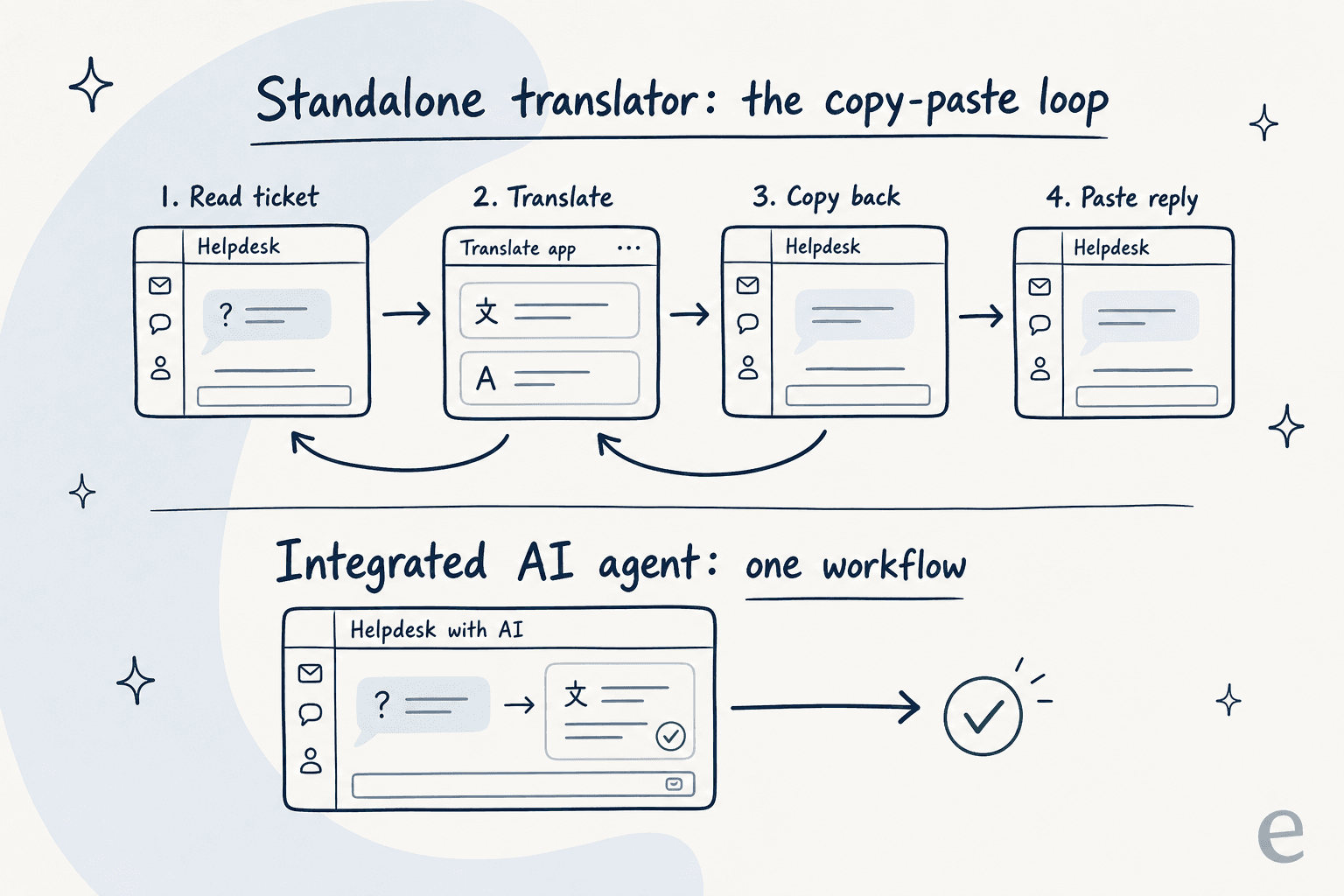
If your business has a global audience, you know the daily routine. A customer question pops up in a language you don't speak. You open a new tab, paste the text into DeepL, figure out what they need, type your reply, translate it back, and copy-paste it into your helpdesk.
I work on eesel's support side, and I've watched this play out across real rollouts. The one that reframed it for me: a German jewelry e-commerce brand running ~1,000 tickets a month on Zendesk and Shopify pointed our AI agent at their help center and tickets, and it started handling German, English, French, Dutch, Spanish, Polish, Croatian and Turkish without anyone configuring a single language. Nobody pasted anything into a translator. That's the gap this guide is about: you're not looking for a better translator, you're looking for a better workflow.
- DeepL is still an excellent translator, but it's a standalone tool. For customer support, the copy-paste loop between your helpdesk and a translate window is what actually slows your team down, not translation quality.
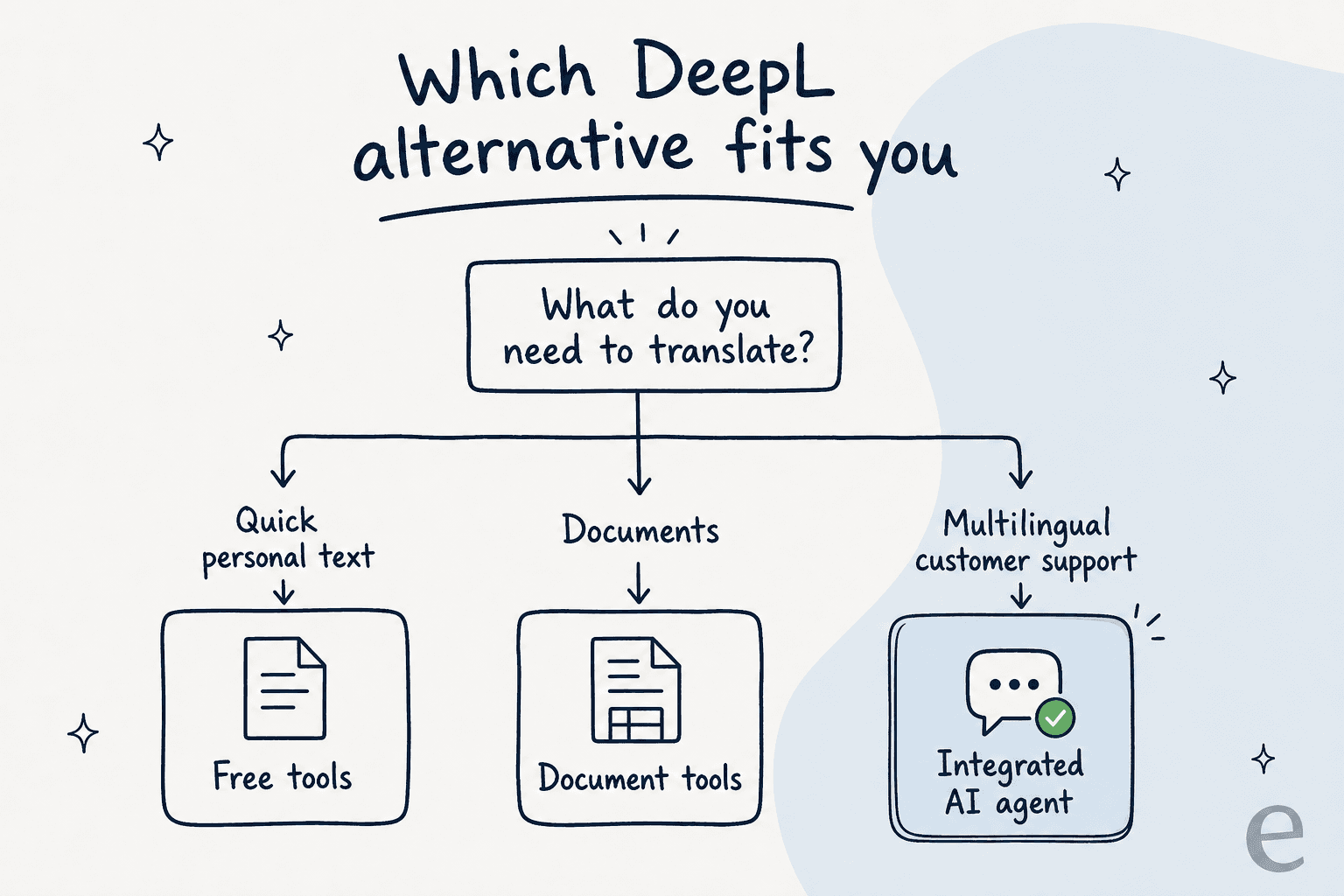
- For quick personal text, Google Translate or DeepL's free tier are fine. For documents, look at Redokun (keeps formatting) or Pairaphrase (enterprise security).
- For multilingual customer support, the biggest win comes from AI that works inside your helpdesk instead of next to it. An AI teammate like eesel answers in whatever language the customer wrote in, with no tab-switching, and it's free to start with no per-seat charge.
What are machine translation tools?
You've probably heard the term "machine translation." It's basically AI that automatically translates text from one language to another. DeepL is a famous example, known for its nuanced translations, especially with European languages.
These tools are built on neural networks that have analysed huge amounts of text to get a feel for context, grammar, and idioms. The result is often a translation that sounds surprisingly human. For businesses, they offer a way to connect with customers across the globe without having to hire a massive multilingual team.
Why look for DeepL alternatives for your business?
DeepL is a solid tool, no doubt, and our full DeepL pricing breakdown covers what it costs. But when you try to build a customer support system around it, some limitations quickly become obvious. As your team grows, these little friction points turn into real problems. Picking the right alternative means figuring out what your specific pain points are and finding a tool that solves them.
Here's what you should be thinking about:
-
Does it work where you work? The number one headache with standalone tools is the lack of integration. Your agents have to constantly jump out of their helpdesk, paste text into another window, translate, and paste it back. A good alternative should live inside the tools you already use, like Zendesk, Freshdesk, or your own help center.
-
Does it get the context? A generic translator doesn't know the difference between a frustrated customer, a refund request, or a bug report. A better alternative should be smart enough to understand the context of a support ticket.
-
Can it keep up? You can't just copy-paste faster when ticket volumes spike. A real alternative automates the process, letting a single agent handle conversations in multiple languages without breaking a sweat, which is the whole point of ticket automation.
-
Is your data safe? Pasting customer conversations into a random third-party website can be a security nightmare. Any tool you consider should have strong data protection policies and a commitment not to use your data to train their models.
-
Does it sound like you? Your company has a specific brand voice. A generic translator can't capture it. The best tools can learn from your past support tickets to make sure every reply sounds like it came from your team, no matter the language.
A quick comparison of the top DeepL alternatives
Here's a bird's-eye view of the tools I'm about to cover. Some are direct competitors to DeepL, while others offer a completely different way of tackling the multilingual support challenge.
| Tool | Best For | Key Feature | Pricing Model | Multilingual Approach |
|---|---|---|---|---|
| ChatGPT (GPT-5.2) | Flexible Text Generation | Conversational AI | Subscription / API usage | Ad-hoc text translation |
| Google Translate | Quick, Free Translations | 100+ languages supported | Free / API usage | Manual copy-paste |
| Microsoft Translator | Business & Office Integration | Real-time conversation translation | Free / API usage | Manual & integrated options |
| Pairaphrase | Enterprise Document Localization | Secure batch file translation | Custom enterprise plans | Centralized translation platform |
| Supertext | Niche European Languages | Swiss language support | Per-word / custom plans | Translation as a service |
| Redokun | Marketing & Design Documents | Preserves file layout | Project Pass / per user | Document workflow tool |
| eesel AI | Multilingual support in your helpdesk | AI teammate inside your helpdesk | From $299/mo (500 credits) | Replies in the customer's language |
The 7 best DeepL alternatives for businesses in 2026
Alright, let's get into the details. Here's a breakdown of each tool, what makes it stand out, its pros and cons, and who it's really for.
1. ChatGPT (GPT-5.2)
Let's be honest, we all use ChatGPT. Its knack for understanding context and generating natural-sounding text makes it a decent DeepL alternative for one-off translations. You can ask it to translate a customer email, rewrite a response to sound more empathetic, or even summarise a long, confusing ticket. Its flexibility is its biggest asset.
The catch? For a structured support workflow, it has the same problems as DeepL. It's a separate tool, which means manual copy-pasting, and you have to be careful about pasting sensitive customer info into it. It's best used as a smart assistant for your agents, not a scalable, automated system. If you do want it closer to your tickets, there are guides on connecting ChatGPT to Zendesk.
-
Pros:
- Really good at understanding nuance and context.
- Can do more than just translate, like summarising and rephrasing text.
- Supports a huge number of languages.
-
Cons:
- Doesn't integrate directly with helpdesks.
- Data privacy can be a big question mark for business use.
- Translation quality can get a bit shaky for less common languages.
-
Pricing:
- Free: Access to GPT-5 with usage limits.
- ChatGPT Plus: $20/month for higher limits on the latest GPT-5.2 models and advanced features.
- ChatGPT Team: $25/user/month (billed annually) for a shared workspace.
- Enterprise: Custom pricing for large companies needing advanced security.
2. Google Translate
Google Translate is the tool everyone knows. It's free, super fast, and supports more than 100 languages. If you just need to know what a single word or phrase means, it's perfect.
For professional customer support, though, its weaknesses show. The translations can miss the subtlety needed for tricky customer conversations. And just like the others, it forces your agents into a clunky workflow. It's a handy tool to have in your back pocket, but you can't build a global support strategy on it.
-
Pros:
- Free and simple to use.
- Supports a massive range of languages.
- Great for quick, on-the-spot translations.
-
Cons:
- Translation quality can be hit-or-miss and often lacks nuance.
- It's not built for business workflows.
- Pasting company data into it is a major privacy concern.
-
Pricing:
- Free: For web, mobile app, and browser extension use.
- Cloud Translation API: You get the first 500,000 characters per month free. After that, it's $20 per million characters.
3. Microsoft Translator
Microsoft Translator is Redmond's answer to Google Translate and DeepL. It offers a similar feature set for translating text, voice, and images. Its main advantage is its tight integration with the Microsoft universe, including Office, Teams, and Bing. If your company already runs on Microsoft, this might feel more natural than other standalone tools.
But even with its business focus, it's still mostly a translation utility. It doesn't solve the core workflow problem for support teams working in platforms like Zendesk unless you're prepared to build a custom integration with their API.
-
Pros:
- Integrates well with other Microsoft products.
- Translation quality is competitive.
- Offers security features geared toward businesses.
-
Cons:
- Needs custom work to integrate deeply with non-Microsoft helpdesks.
- The user interface isn't as clean as DeepL's.
-
Pricing:
- Free Tier (F0): Includes 2 million characters of standard translation per month.
- Pay-as-you-go (S1): Standard text translation costs $10 per million characters.
4. Pairaphrase
Pairaphrase is a translation platform built for big companies where security is everything. It offers features you won't find in consumer-grade tools, like secure batch file translation and support for 24 different file types (including design files).
This is not a tool for casual use. It's a heavy-duty solution for companies that need to translate large volumes of sensitive documents. Think of it as a tool for a corporate localization department, not a nimble customer support team. The complexity and price tag match that enterprise focus.
-
Pros:
- Top-notch security features.
- Supports a wide variety of file formats.
- Designed for team collaboration on big translation projects.
-
Cons:
- It's complex and expensive.
- Total overkill for translating real-time customer support messages.
- Not a self-serve tool; you have to talk to their sales team.
-
Pricing:
- Pairaphrase provides custom enterprise pricing only. You'll need to contact them for a quote, which usually means it's aimed at larger organizations with specific compliance needs.
5. Supertext
Supertext stands out by focusing on quality and specific language niches, particularly Swiss languages like Romansh and Swiss German. It's a mix of AI translation and a network of professional human translators, so it's positioned as a premium service where you absolutely can't afford an error.
Supertext is a great choice if your customers are in these specific regions and you need perfectly localized content. For a global support team juggling dozens of languages in real time, however, it feels more like a traditional translation agency than a modern tech solution.
-
Pros:
- Specializes in Swiss languages and other European niches.
- Strong focus on data protection and local data hosting.
- Gives you the option to have AI translations checked by human experts.
-
Cons:
- Supports fewer languages than the big platforms.
- Not built for real-time, automated support.
- Pricing is based on volume, which could get expensive for a support team.
-
Pricing:
- Free: A basic online translator is available.
- Advanced Subscription: You need to contact them for pricing.
- Professional Services: Priced per word or through custom plans, based on how much human review you need.
6. Redokun
Redokun solves one very specific, very annoying problem: translating documents while keeping the original formatting. If you've ever tried to translate an InDesign brochure or a PowerPoint deck, you know the pain of having to manually fix the layout for every single language. Redokun uses translation engines like DeepL, Google Translate, and OpenAI but wraps the whole process in a workflow that saves your design.
This makes it a fantastic DeepL alternative for marketing and design teams. But for customer support? Not so much. It's built for static documents, not the fast-paced, back-and-forth of a support ticket.
-
Pros:
- Keeps the layout of your design files intact automatically.
- Makes the document translation workflow much smoother.
- Connects with standard machine translation engines and includes AI pre-translation.
-
Cons:
- Not designed for translating real-time support conversations.
- Subscription tiers are priced per seat, which adds up for bigger teams.
-
Pricing:
- Project Pass: A one-time €95 pass gives you 30 days of access for a single project (5 documents, 30,000 words, 2 translator seats).
- Basic & Premium: Ongoing subscriptions for teams with recurring needs (translation memory, AI fine-tuning, more seats). Contact Redokun for current per-plan rates.
- Custom: Larger teams negotiate custom seat and word limits.
7. eesel AI
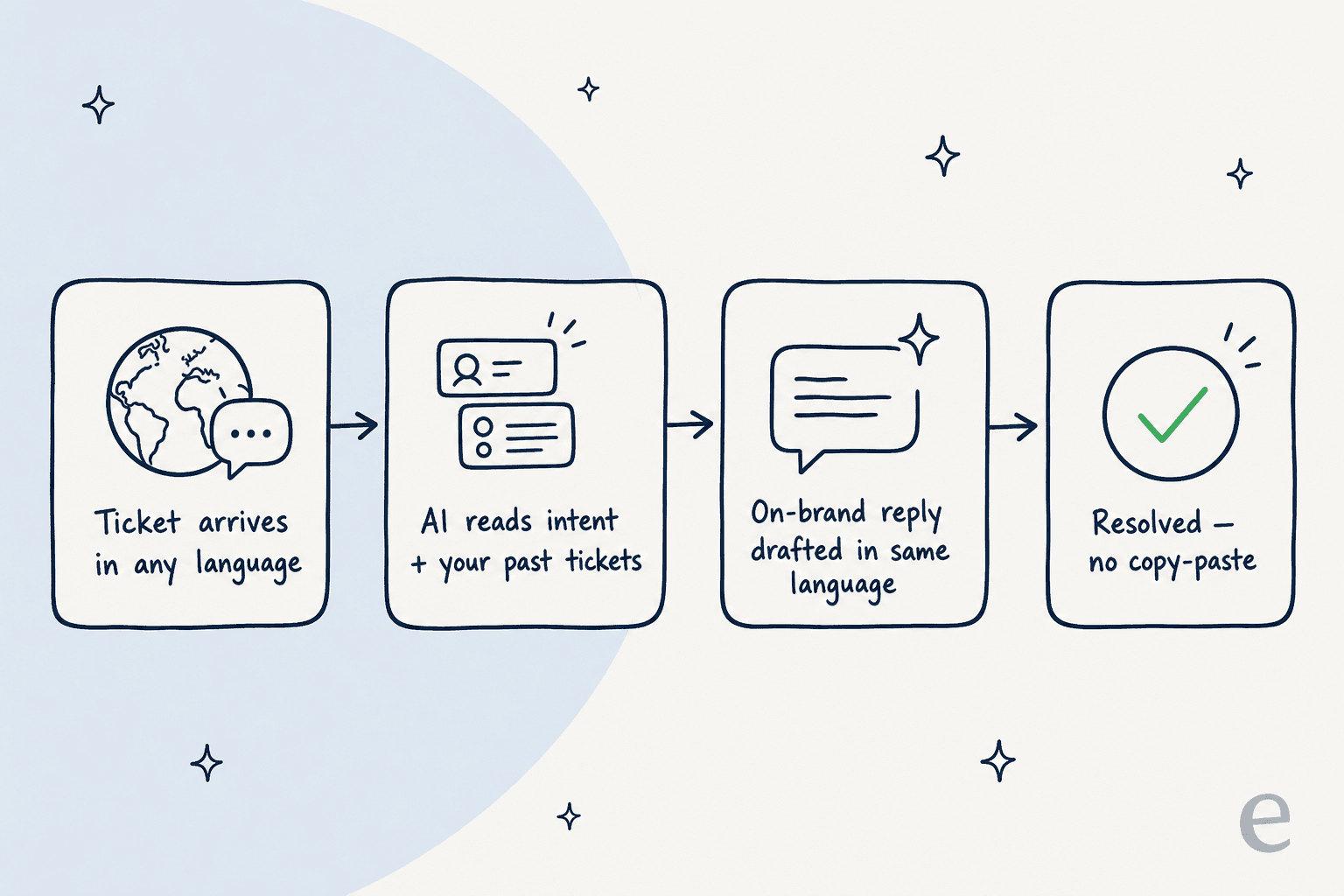
eesel takes the translation step out of support by working inside the helpdesk. It's an AI teammate that joins Zendesk, Freshdesk or the helpdesk you already use, reads your help center, macros and past replies, and answers customers in whatever language they wrote in. Your agents never paste text into another tab.
It's the same teammate in Slack, email and Shopify, so on a ticket it can also pull an order, add a tag or hand the issue to the right person. What it may do is set per person who asks: an action can run on its own for your team, ask a person first when a verified customer asks, and stay off for an anonymous visitor, as the actions and approvals docs explain.
-
Pros:
- Works inside your helpdesk, so the copy-paste loop goes away.
- You can test it on your past tickets before it answers a live customer.
- Pulls answers from Confluence, Google Docs and other places your team writes things down.
- One fixed monthly price with no per-seat charge, so adding agents doesn't raise the bill.
-
Cons:
- It isn't a translator for your own documents or one-off text.
- It's a teammate you set up, which is more than you need for a few translations a week.
-
Pricing:
- Free to start: 100 credits for 7 days, no credit card required.
- Paid plans: from $299/month for 500 credits or $499/month for 1,000, with bigger plans above that. A ticket or chat is 1 credit however many replies it takes, with no platform fee and no per-seat charge.
How to choose the right DeepL alternative for you
The best tool for you really comes down to what you're trying to do. Don't just look for the most accurate translation; think about the workflow that will save your team the most time and headaches.
-
For quick, personal translations: Stick with the free tools like Google Translate or the free version of DeepL. They're more than enough.
-
For translating marketing or legal documents: Look at specialized tools like Redokun (for design files) or Pairaphrase (for high-security needs).
-
For multilingual customer support: This is where you get the biggest win from automation. A tool that works inside your helpdesk, learns from your data, and automates replies is the only way to scale without hiring an army of agents. This is where an AI agent like eesel, working in the helpdesk itself, is a much better fit than any standalone translator.
Beyond translation: Automating your global support with DeepL alternatives
The hunt for DeepL alternatives usually starts because you're tired of translating text.

But for a growing business, the real goal is to talk to your customers well, no matter what language they speak. The solution that truly makes an impact isn't a slightly better copy-paste tool; it's a system that removes the manual work completely.
Internally, our team has a running joke that multilingual support is eesel's most under-marketed strength, as one colleague put it, "a lot of people don't realise this works in all kinds of languages." By putting AI right inside your helpdesk, you stop reacting to language barriers and start building a proactive support strategy. With eesel, your team handles conversations in any language without switching tabs, and the replies come from the help center and answers your team already wrote.
Want an AI for multilingual support?
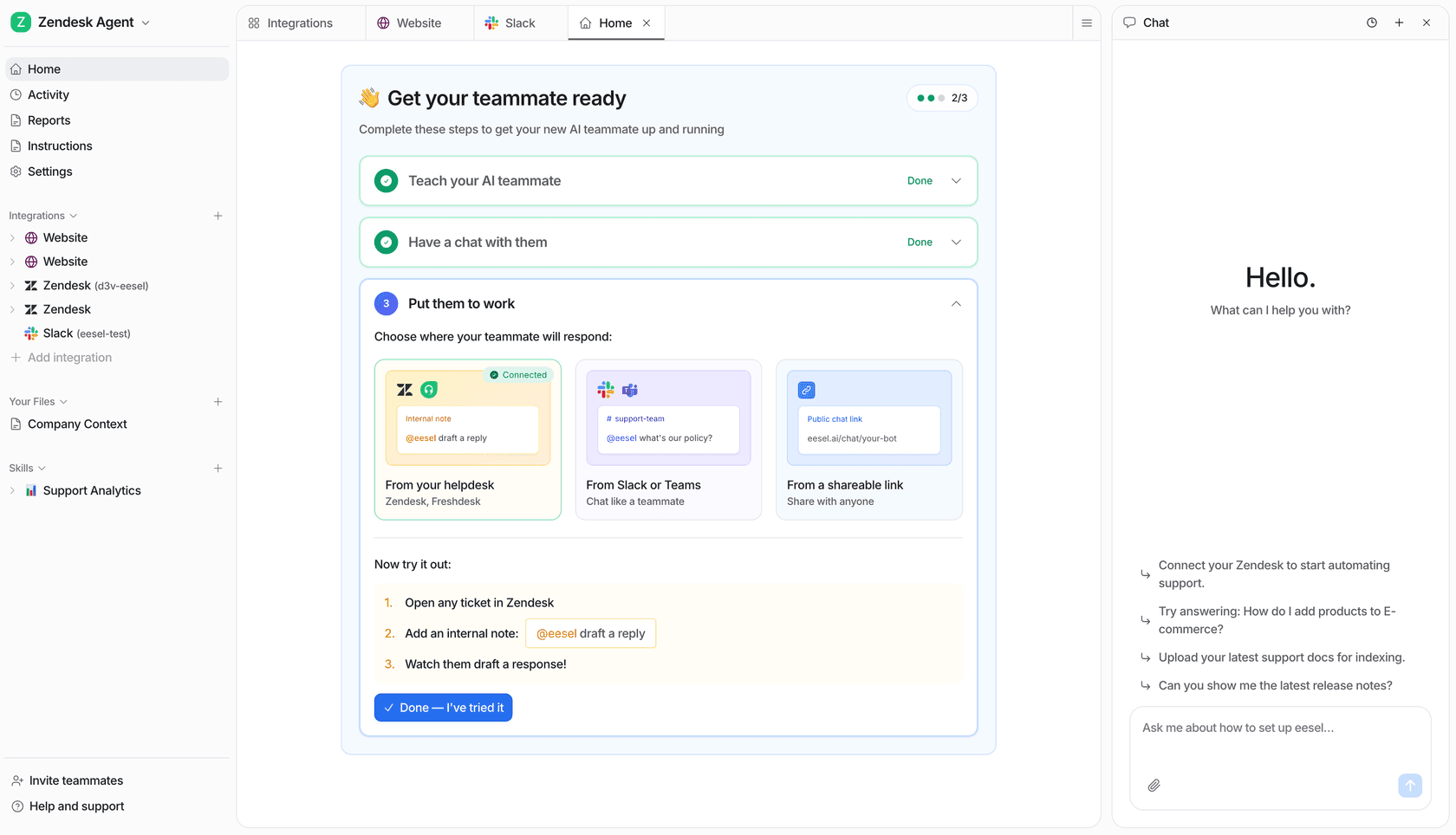
If your tickets land in five languages and your team speaks two, eesel works like a new teammate who speaks all of them. It joins Zendesk, Freshdesk or the helpdesk you already use, reads your help center, and answers in whatever language the customer wrote in, with no copy-pasting.
You decide what it may do and for whom. It can answer and tag on its own, ask a person before it issues a refund, and leave billing alone when an anonymous visitor asks. It's free to try with 100 credits for 7 days, then a fixed monthly price from $299 for 500 credits, with no per-seat charge.
Frequently asked questions
Which of the DeepL alternatives is specifically recommended for improving multilingual customer support?
For multilingual customer support, an AI teammate that works inside your helpdesk beats a standalone translator, and eesel AI is the one I'd look at. It's an AI agent that answers in the customer's language from your help center and your team's past replies, so there's no manual translation step. In one trial it handled eight languages without anyone configuring them.
What are the main advantages of using one of these DeepL alternatives over a standalone tool like DeepL?
The biggest advantage of business-focused DeepL alternatives is integration and automation. They solve the workflow problem by removing the copy-paste loop, understanding ticket context, and keeping your data secure, things standalone translators don't do.
How do DeepL alternatives address data privacy and security concerns for business use?
Reputable DeepL alternatives for business, such as Pairaphrase, prioritise data privacy with secure integration options and clear policies against training their models on your data. For support teams, an AI helpdesk that keeps conversations inside your existing tools avoids pasting customer data into a random third-party site entirely.
Are there any free or budget-friendly DeepL alternatives suitable for small teams?
Yes. For quick, ad-hoc translations, Google Translate and DeepL's free tier (50,000 characters a month) remain free. For structured business needs, some DeepL alternatives offer affordable per-user plans, and the cheapest AI helpdesk apps are free to start with no per-seat fees, so a small team only pays for what the AI actually handles.
Can these DeepL alternatives integrate with my existing helpdesk system, such as Zendesk or Freshdesk?
Beyond simple translation, what advanced capabilities do some DeepL alternatives offer for businesses?
Beyond basic translation, advanced DeepL alternatives offer contextual understanding, automated reply generation, and ticket actions like tagging or escalation. Some preserve document formatting (Redokun) or add enterprise document security (Pairaphrase), while an AI agent can pull order data and resolve the ticket end to end.
Is DeepL still worth it, or should I switch to an alternative in 2026?
DeepL is still one of the most accurate machine translators, so for raw translation it holds up, see our DeepL review for the detail. The reason teams look at DeepL alternatives is the workflow: if your translation lives inside support tickets, an integrated AI agent saves more time than a more accurate copy-paste tool.
