

Here's the short version of Google Gemini pricing in 2026. For everyday use, there's a free tier, then three paid consumer plans: Google AI Plus at $4.99/mo, Google AI Pro at $19.99/mo, and Google AI Ultra from $99.99/mo. All of them run on the Gemini 3 Pro model and mostly differ on usage limits, storage, and access to features like Deep Think.
For developers, the Gemini API is pay-as-you-go per token: Gemini 3.1 Pro runs $2 input / $12 output per million tokens, with cheaper Flash and Flash-Lite tiers below it. Businesses get Gemini bundled into Google Workspace from $8.40/user/month.
The catch for teams: the API meter is hard to forecast, and Workspace is priced per seat for AI that helps each person in their own Gmail and Docs. If you want an AI teammate that does work for the whole team in Slack, email, your helpdesk and your other apps, on one fixed monthly price with no per-seat charge, that's the gap eesel fills.
Trying to figure out Google Gemini's pricing can feel like solving a puzzle with half the pieces missing. Between the API, personal subscriptions, Workspace seats, and developer tools, it's a real headache for teams just trying to work out what they'll actually pay.
I've spent the last few years building AI that runs on live support queues, which means I've watched plenty of teams get burned by "simple" AI pricing that turned into a surprise bill at the end of the month. So when I read Gemini's pricing, I read it the way a buyer should: where's the predictable cost, and where's the meter quietly running?
This guide lays out every part of Gemini pricing in 2026, from the token-based API costs to the per-user subscription fees and everything in between, so you'll know exactly which option fits, whether you're a developer, a business user, or a support leader.
What is Google Gemini?
At its core, Gemini is Google's family of AI models. It's "multimodal," which is just a fancy way of saying it works with more than text. It can process code, images, audio, and even video. If you want the full feature rundown, I've covered what Gemini AI is separately; here we're focused on the money. (And if you just need to switch it on or off, here's how to enable Gemini.)
To get a grip on the pricing, you first need to understand the tiers. The current lineup is built on Google Gemini 3, and each model is tuned for a different job, with its own price tag.
-
Gemini 3 Pro: The top-of-the-line model, built for heavy, complex tasks that need real reasoning power, like advanced coding, deep analysis, or long-form writing.
-
Gemini 3 Flash: The balanced, everyday workhorse. It's tuned for speed and cost-efficiency, making it a great all-rounder for most common business tasks.
-
Gemini 3 Flash-Lite: The most budget-friendly and fastest model in the lineup, designed to handle a huge volume of tasks quickly without running up a massive bill.
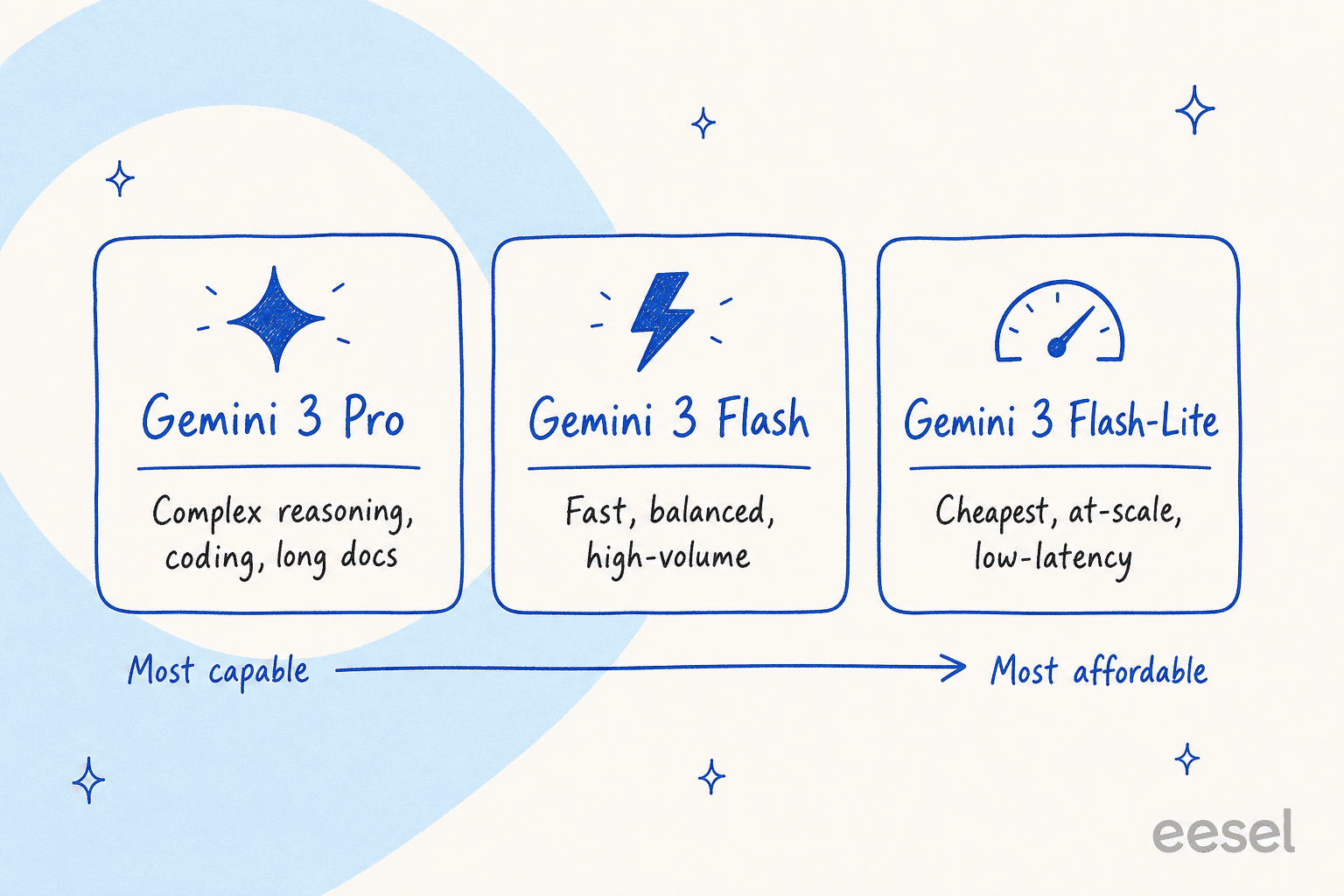
You can get your hands on these models in three main ways: through the API for building your own apps, as part of a subscription for business or personal use, or through special developer tools. Each route prices differently, so let's dive into each one.
Gemini pricing for developers: The API model
For developers and businesses building custom applications on Gemini, the API offers the most control and power. It runs on a pay-as-you-go model, which is fantastic for scaling but can also lead to some surprisingly high bills if you're not keeping a close eye on things.
Understanding how token costs work in Gemini pricing
Before we jump into the numbers, we need to talk about "tokens." In the world of AI models, a token is basically a piece of a word. For example, the word "pricing" might be split into two tokens, "pric" and "ing." You get charged for the number of tokens you send to the model (your input) and the number it sends back (its output).
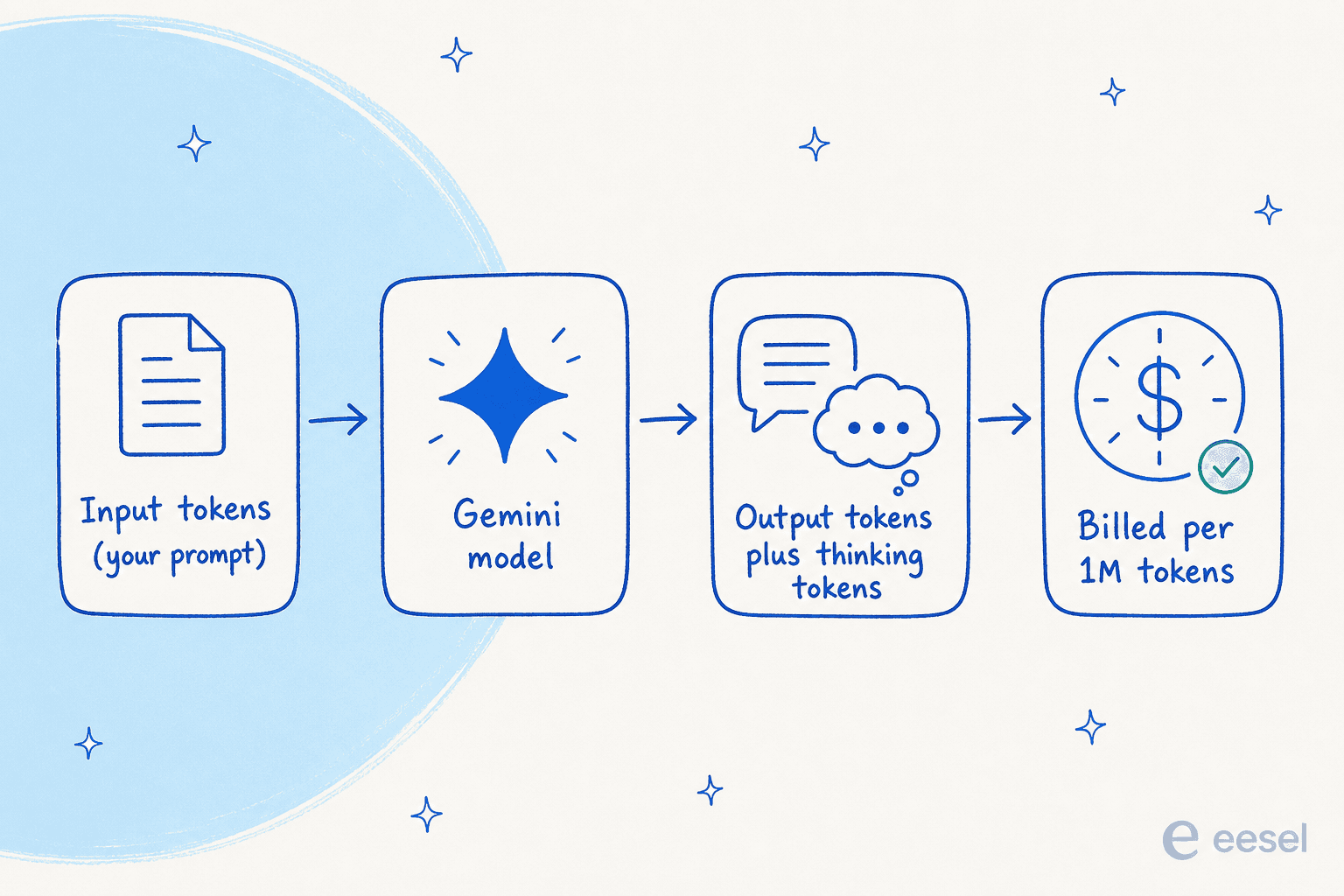
Gemini's API pricing is usually listed per one million tokens. To make things a little more confusing, the newer Gemini 3 models also bill "thinking tokens" as part of the output cost, which covers the model's background reasoning. That makes forecasting your budget with 100% accuracy a real challenge.
API pricing tiers
Here's a straightforward breakdown of the costs for the main API models so you can see how they stack up (per 1M tokens):
| Model | Input Price (per 1M tokens) | Output Price (per 1M tokens) | Best For |
|---|---|---|---|
| Gemini 3.1 Pro | $2.00 (≤200k tokens), $4.00 (>200k tokens) | $12.00 (≤200k tokens), $18.00 (>200k tokens) | Complex reasoning, coding, long-form content |
| Gemini 3.5 Flash | $1.50 | $9.00 | Fast, high-quality, high-volume tasks |
| Gemini 3.1 Flash-Lite | $0.25 (text/image/video), $0.50 (audio) | $1.50 | At-scale, cost-sensitive, low-latency tasks |
| Gemini 2.5 Flash | $0.30 (text/image/video), $1.00 (audio) | $2.50 | Budget all-rounder |
| Gemini 2.5 Flash-Lite | $0.10 (text/image/video), $0.30 (audio) | $0.40 | The cheapest option for the highest volume |
The older Gemini 2.5 Pro is also still around at $1.25/$10 if you want a cheaper reasoning model than the latest Pro tier.
Other factors affecting API costs
On top of those per-token rates, a few other features can sneak onto your final bill:
-
Context caching: This lets you store and reuse parts of your prompts to save on input costs, but it comes with its own small storage fee.
-
Grounding with Google Search: This lets the model pull in live information from the web. You get 5,000 free requests each month on Gemini 3, and after that it costs $14 for every 1,000 requests.
-
Batch mode: If your tasks aren't urgent, you can process them in batches and get a 50% discount.
This level of complexity is a real challenge for teams that need predictable budgets. Developers can juggle these levers to optimize costs, but most business teams just want a number they can budget. eesel, the AI teammate I work on, is priced the other way round: one fixed monthly price for the team (from $299/month for 500 credits), with no per-seat fees and no token bill. A ticket or chat is 1 credit however many replies it takes, and Slack questions, reports and scheduled jobs draw on the same credits.
Gemini pricing: Subscription plans for business and individuals
If you're not building a custom app from scratch, Google's subscription plans are a much simpler way to get Gemini. These plans have a fixed cost per user each month, making them far easier to budget for.
Google Workspace plans
Google has folded Gemini features directly into its Google Workspace plans for businesses, so the AI is now included rather than a separate add-on. The idea is to give your internal teams an AI boost inside the tools they already use every day.
The pricing is billed per user, per month (these are the flexible, no-commitment rates):
-
Business Starter: $8.40/user/month
-
Business Standard: $16.80/user/month
-
Business Plus: $26.40/user/month
Annual-commitment pricing is a bit lower (roughly $7, $14, and $22 respectively). Either way, your team gets Gemini help right inside Gmail, Docs, Sheets, and Meet for drafting emails, summarizing meetings, and creating presentations. I've broken the tiers down further in my Gemini Workspace pricing guide and the wider Google Workspace pricing post.
These are great for making each employee more productive in their own Gmail and Docs. If you want AI that does work for the team as a whole, like taking requests in Slack, answering customers in the helpdesk or sending a weekly report on a schedule, that's a different shape of tool. eesel is one: an AI teammate priced per team rather than per seat.
For individuals: Google AI Pro and Ultra plans
For solo users, freelancers, or anyone who just wants a powerful AI assistant, Google sells a ladder of consumer plans:
-
Free: $0. Access to Gemini 3 with daily usage limits.
-
Google AI Plus: $4.99/month, with higher limits and 400 GB of storage.
-
Google AI Pro: $19.99/month (the plan formerly called Google One AI Pro). You get the top-tier Gemini 3 Pro model, Deep Research and NotebookLM, 2 TB+ of Google Drive storage, and other Google One perks.
-
Google AI Ultra: from $99.99/month, with the highest usage limits, 20 TB+ of storage, and early access to features like Deep Think. I've written a full Google AI Ultra breakdown if you're weighing the top tier.
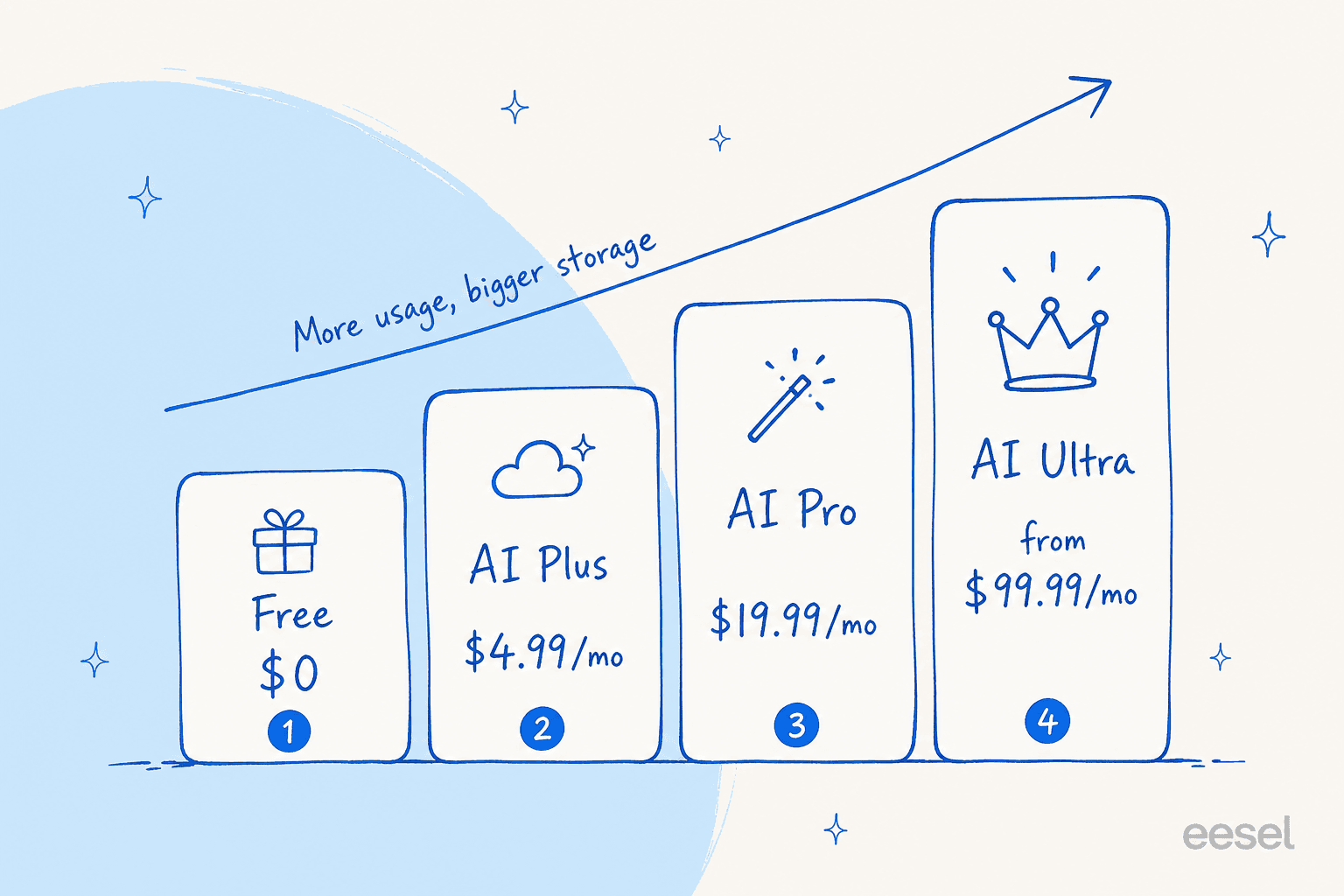
It's worth noting these plans are tied to a personal Google account, so they don't have the admin controls, security features, or team collaboration tools that businesses rely on. They're a solid choice for personal use, but not really cut out for a team environment.
For developers and ops: Code Assist
For the more technical folks, Google has Gemini Code Assist, a separate subscription built to speed up the whole software development process.
-
Standard Plan: $19/user/month (with an annual commitment)
-
Enterprise Plan: $45/user/month (with an annual commitment)
This tool gives developers AI-powered code suggestions, chat help, and other features right inside their coding environment. The pricing is predictable, but it's an add-on cost focused squarely on developer productivity, not on powering the AI features in your final product.
A complete Gemini pricing comparison
With all these different options, it can still be tough to see which one is the right fit. This table puts all the Gemini pricing models in one place to help you decide.
| Plan/Product | Target User | Pricing Model | Price | Key Use Case |
|---|---|---|---|---|
| Gemini API | Developers, Businesses | Pay-as-you-go (per token) | Varies ($0.10 - $18.00 / 1M tokens) | Building custom AI applications |
| Google Workspace | Businesses, Teams | Per user, per month | $8.40 - $26.40+ | Internal productivity and collaboration |
| Google AI Plus/Pro/Ultra | Individuals, Power Users | Per month | $4.99 - $99.99+ | Personal AI assistant and cloud storage |
| Gemini Code Assist | Developers, IT Ops | Per user, per month | $19 - $45 | Speeding up software development |
If you're cross-shopping Gemini against other tools at this point, I've run the head-to-heads: Gemini vs ChatGPT, Gemini vs Perplexity, and Gemini vs Copilot are the most useful starting points.
As you can see, Google's pricing really makes you choose between a complicated, variable API model and a fixed-price license for internal tools. Both are tools a person uses. If you'd rather have the work done for the team, without a developer managing API costs, I cover where eesel fits at the end.
How to choose the right Gemini pricing plan
Google's Gemini pricing is split up for different kinds of users, and the right choice really just boils down to your goal.
-
Use the API if you're building a custom application from the ground up and need all the flexibility you can get.
-
Choose Google Workspace to give your team's internal productivity a boost within the Google ecosystem. (My Gemini for Google Workspace guide goes deeper here.)
-
Go for Google AI Pro or Ultra if you want a powerful personal AI assistant for yourself.
There's a fourth case Google's price list doesn't cover: you want work done for the team, not a model to build on or an assistant per person. A model priced per token is infrastructure. You'd still have to build the agent, its tools and its permissions around it. That's the problem I work on at eesel.
eesel is an AI teammate that joins the apps your team already uses, like Slack, Gmail, Google Drive and your helpdesk, takes requests from anyone there, does the work in those tools and starts jobs from schedules and events too. What it may do depends on who's asking: a teammate, a named person, a verified customer or an anonymous visitor, and for each of them every tool acts on its own, asks first or stays off (how approvals work). Support is the job most teams give it first.
The pricing is the opposite of the token meter: one fixed monthly price for the team, from $299/month for 500 credits and $499 for 1,000, with bigger plans above that, no per-seat fees and no token bill. You can cap any overage at a monthly limit you set.
Try eesel free with 100 credits for 7 days, no card needed.
Frequently asked questions
How is Gemini pricing generally structured across Google's different offerings?
Gemini pricing varies depending on how you access the models. It's structured around pay-as-you-go API costs for developers, fixed monthly subscriptions for business and individual users (Free, AI Plus, AI Pro, and AI Ultra), and specific plans for coding assistance. For the business angle, see my Gemini Workspace pricing guide.
What role do "tokens" play in Gemini pricing for API users, and why is it important to understand them?
For API users, Gemini pricing is based on tokens, which are small pieces of words. You're charged for both input (what you send) and output (what the model returns), including "thinking tokens" for the newer Gemini 3 models. This token-based system can make budgeting tricky without careful monitoring.
How does Gemini pricing differ between the Gemini 3 Pro, Flash, and Flash-Lite models when accessed via API?
Gemini pricing for API models varies significantly. Gemini 3.1 Pro is the most expensive at $2.00 input / $12.00 output per 1M tokens, suited for complex tasks, while Gemini 3.5 Flash offers a balance of speed and cost. Gemini 3.1 Flash-Lite (and the older Gemini 2.5 Flash-Lite) are the most budget-friendly, designed for high-volume, low-latency work.
What's the main difference in Gemini pricing between subscription plans like Google Workspace and the pay-as-you-go API?
Subscription plans, such as Google Workspace, offer a fixed monthly cost per user for integrated AI features, making them predictable for budgeting. The API uses a variable pay-as-you-go model based on token consumption, which can fluctuate with usage. If you only need internal productivity, the Google Workspace pricing tiers are usually the simpler buy.
How does Gemini pricing work for individuals, like with the Google AI Pro plan?
For individuals, Google AI Pro costs a flat $19.99/month (it was previously branded Google One AI Pro). It gives you the top-tier Gemini 3 Pro model, Deep Research, 2 TB+ of storage, and other Google One benefits. If you want the highest limits, the Google AI Ultra plan starts at $99.99/month.
Is Gemini pricing predictable for a business that wants AI doing work for the team?
Partly. Workspace seats are a fixed price per user, but the API bills per token, and thinking tokens make that hard to forecast. If you want an AI teammate doing work in the team's own apps rather than a model to build on, eesel is one fixed monthly price for the whole team with no per-seat fees (from $299/month for 500 credits). You can also compare options in my Gemini alternatives roundup.
