

Stack<T> is a linear data structure that follows the Last In First Out (LIFO) principle. It is defined in the System.Collections.Generic namespace and is used to store elements in a way that allows the last inserted element to be removed first.
- It allows duplicate elements.
- Its capacity grows dynamically when required.
- Push(), Pop(), and Peek() provide efficient stack operations.
Example: This example demonstrates how to use Stack to push and pop elements in LIFO order.
using System;
using System.Collections.Generic;

public class Geeks {
    public static void Main(string[] args)
    {
        // Create a new stack
        Stack<int> s = new Stack<int>();

        // Push elements onto the stack
        s.Push(1);
        s.Push(2);
        s.Push(3);
        s.Push(4);

        // Pop elements from the stack
        while (s.Count > 0) {
            Console.WriteLine(s.Pop());
        }
    }
}
Output
4
3
2
1
Explanation:
- Elements are added to the stack using the Push() method.
- The Count property is used to check whether the stack contains elements.
- The Pop() method removes and returns the element from the top of the stack.
- Since Stack follows LIFO, 4 is removed first, followed by 3, 2, and 1.
Declaration
The Stack<T> class can be declared by specifying the type of elements that the stack will store.
Syntax
Stack<T> stackName = new Stack<T>();
Stack<int> numbers = new Stack<int>();
Here, int specifies that the stack can store only integer values.
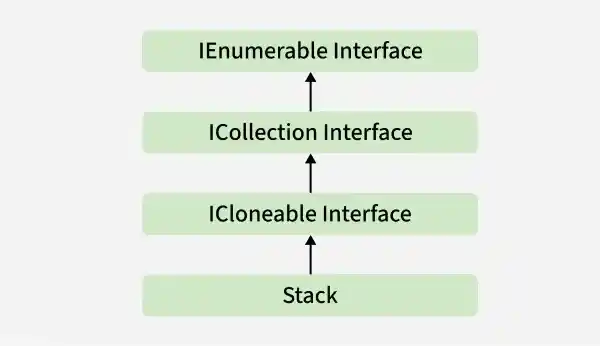
Hierarchy of Stack Class
The Stack<T> class belongs to the System.Collections.Generic namespace and implements collection-related interfaces.
Constructors of Stack<T> Class
The Stack<T> class provides constructors that can be used to create an empty stack, specify its initial capacity, or initialize it with elements from another collection.
1. Generic Stack: Holds elements of a specific type.
Stack<T> stackName = new Stack<T>();
2. Non-Generic Stack: Can hold elements of any type but requires casting when retrieving elements.
Stack stack = new Stack(); // Non-generic stack
Example: Example demonstrating both generic and non-generic Stack usage
using System;
using System.Collections;
using System.Collections.Generic;

public class Geeks {
    static public void Main()
    {
        // Non-generic Stack (can hold any type)
        Stack stack = new Stack();
        stack.Push("GFG");
        stack.Push(1);
        stack.Push(2.5);
        stack.Push(null);
        stack.Push("Geeks123");

        Console.WriteLine("Non-Generic Stack:");
        foreach (var item in stack) {
            Console.WriteLine(item);
        }

        Console.WriteLine();

        // Generic Stack (holds only strings)
        Stack<string> genericStack = new Stack<string>();
        genericStack.Push("GFG");
        genericStack.Push("GeeksForGeeks");
        genericStack.Push("Stack Example");

        Console.WriteLine("Generic Stack:");
        foreach (var item in genericStack) {
            Console.WriteLine(item);
        }
    }
}
Output
Non-Generic Stack:
Geeks123

2.5
1
GFG

Generic Stack:
Stack Example
GeeksForGeeks
GFG
Performing Different Operations on Stack Class
1. Adding Elements
With the help of the Push() method, we can add an element to the stack. The Push() method places the element at the top of the stack.
using System;
using System.Collections.Generic;

class Geeks{

    public static void Main(){

        // Creating an empty Stack
        Stack<string> stack = new Stack<string>();

        // Adding elements to the Stack
        stack.Push("Geeks");
        stack.Push("For");
        stack.Push("Geeks");

        // Displaying the Stack
        foreach (string item in stack){

            Console.WriteLine(item);
        }
    }
}
Output
Geeks
For
Geeks
2. Accessing the Element
With the help of the Peek() method, we can access the top element of the stack without removing it.
using System;
using System.Collections.Generic;

class Geeks{

    public static void Main(){

        // Creating an empty Stack
        Stack<string> stack = new Stack<string>();

        // Adding elements to the Stack
        stack.Push("Welcome");
        stack.Push("To");
        stack.Push("Geeks");
        stack.Push("For");
        stack.Push("Geeks");

        // Displaying the Stack
        Console.WriteLine("Initial Stack:");

        foreach (string item in stack){

            Console.WriteLine(item);
        }

        // Accessing the top element
        Console.WriteLine(
            "The element at the top of the stack is: "
            + stack.Peek());

        // Displaying the Stack again
        Console.WriteLine("Final Stack:");

        foreach (string item in stack)
        {
            Console.WriteLine(item);
        }
    }
}
Output
Initial Stack:
Geeks
For
Geeks
To
Welcome
The element at the top of the stack is: Geeks
Final Stack:
Geeks
For
Geeks
To
Welcome
3. Removing Elements
With the help of the Pop() method, we can remove and return the top element from the stack.
using System;
using System.Collections.Generic;

class Geeks{

    public static void Main(){

        // Creating an empty Stack
        Stack<int> stack = new Stack<int>();

        // Adding elements to the Stack
        stack.Push(10);
        stack.Push(15);
        stack.Push(30);
        stack.Push(20);
        stack.Push(5);

        // Displaying the Stack
        Console.WriteLine("Initial Stack:");

        foreach (int item in stack){

            Console.WriteLine(item);
        }

        // Removing elements using Pop()
        Console.WriteLine("Popped element: " + stack.Pop());
        Console.WriteLine("Popped element: " + stack.Pop());

        // Displaying the Stack after Pop operation
        Console.WriteLine("Stack after Pop operation:");

        foreach (int item in stack)
        {
            Console.WriteLine(item);
        }

        // Checking whether the Stack is empty
        Console.WriteLine("Is stack empty? " + (stack.Count == 0));
    }
}
Output
Initial Stack:
5
20
30
15
10
Popped element: 5
Popped element: 20
Stack after Pop operation:
30
15
10
Is stack empty? False
4. Checking the Number of Elements
The Count property is used to determine the number of elements currently present in the stack.
using System;
using System.Collections.Generic;

class Geeks{

    public static void Main(){

        // Creating an empty Stack
        Stack<int> stack = new Stack<int>();

        // Adding elements
        stack.Push(10);
        stack.Push(20);
        stack.Push(30);
        stack.Push(40);
        stack.Push(50);

        // Displaying the number of elements
        Console.WriteLine("Number of elements: " + stack.Count);
    }
}
Output
Number of elements: 5
5. Removing All Elements
With the help of the Clear() method, we can remove all elements from the stack.
using System;
using System.Collections.Generic;

class Geeks{

    public static void Main(){

        // Creating a Stack
        Stack<int> stack = new Stack<int>();

        // Adding elements
        stack.Push(10);
        stack.Push(20);
        stack.Push(30);
        stack.Push(40);

        Console.WriteLine(
            "Elements before Clear: " + stack.Count);

        // Removing all elements
        stack.Clear();

        Console.WriteLine(
            "Elements after Clear: " + stack.Count);
    }
}
Output
Elements before Clear: 4
Elements after Clear: 0
Properties
The Stack<T> class provides several properties to access its state.
Property | Description |
|---|---|
Returns the number of elements currently in the stack. | |
Indicates whether the stack is thread-safe. | |
Provides an object to synchronize access to the stack. |
Methods in Stack<T> Class
| Method | Description |
|---|---|
| Clear() | Removes all objects from the Stack. |
| Clone() | Creates a shallow copy of the Stack. |
| Contains(Object) | Determines whether an element is in the Stack. |
| CopyTo(Array, Int32) | Copies the Stack to an existing one-dimensional Array, starting at the specified array index. |
| Equals(Object) | Determines whether the specified object is equal to the current object. |
| GetEnumerator() | Returns an IEnumerator for the Stack. |
| GetHashCode() | Serves as the default hash function. |
| GetType() | Gets the Type of the current instance. |
| MemberwiseClone() | Creates a shallow copy of the current Object. |
| Peek() | Returns the object at the top of the Stack without removing it. |
| Pop() | Removes and returns the object at the top of the Stack. |
| Push(Object) | Inserts an object at the top of the Stack. |
| Synchronized(Stack) | Returns a synchronized (thread safe) wrapper for the Stack. |
| ToArray() | Copies the Stack to a new array. |
| ToString() | Returns a string that represents the current object. |
