

Image segmentation is a key computer vision technique that divides an image into meaningful regions at the pixel level, helping machines understand object structure and boundaries. It is widely used in tasks like object detection, image editing, and scene analysis.
- Enables pixel-level separation of objects and background
- Powers applications like medical imaging, AR, and autonomous systems
1. Mask R-CNN
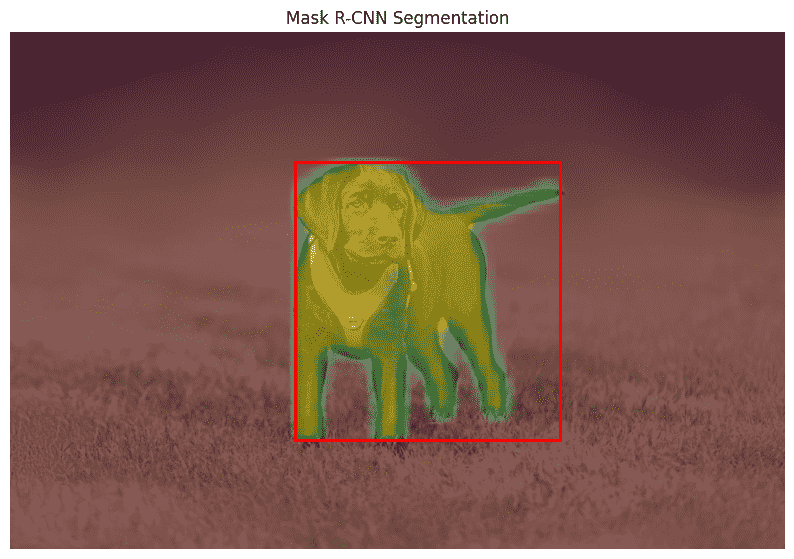
Mask R-CNN (Mask Region-based Convolutional Neural Network) is an extension of Faster R-CNN that enables instance segmentation by adding a parallel branch for predicting pixel-level masks. It performs object detection and segmentation in a unified framework by first detecting objects and then generating a binary mask for each instance. This allows it to identify objects, locate them, and separate each one at the pixel level.
It is built on the Faster R-CNN two-stage pipeline and enhances it by introducing an additional segmentation branch while keeping the detection process unchanged.
- Region Proposal Network (RPN): Generates candidate regions that may contain objects.
- RoI Align: Improves spatial alignment by extracting exact pixel-level features without quantization.
- Mask Branch: Predicts a binary mask for each detected object using RoI-aligned features.
- Output: Produces class label, bounding box, and segmentation mask for each object.
Code Implementation
This Python program implements Mask R-CNN using a pre-trained model from Torchvision to perform instance segmentation on an input image.
import torch
import torchvision
from PIL import Image
import matplotlib.pyplot as plt
import torchvision.transforms as T
import numpy as np

model = torchvision.models.detection.maskrcnn_resnet50_fpn(pretrained=True)
model.eval()

img = Image.open("image.jpeg").convert("RGB")
transform = T.Compose([T.ToTensor()])
img_tensor = transform(img)

with torch.no_grad():
    prediction = model([img_tensor])[0]

img_np = np.array(img)

plt.figure(figsize=(10, 8))
plt.imshow(img_np)
plt.title("Mask R-CNN Segmentation")
plt.axis("off")

boxes = prediction["boxes"].numpy()
scores = prediction["scores"].numpy()
masks = prediction["masks"].numpy()

for i in range(len(scores)):
    if scores[i] > 0.5:
        mask = masks[i, 0]

        plt.imshow(mask, alpha=0.5)

        x1, y1, x2, y2 = boxes[i]
        plt.gca().add_patch(
            plt.Rectangle(
                (x1, y1),
                x2 - x1,
                y2 - y1,
                fill=False,
                edgecolor="red",
                linewidth=2
            )
        )

plt.show()
Output:
2. GrabCut
GrabCut is a classical image segmentation algorithm for foreground extraction with minimal user interaction. It uses a bounding box around the object to separate foreground from background by iteratively refining pixel labels.
It models foreground and background using Gaussian Mixture Models (GMMs) and applies graph-based optimization to improve segmentation based on color similarity and spatial consistency until a clear separation is achieved.
- Bounding Box Initialization: Defines the region likely containing the foreground object.
- Gaussian Mixture Models (GMMs): Models the color distribution of foreground and background pixels.
- Graph Cut Optimization: Minimizes an energy function to separate foreground and background regions.
- Output: Produces a binary mask that separates the foreground object from the background.
Code Implementation
Implementing GrabCut using OpenCV to perform foreground extraction. A user-defined bounding box is used to initialize the segmentation, and the algorithm iteratively refines the result to separate the foreground from the background.
import cv2
import numpy as np
import matplotlib.pyplot as plt

img = cv2.imread("image.jpeg")
img = cv2.cvtColor(img, cv2.COLOR_BGR2RGB)

mask = np.zeros(img.shape[:2], np.uint8)

bgdModel = np.zeros((1, 65), np.float64)
fgdModel = np.zeros((1, 65), np.float64)

h, w = img.shape[:2]

rect = (int(w*0.15), int(h*0.15), int(w*0.7), int(h*0.7))

cv2.grabCut(img, mask, rect, bgdModel, fgdModel, 8, cv2.GC_INIT_WITH_RECT)

mask2 = np.where((mask == cv2.GC_FGD) | (mask == cv2.GC_PR_FGD), 1, 0).astype('uint8')

result = img * mask2[:, :, np.newaxis]

print("Unique mask values:", np.unique(mask2))

plt.figure(figsize=(12,5))

plt.subplot(1,2,1)
plt.imshow(img)
plt.title("Input Image")
plt.axis("off")

plt.subplot(1,2,2)
plt.imshow(result)
plt.title("GrabCut Output")
plt.axis("off")

plt.show()
Output:
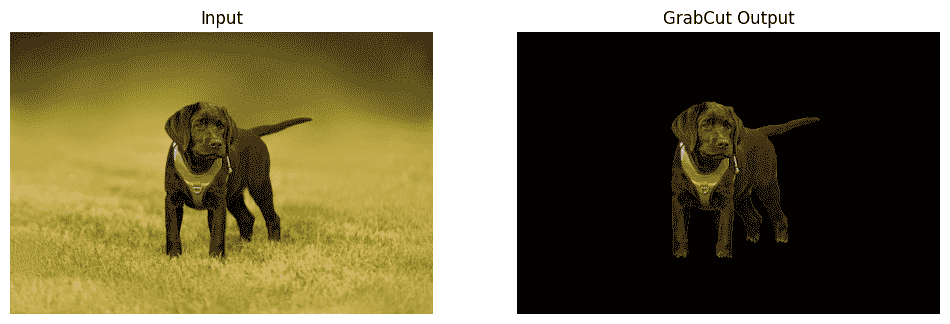
Note: GrabCut performance depends heavily on bounding box selection and works best on images with clear foreground-background contrast.
3. OpenCV
OpenCV provides classical image processing methods for segmentation without using deep learning. It separates objects from the background using pixel-level operations such as thresholding, edge detection, and contour analysis.
Unlike deep learning approaches, it does not require training data and works directly on intensity and color information. These techniques are fast and efficient, making them suitable for simple segmentation tasks.
- Thresholding: Converts grayscale images into binary form based on intensity values.
- Edge Detection: Identifies object boundaries using intensity changes.
- Contour Detection: Finds continuous boundaries of objects in an image.
- Morphological Operations: Refines segmentation by removing noise and filling gaps.
Code Implementation
This implementation applies K-Means clustering in OpenCV to segment the image into different color regions based on pixel similarity.
import cv2
import numpy as np
import matplotlib.pyplot as plt

img = cv2.imread("image.jpeg")
img = cv2.cvtColor(img, cv2.COLOR_BGR2RGB)

pixel_values = img.reshape((-1, 3))
pixel_values = np.float32(pixel_values)

criteria = (cv2.TERM_CRITERIA_EPS + cv2.TERM_CRITERIA_MAX_ITER, 100, 0.2)
k = 3

_, labels, centers = cv2.kmeans(pixel_values, k, None, criteria, 10, cv2.KMEANS_RANDOM_CENTERS)

centers = np.uint8(centers)

segmented_image = centers[labels.flatten()]
segmented_image = segmented_image.reshape(img.shape)

plt.figure(figsize=(10,5))

plt.subplot(1,2,1)
plt.imshow(img)
plt.title("Input Image")
plt.axis("off")

plt.subplot(1,2,2)
plt.imshow(segmented_image)
plt.title("OpenCV Segmentation Output (K-Means)")
plt.axis("off")

plt.show()
Output:
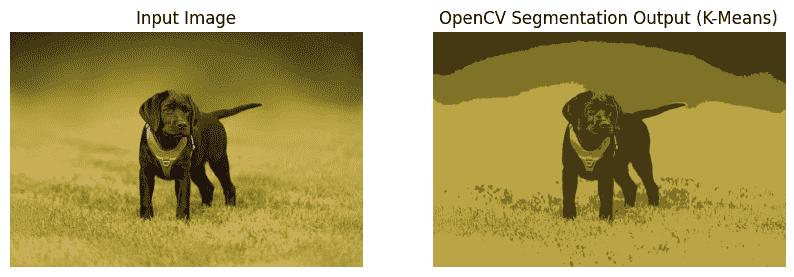
Note: OpenCV-based segmentation using K-Means clusters pixels into different regions based on color similarity, producing a simple form of unsupervised image segmentation.
Comparison of Segmentation Methods
| Feature | Mask R-CNN | GrabCut | OpenCV |
|---|---|---|---|
| Approach | Deep learning model for object detection and pixel-level segmentation | Graph-based method that separates foreground and background using iterative refinement | Classical image processing using edges, intensity, or clustering |
| Segmentation Type | Instance segmentation with precise masks for each object | Binary foreground–background separation | Edge or region-based segmentation |
| User Input | None (fully automatic) | Requires bounding box | None |
| Accuracy | Very high | Moderate | Low to moderate |
| Output | Object labels, bounding boxes, and masks | Foreground mask | Contours or segmented regions |
