

Databases store, organize, and retrieve data so that applications can access and manage it efficiently.
- They form the foundation of nearly every application, from mobile apps to large-scale enterprise systems.
- The type of database chosen affects an application's performance, scalability, and data consistency.
- Databases are commonly classified by how they structure data (tables, trees, graphs), where they're deployed (cloud, centralized), and how they're used (operational, analytical). These categories can overlap rather than being strictly separate.
- Understanding the different types of databases makes it easier to choose the right one for a specific application.
1. Hierarchical Databases
Hierarchical databases organize data in a tree-like structure, where each parent record can have multiple child records.
- Data is arranged in levels, similar to an organization chart or file directory.
- Each child record has exactly one parent.
- As more records are added, the tree grows deeper or wider.
- Good for data with a fixed, ranked relationship; not suited for relationships that don't fit a strict hierarchy.
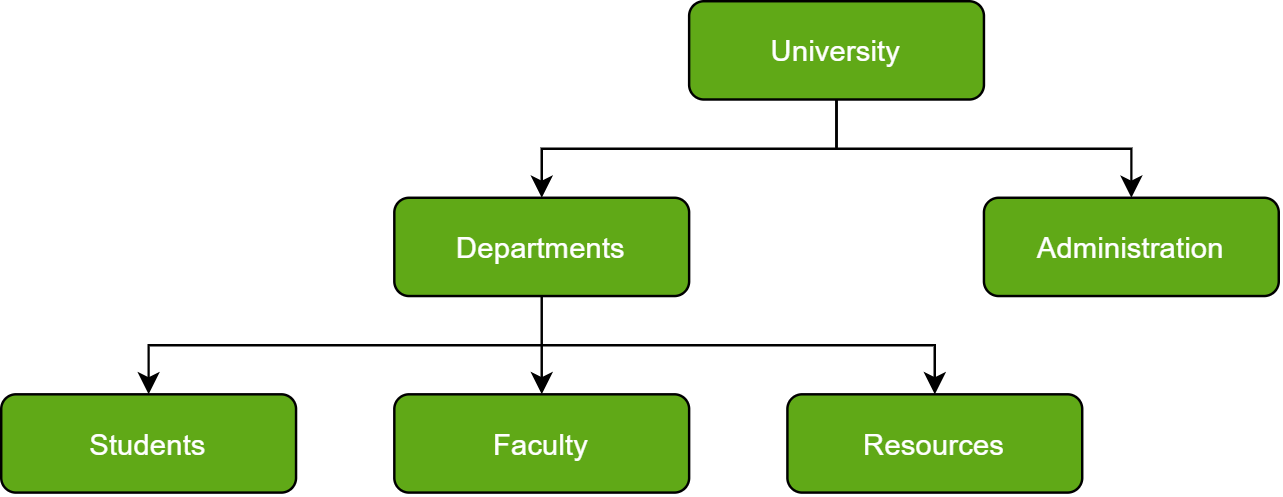
For example, in a university database, "University" is the top-level record, with "Departments" and "Administration" as its children. "Departments" further branches into "Students," "Faculty," and "Resources."
2. Network Databases
Network databases build on the hierarchical model but allow a child record to be linked to multiple parent records, creating a web-like structure of interconnected data.
- Also called a graph model, since records (entities) can connect to each other in multiple ways.
- Supports many-to-many relationships, unlike the strict one-parent rule in hierarchical databases.
- More flexible for complex, interconnected data.
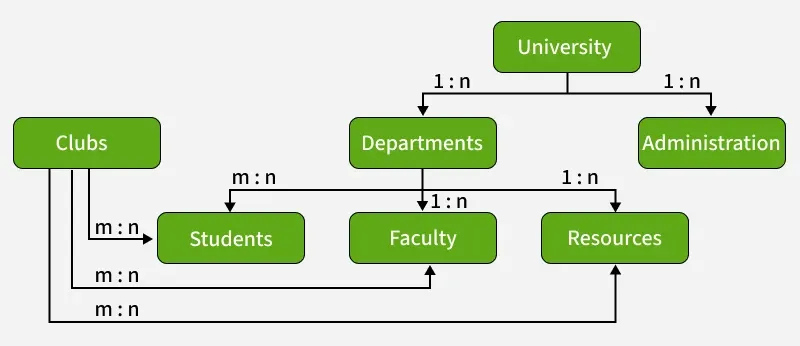
For example, in a university database, a student can join multiple clubs, and a club can have multiple students, shown as club <----> students. This many-to-many relationship is difficult to represent in a hierarchical model but fits naturally here.
3. Object-Oriented Databases
Object-oriented databases store data as objects, following the principles of object-oriented programming (OOP). Each object has attributes (data) and methods (functions).
- Designed to handle complex data types such as multimedia, graphics, and large files.
- Objects can be reused and linked directly, reducing the need for repeated data lookups.
- Each object is an instance of a class defined in the database model.
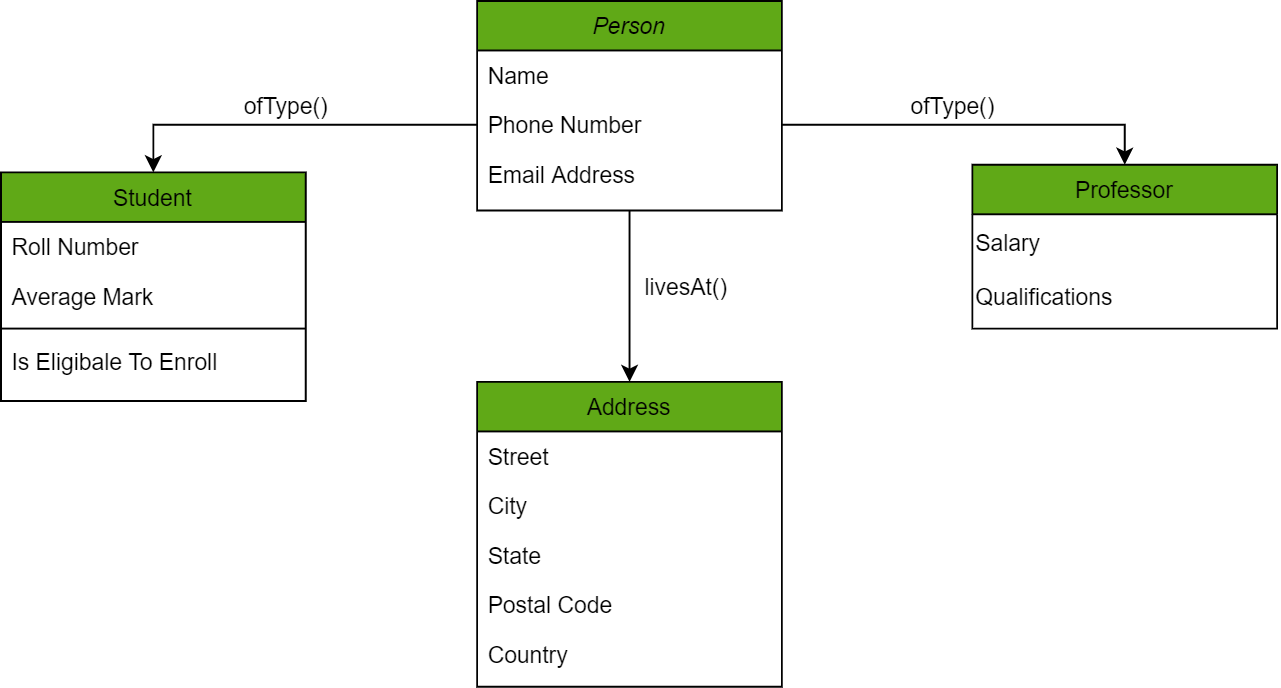
For example, a "Person" object could have attributes like Name and Address, and a method like getLatestAddress() to retrieve address details.
4. Relational Databases
Relational databases store data in tables, where rows represent records and columns represent attributes.
- Every row is linked to another row using a primary key.
- Every table is linked to another table using a foreign key.
- All data is tabulated, making relationships easy to trace across tables.
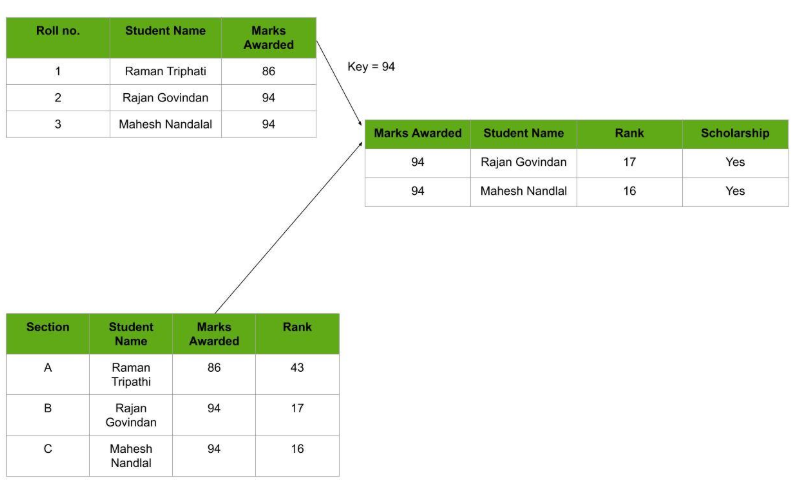
For example, a "Key = 94" links a student's marks record to their rank and scholarship status in another table, as shown above.
- Widely used in web applications as the primary way to store and manage user data.
- Uses SQL, a simple, easy-to-learn query language.
- Scaling and traversing data is lighter compared to hierarchical databases.
5. Cloud Databases
A cloud database runs on a cloud computing platform and is accessed over the internet, instead of being hosted on local, on-premises infrastructure.
- Offers flexibility and easy scalability for applications with changing workloads.
- Commonly accessed as SaaS (Software as a Service) or PaaS (Platform as a Service).
- Removes the need to manage physical servers.
Popular cloud platforms offering database services include:
- Amazon Web Services (AWS)
- Google Cloud Platform (GCP)
- Microsoft Azure
6. Centralized Databases
A centralized database is stored and managed at a single location, such as a central server or data center.
- Easier to maintain consistency and security since all data is in one place.
- Commonly used in enterprise systems where data control is critical.
- Can face scalability and performance limits as usage grows.
7. Personal Databases
A personal database is a small-scale database designed for a single user, typically on personal computers or mobile devices.
- Used for managing individual data like contacts, notes, or schedules.
- Lightweight and easy to use, requiring minimal setup or administration.
Examples: Microsoft Access (for personal or small business use) and SQLite (a lightweight, self-contained database used in mobile and desktop apps).
8. Operational Databases
An operational database manages real-time data for an organization's daily activities, supporting create, update, and delete operations.
- Reflects current transactions and activities as they happen.
- Optimized for quick, live data access rather than long-term analysis.
Example: SAP HANA is used for high-speed transactions and analytics.
9. NoSQL Databases
NoSQL ("non-SQL" or "non-relational") databases store data without relying on the traditional table-based relational model.
- Uses flexible formats like key-value pairs, documents, column families, or graphs.
- Well-suited for unstructured or semi-structured data.
- Scales horizontally (by adding more servers) and offers high availability.
Example: MongoDB, a widely used document-based NoSQL database.
Real World Application of Database
Databases power a wide range of real-world applications, including:
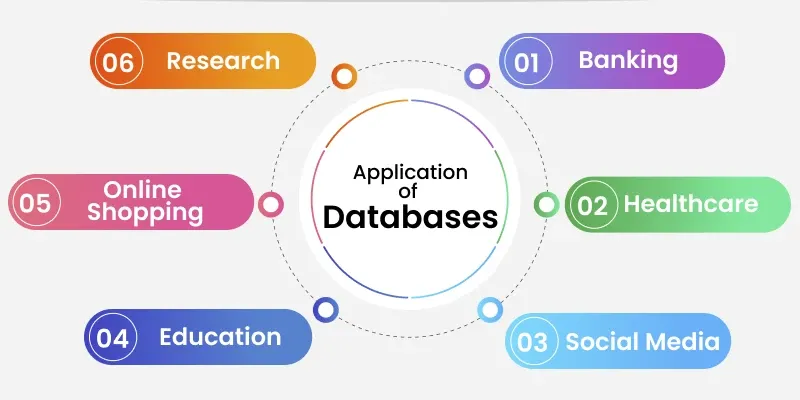
- Banking: managing transactions and account records.
- Healthcare: storing patient and treatment data.
- Social media: managing posts, connections, and interactions.
- Education: storing student and course records.
- Online shopping: managing orders, inventory, and customer data.
- Research: storing and analyzing datasets.
