

The compareTo() method of the File class can be used to compare the abstract pathnames of two files lexicographically. The comparison is based on the pathnames rather than the actual contents of the files.
- The method returns
0when both abstract pathnames are equal. - It returns a negative value when the first pathname comes before the second pathname lexicographically.
- It returns a positive value when the first pathname comes after the second pathname.
Examples:
Input: file1 = "C:\JavaFolderTest\file1.txt", file2 = "C:\JavaFolderTest\file2.txt"
Output: file1 comes before file2Input: file1 = "C:\JavaFolderTest\data.txt", file2 = "C:\JavaFolderTest\data.txt"
Output: Both paths are equal
Syntax:
file1.compareTo(file2);
Approach
- Create File objects representing the paths to be compared.
- Call the compareTo() method on the first File object.
- Compare the returned value with 0.
- Display whether the paths are the same or different.
// Comparing path of two files in Java

import java.io.File;

public class GFG {

    public static void main(String[] args)
    {

        File file1 = new File("/home/mayur/GFG.java");
        File file2 = new File("/home/mayur/file.txt");
        File file3 = new File("/home/mayur/GFG.java");

        // Path comparison
        if (file1.compareTo(file2) == 0) {
            System.out.println(
                "paths of file1 and file2 are same");
        }
        else {
            System.out.println(
                "Paths of file1 and file2 are not same");
        }

        // Path comparison
        if (file1.compareTo(file3) == 0) {
            System.out.println(
                "paths of file1 and file3 are same");
        }
        else {
            System.out.println(
                "Paths of file1 and file3 are not same");
        }
    }
}
Output:
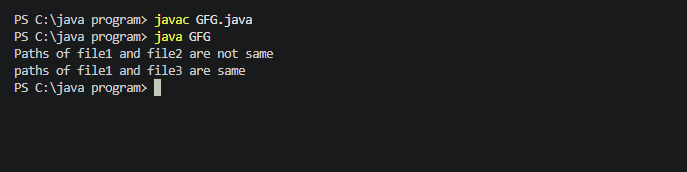
Explanation: The paths of file1 and file2 are different, so compareTo() does not return 0. The paths of file1 and file3 are identical, so the method returns 0 and the program reports that their paths are the same.
Note: compareTo() compares the abstract pathnames. It does not check whether the files actually exist or whether their contents are the same.
