

Java Servlet is a Java program that runs on a Java-enabled web server or application server. It handles client requests, processes them and generates responses dynamically. Servlets are the backbone of many server-side Java applications due to their efficiency and scalability.
- Work on the server-side to manage request-response lifecycle.
- Capable of handling multiple client requests efficiently.
- Suitable for building robust and scalable enterprise applications.
Servlets Architecture
Servlet architecture defines how client requests are processed by the server using servlets. It follows a request-response model where the web container manages execution.
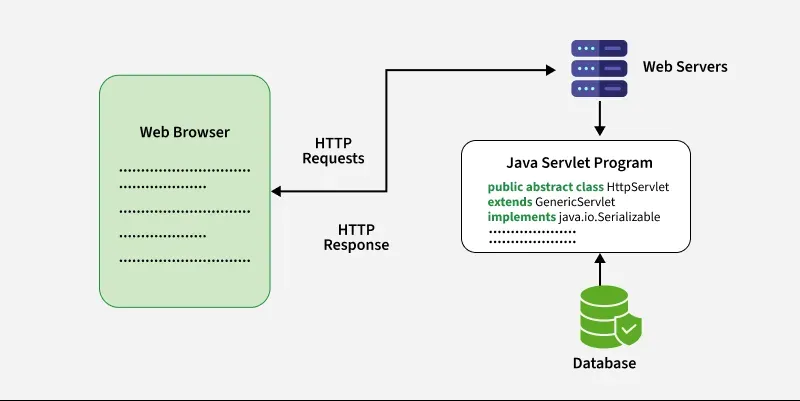
Servlet Architecture Workflow
Execution of Servlets basically involves Six basic steps:
- The client sends an HTTP request.
- The web server or Servlet container receives the request.
- The container identifies the servlet mapped to the requested URL.
- The container invokes the appropriate servlet method, such as doGet() or doPost().
- The servlet processes the request and generates a response.
- The container sends the response back to the client.
Need of Server-Side Extensions
Server-side technologies are used when a web application needs to process requests on the server and generate dynamic responses.
- They allow applications to process user requests.
- They can interact with databases and other services.
- They can generate dynamic HTML or other HTTP responses.
- They allow business logic to be executed on the server.
- Java Servlets provide a standard server-side API for Java web applications.
Servlet Container
A Servlet container, also called a Servlet engine, provides the runtime environment for servlets. It manages servlet lifecycle, request processing, response generation, sessions, security, and other web application services.
Apache Tomcat is a commonly used Servlet container.
Services Provided by a Servlet Container
- Servlet lifecycle management: Loads, initializes, executes, and destroys servlets.
- Request and response handling: Creates request and response objects and passes them to the servlet.
- URL mapping: Maps incoming URLs to the appropriate servlet.
- Session management: Provides APIs for maintaining client sessions, commonly through
HttpSession. - Security: Supports authentication, authorization, and security constraints.
- Resource management: Manages web application resources and servlet components.
- Concurrency management: Handles multiple requests and invokes servlets as required.
Steps to implementation of creating a basic servlet program
Below are the basic steps to create and run a simple servlet program in Java
Prerequisites
- Install JDK 17 or later(Java Development Kit)
- Install Apache Tomcat server 10.1
- Install an IDE such as Eclipse or IntelliJ IDEA.
- Use the Jakarta Servlet API corresponding to the selected Tomcat version.
Step 1: Create a Dynamic Web Project (in Eclipse)
- Open Eclipse -> File ->New ->Dynamic Web Project
- Name the project (e.g., HelloWorldServlet)
- Target runtime -> Select Apache Tomcat
- Click Finish
Step 2: Create Servlet class
- Right-click on src -> New-> Servlet
- Name it HelloWorldServlet and click Finish
HelloWorldServlet.java
import java.io.*;
import jakarta.servlet.*;
import jakarta.servlet.http.*;

public class HelloWorldServlet extends HttpServlet {
    protected void doGet(HttpServletRequest request, HttpServletResponse response)
    throws ServletException, IOException {
        response.setContentType("text/html");
        PrintWriter out = response.getWriter();
        out.println("<html><body><h1>Hello, World!</h1></body></html>");
    }
}
Explanation: This servlet handles a GET request and sends an HTML response to the client. It sets the response type to text/html, gets the PrintWriter, and prints a simple “Hello, World!” message inside HTML tags.
Step 3: Run the Application
Start the Tomcat server and open:
http://localhost:8080/HelloWorldServlet/hello
Configuring a Servlet
To deploy a servlet, you need to configure it in the web.xml file. This file maps URLs to servlets. For example,
XML-Based Configuration (web.xml):
<web-app xmlns="http://www.oracle.com/webfolder/technetwork/jsc/xml/ns/javaee/index.html"
         xmlns:xsi="https://www.w3.org/2001/XMLSchema-instance"
         xsi:schemaLocation="http://www.oracle.com/webfolder/technetwork/jsc/xml/ns/javaee/index.html
         http://www.oracle.com/webfolder/technetwork/jsc/xml/ns/javaee/index.html/web-app_3_0.xsd"
         version="3.0">

    <servlet>
        <servlet-name>HelloWorldServlet</servlet-name>
        <servlet-class>HelloWorldServlet</servlet-class>
    </servlet>

    <servlet-mapping>
        <servlet-name>HelloWorldServlet</servlet-name>
        <url-pattern>/hello</url-pattern>
    </servlet-mapping>

</web-app>
Explanation: This is a web.xml file used for mapping URLs to servlets. So, when you visit http://localhost:8080/yourApp/hello, the servlet runs and shows "Hello, World!" in the browser.
Annotation-Based Configuration (Modern Approach)
From Servlet 3.0, servlet configuration can also be done using annotations. Instead of using web.xml, we can configure the servlet using the @WebServlet annotations.
@WebServlet("/hello")
public class HelloWorldServlet extends HttpServlet {
    protected void doGet(HttpServletRequest request, HttpServletResponse response) throws ServletException, IOException {
        response.setContentType("text/html");
        PrintWriter out = response.getWriter();
        out.println("<html><body><h1>Hello, World!</h1></body></html>");
    }
}
Explanation: Here we have used the @WebServlet("/hello") annotation to register the servlet directly in code (no need for web.xml). It maps the servlet to the URL /hello.
Why Use Java Servlet over other Technologies?
Servlets provide a standard API for handling HTTP requests and responses in Java web applications.
- They provide a standard server-side programming model.
- The Servlet container manages their lifecycle.
- They support HTTP-specific request handling.
- They can maintain sessions using
HttpSession. - They can work with databases and other backend services.
- They can be integrated with filters, listeners, JSP, and other Jakarta EE technologies.
Java Servlets Vs CGI
The table below demonstrates the difference between servlet and CGI
| Servlet | CGI (Common Gateway Interface) |
|---|---|
| Servlets are portable and efficient. | CGI is not portable. |
| In Servlets, sharing data is possible. | In CGI, sharing data is not possible. |
| Servlets can directly communicate with the webserver. | CGI cannot directly communicate with the webserver. |
| Servlets are less expensive than CGI. | CGI is more expensive than Servlets. |
| Servlets can handle the cookies. | CGI cannot handle the cookies. |
Key Classes and Interfaces
Various classes and interfaces present in these packages are:
| Component | Type | Package |
|---|---|---|
| Servlet | Interface | jakarta.servlet.* |
| ServletRequest | Interface | jakarta.servlet.* |
| ServletResponse | Interface | jakarta.servlet.* |
| GenericServlet | Class | jakarta.servlet.* |
| HttpServlet | Class | jakarta.servlet.http.* |
| HttpServletRequest | Interface | jakarta.servlet.http.* |
| HttpServletResponse | Interface | jakarta.servlet.http.* |
| Filter | Interface | jakarta.servlet.* |
| ServletConfig | Interface | jakarta.servlet.* |
