

JDBC (Java Database Connectivity) is a standard Java API that enables Java applications to connect and interact with relational databases. It provides methods to execute SQL queries, retrieve results, and perform database operations such as inserting, updating, and deleting data.
- Supports SQL operations such as SELECT, INSERT, UPDATE, and DELETE.
- Works with multiple relational databases like MySQL, Oracle, PostgreSQL, and SQL Server.
- Uses JDBC drivers to establish communication between Java applications and databases.
JDBC Architecture
The JDBC API provides the standard interfaces, while the JDBC driver implements the database-specific communication required to interact with the database.
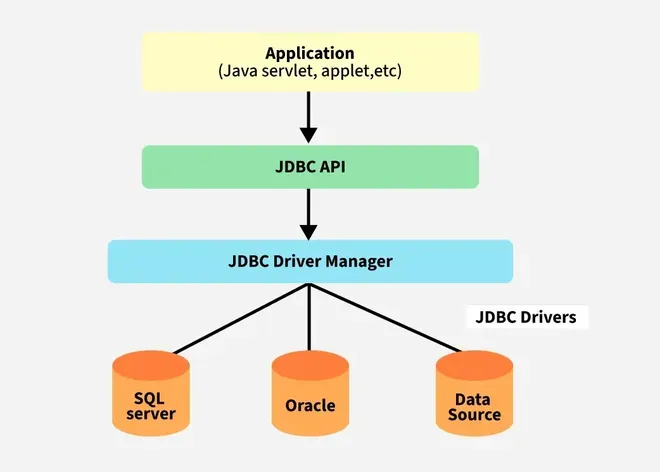
Components of JDBC:
1. Application: It can be a Java application or servlet that communicates with a data source.
2. JDBC API: It allows Java programs to execute SQL queries and get results from the database. Some key components of JDBC API include
- Interfaces like Driver, ResultSet, RowSet, PreparedStatement, and Connection that help manage different database tasks.
- Classes like DriverManager, Types, Blob, and Clob that help manage database connections.
3. DriverManager: It uses database-specific drivers to establish connections between Java applications and databases.
4. JDBC drivers: JDBC drivers are adapters that convert requests from Java programs into a protocol that the DBMS can understand.
JDBC Processing Models
The JDBC architecture consists of two-tier and three-tier processing models to access a database. They are as described below:
1. Two-Tier Architecture
A Java Application communicates directly with the database using a JDBC driver. It sends queries to the database and then the result is sent back to the application. For example, in a client/server setup, the user's system acts as a client that communicates with a remote database server.
Structure:
Client Application (Java) -> JDBC Driver -> Database
2. Three-Tier Architecture
In this, user queries are sent to a middle-tier services, which interacts with the database. The database results are processed by the middle tier and then sent back to the user.
Structure:
Client Application -> Application Server -> JDBC Driver -> Database
JDBC Drivers
JDBC drivers are client-side adapters (installed on the client machine, not on the server) that convert requests from Java programs to a protocol that the DBMS can understand. There are 4 types of JDBC drivers:
- Type-1 driver or JDBC-ODBC bridge driver
- Type-2 driver or Native-API driver (partially java driver)
- Type-3 driver or Network Protocol driver (fully java driver)
- Type-4 driver or Thin driver (fully java driver) - It is a widely used driver. The older drivers like (JDBC-ODBC) bridge driver have been deprecated and no longer supported in modern versions of Java.
Basic JDBC Workflow
A typical JDBC program follows these steps:
- Add the JDBC driver dependency for the database.
- Establish a database connection.
- Create a Statement or PreparedStatement.
- Execute the SQL query.
- Process the ResultSet for queries that return data.
- Commit or roll back the transaction when required.
- Close the JDBC resources.
For example:
try (Connection con = DriverManager.getConnection(url, user, password);
     PreparedStatement ps = con.prepareStatement(
         "SELECT * FROM employee WHERE id = ?")) {

    ps.setInt(1, 101);

    try (ResultSet rs = ps.executeQuery()) {
        while (rs.next()) {
            System.out.println(rs.getString("name"));
        }
    }
}
try-with-resources automatically closes JDBC resources such as Connection, Statement, and ResultSet.
JDBC Classes and Interfaces
Class/Interfaces | Description |
|---|---|
| DriverManager | Manages JDBC drivers and establishes database connections. |
| Connection | Represents a session with a specific database. |
| Statement | Used to execute static SQL queries. |
| PreparedStatement | Precompiled SQL statement, used for dynamic queries with parameters. |
| CallableStatement | Used to execute stored procedures in the database. |
| ResultSet | Represents the result set of a query, allowing navigation through the rows. |
| SQLException | Handles SQL-related exceptions during database operations. |
Advantages of JDBC
- Provides a standard API for database connectivity.
- Supports multiple relational database systems through database-specific drivers.
- Allows Java applications to execute SQL statements directly.
- Supports transactions and transaction control.
- Provides PreparedStatement for parameterized SQL operations.
- Supports processing query results through ResultSet.
- Works across platforms when a compatible JDBC driver is available.
Limitations of JDBC
- Requires a suitable JDBC driver for the target database.
- Developers must write SQL queries and manage database resources.
- Error handling requires handling SQLException.
- Large applications may require additional layers for connection pooling, transaction management, and data mapping.
- JDBC provides low-level database access compared with higher-level technologies such as JPA and Spring Data.
