

A directory is used to organize files and other directories in a hierarchical structure. Java provides different ways to create directories, such as the mkdir() method of the File class and the createDirectories() method of the Files class.
- mkdir() creates a single directory when its parent directory already exists.
- Files.createDirectories() can create a directory along with any missing parent directories.
- Recursion can be used to create multiple directories one level at a time.
Examples
Input: directory = "C:\JavaFolderTest"
Output: Directory created successfullyInput: directory = "C:\JavaFolderTest\NewFolder"
Output: Directory created successfullyInput: path = "C:\JavaFolderTest\A\B\C"
Output: Directories created successfully
Methods To Create Directories Recursively
Java provides methods to create a directory along with its missing parent directories. These approaches are useful when the complete directory structure does not already exist.
1: Using mkdir() Method
The mkdir() method of the File class is used to create a directory. It creates only one directory at a time, so the parent directory must already exist. Recursion can be used to create each directory level one by one.
Approach
- Provide the path of the main directory.
- Create a File object for the main directory.
- Create the main directory if it does not already exist.
- Take the directory names from the given string.
- Create each directory using the mkdir() method.
- Recursively move to the next directory level.
- Stop when all directory names have been processed.
import java.io.File;

public class CreateDirectoriesUsingMkdir {

    // Method to create directories recursively
    static void createDirectories(String mainPath,
                                  String path, int index)
    {

        // Base condition
        if (index == path.length()) {
            return;
        }

        // Create the path for the current directory
        String currentPath = mainPath + File.separator + path.charAt(index);

        File directory = new File(currentPath);

        // Check whether the directory already exists
        if (directory.exists()) {
            System.out.println(currentPath + " already exists.");
        }
        else if (directory.mkdir()) {

            // Directory created successfully
            System.out.println(currentPath + " created successfully.");
        }
        else {
            System.out.println("Unable to create " + currentPath);
        }

        // Recursive call
        createDirectories(currentPath, path, index + 1);
    }

    public static void main(String[] args)
    {

        // Main directory
        String mainPath = "C:\\GFG";

        // Each character represents one directory
        String directoryNames = "abcd";

        File mainDirectory = new File(mainPath);

        // Create the main directory if it does not exist
        if (!mainDirectory.exists()) {

            if (mainDirectory.mkdir()) {
                System.out.println(
                    mainPath + " created successfully.");
            }
            else {
                System.out.println("Unable to create "
                                   + mainPath);
                return;
            }
        }
        else {
            System.out.println(mainPath
                               + " already exists.");
        }

        // Create subdirectories recursively
        createDirectories(mainPath, directoryNames, 0);
    }
}
Output
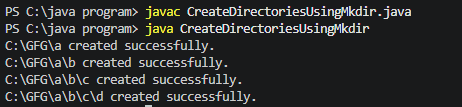
Explanation: The program first creates the C:\GFG directory if it does not exist. The createDirectories() method then creates one subdirectory at each recursion level using mkdir(). After creating a directory, the method recursively processes the next character until all directories are created.
2: Using createDirectories() Method
The Files.createDirectories() method belongs to the java.nio.file package and is used to create a directory along with any required parent directories. It is more convenient when working with complete directory paths.
Approach
- Provide the path of the main directory.
- Create the path for the current directory.
- Convert the directory path into a Path object using Paths.get().
- Check whether the directory already exists using Files.exists().
- Create the directory using Files.createDirectories().
- Recursively process the next directory level.
import java.io.File;
import java.io.IOException;
import java.nio.file.Files;
import java.nio.file.Path;
import java.nio.file.Paths;

public class CreateDirectoriesUsingNIO {

    // Method to create directories recursively
    static void createDirectories(String mainPath, String path, int index) {

        // Base condition
        if (index == path.length()) {
            return;
        }

        // Create the path for the current directory
        String currentPath = mainPath
                + File.separator
                + path.charAt(index);

        Path directory = Paths.get(currentPath);

        try {

            // Check whether the directory already exists
            if (Files.exists(directory)) {
                System.out.println(
                    currentPath + " already exists."
                );
            }
            else {

                // Create the directory
                Files.createDirectories(directory);

                System.out.println(
                    currentPath + " created successfully."
                );
            }

        }
        catch (IOException e) {
            System.out.println(
                "Unable to create " + currentPath
            );
        }

        // Recursive call
        createDirectories(currentPath, path, index + 1);
    }

    public static void main(String[] args) {

        // Main directory
        String mainPath = "C:\\GFG";

        // Each character represents one directory
        String directoryNames = "xyz";

        File mainDirectory = new File(mainPath);

        // Create the main directory if it does not exist
        if (!mainDirectory.exists()) {

            try {
                Files.createDirectories(
                    Paths.get(mainPath)
                );

                System.out.println(
                    mainPath + " created successfully."
                );
            }
            catch (IOException e) {
                System.out.println(
                    "Unable to create " + mainPath
                );
                return;
            }
        }
        else {
            System.out.println(
                mainPath + " already exists."
            );
        }

        // Create subdirectories recursively
        createDirectories(mainPath, directoryNames, 0);
    }
}
Output
On Second time running the code :
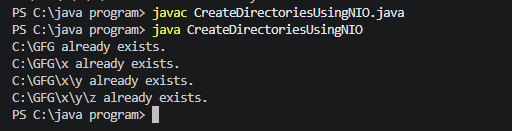
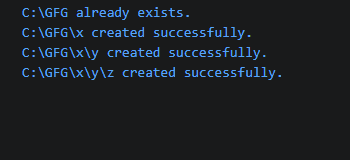
Explanation: The program creates a Path object for each directory and uses Files.createDirectories() to create it. The recursive call then moves to the next directory level until all directory names have been processed.
