

The size of a file can be obtained using the length() method of the File class. For a directory, we can calculate its total size by adding the sizes of all files present inside it. The program can also recursively traverse subdirectories so that files inside nested folders are included in the total size.
- The length() method returns the file size in bytes as a long value.
- The directory size can be converted from bytes to kilobytes (KB) and megabytes (MB) using 1024 as the conversion factor.
- listFiles() is used to access the files and subdirectories present inside a directory.
Examples
Input: directory = "C:\JavaFolderTest" containing 3 files and 1 subdirectory
Output: Size of C:\JavaFolderTest is 162 BInput: file = "C:\JavaFolderTest\file1.txt"
Output: File size = 26 B
File length() Method
The length() method of the File class returns the size of a file in bytes.
Syntax
File file = new File("file_name.txt");
long size = file.length();
Approach
- Create a File object representing the directory.
- Use listFiles() to get the files and subdirectories.
- Check whether each item is a file or a directory.
- If it is a file, add its size using length().
- If it is a directory, recursively calculate its size.
- Display the total size in bytes, kilobytes, and megabytes.
import java.io.File;

public class GetFolderSize {

    private static long getFolderSize(File folder){

        long length = 0;

        File[] files = folder.listFiles();

        if (files == null){
            return 0;
        }

        for (File file : files){

            if (file.isFile()) {
                length += file.length();
            }
            else {
                length += getFolderSize(file);
            }
        }

        return length;
    }

    public static void main(String[] args)
    {

        File file1 = new File("C:\\JavaFolderTest");

        long size = getFolderSize(file1);

        System.out.println("Size of " + file1 + " is " + size + " B");

        System.out.println("Size of " + file1 + " is " + (double)size / 1024 + " KB");

        System.out.println("Size of " + file1 + " is " + (double)size / (1024 * 1024) + " MB");
    }
}
Output
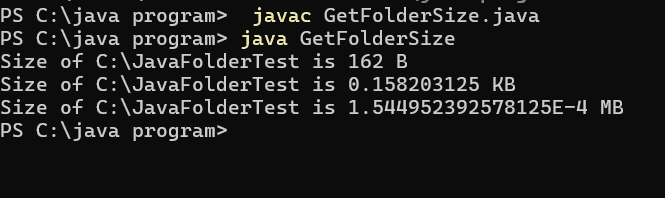
Explanation: The getFolderSize() method uses listFiles() to retrieve the contents of the directory. For every file, its size is added using length(). If a subdirectory is found, the method calls itself recursively to calculate the size of files inside that directory. The main() method creates a File object for C:\JavaFolderTest and displays the calculated size in bytes, KB, and MB.
