

A read-only file is a file that can be opened and read but cannot normally be modified. Java provides methods in the File class to change the writable status of a file.
- The
setReadOnly()method marks a file as read-only and returns a boolean value indicating whether the operation was successful. - The
setWritable(false)method can also be used to disable write access to a file. - The
canWrite()method can be used to check whether the file is currently writable.
Examples
Input: file = "GFG.java"
Output: Is File is read-only? : true
Output: Is File is writable? : falseInput: file = "test.txt"
Output: Is File read-only? : true
Output: Is File writable? : false
Methods to Make a File Read-Only
Java provides methods such as setReadOnly() and setWritable(false) to disable write access to a file and verify its writable status.
1.setReadOnly()
The setReadOnly() method of the File class is used to make a file read-only. It does not require any parameter and returns a boolean value. If the method returns true, the file was successfully marked as read-only. If it returns false, the operation was not successful.
Syntax
file.setReadOnly();
Approach
- Create an object of the File class with the file path.
- Create the file if it does not already exist.
- Call the setReadOnly() method.
- Store the returned boolean value.
- Use canWrite() to verify whether the file is writable.
import java.io.File;

public class GFG {

    public static void main(String[] args)
    {
        // flag variable which contains the boolean
        // value returned by setReadOnly() function
        boolean flag;

        try {

            File file = new File("GFG.java");

            // creates a new file
            file.createNewFile();

            // flag the file to be read-only
            flag = file.setReadOnly();

            System.out.println("Is File is read-only ? : "
                               + flag);

            // checking whether Is file  writable
            flag = file.canWrite();
            System.out.println("Is File is writable ? : "
                               + flag);
        }

        catch (Exception e) {
            e.printStackTrace();
        }
    }
}
Output:
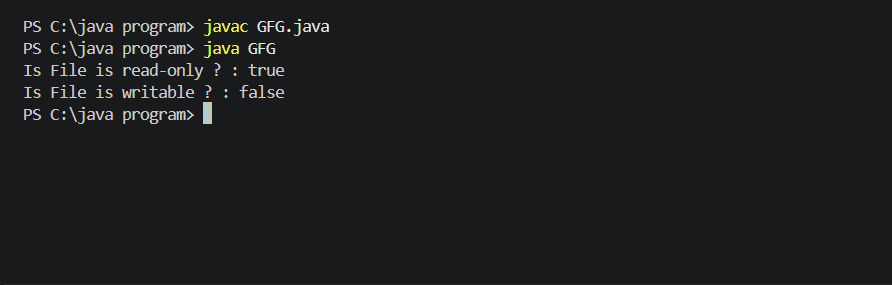
Explanation: The program creates a file and uses setReadOnly() to disable write access. The canWrite() method then returns false, indicating that the file is read-only.
Method 2: Using setWritable() Method
The setWritable() method can be used to control whether a file is writable. By passing false as the argument, write access to the file is disabled, making it read-only.
Syntax
file.setWritable(false);
Approach
- Create a File object with the path of the file.
- Call setWritable(false) to disable write access.
- Use canWrite() to check whether the file is writable.
- Display the appropriate message based on the result.
import java.io.File;

public class ChangetoReadOnly {

    public static void main(String[] args) {

        File file = new File("test.txt");

        try {
            // Create the file if it does not exist
            file.createNewFile();

            // Make the file read-only
            boolean result = file.setReadOnly();

            System.out.println("Is File read-only? : " + result);

            // Check whether the file is writable
            System.out.println("Is File writable? : " + file.canWrite());
        }
        catch (Exception e) {
            e.printStackTrace();
        }
    }
}
Output:
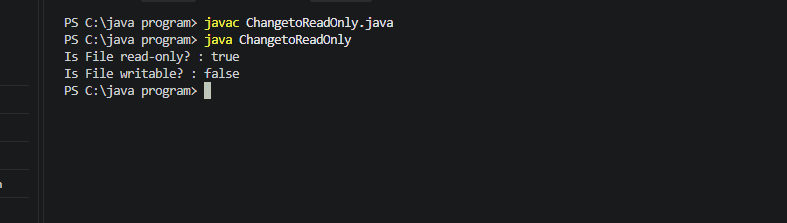
Explanation: setWritable(false) attempts to disable write access to the specified file. The canWrite() method is then used to check whether the file is currently writable.
