

Reading content from one file and writing it into another is a common file-handling operation in Java. It involves reading data from a source file and transferring the same content to a destination file.
- Java provides classes such as FileReader and FileWriter to perform these operations.
- The content can be stored temporarily in a variable or transferred directly from the source file to the destination file.
Methods To Copy File Content
Method 1: Using a Variable
In this approach, the contents of the input file are read character by character using FileReader. Each character is stored in a String variable, which is then written to the output file using FileWriter.
import java.io.FileReader;
import java.io.FileWriter;
import java.io.IOException;

class GFG {

    // Main driver method
    public static void main(String[] args)
    {

        // The file reading process may sometimes give
        // IOException

        // Try block to check for exceptions
        try {

            // Creating a FileReader object and
            // file to be read is passed as in parameters
            // from the local directory of computer
            FileReader fr = new FileReader("gfgInput.txt");

            // FileReader will open that file from that
            // directory, if there is no file found it will
            // through an IOException

            // Creating a FileWriter object
            FileWriter fw = new FileWriter("gfgOutput.txt");

            // It will create a new file with name
            // "gfgOutput.text", if it is already available,
            // then it will open that instead

            // Declaring a blank string in which
            // whole content of file is to be stored
            String str = "";

            int i;

            // read() method will read the file character by
            // character and print it until it end the end
            // of the file

            // Condition check
            // Reading the file using read() method which
            // returns -1 at EOF while reading
            while ((i = fr.read()) != -1) {

                // Storing every character in the string
                str += (char)i;
            }

            // Print and display the string that
            // contains file data
            System.out.println(str);

            // Writing above string data to
            // FileWriter object
            fw.write(str);

            // Closing the file using close() method
            // of Reader class which closes the stream &
            // release resources that were busy in stream
            fr.close();
            fw.close();

            // Display message
            System.out.println(
                "File reading and writing both done");
        }

        // Catch block to handle the exception
        catch (IOException e) {

            // If there is no file in specified path or
            // any other error occurred during runtime
            // then it will print IOException

            // Display message
            System.out.println(
                "There are some IOException");
        }
    }
}
Output
There are some IOException
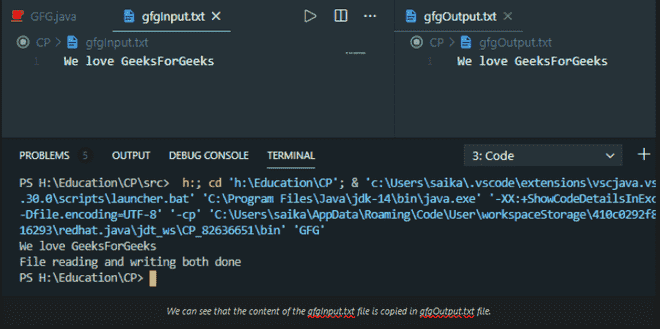
Explanation:
- FileReader opens gfgInput.txt for reading.
- FileWriter creates or opens gfgOutput.txt for writing.
- read() reads one character at a time and returns -1 when the end of the file is reached.
- Each character is added to the str variable.
- fw.write(str) writes the stored content into the output file.
- Finally, close() closes both file streams.
Method 2: Without Using a Variable
In this approach, the complete content of the input file is not stored in a separate String variable. Instead, the data can be processed and written directly to the output file.
import java.io.FileWriter;
import java.io.IOException;

class GFG {

    public static void main(String[] args)
    {

        try {

            // Creating a FileWriter object which will
            // create a new file and if already available
            // it will open it
            FileWriter fw = new FileWriter("gfg.txt");

            // Content to be written on file
            // Custom input string

            // write() method will write the string
            // in the file
            fw.write("We love GeeksForGeeks");

            // Closing the file freeing up resources
            // in the memory
            fw.close();

            // Print and display message
            System.out.println("\nFile write done");
        }

        // Catch block to catch if exception/s occurs
        catch (IOException e) {

            // Print and display message
            System.out.println(
                "There are some IOException");
        }
    }
}
Output
File write done
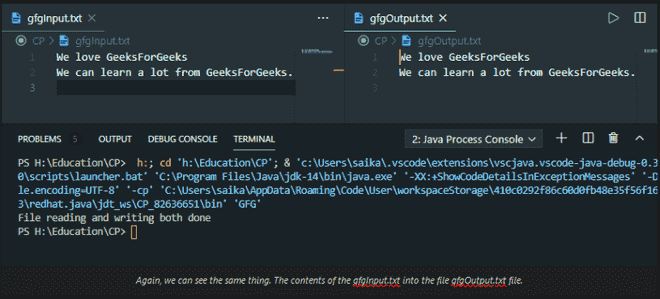
Explanation:
- FileWriter creates or opens the specified file.
- write() writes the given string into the file.
- close() closes the file and releases the associated resources.
- If an I/O error occurs, the catch block displays the exception message.
Note: The second code shown in the provided source does not actually read from one file and write its contents into another. It only demonstrates writing a string to a file. So, if this article is being updated, Method 2 should be replaced with a genuine file-to-file approach rather than describing the existing code as "without using any variable."
