

A package in Java is used to group related classes, interfaces, enums, and sub-packages. Packages help organize code, avoid naming conflicts, control access, and make large applications easier to maintain.
- A package can contain classes, interfaces, enums, and sub-packages.
- The package statement defines the package of a source file.
- They make code easier to maintain and reuse.
Types of Java Packages
Java packages are mainly divided into two types:
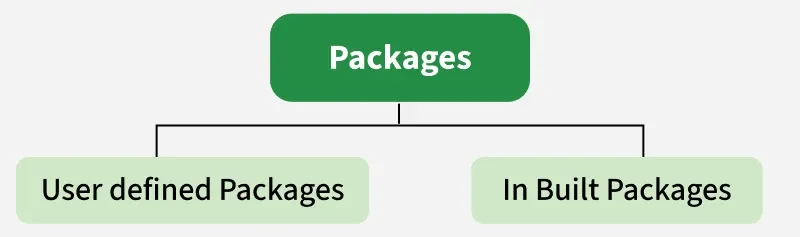
1. Built-in Packages
Built-in Packages are packages provided by the Java API. They contain classes and interfaces for common programming tasks. Some of the commonly used built-in packages are:
- java.lang: Contains language support classes(e.g, classes that define primitive data types, math operations). This package is automatically imported.
- java.io: Contains classes for supporting input/output operations.
- java.util: Contains utility classes that implement data structures such as Linked Lists and Dictionaries, as well as support for date and time operations.
- java.awt: Contains classes for implementing the components for graphical user interfaces (like buttons, menus, etc). 6)
Example: Using java.util.Random (Built-in Package)
import java.util.Random;   // built-in package

public class GFG{

    public static void main(String[] args) {

        // using Random class
        Random rand = new Random();

        // generates a number between 0–99
        int number = rand.nextInt(100);

        System.out.println("Random number: " + number);
    }
}
Output
Random number: 59
Explanation: The program imports the Random class from the java.util package. The nextInt(100) method generates a random integer from 0 to 99.
2. User-defined Packages
User-defined Packages are packages created by programmers to organize application-specific classes and interfaces.
package com.myapp;

public class Helper {
    public static void show() {
        System.out.println("Hello from Helper!");
    }
}
To use it in another class:
import com.myapp.Helper;

public class Test {
    public static void main(String[] args) {
        Helper.show();
    }
}
Explanation: The Helper class belongs to the com.myapp package. The Test class imports it using the import statement and calls its static show() method.
Package Declaration
The package statement is used to specify the package to which a class belongs.
Syntax:
package packageName;
Forder Structure
The directory structure normally follows the package name.

Accessing Classes Inside a Package
In Java, we can import classes from a package using either of the following methods:
1 Import a Single Class
import java.util.Vector;
This imports only the Vector class from the java.util package.
2. Import all classes from a package:
import java.util.*;
This imports all classes and interfaces from the java.util package but does not include sub-packages.
Example: Import the Vector class
import java.util.Vector;

public class Geeks {

    public Geeks() {

        // java.util.Vector is imported, We are able to access it directly in our code.
        Vector v = new Vector();


        java.util.ArrayList l = new java.util.ArrayList();
        l.add(3);
        l.add(5);
        l.add(7);

        System.out.println(l);
    }

    public static void main(String[] args) {


        new Geeks();
    }
}
Output
[3, 5, 7]
Explanation: Vector is accessed directly because it is imported. ArrayList is accessed using its fully qualified name, java.util.ArrayList.
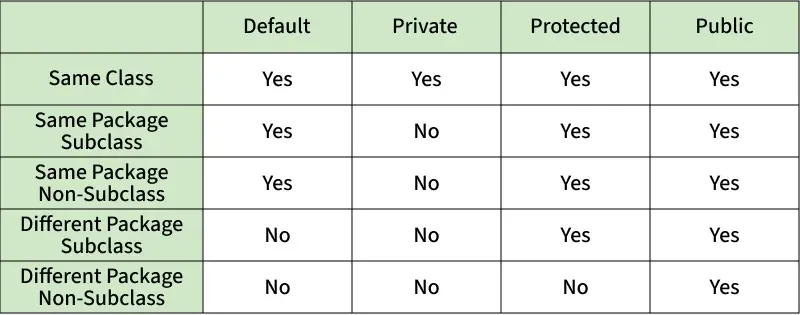
Access Modifiers and Packages
Packages directly influence Java access levels:
Advantages of Packages
- Organize related classes and interfaces.
- Avoid naming conflicts.
- Provide access control.
- Improve code maintainability.
- Promote code reuse.
- Make large applications easier to manage.
- Support modular application design.
