

In Spring Boot, caching is used to temporarily store frequently accessed data so that it can be retrieved quickly without repeatedly accessing the database. It helps improve application performance and reduces the load on backend systems. By using caching, applications can provide faster responses and better efficiency.
- Improves application performance by reducing repeated database queries.
- Stores frequently used data in memory for faster retrieval.
- Reduces server load and response time in applications.
Why Use Caching?
- Improves application response time.
- Reduces repeated database queries.
- Reduces the load on backend systems.
- Avoids repeated execution of expensive operations.
- Improves application scalability for read-heavy workloads.
How Caching Works in Spring Boot
Spring Boot provides a caching abstraction through Spring Framework. The cache is checked before the target method is executed.
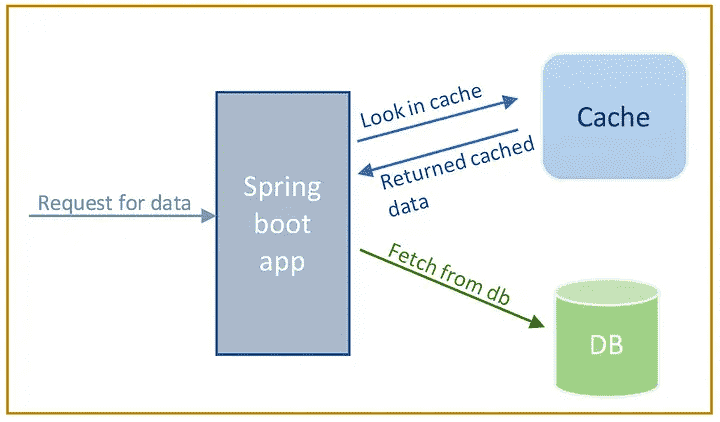
- Client sends a request: The application receives a request for some data, such as customer details.
- Spring checks the cache: Before executing the method, Spring checks whether the requested data is already available in the cache.
- Cache Hit: If the data is found in the cache, Spring returns the cached result directly without executing the method again.
- Cache Miss: If the data is not found, Spring executes the method and retrieves the data, for example, from the database.
- Store the result: The returned result is stored in the cache with a cache key.
- Return the result: The data is returned to the client.
- Subsequent requests: When the same data is requested again, Spring retrieves it from the cache instead of repeatedly accessing the database.
Types of Caching
There are mainly 4 types of Caching:
1. CDN Caching
A Content Delivery Network (CDN) stores copies of web content on distributed servers across different geographic locations to deliver content faster to users.
- Stores static resources like images, videos, and web pages.
- Reduces latency by delivering data from the nearest server.
2. Database Caching
Database caching stores frequently executed query results so that the database does not need to process the same query repeatedly.
- Improves database scalability.
- Reduces query execution time.
- Useful for read-heavy applications.
3. In-Memory Caching
In-memory caching stores data directly in RAM, which allows extremely fast data retrieval.
- Faster than disk or database access.
- Common tools: Redis, EhCache, Hazelcast.
- Used for high-performance applications.
4. Web Server Caching
Web server caching stores copies of web pages or responses at the server level so repeated requests can be served quickly.
- Reduces server processing time.
- Improves page loading speed.
- Reduces backend workload.
Cache Annotations of Spring Boot
1. @Cacheable
@Cacheable stores the result of a method in the cache. If the same method is called again with the same parameters, the result is returned from the cache instead of executing the method.
- Checks cache before executing the method.
- Stores the result if not already cached.
Syntax:
@Cacheable("name")
public String getName(Customer customer) {
// method logic
}
Syntax with condition:
@Cacheable(value="Customer", condition="#name.length < 10")
public Customer findCustomer(String name) {
}
2. @CacheEvict
@CacheEvict is used to remove data from the cache when it becomes outdated or unnecessary.
- Removes stale data from cache.
- Can remove specific entries or all entries.
Syntax:
@CacheEvict(value="name", allEntries=true)
public String getName(Customer customer) {}
3. @CachePut
@CachePut updates the cache with the method result without skipping method execution.
- Always executes the method.
- Updates the cache with the latest result.
- Used when data is modified or updated.
Syntax:
@CachePut(value="name")
public String getName(Customer customer) {
}
@CachePut selectively updates the entries whenever we alter them to avoid the removal of too much data out of the cache. One of the key differences between @Cacheable and @CachePut annotation is that the @Cacheable skips the method execution while the @CachePut runs the method and puts the result into the cache.
4. @Caching
@Caching allows multiple cache operations to be applied to the same method.
- Combines multiple cache annotations.
- Avoids compilation errors caused by multiple annotations.
- Useful for complex cache operations.
Syntax:
@Caching(evict = {
@CacheEvict("name"),
@CacheEvict(value="directory", key="#customer.id")
})
public String getName(Customer customer) {
}
5.@CacheConfig
@CacheConfig defines common cache configuration at the class level, so it does not need to be repeated in every method.
- Reduces repeated configuration.
- Defines default cache names.
- Applied at class level.
@CacheConfig(cacheNames={"name"})
public class CustomerData {
@Cacheable
public String getName(Customer customer) {
}
}
Conditional Caching
Sometimes caching should only occur under certain conditions. Spring Boot supports this using the condition attribute.
- Uses Spring Expression Language (SpEL).
- Cache only if the condition evaluates to true.
- Otherwise, the method executes normally.
Syntax:
@Cacheable(value="name", condition="#customer.name == 'Megan'")
public String getName(Customer customer) {
}
The unless attribute prevents caching based on the method result instead of input parameters.
- Evaluated after method execution.
- Prevents caching unwanted results.
- Uses SpEL expressions.
Syntax:
@Cacheable(value="name", unless="#result.length() < 20")
public String getName(Customer customer) {
}
Cache Dependency
To enable caching in a Spring Boot project, add the caching dependency in the pom.xml file.
Syntax:
<dependency>
<groupId>org.springframework.boot</groupId>
<artifactId>spring-boot-starter-cache</artifactId>
</dependency>
Advantages of Caching
- Improves application performance by reducing repeated operations.
- Reduces the number of database queries.
- Provides faster responses for frequently requested data.
- Reduces server and database load.
- Avoids repeated execution of expensive operations.
- Helps the application handle more requests efficiently.
