

Multilabel Classification is a type of classification where a single data instance can belong to multiple classes simultaneously rather than being restricted to only one class.
Key characteristics of multilabel classification:
- Categories are not mutually exclusive.
- The output is a set of labels instead of a single label.
- Each label is typically represented as present or absent for an instance.
- It is suitable for problems with overlapping categories.
Real-world multilabel classification scenario
In this example, the goal is to identify multiple aspects from restaurant reviews posted on Twitter. Since a single review can discuss several aspects at the same time, it becomes a multilabel classification problem.
- A review may mention Food, Service, Price, Ambience, or Anecdotes simultaneously.
- The dataset is taken from the SemEval-2014 Restaurant Reviews competition.
- Each review is annotated with one or more aspect labels.
Example: A review such as "The food was great but the service was slow" would be assigned both Food and Service labels.
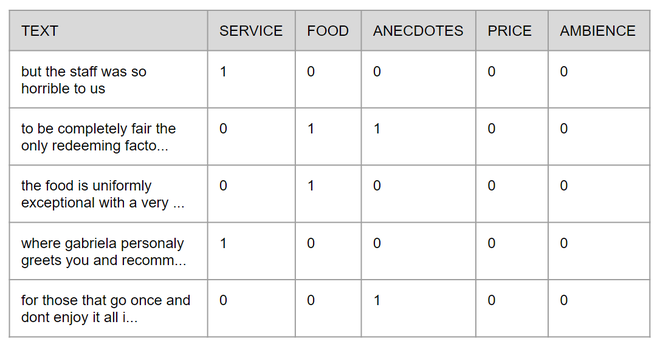
Implementation
Step 1 : Importing Libraries
- Import the required libraries for preprocessing, TF-IDF vectorization, MLKNN, and evaluation.
- These libraries help prepare the data, train the model, and measure its performance.
import pandas as pd
import numpy as np
from sklearn.model_selection import train_test_split
from sklearn.feature_extraction.text import TfidfVectorizer
from sklearn.multiclass import OneVsRestClassifier
from sklearn.neighbors import KNeighborsClassifier
from sklearn.metrics import accuracy_score, hamming_loss
Step 2: Preparing Text Data and TF-IDF Transformation
- Convert restaurant reviews into numerical features using TF-IDF vectorization.
- Split the transformed dataset into training (70%) and testing (30%) sets.
# Load dataset
aspects_df = pd.read_csv("semeval2014.csv")
# Input text
X = aspects_df["text"]
# Aspect labels
y = np.asarray(aspects_df[aspects_df.columns[1:]])
# Initialize TF-IDF Vectorizer
vectorizer = TfidfVectorizer(max_features=3000,max_df=0.85)
# Fit TF-IDF
vectorizer.fit(X)
# Split dataset
X_train, X_test, y_train, y_test = train_test_split( X,y,test_size=0.30,random_state=42)

X_train_tfidf = vectorizer.transform(X_train)
X_test_tfidf = vectorizer.transform(X_test)
Step 3:. Training the MLKNN Model
- Train the MLKNN model using the TF-IDF feature vectors.
- The model learns to predict multiple aspect labels for a single review.
# Multilabel KNN model
model = OneVsRestClassifier(KNeighborsClassifier(n_neighbors=5))
# Train model
model.fit(X_train_tfidf,y_train
)
Step 4: Testing on New Sentences
- Transform new review text using the trained TF-IDF vectorizer.
- Use the trained model to predict the relevant aspect labels.
new_sentences = ["I like the food but I hate the place"]
# Convert sentence to TF-IDF
new_sentence_tfidf = vectorizer.transform(new_sentences)
# Predict aspects
predicted_sentences = model.predict(new_sentence_tfidf)
print(predicted_sentences)
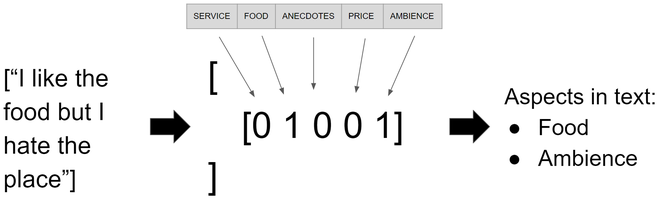
Step 5: Model Evaluation
- Evaluate the model using Accuracy and Hamming Loss metrics.
# Predictions on test data
predicted = model.predict(X_test_tfidf)
# Accuracy
print("Accuracy:",accuracy_score(y_test, predicted))
# Hamming Loss
print("Hamming Loss:",hamming_loss(y_test, predicted))
Output
Accuracy: 0.31181619256017507
Hamming Loss: 0.29824945295404814
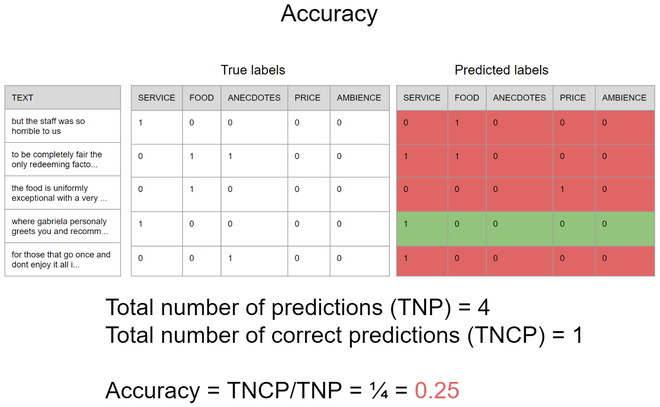
- Evaluate the model using Accuracy and Hamming Loss.
- A lower Hamming Loss indicates better performance; for example, a value of 0.32 means about 32% of labels are misclassified.
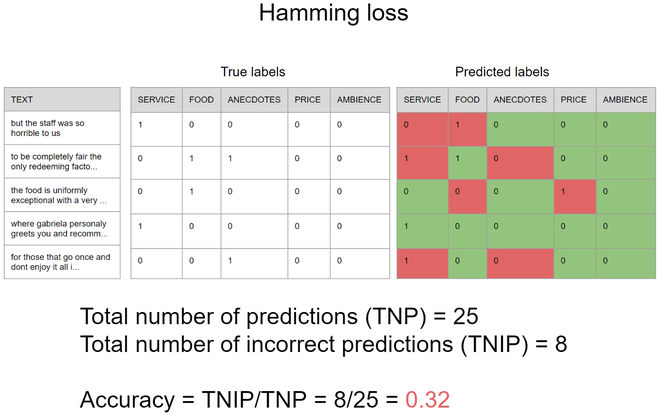
Result: The model achieved an Accuracy of 0.31 and a Hamming Loss of 0.29, indicating moderate multilabel classification performance, with approximately 29% of aspect labels predicted incorrectly.
You can download the source code from here.
