

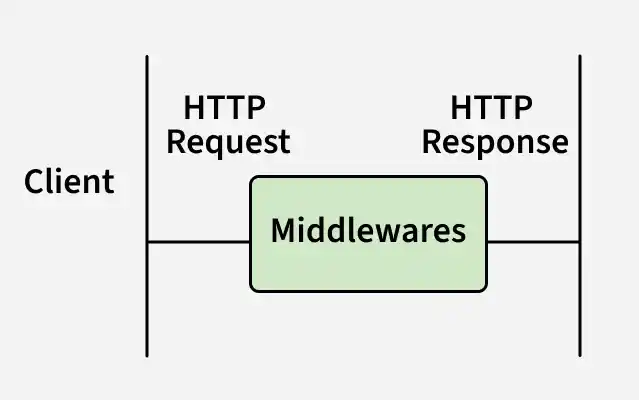
Middleware in Express.js are functions that run during the request–response lifecycle to process requests, modify responses, and control application flow.
- Executes custom logic for each request.
- Can read or modify req and res.
- May send a response and end the cycle.
- Uses next() to pass control to the next middleware.
Syntax:
app.use((req, res, next) => {
    console.log('Middleware executed');
    next();
});
- (req, res, next) => {}: Middleware function to process the request and response before the final handler.
- next(): Passes control to the next middleware if the request–response cycle isn’t ended.
Working of Middleware in Express.js
In Express.js, middleware functions are executed sequentially in the order they are added to the application.
- Request arrives at the server.
- Middleware functions are applied to the request, one by one.
- Each middleware either sends a response or passes control using next().
- If no middleware ends the cycle, the route handler is reached, and a final response is sent.
Types of Middleware
ExpressJS offers different types of middleware and you should choose the middleware based on functionality required.
1. Application-level Middleware
Application-level middleware runs across the entire Express application, handling common logic for all incoming requests.
- Registered using app.use() or app.METHOD().
- Can be applied to all requests or to requests matching a specific path or HTTP method.
- Commonly used for logging, authentication, body parsing, and headers.
app.use(express.json()); // Parses JSON data for every incoming request
app.use((req, res, next) => {
  console.log('Request received:', req.method, req.url);
  next();
});
2. Router-level Middleware
Router-level middleware applies to a specific router instance, allowing middleware logic to be scoped to a defined group of routes.
- Registered using router.use() or router.METHOD().
- Executes only for routes within that router.
- Ideal for modular route grouping (e.g., auth or user routes).
- Improves code organization and maintainability by isolating middleware to related routes.
const router = express.Router();

// Apply middleware to only this router's routes
router.use((req, res, next) => {
  console.log('Router-specific middleware');
  next();
});

router.get('/dashboard', (req, res) => {
  res.send('Dashboard Page');
});

app.use('/user', router); // The middleware applies only to routes under "/user"
3. Error-handling Middleware
Error-handling middleware captures and processes runtime errors during the request–response cycle to ensure stable application behavior.
- Defined with four parameters: err, req, res, next.
- Sends consistent error responses and prevents server crashes.
- Should be defined after the application's routes and other middleware.
app.use((err, req, res, next) => {
  console.error(err.stack); // Log the error stack
  res.status(500).send('Something went wrong!');
});
4. Built-in Middleware
Express offers built-in middleware functions to handle common server tasks efficiently.
- express.static() serves static files like images, CSS, and JS.
- express.json() parses incoming JSON request bodies.
- express.urlencoded() parses incoming URL-encoded request bodies.
app.use(express.static('public')); // Serves static files from the "public" folder
app.use(express.json()); // Parses JSON payloads in incoming requests
app.use(express.urlencoded({ extended: true })); // Parses URL-encoded data
5. Third-party Middleware
Third-party middleware extends Express applications with additional functionality through npm packages.
- Developed by external contributors and installed via npm.
- Adds features like logging, security, and validation.
- Examples include morgan for request logging and body-parser for parsing request bodies.
const morgan = require('morgan');
app.use(morgan('dev')); // Logs HTTP requests using the "dev" format
Implementation of Middleware
After setting up the Express application, create a middleware function using app.use().
- Middleware executes for every incoming request before the route handler.
- It can perform tasks such as logging requests, validating data, or modifying the request and response objects.
- The
next()function passes control to the next middleware or route handler.
// Import Express
const express = require('express');

// Create an Express application
const app = express();

// Define the port
const port = process.env.PORT || 3000;

// Middleware
app.use((req, res, next) => {
  console.log(`Request received: ${req.method} ${req.url}`);
  next(); // Pass control to the next middleware or route handler
});

// Route Handler
app.get('/', (req, res) => {
  res.send(`
    <div>
      <h2>Welcome to GeeksforGeeks</h2>
      <h5>Tutorial on Express Middleware</h5>
    </div>
  `);
});

// Start the server
app.listen(port, () => {
  console.log(`Server is running on http://localhost:${port}`);
});
Output:
When you navigate to http://localhost:3000/, the terminal displays:
Request received: GET /The browser displays:
Welcome to GeeksforGeeks
Tutorial on Express Middleware
Also Read: Middleware Chaining
