

Data refresh in Power BI updates reports and dashboards with the latest data from connected sources. It eliminates the need to rebuild reports whenever data changes. This ensures your insights stay accurate and up to date for better decision-making.
Keeping data fresh is important for the following reasons:
- Accuracy: Outdated data can lead to incorrect analysis and poor decision-making. Data refresh ensures that the information in Power BI remains accurate and reliable.
- Compliance: Some industries require data to be updated regularly (daily, weekly, etc.). Data refresh helps organizations meet these regulatory requirements and maintain data integrity.
Types of Data Refresh
Data in Power BI can be refreshed in different ways depending on the data source and business requirements.
1. Manual Refresh
- To refresh data in Power BI click the Refresh button in either the Power BI Service or the Power BI Desktop App. You can also use the "Ctrl + Alt + R" keyboard shortcut.
- Manual refresh is used when you know new data has been added and you want to see the changes right away. It gives you full control over when your reports get updated.

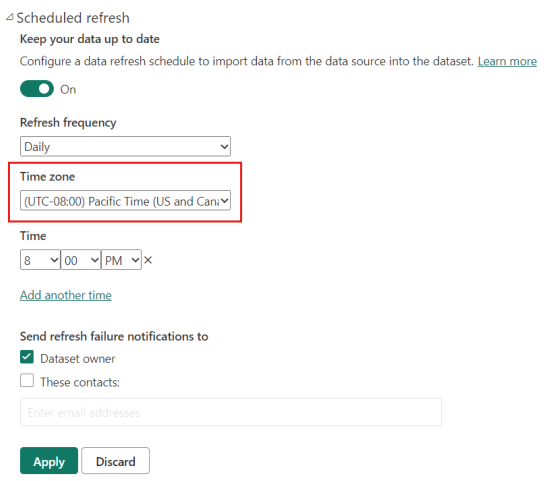
2. Scheduled Refresh
- In Power BI Scheduled Refresh means your data gets updated automatically at set times without you needing to do anything. You can choose when and how often Power BI should pull the latest data like daily or multiple times a day.
- This helps to keep your reports and dashboards always updated with the new information. It’s very useful when you want to make sure everyone is seeing the most recent data without manually refresh it.
3. Real-time Updates
Some data sources support real-time updates, allowing reports to display the most current data without manual refresh.
Ways to enable real-time updates in Power BI include:
- Push Datasets: Data is sent to Power BI using REST APIs or streaming datasets, updating visuals instantly.
- Dataflows: Used to build ETL pipelines that continuously pull and transform data from sources like SQL Server or Salesforce.
- Streaming: Connects to live data sources (e.g., IoT devices, social media feeds) to update dashboards in real time.
- DirectQuery: Connects directly to the data source and fetches live data whenever users interact with the report.
