

Forms in Next.js ensure accurate data through validation by checking user input against predefined rules, providing instant feedback, and displaying appropriate error messages before the form is submitted.
Approach
To add form validation in Next.js, we will use the useState() and useEffect hooks to manage form data and validate user input dynamically. The validation checks whether the required fields are filled, verifies the email format, and ensures the password meets the minimum length requirement.
Steps to Add Form Validation in Next.js
Prerequisite: Before following this tutorial, make sure you have already created a Next.js project. If not, refer to the Next.js Installation and First Application article.
Step 1: Project Structure
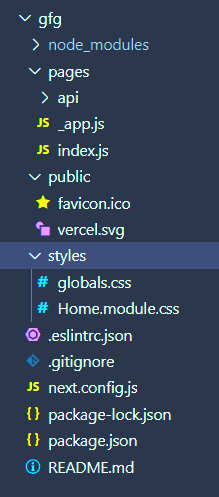
Step 2: Add Form Validation
Open the src/app/page.js file and add the following code.
// File Path: src/app/page.js
"use client";
import { useState, useEffect } from "react";
export default function Home() {
    const [name, setName] = useState("");
    const [email, setEmail] = useState("");
    const [password, setPassword] = useState("");
    const [errors, setErrors] = useState({});
    const [isFormValid, setIsFormValid] = useState(false);
    useEffect(() => {
        validateForm();
    }, [name, email, password]);
    const validateForm = () => {
        let errors = {};
        if (!name) {
            errors.name = "Name is required.";
        }
        if (!email) {
            errors.email = "Email is required.";
        } else if (!/\S+@\S+\.\S+/.test(email)) {
            errors.email = "Email is invalid.";
        }
        if (!password) {
            errors.password = "Password is required.";
        } else if (password.length < 6) {
            errors.password =
                "Password must be at least 6 characters.";
        }
        setErrors(errors);
        setIsFormValid(
            Object.keys(errors).length === 0
        );
    };
    const handleSubmit = () => {
        if (isFormValid) {
            alert("Form submitted successfully!");
        } else {
            alert("Please correct the errors.");
        }
    };
    return (
        <main
            style={{
                display: "flex",
                justifyContent: "center",
                alignItems: "center",
                minHeight: "100vh",
            }}
        >
            <div
                style={{
                    width: "350px",
                    display: "flex",
                    flexDirection: "column",
                    gap: "10px",
                }}
            >
                <h2>Next.js Form Validation</h2>
                <input
                    type="text"
                    placeholder="Name"
                    value={name}
                    onChange={(e) =>
                        setName(e.target.value)
                    }
                />
                {errors.name && (
                    <p style={{ color: "red" }}>
                        {errors.name}
                    </p>
                )}
                <input
                    type="email"
                    placeholder="Email"
                    value={email}
                    onChange={(e) =>
                        setEmail(e.target.value)
                    }
                />
                {errors.email && (
                    <p style={{ color: "red" }}>
                        {errors.email}
                    </p>
                )}
                <input
                    type="password"
                    placeholder="Password"
                    value={password}
                    onChange={(e) =>
                        setPassword(e.target.value)
                    }
                />
                {errors.password && (
                    <p style={{ color: "red" }}>
                        {errors.password}
                    </p>
                )}
                <button
                    onClick={handleSubmit}
                    disabled={!isFormValid}
                >
                    Submit
                </button>
            </div>
        </main>
    );
}
Explanation: In the above example, we first use the useState hook to store the values entered in the form fields and the validation errors. The useEffect hook runs whenever the input values change and calls the validation function. The validation function checks whether the required fields are filled, validates the email format, and ensures that the password contains at least six characters. If all the fields are valid, the Submit button becomes enabled.
Step 3: Run the application
Run the Next.js application at URL http://localhost:3000 using the below command.
npm run devOutput:
