

Postman is an API development and testing tool used to create, send, and test API requests. Global variables allow you to store values that can be accessed throughout a Postman workspace.
- Store values that are used across multiple requests.
- Reuse values without entering them manually.
- Simplify API request configuration and testing.
Prerequisites
- Basic HTTP concepts
- Knowledge of REST API
- Basic familiarity with Postman
Why Use Global Variables?
Global variables are useful when a value needs to be available across different requests and collections in a workspace.
- Reduce repeated data entry.
- Allow commonly used values to be changed from one location.
- Maintain consistent values across API requests.
Steps to Create and Use Global Variables
The following steps demonstrate how to create a global variable and use it in a Postman request.
Step 1: Open Postman and create a new collection. Give it a name such as GFG.
Step 2: Click the Environment Quick Look icon in the top-right corner and select Globals. Click Edit to add a global variable.
Step 3: Add a variable named geek and set its value to GeeksforGeeks.
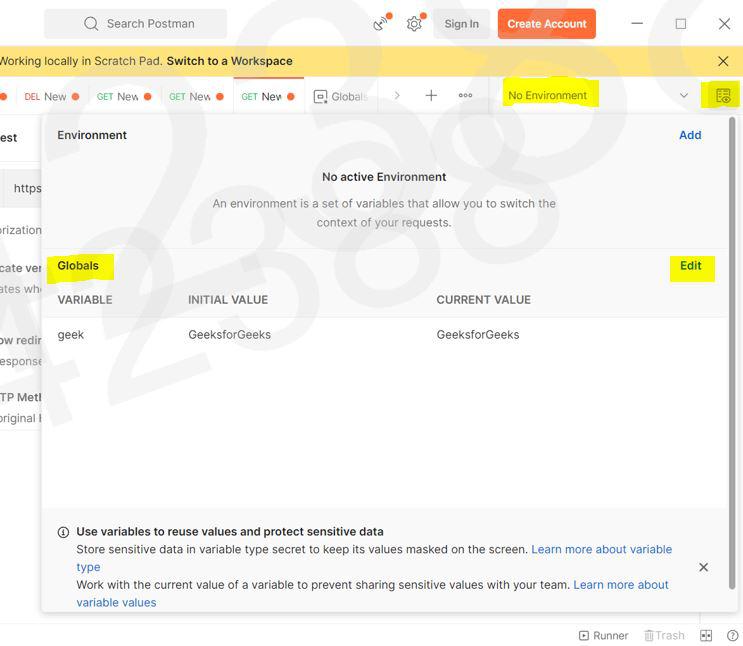
Step 4: Click Save to save the global variable.
Step 5: Click the three dots next to the collection name and select Add request.

Step 6: Enter the API URL and use the global variable with double curly braces, such as {{geek}}. Click Send to execute the request and view the response.
Using Global Variables in Requests
Global variables can be used in different parts of a Postman request by enclosing the variable name in double curly braces.
- Use global variables in URLs, query parameters, headers, and request bodies.
- Example: use {{base_url}}/users when base_url stores the API's base URL.
- Postman resolves the variable to its stored value when the request is executed.
Accessing Global Variables in Scripts
Postman scripts can work with global variables through the pm.globals API. These methods can be used in pre-request and post-response scripts.
// Get a global variable
const baseUrl = pm.globals.get("base_url");
// Set or update a global variable
pm.globals.set("user_id", "123");
// Remove a global variable
pm.globals.unset("user_id");
- pm.globals.get() retrieves the value of a global variable.
- pm.globals.set() creates or updates a global variable.
- pm.globals.unset() removes a global variable.
Managing Global Variables
Global variables can be managed manually from the Globals section or programmatically through scripts.
- Edit a variable's value from the Globals section.
- Use pm.globals.set() to create or update values dynamically.
- Use pm.globals.unset() to remove a variable through a script.
- Delete unused variables from the Globals section.
Troubleshooting Common Issues
Incorrect variable names, values, or scopes can prevent global variables from working as expected.
- Variable not resolving: Verify the variable name and {{variable_name}} syntax.
- Incorrect value: Check the variable's value in the Globals section.
- Updated value not appearing: Save the changes and send the request again.
- Script cannot access the variable: Verify that the script uses the appropriate pm.globals method.
- Variable conflict: Check whether another variable with the same name exists at a different scope, such as an environment or collection variable.
Example: In this example, we will create a global variable, id with a initial value=1. We will call API like:
https://jsonplaceholder.typicode.com/posts/?userId={{id}}
Output:
