November 17, 2026
|
5 min read

Blazingly fast way to build, track and deploy your models!
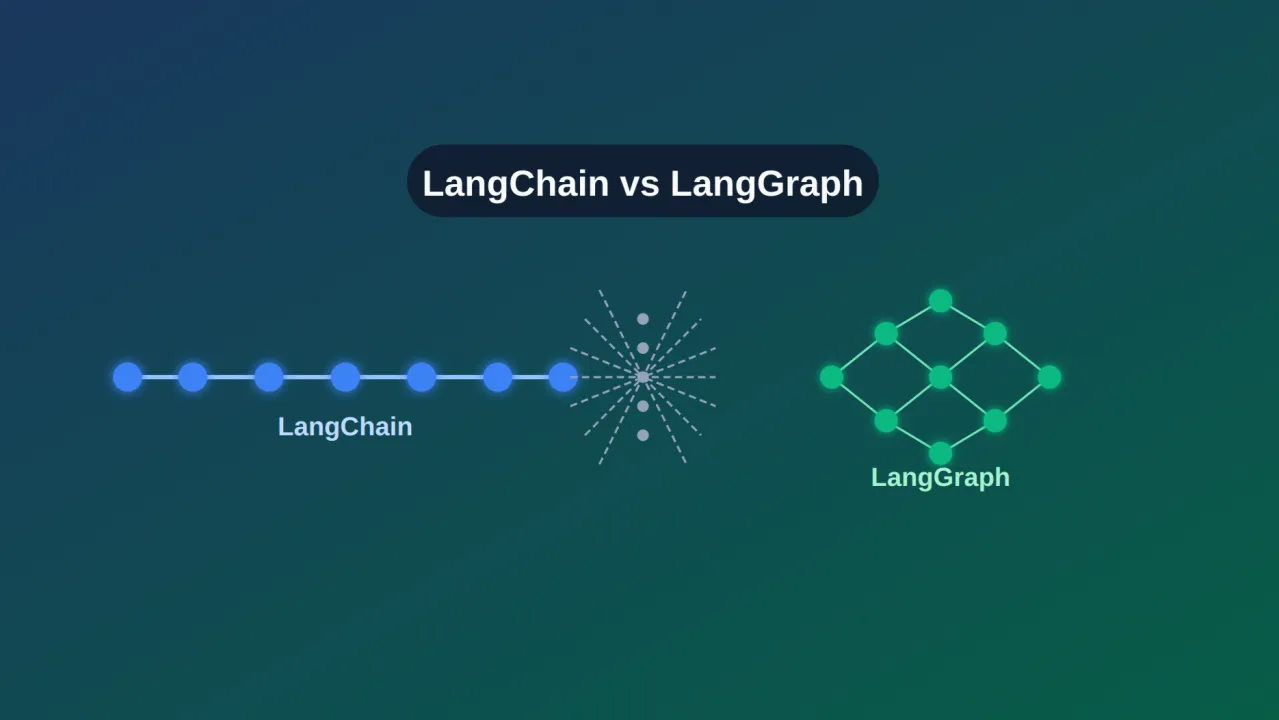
For a while, LangChain versus LangGraph looked like a choice between two frameworks. It no longer is. In October 2025 both libraries reached version 1.0, and LangChain's agents were rebuilt on top of the LangGraph runtime. LangGraph is now the foundation, and LangChain is the faster, higher-level way to use it.
That changes the question from "which framework?" to "which layer do I want to work at?" This guide explains each, shows current code for both, and gives a simple way to decide.
LangChain is an open-source framework for building applications on top of language models. It gives you a common interface for models, tools, messages and retrieval across providers, so you can switch between OpenAI, Anthropic, Google and others without rewriting your app.
The 1.0 release narrowed its focus to agents. The main entry point is create_agent, which runs the standard loop: call the model, let it choose tools, run them, and stop when it has an answer. Its defining feature is middleware, which hooks into the loop. Built-in middleware covers human approval of sensitive tool calls, summarizing long histories, and redacting personal data, and you can write your own. Messages also gained standard content blocks, so reasoning traces, citations and tool calls look the same across providers.
Older pieces such as LLMChain and ConversationChain moved to a separate langchain-classic package, so many tutorials written before 2025 no longer match current code. Here is a minimal agent with the current API:
from langchain.agents import create_agent

def get_order_status(order_id: str) -> str:
    """Look up the status of an order."""
    return "Shipped"

agent = create_agent(
    model="anthropic:claude-sonnet-5-5",
    tools=[get_order_status],
    system_prompt="You are a helpful support agent.",
)

result = agent.invoke(
    {"messages": [{"role": "user", "content": "Where is order 4821?"}]}
)
LangGraph is a lower-level framework and runtime for agents that need to run reliably over time. You describe a workflow as a graph. Nodes are steps, edges decide what runs next, and a shared state object carries data between them. Because you define the edges, you can loop until a condition is met, branch on a result, run steps in parallel, or mix fixed code with model-driven decisions.
The runtime adds the features production agents need. Checkpointers save state after each step, so a run can survive a restart, pause for human review for as long as it takes, and resume exactly where it stopped. This example loops until three revisions are done and saves state under a thread ID:
from typing import TypedDict
from langgraph.graph import StateGraph, START, END
from langgraph.checkpoint.memory import InMemorySaver

class State(TypedDict):
    draft: str
    attempts: int

def improve(state: State):
    return {"draft": state["draft"] + " (revised)", "attempts": state["attempts"] + 1}

def route(state: State):
    return "improve" if state["attempts"] < 3 else END

builder = StateGraph(State)
builder.add_node("improve", improve)
builder.add_edge(START, "improve")
builder.add_conditional_edges("improve", route)

graph = builder.compile(checkpointer=InMemorySaver())
config = {"configurable": {"thread_id": "demo-1"}}
result = graph.invoke({"draft": "v1", "attempts": 0}, config)
LangGraph can be used on its own, and LangChain agents are built on it, so you can start high-level and move down without throwing work away. An agent from create_agent can also be dropped into a larger LangGraph workflow as one node.
Start with LangChain's create_agent unless you already know you need custom control flow. It is the quickest way to something that works, and you lose nothing by starting there, since the same runtime is underneath. Move to LangGraph when you hit a wall: you need a flow the default loop can't express, state that has to survive long pauses, or tighter control over each step.
If you are moving old code, replace create_react_agent and legacy chains with create_agent, or keep legacy pieces working through langchain-classic while you migrate. Both libraries release often, so pin versions and read the changelog before upgrading.
Neither library decides which model a request goes to, how much a team may spend, what a guardrail should block, or how to trace a failure across ten steps and three providers. That is the job of a gateway layer.
TrueFoundry's AI Gateway sits between your agents and your models. Point your LangChain or LangGraph model calls at one OpenAI-compatible endpoint and you get routing and fallbacks across providers, per-team budgets and rate limits, guardrails, and request tracing, deployed inside your own cloud. It works the same whichever framework you pick, so changing frameworks later doesn't mean rebuilding your controls. If you'd like to see it with your own agents, book a demo.
For more on running agents safely at scale, see our guides to AI gateways and LLM cost optimization.
LangChain and LangGraph are two layers of one stack. Choose LangChain when you want to ship a standard agent quickly, and LangGraph when you need control over the flow and durable state. Because they share a runtime, the first choice is easy to revisit. What matters more in the long run is the production layer around them: routing, cost control, guardrails and tracing.
ile LangChain memory suits linear, simpler tasks.
TrueFoundry AI Gateway delivers ~3–4 ms latency, handles 350+ RPS on 1 vCPU, scales horizontally with ease, and is production-ready, while LiteLLM suffers from high latency, struggles beyond moderate RPS, lacks built-in scaling, and is best for light or prototype workloads.




The latest news, articles, and resources sent to your inbox