Repository navigation
Titles not appearing (no text shows) #3462
Description

Describe the bug:
I'm fairly sure text is supposed to appear in the preview box, and in the image when I save it, but I'm just not seeing any at all. I restarted and there's still nothing.
If I start OpenShot in Terminal, I can see that it's giving this error:
Warning (in usvg::convert::text::convert:370): No match for ''Bitstream Vera Sans'' font-family.
If I try some different ones, some work, but for others I get
Warning (in usvg::convert::text::convert:370): No match for 'URW Chancery L' font-family.
Warning (in usvg::convert::text::convert:370): No match for 'URW Bookman L' font-family.
What's all the weirder is that it seems like it defaults back to Bitstream Vera Sans every time I switch templates, so the text disappears again - even though if I go to change font, it lists Ubuntu/Italic/12 and if I say Save, the text appears.
Steps to reproduce the behavior:
- Go to 'Titles'
- Click on 'Bar 1'
- See preview panel
Expected behavior:
Text should appear. Nonexistent fonts shouldn't be selected to start with. If specific desired font is missing, a fallback should probably be found.
System Details:
- OpenShot Version: 2.5.1, libopenshot: 0.2.5 {{ log_context.openshot_qt_version }}
- Operating System / Distro: Linux Mint 19.3 Cinnamon (4.4.8)
Log Files:
If you are experiencing a crash, please collect and attach logs of the problem.
Log files can be found in your HOME/.openshot_qt/ folder. Please compress or zip
the log files (as they can become quite large).
Exception / Stacktrace:
Warning (in usvg::convert::text::convert:370): No match for ''Bitstream Vera Sans'' font-family.
Screenshots: (Optional)


Activity
ferdnyc commentedon May 7, 2020
Yeah, Bitstream Vera Sans is the default font in most of the templates (the ones that don't use simply "sans"), unless a different font is selected to override it.
The first time the font dialog comes up, there's no user-selected font override, so the font selector defaults to the application font ("Ubuntu"). Once a replacement is selected, the font dialog retains that choice, but it doesn't know the initial default font used in the template.
If some fonts are working, then most likely the fonts that AREN'T are incompatible with the SVG file format of the title templates. Unfortunately, we don't currently have any way of excluding non-compatible fonts from the list in the font selection dialog. But URW Chancery and URW Bookman are traditionally PostScript typefaces, and if those fonts are installed on your system in PostScript Type 1 format, that would mean they can't be used in SVG title files.
ferdnyc commentedon May 7, 2020
(And most likely Bitstream Vera Sans just isn't installed on your system; you can check that by seeing whether it's not listed in the font dialog. If it is listed, then it's installed and should be working.)
MBB232 commentedon May 8, 2020
If a font is default, then should it not be bundled with Openshot like the Ubuntu font, or would that not work?
Also Inkscape has the option of a custom font dir in version 1 now. Would it be desirable if Openshot can use those fonts too if Inkscape is used for templates?
If that is not possible, should the font in the templates be replaced with 'Ubuntu' ?
(Font embedding in SVG exists too (by binary encoding in base) , but from what I read about it, it is mostly theoretical, a practical nightmare, legally dubious and incompatible with everything)
PS: also add the dog-tag, I think I have seen this question before.
ferdnyc commentedon May 9, 2020
It wouldn't work in the sense that it would have to be installed to be used by the SVG renderer. Ubuntu, OpenShot will load directly from the bundled font file for use in its interface. (If the font is part of the installation. Most Linux distributions remove bundled fonts during packaging, expecting applications to work off of system fonts under user/theme control, rather than forcing their own choices.)
That's also why changing the default to Ubuntu instead of BVS wouldn't work — it's just as unavailable unless it's been installed.
What we probably should do is change the initial font in the rest of the templates to just "sans" (which a few of them already use), as that name should be aliased to something on every system.
The concern there, however, is that titles using "sans" aren't going to look the same on every system. And if a system's fonts are configured weird, things may look really out of whack.
Inkscape was used to create the templates, and they can be loaded into it for editing, but it doesn't render the SVG for the timeline. OpenShot's SVG rendering is handled by the Resvg library, if libopenshot has been built with Resvg. Otherwise, QtSVG is used as a fallback. Resvg was added because it's a far superior renderer. QtSVG was intended only for rendering simple things like icons, so it only supports a limited subset of the SVG featureset. However, Resvg is written in Rust, a relatively new language, and it's got a lot of dependencies. It isn't packaged on many Linux distributions yet, so it isn't always available.
Wouldn't help us anyway, when it comes to incompatible fonts. All of the fonts listed in the font selector dialog (my theory is that B-V-S isn't listed, for @oolong, ) should be installed fonts, so there'd be no need to embed them because they'd already be available to the renderer. But available and usable are different things, when the font's not an OpenType-compatible format. If the font chosen is a bitmap font, a Type 1 PostScript font, or any other format not supported by SVG, embedding it won't make any difference.
Yeah, it comes up... surprisingly often, recently. If I had any good ideas how to handle it better, I would, but attempts to filter the font list so it doesn't include incompatible fonts were a bust. The font dialog support in Qt is primarily meant for use with Qt UI elements, and all of the fonts listed can be set as screen fonts for its UI. Resvg doesn't have any UI, so there's no "Resvg font selector" or anything like that.
Maybe I will change the rest of the templates to use "sans" as the font, though. Can't imagine it'd really be any worse. (...He says, unimaginatively.)
ferdnyc commentedon May 9, 2020
Shows what I know. Seems that "sans" just means "the default font", which can be something like Times New Roman. So if you set "sans" as the font family, you often get... a serif font. 😠
oolong commentedon May 10, 2020
To be honest, even having a ridiculous font like Times New Roman in place of 'sans' still strikes me as a substantial improvement on text not showing up at all, with no visible explanation!
Would it be feasible to have a set of default fonts to run through, and check if each one works at all before falling back to a less desirable option?
ferdnyc commentedon May 10, 2020
@oolong I'm really not sure how we'd check that, is the problem. OpenShot gets no indication that a font rendered differently than requested, or didn't render at all.
Actually, on my Fedora system I haven't convinced OpenShot to not render text under any circumstances. I have noticed that a number of my own fonts also don't apply when selected. (But still not worked out any sort of pattern to it, if there is one.) But in the cases where that happens to me, the text has always just shown up rendered in Times New Roman instead.
That may be a difference between Resvg (enabled in my libopenshot build) vs. the fallback QtSVG rendering, perhaps. Or it may be a difference in Fedora's default fontconfig setup, vs. Mint's. Hard to say.
I'd tend to agree, in theory, that text in the wrong font is better than no text at all. Although to be honest, I'm not sure all of our users would. When you get no text at all, it's at least clear that the selected font isn't displaying properly.
Rendering in Times New Roman when you selected something different, OTOH, has the same frustrating "stealth error" feel that most of us over 40 can probably remember all too well from past generations of computer typesetting tech. You'd look over the pages you just plucked from the laser printer, only to discover that the whole thing had to be re-printed because part of your text is set in fallback Courier New instead of the font you chose. (Maddening. Especially if the other 95% of the job looked flawless.)
Meanwhile, last night as I was testing this, I ended up building what should be complete support for user control over both bold (previously mostly supported, but with quirks) and italics (previously completely unsupported), for the title font. Except, things are just as spotty there. Sometimes it changes the font, but it isn't in italics. Other times, it doesn't use the selected typeface, so you get Times New Roman — but it is in italics. And then for some fonts, everything works as expected: Right typeface, bold, italics, the works.
For builds that include Resvg, it appears the issue is at least partly coming from there. When OpenShot writes the
$HOME/.openshot_qt/title/temp.svgfile for the title preview, I can run it through Resvg'srendersvgcommand-line tool to double-check the preview. Just like in the OpenShot window, the fonts will sometimes be rendered without italics, or with the wrong typeface. Even thoughdisplay temp.svg(the ImageMagick viewer, which uses Inkscape's renderer) does show the correct font, including bold and/or italics. So it doesn't appear our generated SVG is the problem... but I'll need to get @RazrFalcon's (the Resvg developer) take on that.And now, much like the font-changing issue in general, I'm debating whether a "works sometimes" ability to select italic fonts would really be better or worse than not supporting them at all.
I also still need to re-test all of this with QtSVG.
RazrFalcon commentedon May 10, 2020
Afaik, the font fallback is an unspecified feature of the SVG Text. So we can do whatever we want. Therefore not showing text at all when there is no font is kinda a valid behavior.
QtSVG, and Qt in general, will simply fallback to a some random font. Since there are no specified rules about how it should be processed.
I do plan to improve font fallback in the future releases of
resvg. But for now, the only solution is to add more fonts to thefont-familyattribute.PS: I haven't read all the messages, but I should note that on Linux we are using fontconfig to find generic fonts like
sans-serif. So as long as afont-familyattribute has such family and fontconfig is correctly configured - it should not happen.oolong commentedon May 10, 2020
Thanks for all that! It sounds like you're dealing with some fairly frustrating features of the underlying font system. Does it work something like the CSS
font-familyattribute where you can give it a list of fallbacks in order?From my user experience perspective, getting no text at all was definitely unexpected behaviour. As a reasonably tech savvy user my first guess was that it was trying to use a nonexistent font; I guess it was just bad luck that when I selected a different one there was a problem with that too, so then I went looking for other things that it could possibly be. But while it's reasonably obvious there's a problem, it's not necessarily obvious that it's a problem with the font! People might just assume that the whole Title feature is broken. I thought maybe the text would appear somewhere down the line, even though it wasn't in the preview panel.
For what it's worth, I'm seeing exactly the same problem in Ubuntu MATE, which I've got installed on another partition.
On the issue of checking whether text has rendered - it might be an ugly kludge, but could it be worth running a simple check to see if the space where it's meant to appear looks exactly the same before and after? I don't know enough to have any idea if this is sensible though - apologies if it's annoying.
MBB232 commentedon May 11, 2020
@ferdnyc
But that does not line up with the original discription; it defaults back to the Ubuntu font. Which suggests that Openshot knows that font from its own interface use, and somehow makes it availeble.
It even does so on Windows, and there it (almost) never has the Ubuntu font installed.
(Neither is Bitstream Vera Sans. Which I did add to Inkscape in my previous fight for titles with Flowroot, but never checked if it was actually showing up in the same font in OpenShot)
Actually, scratch that, I think I now understand what you meen. - It seems that even though 'Ubuntu' is selected, it is no different from some other fonts I select that probably do not work (like WingDings), so it in reality it may not be using the Ubuntu font at all.
Personally I never really understood that obsession about fonts, I'd have happily stuck with Courier. It printed perfectly fine on my fathers old Matrix printer. (It may have something to do that I try to work paperless, so text printouts tend to be for other people :-P )
That is unfortunate, So much for freedom for coders :-)
Trying to think along here:
You need read access to the font dir for use. Can you not check for the font during installation/startup, and offer it for download if it does not exist?
Or as SVG is scriptable, you could interactively replace the default font in the templates based on the default font of the distribution. But as you mention, that is bount to give odd templates.
How does it do that? Export the SVG as PNG and do a pixel verification or hash-check on that compared to a proven version? (Please do not explain if it is long and complex! It's just idle curiosity on my part, link would be fine if you happen to have one)
I still do not understand why the SVG renderer can only work with installed fonts, when the interface can work with separate fonts. The text renderers of GIMP and Inkscape can use their own separate directory in combination with the installed fonts.
It won't help the general issue for other fonts, but it would make your templates visible and working in their default font.
And if included anyway as fix, while it is probably overkill for most of the normal user base and general use, it might be a neat feature for advanced users.
I would imagine that the people that use custom titles most heavily already use a lot of different fonts, and may not want to install all of them.
Either because they do not want to clutter their machine with too many fonts, do not want to rebuild their font cache when adding a new font during their project or want to keep the font bundled with the video project.
For instance for a movie about space, you may want to use the font Nasalization (aka the Worm font), but not want to see it in Writer. (Or even other projects video projects. )
Graphical artists may even use self-designed fonts that may only include the letters from the movie title, so would be unsuited for installation.
MBB232 commentedon May 11, 2020
Never mind advanced users, they probably use a font manager like FontBase. https://fontba.se/learn
And for all its features and crossplatfom open license, I could not find if it can sort on font type number.
Here they claim that the type one can be recognized in the first four bytes, but it may be Apple-only?
https://stackoverflow.com/questions/55966692/how-to-use-fonttools-to-detect-type-1-and-opentype-cff-fonts
Maybe you can ask advice in this project, they would probably know
https://pypi.org/project/fonttools/
ferdnyc commentedon May 11, 2020
That's not what @oolong 's original description says, actually. (Though it likely is what you're seeing on Windows.) Oolong wrote:
IOW, the font in use resets to B-V-S, and the font selector resets to Ubuntu.
The font selector actually tries to open on B-V-S, and should if possible (meaning, if it's an installed font). If it's not available, the selector unfortunately falls back to the application font (Ubuntu), even if that's not an installed font.
Selecting Ubuntu causes text to appear, most likely because OpenShot is built without Resvg, so it's using QtSVG which (as a Qt internal library) can render using the application font. But if it's not an installed font, it's not available to external code (including Resvg and/or Inkscape).
...The latter being the bigger problem, really.
If you did install it systemwide, I believe it should be, though I haven't tested this much on Windows.
Well, it is somewhat different, though not in ways that make any difference. An installed Wingdings is most likely a bitmap font, so it's one of the ones that are incompatible with SVG. Legacy bitmap fonts are still common on Windows, but almost unheard of on Linux and MacOS.
But yeah, the font selector can show Ubuntu only because it's set as the application font, however that doesn't make it available for use in SVG files. (And honestly I'm not sure whether Ubuntu is shown in the native font selection dialogs — in GNOME with the platform plugin installed, for instance — because the one time I experimentally removed B-V-S from my system to test the fallback, Resvg wasn't yet a thing and I think I do also have Ubuntu installed anyway.
But, hey, I may even be wrong about some parts of this. I haven't tested all of these fallback possibilities extensively because, well, I don't enjoy constantly breaking things on the system I'm actively using just to run tests.
The freedom to force one's will on others is a rarely-trumpeted freedom, thankfully. (Though it's an oft-enjoyed freedom, in the commercial world.)
We don't do anything read or write with font files (aside from the bundled Ubuntu). The font dialog provider (Qt or the native platform) handles that, we just ask it to show a list to the user. On Linux there's no "the font dir" at all; in addition to the user's own font directories, system fonts can be scattered across dozens of directories. They all get registered with fontconfig on installation, and it handles keeping track of everything.
Installing fonts is a platform-dependent operation for which there are no good abstractions or cross-platform support libraries available, I'm not sure we want to get into all that. (Certain systems also prohibit font installation entirely. Like, it wouldn't work in the Flatpak version of OpenShot, which isn't permitted to modify anything outside of its application sandbox. Non-Administrator users on Windows likely can't install fonts, either.)
We do replace fonts already, however we can't really know what the system's default font is. Or even what's available for use, other than what the user selects from the font dialog. I was hoping "sans" might work as a starting default, but it appears that Resvg, at least, will apply its default in that case. And even worse, that default is Times New Roman. (I have no idea what happens in Resvg if Times New Roman isn't available on the system.)
Nothing like that. I run
rendersvg temp.svg temp.png, which uses Resvg to render the contents oftemp.svgas a PNG file. Then I opentemp.pngand look at it with my eyes.I'm fairly confident the intersection between that universe and the universe of OpenShot users is too small to measure. But if those people do exist, they can always create their titles in Inkscape and render them as PNG files.
The SVG support in OpenShot is not that robust that it's meant to be all-purpose, but honestly it also doesn't need to be. In reality, everything you can do with OpenShot's title feature you can do by importing a transparent PNG file.
(Dirty secret: the first thing OpenShot does with an imported SVG is convert it to a bitmap internally. Which is why if you zoom in on a title clip, it will ignore the fact that it started as an SVG file, and it will pixelate just the same as any bitmap image.)
ferdnyc commentedon May 11, 2020
In part because, once we've set Ubuntu as the application font, Qt makes that our default. If we didn't select a default font loaded from our bundled file, it might be easier to determine what fonts are generally available using QFont queries.
But I think the impetus behind the inclusion/loading of Ubuntu is that everything can break if the default interface font is a bitmap font, or a non-Unicode font, or any of the other weird defaults people's systems can have.
(Having a bitmap font selected as the default was probably fairly common on Windows in 2014. It may even still be common today. The same way that an obscene number of Android users customize their phone's interface font to something insane. Comic Sans is a popular choice. I swear. It's beyond comprehension to me that someone would want that, but those people are out there.)
Bundling a specific font with the application and loading it on startup probably wouldn't have been my solution to that problem, but it's the way things currently work.
ferdnyc commentedon May 11, 2020
Fonts don't really have a "type number" generally. Adobe Type 1 is the name of the PostScript font format. (There's also a Type 2, I forget what the difference was.) Alternatives are things like TrueType, OpenType, and bitmap (which I think are still TrueType fonts, just to add to the confusion). A few domains have their own font formats (the TeX/LaTeX document systems, HP printers, legacy Xwindows bitmap fonts, the .WOF format for web fonts) but those aren't usually compatible with anything else.
SVG should be compatible with most TrueType/OpenType scalable fonts. It probably supports WOF as well, I imagine, but Qt can't.
But like I said, we don't ever handle (or even see) font files at all. And even if we did, it's unclear what would be involved in making them available to external renderers.
Actually, no, it is clear: For Resvg, it's currently not supported. (That limitation is the subject of an open issue (linebender/resvg#202) which apparently originated with us (linebender/resvg#159, linebender/resvg#161).)
3 remaining items
ferdnyc commentedon May 12, 2020
Actually, if anyone's interested in testing some title font options, particularly if you're on Windows or Debian-based Linux distros (all I have to test on is my Fedora box), this would be helpful.
You'll need to be using a recent Daily Build, as support for user title templates wasn't added (restored, actually) until about a month ago, after the 2.5.1 release.
But if you are, this zip file contains four SVG title templates:
openshot-test-templates.zip
Extract its contents into the following directory:
$HOME/.openshot_qt/title_templates/for Linux usersC:\Users\username\.openshot_qt\title_templates\for those running Windows(Which should exist, if you're using a recent enough OpenShot and have run it at least once. Supported paths get auto-created on startup. So, if you don't see that dir, it probably means the build you have installed won't work for this test.)
Assuming you get the files in place, start or restart OpenShot and when you open the Title Editor, you should see four new templates at the front of the set:
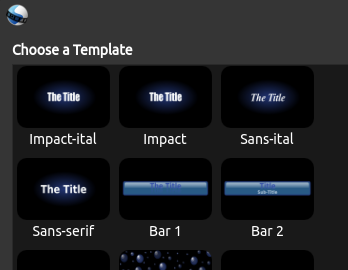
I'm curious to get reports of what you see:
Screenshots, just text descriptions, whatever works. If you see nothing, in particular, I don't really need a screenshot of no text — my imagination is quite sufficient. More useful would be exactly what template(s) showed no text, and if you saw no text after using "Change Font", exactly what you chose in the font dialog. (You might even consider including screenshots of THAT, instead of the resulting blank titles.)
Thanks!
ferdnyc commentedon May 12, 2020
Oh, one more thing I don't need: An exhaustive list of what font selections do and don't display certain ways. Though that information is the sort of thing I'm looking to compile in my own testing, it's useless to me from anyone else's testing.
(I would need to also have access to that PC, in order to collect the necessary information from the underlying system.) So, once you've tested a couple of representative samples, that should provide enough useful data. No need to go crazy.
Maxi1000dp commentedon May 12, 2020
Hi!
Thanks for your answer, but i cant solve the problem.
I tried change the font, install Bitstream, and install the templates, but the problem persist.
This image show the new templates (only in the title folder shows the template, in title_template dont show it), and the text isnt rendering.
Do you think any other solution?
ferdnyc commentedon May 13, 2020
@Maxi1000dp
NONE Of them showed up AT ALL!?!
Wow, I admit I wasn't even prepared for that possibility. I'm kind of at a loss here, I'll sleep on it and try to come up with something.
You haven't said, what version of Windows exactly? From your window borders it looks like Windows 7 perhaps? And I know you said 32-bit, is there anything else you can think of in terms of system configuration/parameters that might be relevant?
(Things like: Running in a VM, running as part of a business network with managed configuration, using network homedirs... anything that might make your setup different from the typical Windows user install, since it's possible some environmental factor that makes your system different is un-accounted for in our program logic.)
Another thing you could try is the old stalwart DLL-list collection procedure from #2367 (comment) (which I think I'll turn into a Wiki page, but for now I'll just reproduce from my comments on that bug:
openshot-qt.exeentry in the upper pane, to select the OpenShot process for examination.The text file will contain a list of all of the DLLs loaded into OpenShot. Problems with Windows installs of OpenShot are not-infrequently tracked down to issues with DLLs being loaded incorrectly or not at all. Those problems are often detectable upon careful inspection of that listing.
eszlari commentedon May 14, 2020
I have not read everything above, I just wanted to say, that for the flatpak version of OpenShot, I simply run
sed 's/Bitstream Vera Sans/DejaVu Sans/g'on the complete source three. DejaVu Sans seems to me like a much saner choice (on Linux at least).ferdnyc commentedon May 14, 2020
*nod* In the RPM Fusion package we just made B-V-S a soft required dependency, so we can rely on it being there. But that doesn't help Windows users, in particular, who are least likely to have any of those font choices.
I was hoping the generic "sans-serif" might at least work, but the feedback from @Maxi1000dp on my test files was that even that doesn't render, so I'm hoping the DLL information I requested will give some indications as to why.
ferdnyc commentedon May 14, 2020
Hmm. Inno Setup has the ability to install fonts in the proper manner. (See the "FontInstall" item about 1/3 of the way down the page.) In theory I suppose we could bundle B-V-S or any other freely-available font with the Windows installer package, and add it to the system.
I just wish I knew with more certainty whether even that would solve these issues. (And it definitely still won't solve the cases where selecting a different font has no effect on the rendered titles, at most it'll just mean that the text remains in B-V-S instead of not showing up at all.)
MBB232 commentedon May 15, 2020
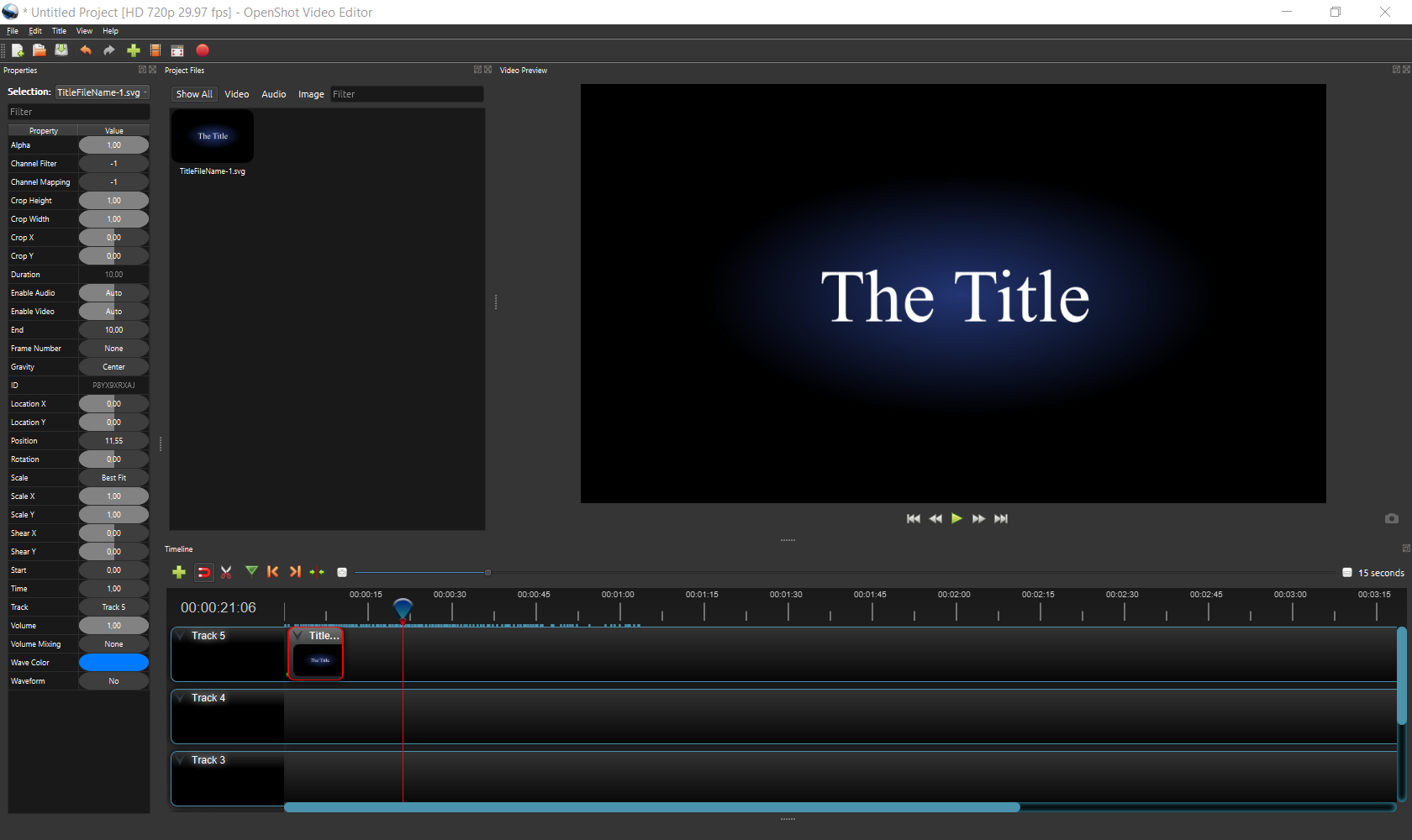
@ferdnyc Made this yesterday. Sorry that it toke a bit of time. I had to figure out recording software (ScreenToGif) and Handbrake. (It was very ... educational. Though I did not expect H265 to be larger then H264, so more learning is required) I toke the video before installing the Vera font. I did not install the Ubuntu font. I used the Vera that you linked with 4 font types. (I previously found a Vera font that had 10, including VeraMono and VeraSe, but never installed it using the customdir of Inkscape)The oddest thing I found that the title is not showing where it is shown in the timeline, but a bit later.
Is this a bug in the 2.5.1 dev version? I do not remember the issue in the normal version. (I installed a daily like you asked, although I titles seemed to work for me in the regular installer. Was it something special for the fonts, or was it only the Linux version that needed the daily?
Putting fonts in the Openshot font dir does indeed not make any difference.
TitlesTest.zip
ferdnyc commentedon Jun 8, 2020
@MBB232 Apologies, I somehow missed your previous comment when you posted it, only just seeing it now. Thanks for taking the time to test!
I've since confirmed with @RazrFalcon that resvg does not currently support what's called "font synthesis", which is the renderer's ability to create bold and/or italic versions on-demand for fonts that don't natively support them. (Impact is handy for that, as it only comes in one variation: Condensed Regular. So, anytime you see Impact Bold, Impact Italic, or Impact Bold Italic, it's a synthesized variation.) That issue 297 I opened in the resvg repo (link above this comment) is exploring the possibility of adding that support to resvg, which would definitely make things a lot more predictable in OpenShot font land.
The daily build version was so that you could drop the test files in
C:\Users\username\.openshot_qt\title-templatesand have them show up in the interface. In 2.5.1 that feature wasn't yet implemented, so you wouldn't have seen the title options from the test set in the Title Editor list. But that was the only thing (of any significance to these tests) that was different from 2.5.1 release.Yeah, that is truly bizarre. The oddest thing is that, if you look at the Position property of the first clip you drop, OpenShot thinks it's positioned over 7 seconds later than the actual location in the interface:
When you later drop the second title, same thing, it's showing as positioned at
2.80(Edit: Typo, 22.80) seconds, so the preview is correct based on the property values shown, despite what the interface is displaying:It's as though your timeline's entire display coordinate system had somehow been shifted 7.65 seconds to the left. I've NEVER seen anything like that happen before, so I really don't have any theories. Presumably if you'd saved the project, quit OpenShot, and loaded it back in, the positions of the title clips would've updated to their real locations farther down the timeline. But how that situation came to be, and whether it's something that can be expected to reoccur, I couldn't begin to guess.
I suppose we'll have to keep watch for other reports of similar problems, so we can hopefully get a handle on it. But it's not generally something that should happen in the Daily Builds or any other version. I guess, if it does rear its head again, open an Issue please, ideally with logs. (Not that I expect them to show anything. Especially if the error occurred in the JavaScript, which seems likely.)
MBB232 commentedon Nov 7, 2020
TItleColours_Project.zip
@ferdnyc
I'm sure I'll make that first video someday, but playing with the parts of Openshot that do /not/ work has been so much more interesting and educational for now.
I've been thinking about this. I originally tried creating hashes of the screenshots of 'correct' title svgs. But while it always created the same hash regardless of the position, it was dependend on the resolution size Openshot was running in. So it did not even work on the same machine, moving OpenShot to a different screen or changing the monitor zoom factor would change the hash value. Perhaps it works in Linux, or can be done on a 'virtual' desktop within Python, but on Windows this did not work.
However I was on to something with checking the pixels on the rendering. I've started playing with PyAutoGui a bit. I'm still not close to being a real programmer, but checking against an correctly rendered existing PNG should work.
PyAutoGui can take a screenshot of a defined area, and then check every pixel for its colour. (There are probaly less resource-intense ways to do this if you do know how to program). So if all the pixels are still black, then no text has been rendered, and the font must be broken.
I think a similar way can be used to test if certain default fonts are rendered correctly, or if they are being substituted.
Or check any font for substitution by checking them against the default font. (If they are the same then the custom font is not working right.)
I've tried this concept manually in the following project. I've created PNG's of the correct font and the Title-generated font on the track behind it at the same tine. When they are not the same, it gives a high color contrast. If rendered correctly, they appear in grey. (Have Python check the same part of title for Cyan or Red colors to detect errors)
Profile: HD 72p 29.97fps 1280c720 2 tracks,
2 PNG images of font in Cyan (0.255.255, at 50% opacity
1 Font rendering from Title SVG, RED 255, 0, 0)
NOTE: if both set to 50% on the /same/ track, it starts to flicker
It is probably resource heavy to do this every time you select a different font, but perhaps every time you try a new font?
Or maybe this can be done at startup or during install, and have a checkbox to force a re-run if you install new fonts?
The simplest case would be having the user compare image manually against a packaged video.
PS: I've tried it on a second machine without the fonts installed, and it did give the high contrast, see the second video.
However, OpenShot did not save its imported images along with its project, so when I opened up on the second machine, I got a lot of 'missing image' errors. It was easier to terminate Openshot, so a Cancel All button would be nice.
PS: added the project file.
TitleColours.zip
TItleColours_Project.zip
MBB232 commentedon Nov 7, 2020
The previous post should be platform agnostic, but Windows is a Font hell in itself, so I thought I'll document it.
The system-wide installation recommendation that you give is very important. (I'll add it to the FAQ) Windows now places them in a user dir by default. It no longer throws a pop-up about admin rights on double click. You need to use 'right mouse button, install for all users'. , or copy them in from an admin console.
But when you look under Control Panel >fonts or C:\Windows\Fonts they still show up! Only with properties, you can see that they are actually installed under C:\Users[username]\AppData\Local\Microsoft\Windows\Fonts
If you try again, it happily gives the notification that the font is already installed, or leaves the local version if you add it machine-wide,
They did not seem to appear under the new Config>Fonts, but that one is known to have issues. https://answers.microsoft.com/en-us/windows/forum/windows_10-files/installed-fonts-not-showing-up-in-windows-fonts/5fa9c4a1-e86c-4bd6-af33-13e249b3ec43?page=3
It also has the options "(Font Settings: Hide fonts based on language settings [disabled]
(To save space, allow fonts to be installed using a shortcut (advanced)) [disabled]
I have no idea if programs can still see them if these are enabled.
Which gives odd behaviour under OpenShot, probably because of the two different render engines;
They ARE showing in Title>Edit>Change Font
NOT showing in Title>Edit (preview) or in video
(Of course the fonts worked just fine in MS Notepad - and IRRC they had a different name in Gimp
The default fallback font seems to be Courier New,
The normal Courier is behaving odd; if selected the font becomes very small. If another font is then selected, it remains small.
Another bug I noticed (though I believe I have seen reported before:
If you use a Title card with multiple rows, and leave row empty, the field disappears for edit and it breaks the rows below.
BUG: Title with 3 lines ex: Standard 3
set line 1 + 3, leave 2 empty
If copy title with 3 lines: edit text not working for line 3 (line 2 gone
-> title with 4 lines standard 4 (same for Post-It
remove line 2
copy, edit: 'line 4' changes line 3, line 2 is now missing, line 4 can not be edited.
MBB232 commentedon Nov 7, 2020
I think that would be an improvement on Windows, yes. Or at least offer a warning and a download link if found missing. (On Linux machines, it can try to add it the normal way from the repository?)
I still do not understand why you can not run a check on the font dir to make sure the default fonts at least exist on the machine. Another quick search gave me this: https://stackoverflow.com/questions/64070050/get-a-list-of-installed-fonts-python-windows
Another article mentions the existance of a Python script, but does not mention where. https://superuser.com/questions/1432800/get-actual-font-name-of-ttf-file-from-command-line
For Linux, this came up, though not sure if it gives the right properties,
https://unix.stackexchange.com/questions/26053/is-there-a-unix-command-line-tool-that-can-analyze-font-files
I also think that (the option for) packaging the fonts along with the project would be a good idea, or setting a custom font dir. (Which the user can set either to the local Windows font dir, a project dir, or one shared with Inkscape and other design programs. I think Gimp has this feature too?)
stale commentedon May 8, 2021
Thank you so much for submitting an issue to help improve OpenShot Video Editor. We are sorry about this, but this particular issue has gone unnoticed for quite some time. To help keep the OpenShot GitHub Issue Tracker organized and focused, we must ensure that every issue is correctly labelled and triaged, to get the proper attention.
This issue will be closed, as it meets the following criteria:
We'd like to ask you to help us out and determine whether this issue should be reopened.
Thanks again for your help!