Repository navigation
.NET Support for macOS 11 and Windows 11 for Arm64 and x64 #22380
Description

.NET Support for macOS 11 and Windows 11 for Arm64 and x64
macOS and Windows Arm64 OSes include support for x64 emulation in addition to native Arm64 execution. This means that these OSes support both Arm64 and x64 apps, and by extension the Arm64 and x64 versions of .NET. The .NET 6 release includes support for macOS and Windows Arm64 OSes, for both native Arm64 execution and x64 emulation. Unintuitively, the majority of the effort for the project wasn't adding support for Arm64 but a large set of changes to support x64 emulation. You can see those changes demonstrated in .NET 6 RC2 Update for macOS and Windows Arm64
The complex nature of the project requires us to explicitly define support for .NET SDKs and runtimes, specifically for .NET on macOS and Windows Arm64.
In terms of operating system support, x64 emulation is a recent feature. It was first introduced (respectively):
- macOS 11 (Big Sur; November 2020)
- Windows 11 (October, 2021)
Note: macOS Arm64 is referred to by Apple as "Apple Silicon" or "M1".
Installation guidance
You are recommended to install the .NET 6 Arm64 SDK on macOS and Windows Arm64. It provides the best experience. The x64 SDK is only recommended for specific use cases, and is typically not needed, even for x64 development. The Arm64 SDK can be used for x64 development.
Note: The key missing scenario is using dotnet test to test with x64 emulation using the Arm64 SDK. At this time, you need to install the x64 SDK to run tests with x64 emulation.
The existing x64 and Arm64 .NET Installers were never built with x64 emulation mind and would clash when installed together. They required changes to support side by side installation. As a result, the existing installers and any existing x64 installations are incompatible with the new .NET 6 Arm64 and x64 installers. Supporting upgrade here is impossible (arm64 would have to remove x64) and doing so partially would make things much more complicated for limited customer benefit.
The following applies only to macOS 11 and Windows 11 Arm64 machines.
- If you have never installed an x64 version of .NET, you are good to go.
- If you have installed an x64 version of .NET (earlier than the supported builds listed below), then you must uninstall or otherwise delete them before installing the new supported builds.
- If you want to be extra careful, uninstall all .NET versions and start with the builds listed below.
On Windows, you can uninstall .NET via "Add or Remove Programs".
On macOS, you must manually delete a .NET installation. The easiest approach is with the following two commands (from the terminal window):
sudo rm -r /usr/local/share/dotnet
sudo rm -r /etc/dotnet
On macOS, you might need to reinstall .NET 6 Arm64 after installing .NET 6 x64 if you previously had x64 installed.
Install directories
On macOS and Windows Arm64, .NET builds install in the following directories, respectively:
Arm64 builds:
/usr/local/share/dotnetC:\Program Files\dotnet
These directories are added to the PATH.
.NET x64 builds:
/usr/local/share/dotnet/x64C:\Program Files\dotnet\x64
These directories are not added to the PATH.
Critical note: That means, if you install a .NET Arm64 build and type
dotnetfrom the terminal (or command prompt), then the Arm64dotnetlauncher will execute. This will not happen for a .NET x64 build, even if it is the only .NET build you install on an Arm64 machine.
Supported Arm64 SDKs
The .NET 6 Arm64 SDK is the first fully-supported Arm64 SDK on macOS 11 and Windows 11 Arm64.
The Arm64 SDK and runtimes install to the dotnet directory, same location the x64 SDK does on an x64 machine.
The following .NET Arm64 SDK builds (and later) are half-supported on Windows Arm64:
- 5.0.403
Half support:
- Can install SDK.
- Can use the templates.
- Can use the runtimes.
- The CLI and toolset (like
dotnet build) have not been updated and may have bugs that we are unlikely to fix.
For example, the following command is supported to run an app via x64 emulation with the .NET 6 CLI but not the .NET 5 CLI.
dotnet run -a x64Supported x64 SDKs
The .NET 6 x64 SDK will be the first fully-supported x64 SDK for both macOS 11 and Windows 11 Arm64.
The x64 SDK and runtimes install to a new x64 directory within the dotnet directory, creating an x64 product hive.
The following .NET x64 SDK builds (and later) are half-supported on macOS Arm64:
- 5.0.403
- 3.1.415
Supported runtimes
All in-support Arm64 and x64 runtimes are supported on macOS and Windows Arm64. We had to change existing installers to install side-by-side with the Arm64 runtimes and SDKs. As a result, none of the existing builds of the runtime are supported. You need to install runtimes released in November 2021 or later.
The following runtime builds (or later) are supported on macOS and Windows Arm64:
- 3.1.21 (x64 only)
- 5.0.12 (x64 only for macOS; Arm64 and x64 for Windows)
- 6.0.0 (x64 and Arm64)
Supported runtimes include:
- .NET Runtime
- ASP.NET Core Runtime
- Windows Desktop Runtime
Unsupported installers
All installers released before November 2021 are not supported on macOS and Windows Arm64.
Where possible, we have added installer blocks into unsupported installers so that users don't accidentally break their .NET installation.
Private installs
You can install any supported .NET version (x64, Arm64, runtime, or SDK) on your macOS and Windows Arm64 machine privately.
For example, on macOS Arm64, you can download and expand a .NET .tar.gz archive to a private location and it should work. The primary challenge we needed to overcome was installing .NET to the global location with the official .NET installers. If you use private installs, then you have a lot more flexibility.
.NET builds for Windows x86
.NET builds for Windows x86 are unaffected by these changes. They are supported on Windows x86, x64, and Arm64 OSes.
However, starting with .NET 6, you can now do the following using the .NET 6 x64 or Arm64 SDK (on Windows):
dotnet run -a x86This command will launch an app as a 32-bit x86 process, from an x64 or Arm64 SDK.
Notes
Note: None of these changes apply to Linux since its model for x64 emulation on Arm64 is very different. The macOS and Windows models are very similar to one another.
Note: VS Code and Omnisharp support native architecture SDKs, only. Omnisharp does not support x64 SDKs on macOS and Windows Arm64, nor are there plans to support that.
Note: The support model is asymmetric between macOS 11 and Windows 11 Arm64, specifically for .NET 5 and .NET Core 3.1. We have various users on macOS and Windows and are helping them go through this transition to Arm64 with us and are addressing their specific needs.

Activity
artl93 commentedon Oct 29, 2021
@richlander - There directories are not added to the PATH. << Their?
NatMarchand commentedon Oct 29, 2021
Hi there!
Thanks for the post, we tried yesterday to make dotnet 6 work with a colleague on her Mac M1 and were unable to do so, hopefully it will help us to get there.
However, we're unable to find a link to download the mentioned sdks :
I guess they'll be available soon but can't we download a preview of them ?
richlander commentedon Nov 1, 2021
@artl93 -- Oops. Fixed that. Thanks.
@NatMarchand -- Sorry about that. Those builds are not yet released. They will be released at the same time as the .NET 6 final build. I updated to text to clarify.
hdamasceno commentedon Nov 8, 2021
After install the new version, nothing the console CLI not works!
Is this issue only with me?
My Mac is updated and before I install the new version 6.0.100 was everything OK
marinasundstrom commentedon Nov 8, 2021
I have never got this to work either on my M1 Mac. I need older versions in order to run tools that target those frameworks, like Tye.
danmoseley commentedon Nov 9, 2021
@hdamasceno @RobertSundstrom what are your symptoms/setup -- can you share more info?
richlander commentedon Nov 9, 2021
In particular, can you share which versions of .NET you have on your machine?
eluchsinger commentedon Nov 9, 2021
Also having issues here. By the way can you make this documentation available somewhere more public? Finding this in GitHub is not the best way to go with such an important information.
Reproduction Steps:
dotnetworks.dotnetstopped working - it's not found.dotnetcommand is found, but I only see the ARM runtimes / SDKs (I don't know how I can't make it show the x64 ones anymore -dotnet -a x64 --list-sdksdoes not work.Failed to load /usr/local/share/dotnet/host/fxr/6.0.0/libhostfxr.dylib,marinasundstrom commentedon Nov 9, 2021
@danmoseley Now it seems to work. All the older versions, new installers, have been put in the x64 directory.
Tye (.NET 3.1 x64 self-contained, I believe) seems to run, at least. It runs a build on my broken project☺️
The problem could have been that the necessary files were missing in /etc/dotnet. I had not deleted the directory before.
I will try this further and see what does work and not work. Hopefully, all of my stuff will.
The latest version of VS for Mac 2022 (Preview 3) defaults to ARM64. That is great.
One annoying thing, that someone else pointed out, is that the dotnet --list-sdks command does not show any of the x64 SDKs.
Better user experience and documentation is needed. Not simply dev docs on GitHub.
eluchsinger commentedon Nov 9, 2021
How am I supposed now to run the
dotnetx64 version? I get a warning about the development certificates when running my .NET 5 project. Running thedotnet dev-certs https --trustcommand doesn't help - probably because that command uses the ARM versiondotnet.How can I run
dotnetin the x64 mode when I have both ARM and x64 installed?After uninstalling all .NET Versions and reinstalling .NET 5, now it is in the x64 folder and the command
dotnetcan not be found. Probably adding the x64 folder to PATH will fix this problem, but then I will have a whole lot of other issues as soon as I install .NET 6 again.Right now I will defer installing or migrating to .NET 6 until these issues are fixed or a clear guidance is provided.
Serge-N commentedon Nov 9, 2021
No luck for me here. Such a pain. Dotnet 6 (Arm64) runs just fine. The moment one installs dotnet 3 (x64) and dotnet 5 (x64). The last to install become the default.
For now, I will resort to running the ARM version and try to get only runtimes for dotnet 3 and 6.
marinasundstrom commentedon Nov 9, 2021
@Serge-N
On macOS on Silicon, if have previous installs of .NET:
Remove installed runtimes and SDKs:
Then download the latest SDK installers:
The previous versions have been doing updated with support for multi-architecture targeting.
Run the instwllers in the order of the list. From top to bottom.
Check
/usr/local/share/dotnet/x64/sdkto see that the SDKs are there.And also run:
The directory should contain a file for each architecture containing the SDK path of each.
Now you should be able to run this code:
Using either of these with the expected result:
If it does not work, then you might have to run the .NET 6 (ARM64) installer again after running all of the above.
Keep in mind:
Will only show .NET 6 on ARM64. The reason is that the dotnet command belongs to the Silicon/ARM64 SDK.
Serge-N commentedon Nov 9, 2021
@RobertSundstrom
I followed the instructions, it worked but not natively.
You may note that :
dotnet --list-sdksdoes list all the installed versions except ARM64.dotnet rundoes run but always under emulation (x64) as per given code example.Device details
6 remaining items
Meowzz95 commentedon Nov 11, 2021
@eluchsinger
My current workaround is to alias
alias dotnet64="/usr/local/share/dotnet/x64/dotnet"So I can run dotnet64 xxx if I ever need some package from old arch
Edit:
Sorry, it does not work, I was using this to build, but just tried ef tools indeed failed to work.
So same question here, how do we run dotnet tools for projects in x64 only SDK version?
Edit 2:
export DOTNET_ROLL_FORWARD=LatestMajorThe current workaround I found from another issue(dotnet/efcore#27787) is to export the above env var and run dotnet ef again.
matt-goldman commentedon Nov 24, 2021
Thanks @Meowzz95 your workaround worked for me. I dropped the alias and the export into a bash script so I can easily set up my environment for .NET 5 when I need it. Hopefully we get a fix soon.
mumby0168 commentedon Nov 25, 2021
This is a great read and explains the differences between the two archs and how to set them up and use them.
For me, I started off installing the arm based dotnet tool and I have had the issues with the
dotnet --list-sdkscommand only displaying the version6.0.xand none of thex64based runtimes which include5.0.xand3.1.xand alsenet6if you want to install it via the x64 and run it being emulated. For me, we have a lot of projects that are a mix of versions 3, 5 and 6 so until the migration for all the projects i'd need to use all versions.In order to get this working, I used part of the above to get me started first off remove all the .net installtions from your mac using the commands
this get's rid of all the
dotnetversions on your machine. The next step is to install the version you like but explicitly forx64as the above states these will be installed in the following location's and these are not added toPATHfor M1 mac's. So once you have installed the versions you want you then add thedotnettool to the your path by runningThen add the following path to the list
/usr/local/share/dotnet/x64and save the file. Then you should be able to rundotnet --list-sdksand see all the versions see the output from my system belowI have then got this setup to build a project in jetbrains rider by setting the following setting
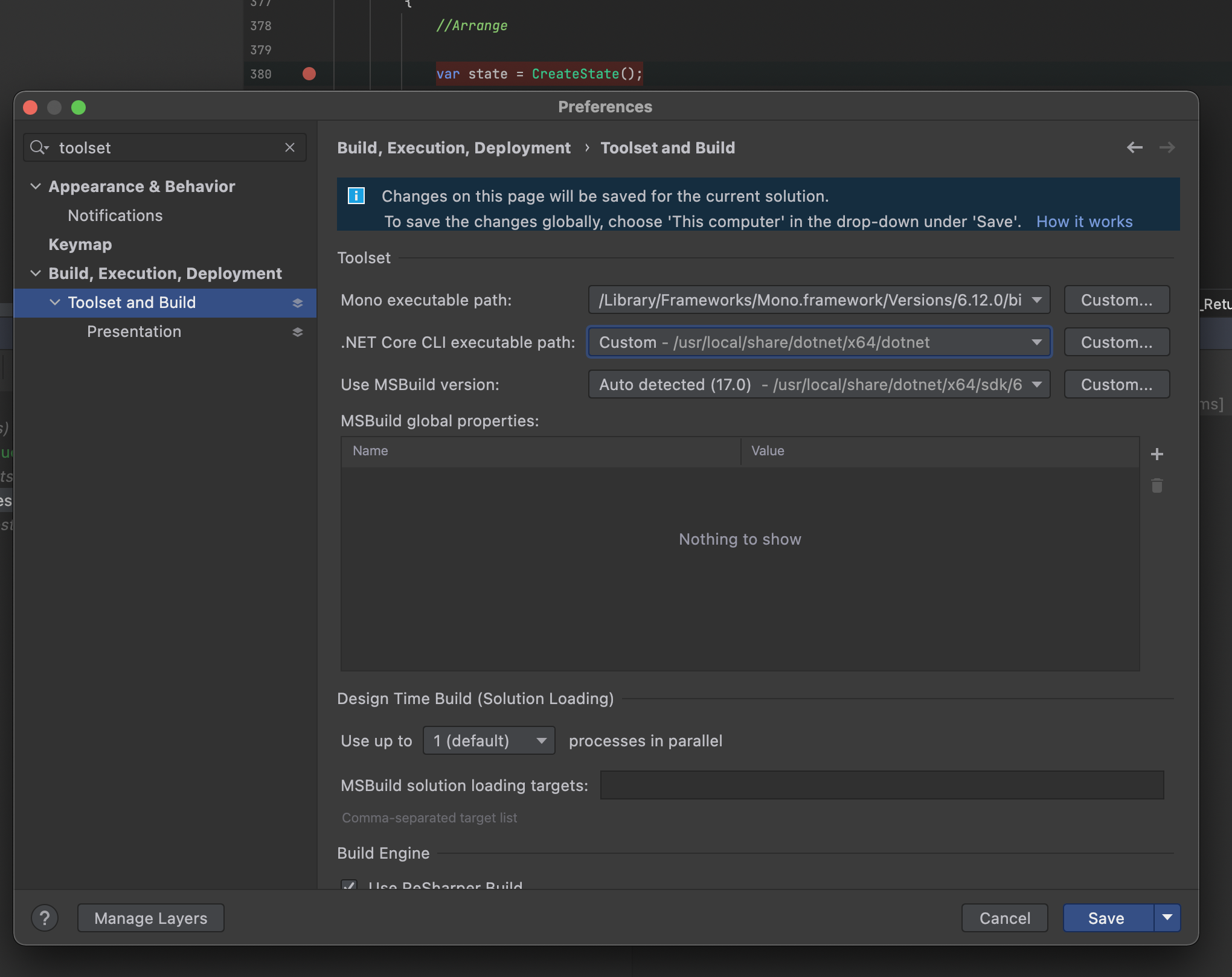
Feel free to tag me and I'll try and help anyone who is stuck, hope this helps 😃
mattjohnsonpint commentedon Mar 3, 2022
Just wanted to add that while these instructions worked down to 3.1, installing any lower (unsupported) versions corrupts the installation. After installing 2.1.818 I get:
This appears to happen because the older (unsupported) installers are still using
/usr/local/share/dotnetinstead of/usr/local/share/dotnet/x64.A workaround I found is to use the dotnet-install bash script, after running the full installer packages for the supported versions. The following added the current 2.1 SDK to the correct location:
mattjohnsonpint commentedon Mar 3, 2022
A quick follow-up. The above workaround works for
dotnet testwhen test projects are targeting netcoreapp2.1, but doesn't appear to work fordotnet run. It still gives the same error about incompatible architectures.richlander commentedon Jun 25, 2022
We didn't do anything for .NET Core 2.1. It's out of support, so wasn't important for us to special case.
mgpepe commentedon Jul 12, 2022
Hi, I am running an M1 with Parallels and Windows 11 Arm. As per this documentation it looks like arm64 3.1 SDK should be able to install. However, when I run the installer, I get a "This app can't run on your PC. To find a version for your PC, check with the software publisher."
Any ideas why this is and how can I overcome it?
richlander commentedon Jul 12, 2022
Which installer are you using? There is no .NET Core 3.1 Windows Arm64 SDK.