Repository navigation
Update to nimbus-jose-jwt:6.3 #6095
Description

Summary
We need to update to Nimbus Jose Jwt 6.3. This can be done by updating dependency-management.gradle.
Related to #5853
We need to update to Nimbus Jose Jwt 6.3. This can be done by updating dependency-management.gradle.
Related to #5853

Activity
CQuarterz commentedon Nov 15, 2018
Hi,
Would this just involve changing the dependency on the gradle?
Sorry, first timer here and would like to contribute!
hellosatish commentedon Nov 15, 2018
Hi @jzheaux
I would like to contribute to this. Could you please point me to the guide and verification steps
.
hellosatish commentedon Nov 15, 2018
Hi @jzheaux
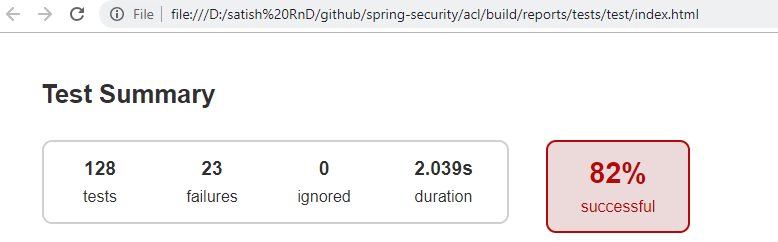
I forked and cloned the repo but my tests are failing for ACL 82% are successful
hellosatish@9eefb23
jzheaux commentedon Nov 15, 2018
@hellosatish and @CQuarterz sorry for a bit of confusion here.
So happy that you both want to contribute! Since @CQuarterz claimed it first, would you still like to make the changes?
@hellosatish when the next "first-timers" issue comes up, I'll not tag it, but will simply ping you to give you first pick. Does that sound alright?
jzheaux commentedon Nov 15, 2018
@CQuarterz yes, that's right. The basic steps are:
./gradlew clean build integrationTestOnce the build passes, check out the contribution guidelines for a couple more details (and feel free to ping me here with more questions). There are some guidelines on committing and submitting a PR.
jzheaux commentedon Nov 15, 2018
@hellosatish would you like to take this other dependency management issue?
We can also chat about the build failures you were experiencing over on that ticket if you are still having difficulties.
hellosatish commentedon Nov 16, 2018
Hi @jzheaux
i would like to take that, and have claimed on that issue as well.
CQuarterz commentedon Nov 16, 2018
Cool I'll take it on! Thanks for the opportunity!
jzheaux commentedon Nov 16, 2018
Excellent, @CQuarterz, it's yours!
4 remaining items
CQuarterz commentedon Nov 17, 2018
Okay I think I added a couple commits by accident, but I think I fixed the message correctly!
jzheaux commentedon Nov 17, 2018
No problem, @CQuarterz, I've done that before, too. :) It's fixable!
You have five commits right now, and you just want one. What you can do is the following:
This is going to list the latest commits in an editor. Next to each one, you can specify an what action you'd like to do. Next to the last four commits, change the command word out for
squash. This is going to combine those commits and show you an editor to change your commit message. (If you want to read up on this, it's what we mean when we say "squash your commits")Then, change the commit message and save.
Now if you do
git logyou should see only one commit that is yours.From this point, it will be simpler to create a branch:
git checkout -b gh-6095And then push to that branch:
git push origin gh-6095Let's get that far, and then ping me again.
CQuarterz commentedon Nov 18, 2018
I believe I got the new branch created!
jzheaux commentedon Nov 18, 2018
@CQuarterz I do see the branch, but not your commit on that branch. Would you mind trying again? You'll know you have it right when you are on your branch locally (
git checkout gh-6095) and you do agit logand the first commit in the list in yours. Once you see that, make sure to push, and you'll see your commit here, too.CQuarterz commentedon Nov 19, 2018
I believe I might have merged the branches into someone else's commit. Not sure how to fix that.
jzheaux commentedon Nov 19, 2018
When you amend a commit or when you rebase, it resets the commit hashes for the commits that were changed. When you push, Git wants to try and reconcile those changed hashes with what the remote repository has.
This is why when you do a
git pushafter acommit --amendor arebasethat it warns you to first do a merge commit (read: a reconciliation commit). (Not sure if this is what is happening on your repo, but it sounds like it)But actually, you don't want to merge with your remote repository in this case because you are saying that your local repository is the one that has the correct hashes. To do that, you force the push instead, e.g.:
git push origin +gh-6095- (note the plus sign)This will tell Git to just take the commit hashes in your local repository and change the remote hashes to match.
jzheaux commentedon Nov 28, 2018
@CQuarterz are you still interested in completing this?
jzheaux commentedon Dec 3, 2018
@CQuarterz do you think that you could complete this by next Monday?
If that sounds workable, then let me know where you are at with making the PR work, and I can help you take next steps.
If not, that's okay, too, and we can open it up to others who would also like to contribute.
CQuarterz commentedon Dec 4, 2018
I believe I changed someone else's commit by accident and not sure how to remove it to make my own.
jzheaux commentedon Dec 4, 2018
No problem, @CQuarterz. When you are new to git, everything is Greek.
Let's try this from scratch if you don't mind.
At this point, your local branch will be reset to look like the main repository.
Then, make your edit again.
Once you've made your edit again, do:
Your commit message should follow the contribution guidelines, meaning a short title, any additional description in the body, and then a final line that looks like "Fixes: gh-6095"
Update to nimbus-jose-jwt:6.3
CQuarterz commentedon Dec 4, 2018
Done I believe! Thanks for the help!
jzheaux commentedon Dec 4, 2018
@CQuarterz perfect! Now, just create a pull request.
Update to nimbus-jose-jwt:6.3