
Author’s note: To build a playable little game with the Claude Code game studio template, you first need to understand how the 49 agents divide the work, which stages burn the most tokens, and how to pair models to keep costs down.
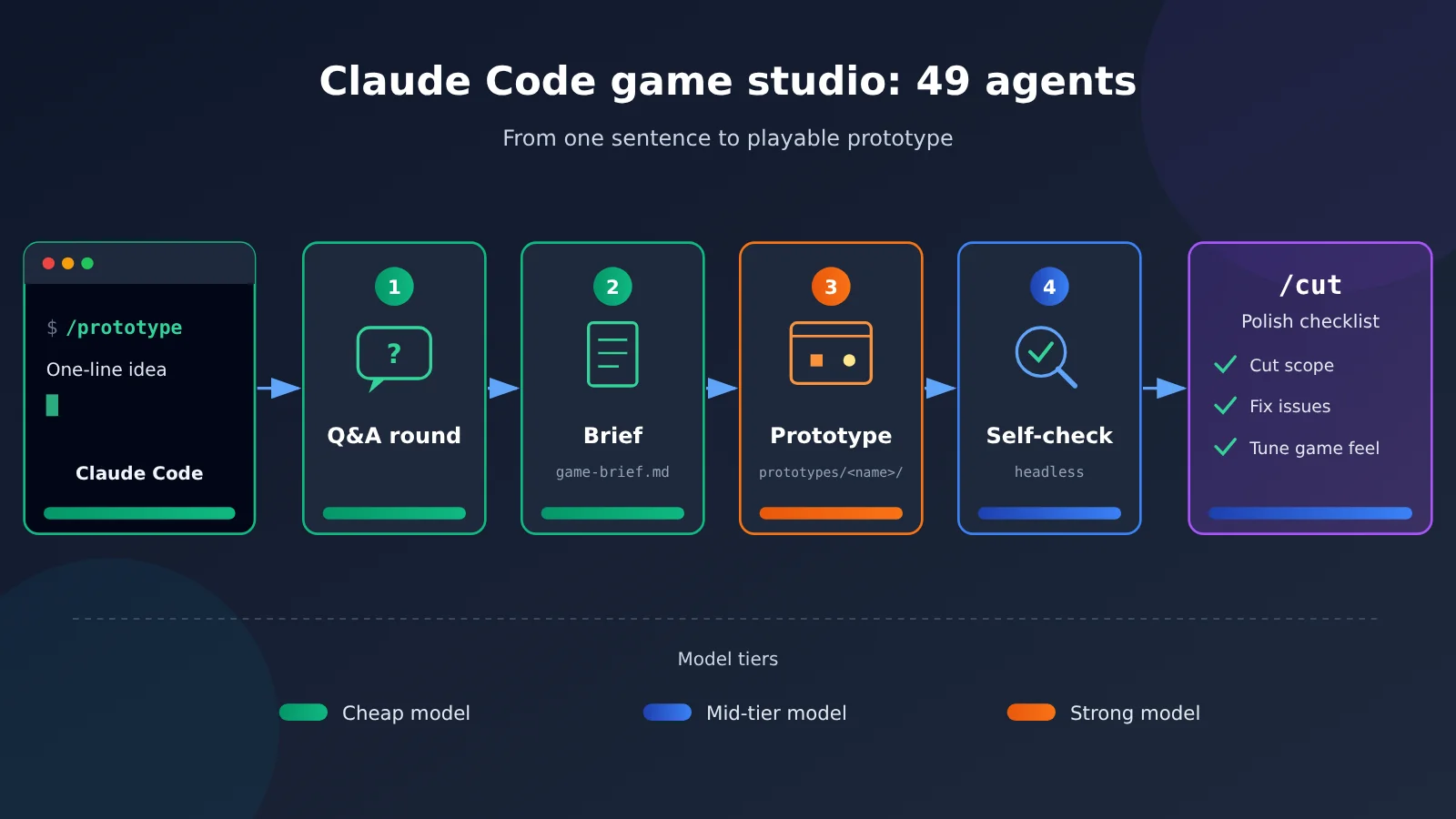
A lot of people want to make a small game with AI, but once they open Claude Code, they have no idea where to start. If you just ask a Large Language Model to write a game, you’ll usually get a chunk of code that runs, with no clear process for how to revise it, how to sign off on it, or how to keep the scope in check. The open-source repo Donchitos/Claude-Code-Game-Studios takes a different approach: organize Claude Code into a game studio made up of 49 agents, then take a one-sentence idea all the way to a playable prototype.
This isn’t a game design tutorial, and it doesn’t cover the Godot, Unity, or Unreal engine paths. The repo’s author notes that the engine paths haven’t been tested the same way yet. This article only covers the browser prototype workflow that already works end to end, and how many tokens that workflow costs.
By the end of this article, you’ll know: the complete steps from /prototype to /cut and the acceptance criteria for each step, how the 49 agents are grouped by function and what rules they follow when collaborating, which stages are token-heavy and which are light, and how to pair cheap models with strong models so a prototype’s cost stays within an acceptable range.
Claude Code Game Studio: Key Takeaways
Here’s a quick table covering what this template is, what it delivers, and where its limits are. The numbers below are self-reported by the repo, as of 2026-11-27.
| Point | What it means | Why it matters to you |
|---|---|---|
| Repo positioning | Donchitos/Claude-Code-Game-Studios, MIT license, ~41,035 stars, latest commit 2026-11-09 | Clone it and use it as-is, or modify it to fit your needs |
| 49 subagents | Covers seven disciplines: design, programming, art, audio, narrative, QA, and production | Each kind of work gets its own dedicated agent |
| 75 skills | Mapped to workflow stages as slash commands, such as /prototype, /dev-story, /cut |
You don’t have to write your own prompts to orchestrate the process |
| Process mechanics | Sprints, phase gates, team-* multi-agent pipelines |
You can roll back when requirements change, and scope stays under control |
| Verified scope | Browser-prototype path; the engine path is unverified | Great for building a playable prototype first, not for jumping straight into an engine project |
How Claude Code Game Studio works
The whole template is essentially a set of files. The agents/ directory holds definitions for the 49 agents, each a markdown file with YAML frontmatter; the skills/ directory holds the 75 skills, each tied to one workflow stage. Clone the repo into your own project directory, open Claude Code inside that copy, and those roles and commands take effect.
The upside of this design is transparency. If an agent doesn’t behave the way you expected, you can just open its definition file and edit it—no black-box service in the way. The trade-off is that every agent conversation, file read, and line of code burns model tokens. More agents and more back-and-forth discussion mean a bigger bill. We’ll dig into the cost side in a later section.
Claude Code Game Studio Quick Start: The Shortest Path
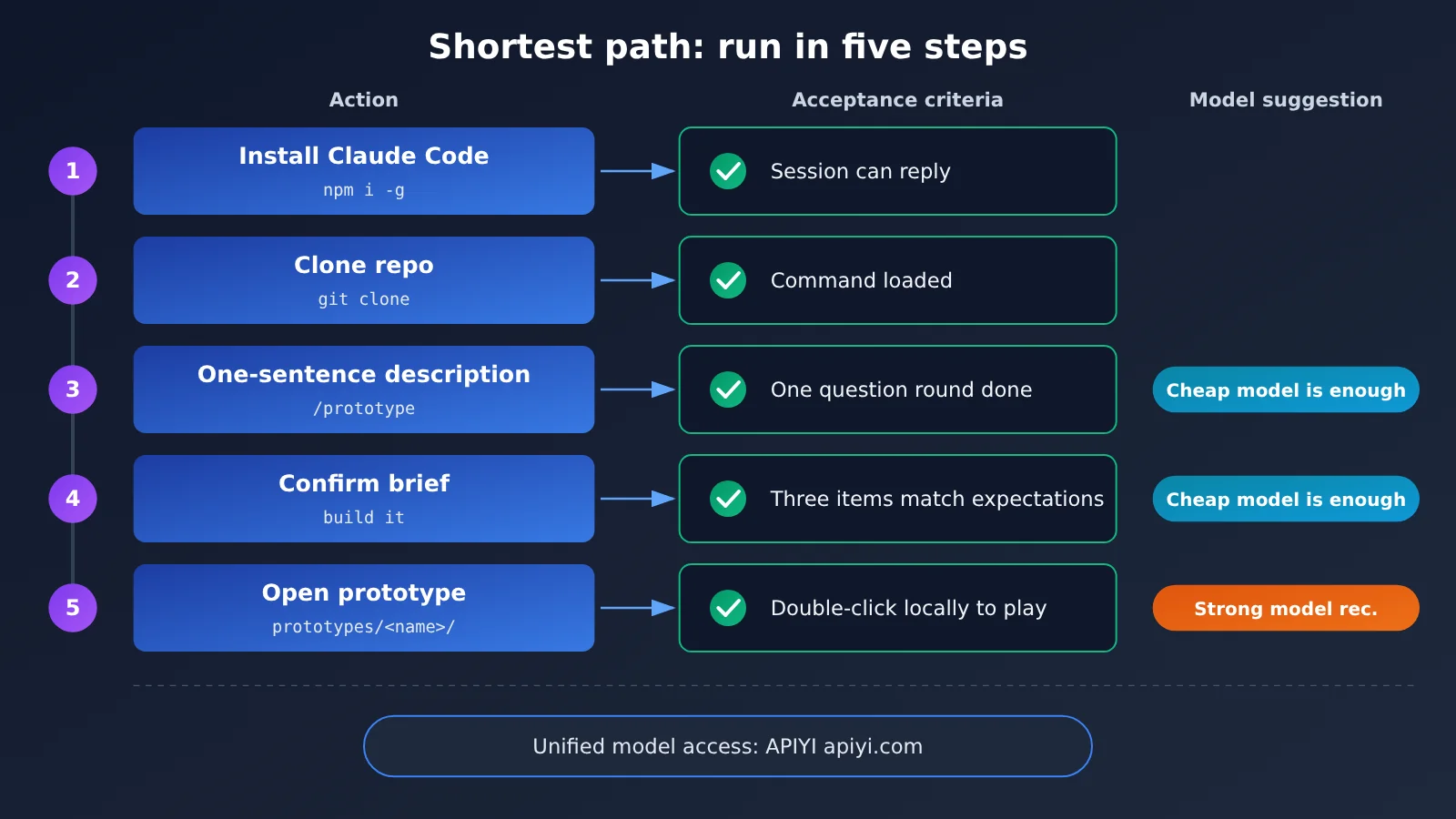
The shortest path has five steps: install, clone, run /prototype, confirm the brief, then build and self-check. Each step comes with acceptance criteria—hit them before moving on, and you’ll avoid rework later.
Step 1: Install Claude Code and set up a model endpoint
- Installation: use the official installer, or run
npm install -g @anthropic-ai/claude-code. Node.js 22 or later is required. - Model access: if you want to switch between Claude and other models under the same account, you can use the unified endpoint from APIYI apiyi.com. The OpenAI-compatible base_url is
https://api.apiyi.com/v1, and Claude Code can also use the Anthropic protocol’s/v1/messagespath. For the exact environment variable setup, follow the instructions at docs.apiyi.com. - Acceptance criteria: Running
claudein the terminal opens a session; send a message and get a reply, with no authentication errors.
Step 2: Clone the repo into your own project directory
- Run
git cloneto pull Donchitos/Claude-Code-Game-Studios, then launch Claude Code inside the copy directory. - Don’t develop directly in the original repo — otherwise, when you pull upstream updates later, they’ll collide with your game code.
- Acceptance criteria: Type
/in the session and you should see commands like/prototypeand/startin the suggestion list, which means the skill has loaded successfully.
Step 3: Describe your game in one sentence with /prototype
- Example:
/prototype a fishing game where the rare fish only bite at dusk. - Next comes a round of questions covering genre, feel, visuals, difficulty, and objectives. Each one has a default answer — if you’d rather not think it through, just reply “you decide.”
- Acceptance criteria: The Q&A wraps up in a single round, with no repeated follow-ups on the same question.
Step 4: Read the one-page brief, then say “build it”
- The generated file is
design/game-brief.md, and it keeps your original words. - If it looks right, reply “build it”; if there’s anything you’re not happy with, revise the brief first and then start the build. It’s cheapest to make changes at this step — once the code is written, changes cost a lot more.
- Acceptance criteria: The brief clearly spells out the core gameplay, what to keep, and what to avoid — and all three match what you had in mind.
Step 5: Get the first playable version and check the self-test results
- The output lives in
prototypes/<name>/and is a browser game you can open by double-clicking. All graphics are drawn — no emoji placeholders. - Before delivery, the system presses a few keys in a headless browser to confirm the game opens, throws no errors, and responds to key presses. If text is too small, overlapping, off-screen, or the game hangs, it automatically runs one round of fixes.
- Acceptance criteria: Every item in the brief is marked as one of four states — “done, missing, broken, not evaluated” — and you can double-click it locally and play it.
🚀 Quick-start tip: The first time you run through the flow, you can use APIYI apiyi.com’s free trial credits for new users to go from
/prototypethrough the build stage — get a clear picture of how many tokens a prototype actually burns, then decide which model tier to use long term.
Once it works: iterating down to /cut
Once the prototype is playable, you can just describe requirement changes in plain language. Every change gets checked against what you said earlier you wanted to keep and wanted to avoid, and once you accept it, a rollback-able checkpoint is created. From there you can add a tuning panel, export a clean itch.io build, or expand the project into a full Vite + TypeScript setup.
When you’re ready to wrap up, run /cut. It proposes what should be cut and hands you a polish checklist plus a launch date. For personal projects that tend to keep sprouting features, this step is what keeps the scope in check.
How the 49 agents in the Claude Code game studio split the work
The repo doesn’t have one agent do everything. It divides the work by game-studio function. The table below groups them into seven categories; check the agents/ directory for the exact agent file names.
| Function | What it owns | Common trigger | Main output |
|---|---|---|---|
| Design | Gameplay, rules, difficulty curve, system design | /prototype questions, /design-system |
Brief, design doc |
| Program | Writing game code, fixing bugs, engineering | build, /dev-story |
Code under prototypes/<name>/ |
| Art | Drawing graphics, visual style, UI | build, filling in art | Actual drawn graphics, no placeholders |
| Audio | Sound effects, music direction | Iteration phase | Audio plan |
| Narrative | World-building, text, character dialogue | Games that need a story | Copy and narrative setting |
| QA | Headless browser self-checks, acceptance against the brief | Before delivery, /story-done |
Done / missing / broken / not assessed list |
| Production | Sprints, breaking down epics and stories, cutting scope | /create-epics, /create-stories, /cut |
Task breakdown, polish checklist, launch date |
Claude Code multi-agent collaboration rules
The 49 agents can work together without stepping on each other because of a few hard rules the repo defines:
- Peers can consult each other, but they can’t make decisions for each other: the program agent can ask the design agent, but it can’t change gameplay rules on its own.
- No cross-domain file edits: the art agent doesn’t touch game logic, and the QA agent doesn’t directly rewrite features.
- Ask first, propose second: when requirements are unclear, ask before doing anything.
- Offer 2 to 4 options and spell out the trade-offs: don’t give just one answer — lay out what each option costs, too.
- Draft first, finalize later: changes are cheap at the draft stage, which is exactly why the brief has to be confirmed before build.
- The human has the final say: no agent’s conclusion counts until you accept it.
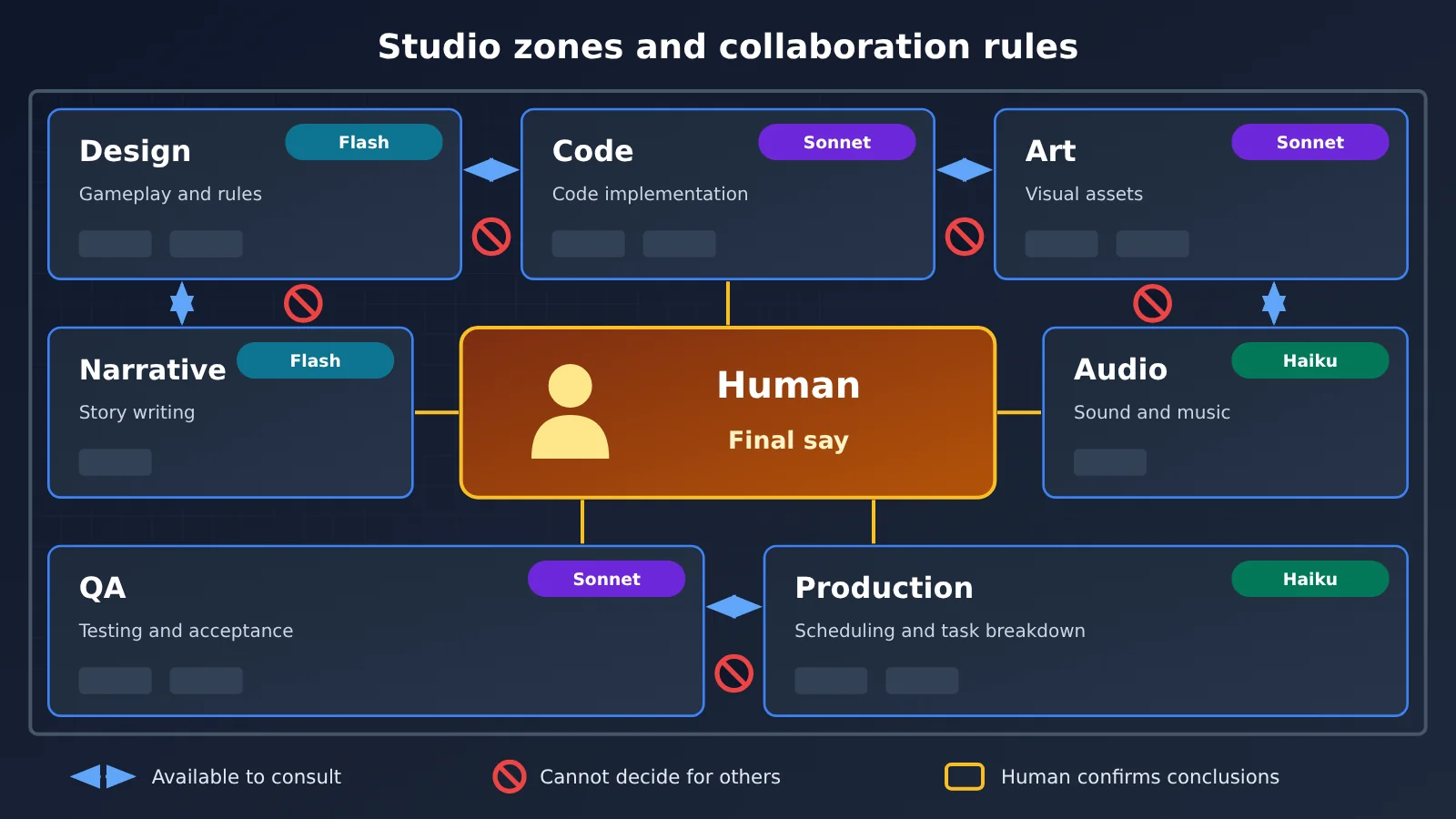
These rules directly affect cost. “Offer 2 to 4 options” and “ask first” increase output tokens, but they cut down on rework. Rework means regenerating code and re-running self-checks, which is usually far more expensive than spending a few extra tokens on discussion.
Claude Code Game Studio: Who’s the Most Expensive? Model Pricing and Stage Costs
In Claude Code, every sentence, every file read, and every line of code written gets billed — so let’s start with the per-unit prices. The table below shows prices from the APIYI apiyi.com model page, in USD per 1M tokens, as of 2026-11-27.
| Model ID | Input | Output | Cache read | Best for |
|---|---|---|---|---|
claude-opus-5-5 |
$4 | $20 | $0.2 | Complex bugs, architecture refactoring |
claude-sonnet-5-5 |
$2 | $10 | $0.1 | Writing code, self-check fixes |
claude-haiku-5-5 |
$0.1 (0–100,000 tokens tier) / $0.5 (over 100,000 tokens tier) | $0.5 | $0.01 | Lightweight Q&A, formatting |
gemini-3.8-flash |
$0.75 | $3.75 | $0.075 | Design discussion, copywriting |
qwen3.8-flash |
$0.114 | $0.3876 | $0.01425 | Design discussion, questions, briefs |
A few things worth noting from the table: every model’s output price is significantly higher than its input price, so an Agent writing long code or long documents is where the money really goes. Cache read prices are only a small fraction of the input price — when Claude Code repeatedly reads the same batch of project files, cache hits save you quite a bit. claude-haiku-5-5‘s input price is tiered by length: once the context exceeds 100,000 tokens, the unit price goes up.
How many tokens does a playable prototype need?
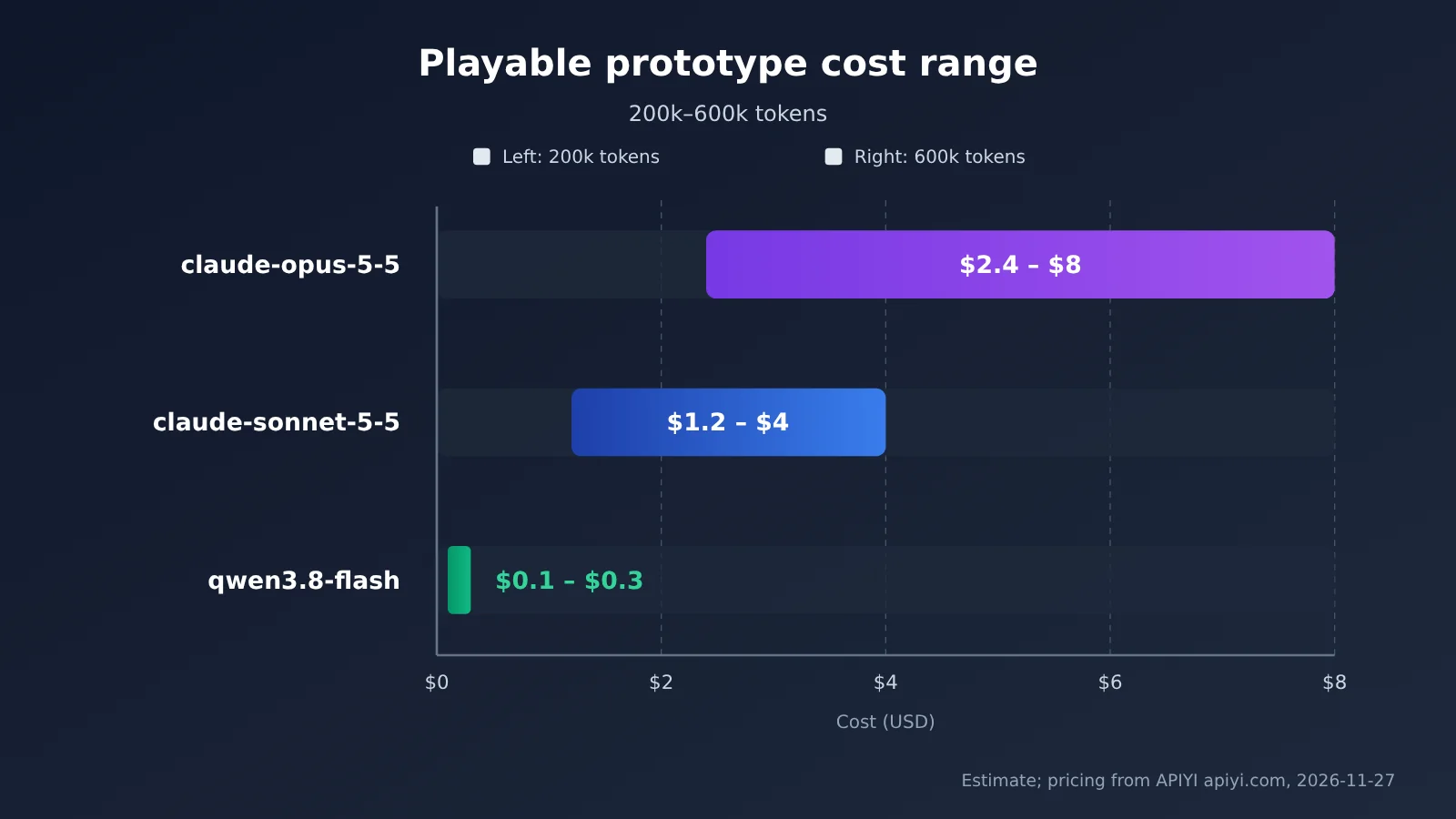
Estimate 200,000 to 600,000 tokens for a playable prototype — that covers the questions, the brief, code, and self-checks. Converted using the pricing table above: all-claude-opus-5-5 lands around $2.4–8, all-claude-sonnet-5-5 around $1.2–4, and all-qwen3.8-flash around $0.1–0.3. These are estimates; the real number swings a lot depending on how complex the gameplay is and how many revisions you go through.
Cost breakdown by stage in a Claude Code game studio
The source material doesn’t give exact token counts per stage, so the table below only judges relative high versus low — enough to decide which stages are worth throwing a strong model at.
| Stage | Main functions involved | Token consumption | Suggested model |
|---|---|---|---|
/prototype questions |
Design, production | Low — mostly short Q&A | qwen3.8-flash or claude-haiku-5-5 |
| Generate brief | Design | Low to medium | qwen3.8-flash or gemini-3.8-flash |
| First build pass | Programming, art | High — outputs a lot of code and graphics | claude-sonnet-5-5 |
| Headless-browser self-check and fixes | QA, programming | Medium to high — reads logs and edits code | claude-sonnet-5-5 |
| Iterating on gameplay | Design, programming, QA | Highest — every round means rewriting and re-running self-checks | Cheap model for discussion, strong model for shipping code |
| Adding art | Art | Highest — graphics code tends to be very long | claude-sonnet-5-5, upgrade to opus for the hard parts |
/cut polish checklist |
Production | Low | A cheap model is fine |
The conclusion is clear: the expensive parts are iterating on gameplay and adding art, not the initial questions. So the key to saving money is nailing down the brief and cutting down on rework — not squeezing the word count of your questions.
How to Pair Cheap Models with Strong Models
The recommended division of labor: give design discussion to cheap models, and coding plus self-checks to strong models. Here’s how it works in practice:
- Use
qwen3.8-flashorgemini-3.8-flashfor questions, briefs, copywriting, and/cut— these stages don’t demand much coding ability. - Use
claude-sonnet-5-5for builds,/dev-story, and self-check fixes. It strikes a good balance between code quality and price. - Only switch to
claude-opus-5-5temporarily when sonnet keeps failing to fix a bug after several tries, or when you need a large-scale refactor. - Agent definition files use YAML frontmatter, where you can assign model tiers to different roles — that way the whole workflow switches models automatically by stage.
💰 Cost tip: When mixing models from different vendors, the biggest hassle is maintaining multiple keys and billing accounts. With APIYI apiyi.com, a single key lets you call Claude, Gemini, Qwen, and more. The OpenAI-compatible endpoint is consistently
https://api.apiyi.com/v1, billing is pay-as-you-go, and it’s easy to reconcile costs by stage.
Claude Code Game Studio Troubleshooting Table
| Symptom | Likely cause | Fix |
|---|---|---|
Typing / doesn’t show /prototype |
You didn’t launch from inside the cloned copy directory | cd into the project directory first, then run claude |
| Claude Code installation fails | Node.js version is below 22 | Upgrade Node.js, then re-run npm install -g @anthropic-ai/claude-code |
Returns 401 or an auth failure |
Wrong key or base_url configuration | Verify the key and confirm the endpoint path is /v1/messages or https://api.apiyi.com/v1 |
Returns 404 or says the model doesn’t exist |
Typo in the model ID | Check against the model page, e.g. claude-sonnet-5-5 |
| The prototype shows a blank screen when double-clicked | The self-check stage missed a runtime error | Have QA re-run the headless browser self-check and paste the console errors |
| The bill climbs noticeably after every change | You keep tweaking gameplay and fully rewriting each round | Talk it through on a cheap model first, then hand it to a strong model to implement in one pass |
| Parts you were happy with break after changes | You didn’t say what to keep | Explicitly tell it what to keep and what to avoid; when things break, roll back to the last checkpoint |
FAQ
Q1: What is Claude Code Game Studios?
It’s a template from the open-source repo Donchitos/Claude-Code-Game-Studios that turns Claude Code into a game studio made up of 49 specialized subagents and 75 slash commands, taking you from a one-sentence idea all the way to a playable browser prototype.
Q2: Is the brief generated by /prototype better than writing one yourself?
According to the author’s own account, in a blind test of three game ideas, the one-page brief generated from the prompt was picked all three times. But when six games were built from the two kinds of briefs, testers said they’d be happy to keep working on either, so it ended in a tie. These are the author’s own claims, not a third-party evaluation.
Q3: Can a prototype keep iterating into a full game?
The author mentions one game that grew from its first version through six stories into something testers wanted to keep working on — but the author also notes this is just a single case and can’t be treated as a pattern yet. A prototype can be expanded into a Vite + TypeScript project, but whether it becomes a complete game is still up to you.
Q4: Do all 49 agents take part every time?
No. Different skills call on agents with the matching roles — for example, the questioning stage is mostly design and production, the build stage is mostly programming and art, and QA runs a self-check before delivery. The fewer agents involved, the lower the token consumption.
Q5: How do you use one Key with multiple models?
You can register at APIYI apiyi.com to get a Key — new users get free trial credits. The OpenAI-compatible endpoint is `https://api.apiyi.com/v1`, Claude Code can go through `/v1/messages`, and then you can assign models like `qwen3.8-flash` and `claude-sonnet-5-5` to agents by stage.
Q6: How do you estimate what your project will cost?
First, run one full `/prototype` to build on the free credits and see how many tokens it actually burns, then multiply by the number of revision rounds you’re planning. For the prototype stage you can budget roughly 200,000 to 600,000 tokens — the more rounds you spend tweaking gameplay and filling in art, the higher the cost.
Q7: What are the known limitations of this approach?
The author hasn’t tested the Godot, Unity, or Unreal engine paths, or digging deep into a single system with a design document, in comparable depth. On the cost side, multi-agent discussion increases output tokens, and if you don’t keep the number of revisions in check, costs can climb noticeably.
Claude Code Game Studio Key Takeaways
- Positioning: 49 Agents plus 75 skills turn Claude Code into a game studio.
- Quickest path: clone, run
/prototype, read the brief, build it, check the self-check results. - Collaboration rules: don’t edit files outside your domain, don’t make decisions for peers, and keep the final call with humans.
- Most expensive stage: iterating on gameplay and adding art; asking questions and writing briefs is cheap.
- Cost estimate: about 200k–600k tokens per prototype, roughly $1.2–4 with Sonnet.
- Model pairing: use cheaper models for discussion, stronger models for coding and self-checks; connect them through APIYI in one place.
- Validation boundary: only the browser prototype path has been validated; the engine path has not.
Summary
The Claude Code Game Studio has three core pieces:
- Process: from
/prototypeto/cut, every step produces acceptance-ready deliverables, including a brief, a playable prototype, a self-check checklist, and a polish checklist. - Division of labor: 49 Agents are split across seven functional areas and kept coordinated by three rules: stay within your domain, don’t make decisions for peers, and let humans make the final call.
- Cost: most spending goes into rework, so lock down the brief first, put discussion on cheaper models, and hand coding off to stronger models.
This approach is not recommended when: you’ve already decided to develop with Godot, Unity, or Unreal (that path hasn’t been validated); you want to dive deep into a single complex system instead of building a playable prototype first; your budget can’t absorb the token consumption from multiple rounds of gameplay iteration; or you just need a small demo of a few dozen lines, in which case a single Agent writing it directly will be cheaper.
If this approach fits your use case, first run one prototype end-to-end on APIYI apiyi.com using free credits, work out your own unit cost, and then decide on the model pairing.
📚 Further Reading
-
GitHub – Claude-Code-Game-Studios: Game studio template repository
- Link:
github.com/Donchitos/Claude-Code-Game-Studios - Notes: includes 49 Agent definitions, 75 skills, and the author’s testing write-up
- Link:
-
Claude Code official documentation: installation and subagent configuration
- Link:
docs.anthropic.com/en/docs/claude-code - Notes: installation steps, Node.js version requirements, and how to write subagent frontmatter
- Link:
-
APIYI model pricing page: per-model input, output, and cache-read unit prices
- Link:
docs.apiyi.com/models - Notes: the pricing data in this article is dated 2026-11-27; always check the latest figures on the page before you use them
- Link:
Author: APIYI technical team
Get in touch: feel free to reach us through the APIYI homepage at apiyi.com — for integration details and pricing explanations, see the docs center at docs.apiyi.com