

LlamaIndex is an open source library that helps build AI applications by integrating agents with various data sources, offering a modular approach for tasks like chatbots, document analysis and NLP. Here we will build a movie recommendation bot using LlamaIndex, where a user query is processed, relevant data is retrieved and recommendations are generated.
- Query Input: The user enters a query like “Show me some action movies.”
- Document Retrieval: The retriever searches indexed movie data (VectorStoreIndex) to find relevant results.
- Response Generation: The model combines the query and retrieved data to generate recommendations.
Step 1: Installing Required Packages
- llama-index: Used for indexing and querying large datasets.
- transformers: Provides access to pre-trained models.
- torch: Deep learning framework for running models.
- accelerate, bitsandbytes: Optimize performance and memory for large models.
!pip install --upgrade llama-index llama-index-embeddings-huggingface llama-index-llms-huggingface transformers torch accelerate bitsandbytes
Step 2: Importing Required Libraries
from llama_index.core import Settings, VectorStoreIndex, Document
from llama_index.embeddings.huggingface import HuggingFaceEmbedding
from llama_index.llms.huggingface import HuggingFaceLLM
import torch
import pandas as pd
import os
Step 3: Setting Up Models and Embeddings
- Use a Hugging Face embedding model (all-MiniLM-L6-v2) to convert movie data into vector representations.
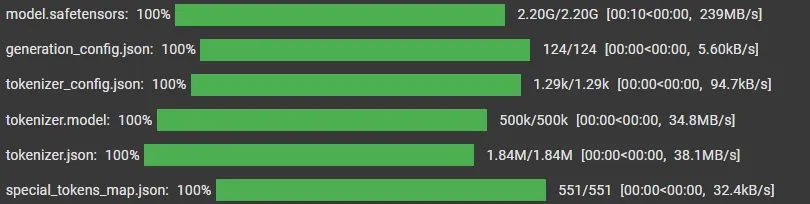
- Set up a language model (TinyLlama-1.1B-Chat-v1.0) for generating responses to user queries.
- Configure parameters like tokenization, context window and token limits for efficient performance.
Settings.embed_model = HuggingFaceEmbedding(
    model_name="sentence-transformers/all-MiniLM-L6-v2"
)

Settings.llm = HuggingFaceLLM(
    model_name="TinyLlama/TinyLlama-1.1B-Chat-v1.0",
    tokenizer_name="TinyLlama/TinyLlama-1.1B-Chat-v1.0",
    context_window=2048,
    max_new_tokens=256,
    device_map="auto",
    model_kwargs={"torch_dtype": torch.float32}
)
Step 4 Loading Data from CSV
- Load the dataset and convert each row into Document objects for indexing.
- Extract fields like ID, title, genre and rating from each row.
- Create Document objects using this data for further processing.
You can download dataset from here.
csv_file_path = "/content/movie_recommendations_with_names.csv"

df = pd.read_csv(csv_file_path)
Step 5: Document Creation and Indexing
- Build a VectorStoreIndex from the movie documents to enable efficient search and retrieval.
- Create a query engine to interact with the index and handle user queries.
movies_data = [
    Document(
        text=f"Title: {row['title']}, Genre: {row['genre']}, Rating: {row['rating']}",
        metadata={
            "title": row['title'],
            "genre": row['genre'],
            "rating": row['rating']
        }
    )
    for _, row in df.iterrows()
]
index = VectorStoreIndex.from_documents(movies_data)
query_engine = index.as_query_engine()
Step 6: Querying and Displaying Recommendations
- The user provides a movie genre as input through the loop.
- A structured prompt is created to guide the model to return movie titles with ratings in a specific format.
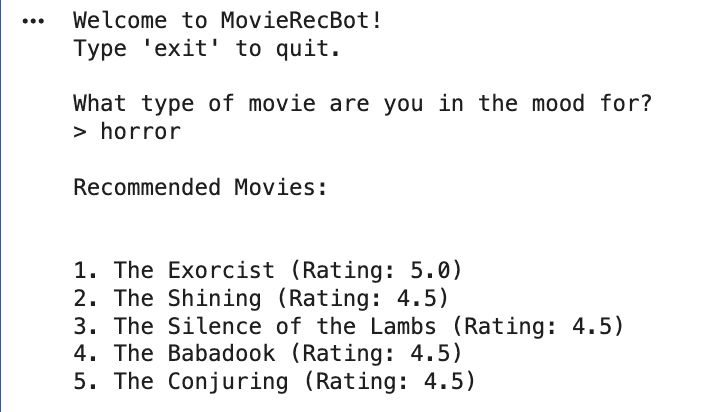
- The query is passed to the query engine, which retrieves relevant documents and generates recommendations.
- The response is printed directly using response.response, ensuring clean and readable output.
print("Welcome to MovieRecBot!")
print("Type 'exit' to quit.\n")

while True:
    query_string = input("What type of movie are you in the mood for?\n> ")

    if query_string.lower() == "exit":
        print("Thanks for using MovieRecBot!")
        break

    prompt = f"""
    Recommend top 5 movies for genre: {query_string}.
    Only return:
    Title - Rating

    Do NOT return numbers alone.
    """

    response = query_engine.query(prompt)

    print("\nRecommended Movies:\n")
    print(response.response)
Output:
You can download source code from here.
Applications
- LlamaIndex can recommend products, movies or content by matching user preferences with indexed data.
- Helps build search systems for large datasets like company documents or FAQs using natural language queries.
- Enables chatbots and virtual assistants to understand user queries and provide intelligent responses using indexed knowledge.
- Can be used to analyze reviews or social media data to understand public sentiment about products or services.
- Supports retrieval across multiple languages, making it useful for global applications.
