

Long Claude Code sessions can slow down as the context window fills with file reads, search results, and command outputs. Subagents help by handling individual tasks in separate, scoped contexts and returning only the relevant results to the main conversation.
- Operates on a completely fresh context window.
- Cannot see previous conversation turns, previously read files, or invoked skills.
- Runs its custom definition prompt alongside basic environment details rather than the standard Claude Code system prompt.
- Grants tool permissions independently of the parent session.
- Configures approval behavior within boundaries enforced by the main session.
- Retains intermediate tool calls within its context and reports only the final output back to the main thread.
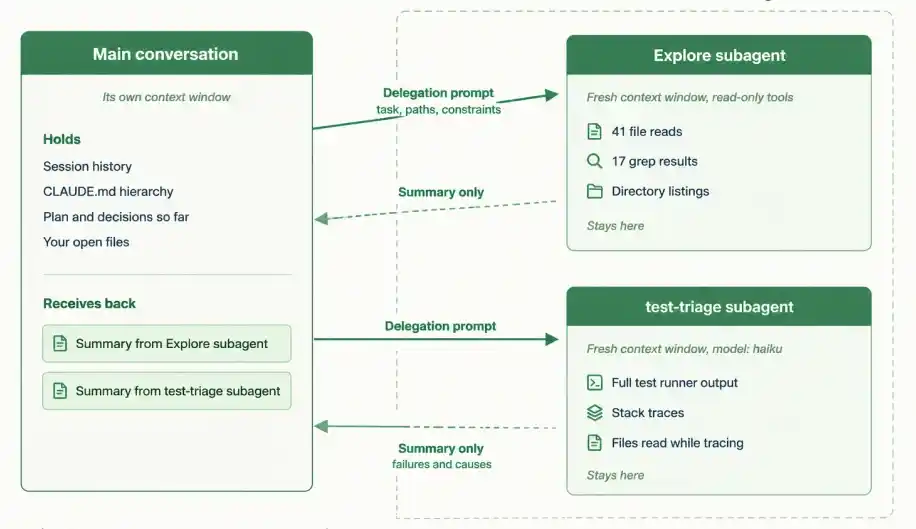
Delegating Work to a Subagent
The official documentation lists five reasons, and each maps to a different kind of task:
- Preserve context by keeping exploration, log processing, and test output out of the main conversation.
- Enforce constraints by limiting which tools a subagent can use, for example a reviewer that can read but never write.
- Reuse configurations across projects by storing subagent definitions at user level.
- Specialize behaviour with a focused system prompt for one domain, without adding that instruction noise to every session.
- Control costs by routing routine work to a faster, cheaper model such as Haiku.
Built-in Subagents
- Registered by default in interactive sessions, and delegated to automatically when a task matches.
- Permissions are inherited from the parent conversation, with additional tool restrictions applied on top.
| Subagent | Model | Tools | Used for |
|---|---|---|---|
| Explore | Inherits from the main conversation, capped at Opus on the Claude API | Read-only; Write and Edit denied | File discovery, code search, and codebase exploration |
| Plan | Inherits from the main conversation | Read-only; Write and Edit denied | Codebase research during plan mode |
| general-purpose | Inherits from the main conversation | Every tool available to subagents | Complex, multi-step tasks requiring exploration and changes |
| statusline-setup | Sonnet | Scoped to the task | Configuring the status line via /statusline |
| claude-code-guide | Haiku | Scoped to the task | Answering questions about Claude Code features |
| claude | Inherits | Standard subagent pool | Background sessions dispatched without naming an agent |
Where Subagents Live
- Subagents are Markdown files with YAML frontmatter.
- Location decides scope, and when two definitions share a name, the higher-priority location wins.
| Location | Scope | Priority |
|---|---|---|
| Managed settings | Organization-wide | 1, highest |
| --agents CLI flag | Current session only | 2 |
.claude/agents/ | Current project | 3 |
~/.claude/agents/ | All your projects | 4 |
| Plugin agents/ directory | Wherever the plugin is enabled | 5, lowest |
Anatomy of a Subagent File
Only name and description are required. Configuration details sit in the frontmatter, while the Markdown body acts as the system prompt:
---
name: code-reviewer
description: Expert code review specialist. Reviews code for quality, security, and maintainability. Use immediately after writing or modifying code.
tools: Read, Grep, Glob, Bash
model: inherit
---
You are a senior code reviewer ensuring high standards of code quality and security.
When invoked:
1. Run git diff to see recent changes
2. Focus on modified files
3. Begin review immediately
Provide feedback organized by priority: critical issues, warnings, and suggestions.
Include specific examples of how to fix each issue.
Frontmatter Configuration Options
Field | Required | Purpose |
|---|---|---|
name | Yes | Lowercase identifier with hyphens. Cannot contain :, which is reserved for plugin-scoped names |
description | Yes | Tells Claude when to delegate to this subagent |
tools | No | Allowlist of tools. Inherits everything available to subagents if omitted |
disallowedTools | No | Denylist, removed from the inherited or specified list |
model | No | sonnet, opus, haiku, fable, a full model ID, or inherit. Defaults to inherit |
permissionMode | No | How permission prompts are handled |
maxTurns | No | Maximum agentic turns before the subagent stops |
skills |
| Skills preloaded into context at startup, full content injected |
mcpServers | No | MCP servers available to this subagent only |
hooks | No | Lifecycle hooks scoped to this subagent |
memory | No | Persistent memory scope: user, project, or local |
background | No | Set true to always run as a background task |
effort | No | Effort level while this subagent is active |
isolation | No | Set worktree to run in a temporary git worktree |
color | No | Display colour in the task list and transcript |
initialPrompt | No | Auto-submitted first turn when the agent runs as the main session |
Invoking a Subagent
Workflows can trigger subagents using four main invocation methods:
- Automatic Delegation: Claude evaluates the description field and delegates automatically.
- Natural Language Mention: Referencing the name in conversation (e.g., "Use the test-runner subagent to fix failing tests").
- Direct @-Mention: Typing @agent-<name> directly forces the chosen subagent to execute.
- Whole Session Override: Running claude --agent code-reviewer or setting "agent": "code-reviewer" inside .claude/settings.json enforces the subagent configuration as the project default.
Session-scoped definitions:
- Passed as JSON with --agents, using the same fields as file frontmatter.
- Never written to disk, which suits automation scripts and quick tests.
- Use prompt in place of the Markdown body.
claude --agents '{
"debugger": {
"description": "Debugging specialist for errors and test failures.",
"prompt": "You are an expert debugger. Analyze errors, identify root causes, and provide fixes.",
"tools": ["Read", "Grep", "Glob", "Bash"],
"model": "sonnet"
}
}'
Limits Worth Knowing
Limit | Default | Override |
|---|---|---|
Subagents per session | 200 | CLAUDE_CODE_MAX_SUBAGENTS_PER_SESSION, v2.1.212 or later |
Concurrent subagents | 20 | CLAUDE_CODE_MAX_CONCURRENT_SUBAGENTS, v2.1.217 or later |
Nesting depth below the main conversation | 3 layers | CLAUDE_CODE_MAX_SUBAGENT_SPAWN_DEPTH, v2.1.217 or later |
Practical Example
- The Problem: Running a full test suite directly inside the main conversation dumps extensive, verbose output into context—most of which consists of irrelevant passing tests.
- The Fix: A dedicated subagent executes the suite in an isolated environment, processes the verbose logs elsewhere, and returns only a summary of failure points.
---
name: test-triage
description: Runs the test suite and reports only failures with their root causes. Use proactively after code changes that touch tested modules.
tools: Read, Grep, Glob, Bash
model: haiku
---
You triage failing tests. When invoked:
1. Run the project's test command.
2. Ignore passing tests entirely.
3. For each failure, report the test name, the assertion that failed, and the file and line most likely responsible.
4. Group failures that share a root cause.
Do not fix anything. Return a list, ordered by how many tests each root cause explains. If the suite passes, say so in one line.
Invoke it explicitly:
@agent-test-triage run the suite after the parser changes
Workflow & Execution Breakdown
- Inside the subagent: the full test runner output, every file read while tracing a failure, and every grep result.
- Back in your main conversation: a short ordered list of failures and probable causes, typically a few hundred tokens.
- On cost: the run happens on Haiku because of the model field, even when the main session is on a larger model.
- On permissions: the definition omits Write and Edit, so the subagent cannot quietly patch a failing test to make it pass.
Tooling Strategy
Mechanism | Ideal Usage Scenario |
|---|---|
Main conversation | The task needs iterative back-and-forth, several phases share context, the change is small, or latency matters |
Subagent | Output is verbose and disposable, tool restrictions need enforcing, or the work is self-contained enough to return a summary |
Skill | You want a reusable prompt or workflow that runs in the main conversation context rather than an isolated one |
Agent teams or background sessions | Work needs sustained parallelism across sessions or exceeds a single context window |
Note: Use /btw for quick questions about existing conversation context. It accesses session history without tool capabilities, and its response is discarded immediately rather than appended to history.
