

Model Context Protocol (MCP) standardizes how models like Claude connect to external tools, databases, calendars, and internal APIs. Instead of writing custom integration logic for every service, MCP defines a unified interface: servers expose tools with structured descriptions, and any MCP-compatible client can discover and call them.
MCP operates through two main architecture pathways:
- A connector integrated into the Messages API for remote servers
- A client-side SDK for local servers and advanced capabilities.
Feature | MCP Connector | Client-Side MCP SDK |
|---|---|---|
Integration Architecture | Built directly into the API endpoint (mcp_servers parameter). | Requires local client session management (mcp library) |
Supported Transports | HTTP endpoints | Standard Input/Output |
Capabilities | Focused on remote server tool execution. | Handles MCP tools, prompts, resources, and file uploads. |
Infrastructure Need | Needs a publicly accessible remote HTTP server. | Ideal for local development environments and local execution. |
1. The MCP Connector (Directly in the API)
Allows Claude to connect directly to remote servers over HTTP without managing a separate client instance.
response = client.beta.messages.create(
    model="claude-opus-5", max_tokens=1000,
    messages=[{"role": "user", "content": "What tools do you have available?"}],
    mcp_servers=[
        {
            "type": "url",
            "url": "https://example-server.modelcontextprotocol.io/sse",
            "name": "example-mcp",
            "authorization_token": "YOUR_TOKEN",
        }
    ],
    tools=[{"type": "mcp_toolset", "mcp_server_name": "example-mcp"}],
    betas=["mcp-client-2025-11-20"],
)
The API connector processes requests using two distinct core components: mcp_servers establishes the remote server connection details, while mcp_toolset specifies which tools from that server are activated for Claude to access.
- Remote Endpoint Setup: Requires a public, HTTP-reachable server using Streamable HTTP or SSE transports.
- Core Parameters: Operates via mcp_servers (defines URL and auth token) and mcp_toolset (enables specific tools).
- Execution Limit: Cannot connect to local stdio servers directly through the API.
2. The Client-Side SDK
Used when manually managing client connections, local setups, or advanced protocol features.
from anthropic.lib.tools.mcp import async_mcp_tool
from mcp import ClientSession
from mcp.client.stdio import StdioServerParameters, stdio_client
server_params = StdioServerParameters(command="mcp-server")
async with stdio_client(server_params) as (read, write):
    async with ClientSession(read, write) as mcp_client:
        await mcp_client.initialize()
        tools_result = await mcp_client.list_tools()
        runner = client.beta.messages.tool_runner(
            model="claude-opus-5", max_tokens=1024,
            messages=[{"role": "user", "content": "What tools do you have available?"}],
            tools=[async_mcp_tool(tool, mcp_client) for tool in tools_result.tools],
        )
The client-side SDK manages a dedicated protocol session, leveraging utility wrappers like async_mcp_tool to convert raw MCP definitions into Claude-compatible tool objects without writing custom parsing code.
- Local Support: Enables connections to local stdio servers.
- Auto Conversion: Uses Anthropic SDK helpers to convert MCP types into Claude API formats without custom code.
- Extended Features: Unlocks converting MCP prompts into API messages and MCP resources into file uploads or content blocks.
Process of an MCP Tool Call
An MCP tool call follows a four-step sequence where Claude processes a request, generates execution parameters, runs the tool on the server, and returns the result.
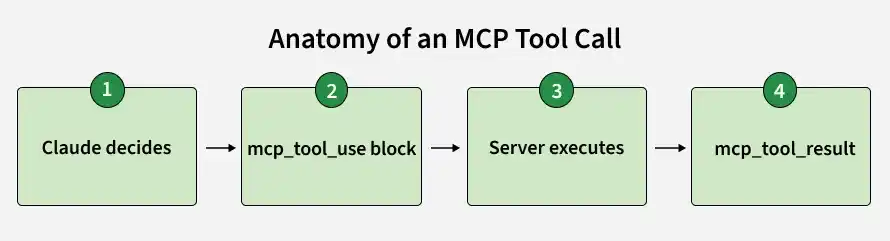
- Claude evaluates if a request maps to a connected tool's description.
- Claude issues an mcp_tool_use block containing server_name, tool_name, and input parameters.
- The receiving MCP server processes input and executes the underlying tool.
- Output returns as an mcp_tool_result block within the same response loop.
Note: General knowledge questions are answered directly from internal knowledge without triggering a tool call
Controlling Which Tools Claude Can Use
Manages tool access using default_config and per-tool options within MCPToolset. Denylisting write or destructive tools is recommended when building read-only assistants.
Control Strategy | Configuration Mechanism | Description |
|---|---|---|
Enable Everything | Omit configs entirely. | Every tool on the connected server remains active and callable. |
Allowlist | default_config.enabled: false | Explicitly enables only the specific tools you want to expose. |
Denylist | Per-tool enabled: false | Keeps all tools enabled except explicitly disabled destructive ones (e.g., delete_all_events). |
Mixed / Defer Loading | Combine allowlisting + defer_loading | Hides descriptions until queried via Tool search, keeping large toolsets out of context. |
A Few Things Worth Knowing
- Connect multiple servers in one request by giving each its own entry in mcp_servers and its matching MCPToolset.
- CUse defer_loading with the Tool search tool for large toolsets to avoid sending all descriptions up front, surfacing only query-relevant tools.
- Works in Message Batches requests with identical pricing to regular synchronous calls.
- Excluded from Zero Data Retention; tool definitions and execution results follow Anthropic's standard data retention policy.
