

A personal ethical hacking lab is an isolated environment designed to safely learn penetration testing, vulnerability assessment, malware analysis, digital forensics and network security without affecting production systems.
Hardware Requirements
The performance of your lab depends primarily on RAM, CPU and storage. Hardware virtualization (Intel VT-x or AMD-V) must be enabled in BIOS/UEFI.
- Processor: Intel Core i5 / AMD Ryzen 5 with VT-x or AMD-V.
- RAM: 16 GB.
- Storage: 512 GB SSD.
- Graphics: Integrated.
- Internet: Broadband.
Software Requirements
The following software forms the foundation of most cybersecurity labs.
- VirtualBox or VMware Workstation: Virtualization platform.
- Kali Linux: Penetration testing distribution.
- Windows 10/11: Target workstation.
- Windows Server: Active Directory environment.
- Ubuntu Server: Linux target.
- REMnux: Malware analysis
- pfSense: Virtual firewall (optional)
Install a Virtualization Platform
Virtualization allows multiple operating systems to run simultaneously on a single computer. Virtual machines remain isolated from the host operating system, reducing the risk of accidental damage during security testing. Popular choices include: Oracle VirtualBox, VMware Workstation, Hyper-V (Windows Pro).
Create Virtual Machines
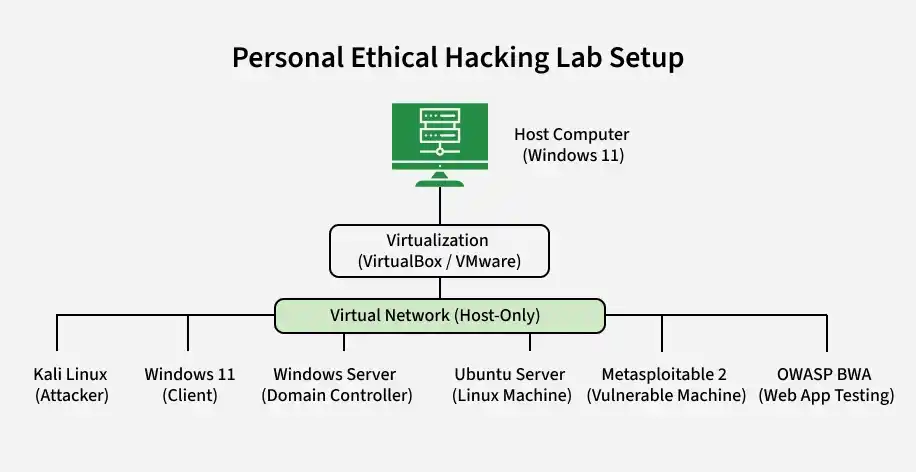
A basic ethical hacking lab should include several virtual machines.
- Kali Linux: Attacker machine.
- Windows 11: Client system.
- Windows Server: Domain Controller.
- Ubuntu Server: Linux target.
- Metasploitable 2: Vulnerable Linux machine.
- OWASP Broken Web Apps: Web application testing.
Configure Virtual Networks
Networking determines how virtual machines communicate. For maximum safety, malware analysis should always use an Internal Network or Host-Only Network. Common network modes include:
- NAT: Internet access available, Hidden from the physical network, Suitable for downloading updates.
- Host-Only: Communication only between host and VMs, Ideal for penetration testing, Completely isolated.
- Internal Network: Only virtual machines communicate, No Internet access, Best for malware analysis.
Install Essential Security Tools
- Offensive Security: Nmap, Burp Suite Community, Metasploit Framework, Gobuster, Nikto, SQLmap, Hydra, John the Ripper, Aircrack-ng, Wireshark.
- Defensive Security: Sysmon, Windows Defender, OSQuery, Wazuh Agent, Zeek, Suricata, YARA.
- Digital Forensics: Autopsy, FTK Imager, Volatility, RegShot, Process Monitor, Process Hacker.
Build an Active Directory Lab
An Active Directory environment is essential for learning enterprise security.
- Typical setup: One Windows Server as Domain Controller, One Windows client joined to the domain, One Kali Linux attacker, DNS configured correctly, Group Policy Objects (GPO), Active Directory Users.
- This environment enables learning: LDAP Enumeration, Kerberos Authentication, BloodHound, PowerView, Pass-the-Hash, Kerberoasting, ACL Enumeration, SMB Security.
Add Vulnerable Machines
Purposefully vulnerable systems help practice exploitation safely. Popular choices include:
- Metasploitable 2: Linux exploitation.
- Metasploitable 3: Enterprise vulnerabilities.
- OWASP Broken Web Apps: Web security.
- DVWA: SQL Injection, XSS.
- OWASP Juice Shop: Modern web vulnerabilities.
- VulnHub VMs: Mixed penetration testing.
- Hack The Box VM Downloads: Advanced labs.
Snapshot Virtual Machines
Snapshots preserve the exact state of a virtual machine. Always create a snapshot before major testing activities. Benefits include:
- Roll back after malware execution.
- Recover from failed experiments.
- Save different lab configurations.
- Restore compromised systems instantly.
Common Lab Configurations
- Basic Penetration Testing: Kali + Metasploitable.
- Web Application Security: Kali + DVWA + Juice Shop.
- Active Directory Security: Kali + Windows Server + Windows Client.
- Malware Analysis: Windows VM + REMnux.
- Digital Forensics: Windows VM + Autopsy + FTK Imager.
- Network Security: Kali + pfSense + Ubuntu.
Common Mistakes to Avoid
- Running malware on the host operating system.
- Connecting vulnerable machines directly to the Internet.
- Forgetting to create snapshots.
- Using insufficient RAM for multiple virtual machines.
- Mixing production and lab networks.
- Ignoring virtualization support in BIOS/UEFI.
- Performing unauthorized testing outside the lab.
