

A runtime error occurs while a program is executing, after it has been successfully compiled. In C++, runtime errors can occur due to invalid operations, memory access, or resource-related issues.
- Runtime errors occur during program execution and may terminate the program.
- Common examples include division by zero, segmentation faults, and invalid memory access.
Common Runtime Errors
The following examples demonstrate some common situations that can cause runtime errors in C++.
1. Division by Zero
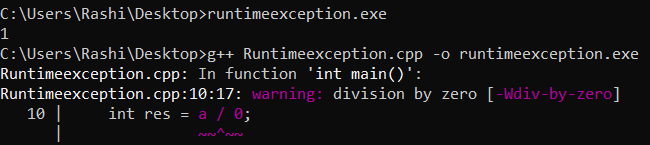
Dividing an integer by zero results in undefined behavior and commonly causes a runtime error such as a floating-point exception (SIGFPE).
#include <iostream>
using namespace std;

// Driver code
int main()
{
    int a = 10;
    int res = a / 0;
    cout << res;
    return 0;
}
Output
Explanation
- a / 0 attempts to divide an integer by zero.
- Integer division by zero is undefined behavior and typically causes a runtime error such as a floating-point exception.
2. Segmentation Faults
A segmentation fault can occur when a program attempts to access memory that it is not allowed to modify or access.
#include <iostream>
using namespace std;

// Driver code
int main()
{
  char *str;

  // Stored in read only part
  // of data segment
  str = "GfG";

  // Trying to modify read only
  // memory
  *(str + 1) = 'n';
  return 0;
}
Output

Explanation
- str points to the string literal "GeeksforGeeks", which should not be modified.
- *(str + 1) = 'n' attempts to modify the string literal, causing undefined behavior and potentially a segmentation fault.
3. Large memory Allocation/Large Static Memory Allocation
Requesting an excessively large amount of memory can cause memory allocation to fail. The new operator may throw a std::bad_alloc exception when sufficient memory cannot be allocated.
#include <iostream>
using namespace std;

// Driver code
int main()
{
  int a = 100000000000;
  int * arr = new int[a];
  return 0;
}
Output

Explanation
- new int[a] attempts to allocate memory for a very large number of integers.
- The allocation may fail due to insufficient memory and can throw a std::bad_alloc exception.
4. Type Specifier Error
Using an incorrect format specifier with C-style input/output functions such as scanf() can cause undefined behavior. For example, %d is used for int, while %lld should be used for long long.
#include <iostream>
using namespace std;

// Driver code
int main()
{
    long long int a;
    scanf("%d", &a);
    return 0;
}
Output
warning: format ‘%d’ expects argument of type ‘int*’, but argument 2 has type ‘long long Explanation
- a is declared as a long long int, but scanf() uses %d, which is meant for an int.
- This format mismatch can cause undefined behavior and may result in a compiler warning or runtime issues.
5. Invalid Memory Access During Runtime
Accessing an array outside its valid range results in undefined behavior. It may produce a garbage value, crash the program, or appear to work unexpectedly.
#include <iostream>
using namespace std;

int arr[5];

// Driver code
int main()
{
  int a = arr[-10];
  cout << a;
  return 0;
}
Output
-135563392
Explanation
- arr has valid indices from 0 to 4, but arr[-10] accesses memory outside the array.
- This causes undefined behavior and may produce a garbage value or crash the program.
Note: Not all runtime errors are C++ exceptions. Errors like invalid memory access and division by zero cause undefined behavior, while exceptions such as std::bad_alloc can be handled using try-catch.
