

C++ templates allow us to write generic code that works with different data types without rewriting the same logic for each type.
- Reduce code duplication by allowing the same function or class to work with multiple data types.
- Provide type safety compared to approaches such as void* pointers and macros.
- Form the foundation of many STL components, including containers and algorithms .
Example: Below code demonstrates a generic function that return the maximum among the two passed arguments to the function:
#include <iostream>
using namespace std;

template <typename T> T myMax(T x, T y){
    return (x > y) ? x : y;
}

int main(){

    cout << "Max of 3 and 7 is: " << myMax<int>(3, 7) << endl;
    cout << "Max of 3.5 and 7.5 is :" << myMax<double>(3.5, 7.5) << endl;
    cout << "Max of 'g' and 'e' is: " << myMax<char>('g', 'e') << endl;

    return 0;
}
Output
Max of 3 and 7 is: 7
Max of 3.5 and 7.5 is :7.5
Max of 'g' and 'e' is: g
Explanation:
- template <typename T> makes myMax() a generic function for different data types.
- The compiler generates the required version of myMax() based on the type used.
- myMax<int>, myMax<double>, and myMax<char> compare values of their respective types.
- The function returns the larger value using (x > y) ? x : y.
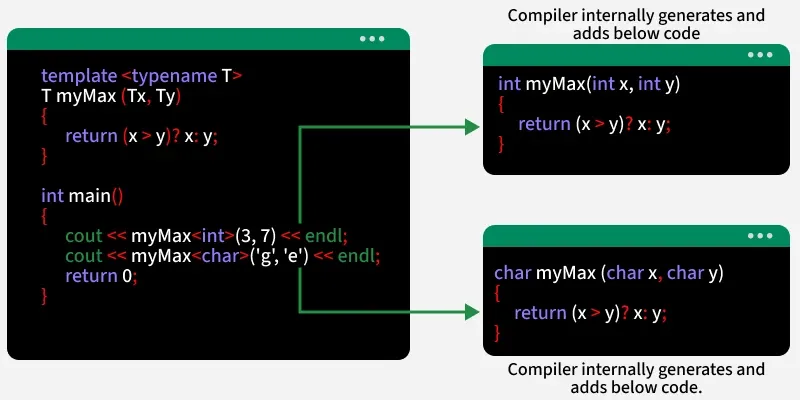
Syntax of Templates
Templates are defined using the template keyword and template parameters declared using typename or class.
template <typename A, typename B, ...>
entity_definition
typename and class are interchangeable in template declarations.
Types of Templates
Templates can be used to define:
1. Function Templates
In C++, templates allow us to write generic code for functions that can be used with different data types, and this can be achieved by function templates.
Example: Maximum of Two Values
#include <iostream>
using namespace std;

template <typename T> T myMax(T x, T y){
    return (x > y) ? x : y;
}

int main(){

    cout << myMax<int>(3, 7) << endl;
    cout << myMax<double>(3.0, 7.0) << endl;
    cout << myMax<char>('g', 'e');
    return 0;
}
Output
7
7
g
Explanation:
- template <typename T> makes myMax() a generic function.
- myMax<int>, myMax<double>, and myMax<char> use the same function logic with different data types.
- The function returns the larger value using the conditional operator.
2. Class Templates
A class template allows a class to work with different data types. It is useful when the class logic remains the same regardless of the type of data it stores. Class templates are commonly used to implement data structures such as linked lists, stacks, queues, and arrays.
#include <iostream>
using namespace std;

template <typename T>
class Geek {
public:
    T x;
    T y;

    Geek(T val1, T val2) : x(val1), y(val2) {}

    void getValues() {
        cout << x << " " << y;
    }
};

int main() {
    Geek<int> intGeek(10, 20);
    Geek<double> doubleGeek(3.14, 6.28);

    intGeek.getValues();
    cout << endl;

    doubleGeek.getValues();

    return 0;
}
Output
10 20
3.14 6.28
Explanation:
- Geek<T> is a class template that can store values of type T.
- Geek<int> creates a class instance where T is int.
- Geek<double> creates a class instance where T is double.
- The constructor initializes x and y, and getValues() prints them.
Multiple Template Parameters
A template can have multiple type parameters, allowing a class or function to work with different types simultaneously.
#include <iostream>
using namespace std;

template <typename T1, typename T2, typename T3> class Geek {
  public:
    T1 x;
    T2 y;
    T3 z;

    Geek(T1 val1, T2 val2, T3 val3) : x(val1), y(val2), z(val3){
    }

    void getValues(){
        cout << x << " " << y << " " << z;
    }
};

int main(){

    Geek<int, double, string> intDoubleStringGeek(10, 3.14, "Hello");
    Geek<char, float, bool> charFloatBoolGeek('A', 5.67f, true);

    intDoubleStringGeek.getValues();
    cout << endl;
    charFloatBoolGeek.getValues();
    return 0;
}
Output
10 3.14 Hello
A 5.67 1
3. Variable Templates (C++14 Onwards)
A variable template allows a variable to be defined for different types. Each specialization of the variable template can have a different type.
Syntax:
template <typename T> constexpr T pi = T(3.14159);
#include <iostream>
using namespace std;

template <typename T> constexpr T pi = T(3.14159);

int main(){
    cout << "Pi as float: " << pi<float> << endl;
    cout << "Pi as double: " << pi<double>;
    return 0;
}
Output
Pi as float: 3.14159
Pi as double: 3.14159
Explanation:
- pi<T> is a variable template whose type depends on T.
- pi<float> creates a float specialization, while pi<double> creates a double specialization.
- constexpr allows the value to be used as a constant expression.
Default Template Arguments
Template parameters can have default arguments. If a template argument is not explicitly provided, its default type is used.
#include <iostream>
using namespace std;

template <typename T1, typename T2 = double, typename T3 = string> class Geek{
  public:
    T1 x;
    T2 y;
    T3 z;

    Geek(T1 val1, T2 val2, T3 val3) : x(val1), y(val2), z(val3){
    }

    void getValues(){
        cout << x << " " << y << " " << z;
    }
};

int main(){

    Geek<int, float, string> intFloatStringGeek(10, 5.67f, "Hello");
    Geek<char> charDoubleStringGeek('A', 3.14, "World");

    intFloatStringGeek.getValues();
    cout << endl;
    charDoubleStringGeek.getValues();
    return 0;
}
Output
10 5.67 Hello
A 3.14 World
Explanation: In this code, when all template types are given, the class uses those exact types, but when only the first type is provided, the remaining template parameters automatically use their default types (double and string).
Template Non-Type Arguments
Templates can take non-type parameters (constant values, not types). These are used to fix values like size, max, or min for a template. Non-type parameters must be compile-time constants because the compiler generates the template code using those values at compile time.
#include <iostream>
using namespace std;

template <class T, int INIT>int arrMin(T arr[], int n){
    int m = INIT;
    for (int i = 0; i < n; i++)
        if (arr[i] < m)
            m = arr[i];
    return m;
}

int main(){

    int arr1[] = {10, 20, 15, 12};
    int n1 = sizeof(arr1) / sizeof(arr1[0]);
    char arr2[] = {1, 2, 3};
    int n2 = sizeof(arr2) / sizeof(arr2[0]);
    cout << arrMin<int, 10000>(arr1, n1) << endl;
    cout << arrMin<char, 256>(arr2, n2);

    return 0;
}
Output
10
1
Template Argument Deduction
Template argument deduction automatically deduces the data type of the argument passed to the templates. This allows us to instantiate the template without explicitly specifying the data type.
Note: It is important to note that the template argument deduction for classes is only available since C++17, so if we try to use the auto template argument deduction for a class in previous version, it will throw an error.
The below example demonstrates how the STL max() method deduces the data type without being explicitly specified.
#include <bits/stdc++.h>
using namespace std;

int main()
{
    cout << max(3, 4);
    return 0;
}
Output
4
Note: The above example uses function template argument deduction, which has been supported since C++98. The compiler automatically deduces the template type from the arguments passed to max().
1. Function Template Arguments Deduction
Function template argument deduction has been part of C++ since the C++98 standard. We can skip declaring the type of arguments we want to pass to the function template and the compiler will automatically deduce the type using the arguments we passed in the function call.
#include <iostream>
using namespace std;

template <typename t> t multiply(t first, t second){
    return first * second;
}

int main(){
    cout << multiply(3, 4);
    return 0;
}
Output
12
Note: For the function templates which is having the same type for the arguments like template<typename t> void function(t a1, t a2){}, we cannot pass arguments of different types.
2. Class Template Arguments Deduction (C++17 Onwards)
The class template argument deduction was added in C++17 and has since been part of the language. It allows us to create the class template instances without explicitly definition the types just like function templates.
#include <iostream>
using namespace std;

template <typename T> class Geek{
  public:
    T x;
    T y;
    Geek(T val1, T val2) : x(val1), y(val2){}
    void getValues(){
        cout << x << " " << y;
    }
};

int main(){
    Geek intGeek(10, 20);
    Geek doubleGeek(3.14, 6.28);

    intGeek.getValues();
    cout << endl;
    doubleGeek.getValues();
    return 0;
}
Output
10 20
3.14 6.28
Template Metaprogramming
In C++, template metaprogramming refers to template perform computation at the compile time rather than runtime. To perform computation at compile time, template metaprogramming involves recursive template structures where templates call other templates during compilation.
#include <iostream>
using namespace std;

template <int N> struct Factorial{
    static const int value = N * Factorial<N - 1>::value;
};

template <> struct Factorial<0>{
    static const int value = 1;
};

int main(){
    cout << "Factorial of 5 is: " << Factorial<5>::value;
    return 0;
}

Output
Factorial of 5 is: 120
Explanation:
- "template <int N>" defines a template that computes factorial recursively at compile time.
- "Factorial<N>::value" multiplies N with "Factorial<N-1>::value".
- The specialization "Factorial<0>" stops the recursion and returns 1.
- "Factorial<5>::value" is calculated by the compiler and printed at runtime.
