

A stack is a container adaptor in C++ STL that follows the LIFO (Last In, First Out) principle, where the last inserted element is removed first. It allows insertion, deletion, and access only from one end, called the top of the stack.
- std::stack provides simple and efficient operations for managing elements in LIFO order.
- The <stack> header provides functions such as push(), pop(), top(), empty(), and size().
#include <iostream>
#include <stack>
using namespace std;
int main(){
    stack<int> st;
    st.push(10);
    st.push(5);

    // Accessing top element
    cout << "Top element: " << st.top() << endl;

    // Popping an element
    st.pop();
    cout << "Top element after pop: " << st.top() << endl;
    return 0;
}
Output
Top element: 5
Top element after pop: 10
Explanation:
- stack<int> st creates a stack that stores integer elements.
- push() adds 10 and 5 to the stack, making 5 the top element.
- top() returns the current top element, which is 5.
- pop() removes 5, so 10 becomes the new top element.
Syntax
Stack is defined as std::stack class template inside the <stack> header file.
stack<T> st;
where,
- T: DataType (int, char etc.) of elements in the stack.
- st: Name assigned to the stack.
Basic Operations
Here are the basic operations that can be performed on a stack:
1. Inserting Elements
In stack, new elements can only be inserted at the top of the stack by using push() method.
.webp)
#include <iostream>
#include <stack>
using namespace std;

int main(){
    stack<int> st;

    // Inserting element top of the stack
    st.push(10);
    st.push(20);
    st.push(30);
    st.push(40);
    return 0;
}
Explanation: The stack is initially empty, and push() inserts each element at the top. After all four operations, 40 is the top element, followed by 30, 20, 10.
2. Accessing Elements
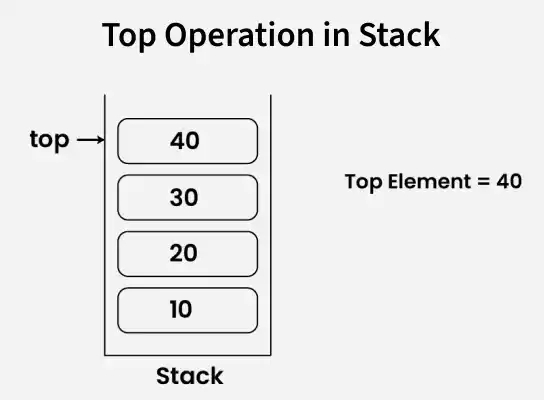
Only the top element of the stack can be accessed using top() method.
#include <iostream>
#include <stack>
using namespace std;

int main(){
    stack<int> st;
    st.push(10);
    st.push(20);
    st.push(30);
    st.push(40);

    // Accessing the top element
    cout << st.top();
    return 0;
}
Output
40
Explanation: Four elements are inserted into the stack, with 40 as the top element because it was inserted last. The top() function accesses 40 without removing it.
Note: top() returns the top element; it does not remove the element from the stack. Calling top() on an empty stack results in undefined behavior, so check empty() before accessing it when the stack may be empty.
3. Deleting Elements
In stack, only the top element of the stack can be deleted by using pop() method in one operation.
.webp)
#include <iostream>
#include <stack>
using namespace std;

int main() {
    stack<int> st;

    st.push(10);
    st.push(20);
    st.push(30);
    st.push(40);

    st.pop();

    while (!st.empty()) {
        cout << st.top() << " ";
        st.pop();
    }

    return 0;
}
Output
30 20 10
Explanation: The stack contains 40, 30, 20, 10 from top to bottom. The first pop() removes 40, and the while loop accesses and removes the remaining elements, printing them in LIFO order: 30 20 10.
4. Checking Whether the Stack Is Empty
This checks whether the stack is empty. It returns true if the stack has no elements, otherwise, it returns false.
#include <iostream>
#include <stack>
using namespace std;

int main() {

    stack<int>st;
    if(st.empty()){
        cout<<"Stack is empty "<<endl;
    }
    st.push(100);
    if(!st.empty()){
        cout<<"Stack is not empty. Top element: "<<st.top()<<endl;
    }
    return 0;
}
Output
Stack is empty
Stack is not empty. Top element: 100
Explanation: Initially, the stack is empty, so empty() returns true. After inserting 100, empty() returns false, and top() accesses 100.
5. Finding the Size of the Stack
The size() function in a stack returns the number of elements currently in the stack. It helps to determine how many items are stored without modifying the stack.
#include <iostream>
#include <stack>
using namespace std;

int main()
{

    stack<int> st;
    st.push(10);
    st.push(5);
    cout << "Size of stack: " << st.size() << endl;
    st.pop();
    cout << "Size of stack:" << st.size() << endl;
    return 0;
}
Output
Size of stack: 2
Size of stack:1
Explanation: Two elements, 10 and 5, are inserted, so size() returns 2. After pop() removes 5, only 10 remains and the size becomes 1.
Traversing a Stack
A stack cannot be directly traversed, but by creating a copy and repeatedly accessing and popping the top element, we can traverse it without modifying the original stack.
#include <iostream>
#include <stack>
using namespace std;

int main()
{
    stack<int> st;
    st.push(10);
    st.push(20);
    st.push(30);
    st.push(40);

    // Create a copy
    stack<int> temp(st);

    while (!temp.empty())
    {
        cout << temp.top() << " ";
        temp.pop();
    }
    return 0;
}

Output
40 30 20 10
Explanation: Pseudo-traversal is done by creating a copy of the "st" to avoid modifying the original stack. The while loop prints and removes elements from temp using "top()" and "pop()" until the stack becomes empty.
