

Searching for a file inside a directory is a common file-handling operation in Java. Java provides classes such as File and Files to access directories and search for files based on their names.
- The File class provides methods such as listFiles() to access files and subdirectories.
- Recursive searching helps locate a file inside nested directories.
Examples
Input: Directory: C:\GFG, File name: example.txt
Output: File found: C:\GFG\example.txtInput: Directory: C:\GFG, File name: notes.txt
Output: File not found.
Ways To Search for a File in a Directory
Java provides different approaches to search for a file in a directory. The following methods demonstrate searching with the File class and the Files class.
1. Using File Class
The File class from the java.io package provides listFiles() to retrieve the files and directories inside a specified directory. We use recursion to search through nested directories.
import java.io.File;
import java.util.Scanner;

public class SearchFile {

    static boolean searchFile(File directory, String fileName) {

        File[] files = directory.listFiles();

        if (files == null) {
            return false;
        }

        for (File file : files) {

            if (file.isFile() && file.getName().equalsIgnoreCase(fileName)) {
                System.out.println("File found: " + file.getAbsolutePath());
                return true;
            }

            if (file.isDirectory()) {
                if (searchFile(file, fileName)) {
                    return true;
                }
            }
        }

        return false;
    }

    public static void main(String[] args) {

        Scanner sc = new Scanner(System.in);

        System.out.print("Enter directory path: ");
        String directoryPath = sc.nextLine();

        System.out.print("Enter file name to search: ");
        String fileName = sc.nextLine();

        File directory = new File(directoryPath);

        if (!directory.exists() || !directory.isDirectory()) {
            System.out.println("Invalid directory path.");
            sc.close();
            return;
        }

        boolean found = searchFile(directory, fileName);

        if (!found) {
            System.out.println("File not found.");
        }

        sc.close();
    }
}
Output
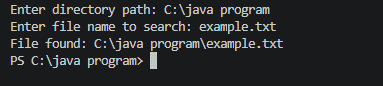
Explanation: The program first creates a File object for the specified directory and obtains its contents using listFiles(). For every subdirectory, the searchFile() method calls itself recursively until the requested file is found or all directories are searched.
2. Using Files.walk()
The Files.walk() method from the java.nio.file package traverses a directory and its subdirectories. We use a stream to filter regular files whose names match the specified file name.
import java.nio.file.Files;
import java.nio.file.Path;
import java.nio.file.Paths;
import java.util.Scanner;
import java.util.stream.Stream;

public class SearchFile {

    public static void main(String[] args)
    {

        Scanner sc = new Scanner(System.in);

        System.out.print("Enter directory path: ");
        String directoryPath = sc.nextLine();

        System.out.print("Enter file name to search: ");
        String fileName = sc.nextLine();

        Path directory = Paths.get(directoryPath);

        if (!Files.exists(directory)
            || !Files.isDirectory(directory)) {
            System.out.println("Invalid directory path.");
            sc.close();
            return;
        }

        try (Stream<Path> paths = Files.walk(directory)) {

            paths.filter(Files::isRegularFile)
                .filter(path
                        -> path.getFileName()
                               .toString()
                               .equalsIgnoreCase(fileName))
                .forEach(path
                         -> System.out.println("File found: "+ path.toAbsolutePath()));
        }
        catch (Exception e) {
            System.out.println("Error while searching: "+ e.getMessage());
        }

        sc.close();
    }
}
Output
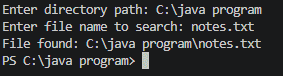
Explanation: Files.walk() traverses the complete directory tree, including nested directories. The stream filters regular files and compares their names with the requested file name.
Note: If multiple files with the same name exist, the second approach prints all matching paths. The first approach stops after finding the first match.
