

A directory is a file-system structure used to organize files and other directories. In Java, we can traverse a directory to access and display the files and subdirectories present inside it.
Java provides different ways to traverse directories. The File class provides listFiles(), while the Files class provides the walk() method for recursive traversal.
- listFiles() returns the files and directories directly present inside a directory.
- Files.walk() can recursively traverse the complete directory structure and returns a Stream<Path>.
Note: Directory traversal is different from a path traversal attack. A path traversal attack occurs when an application improperly allows an attacker to access files outside the intended directory.
Ways To Traverse a Directory
There are several ways to traverse a directory in Java, depending on the required level of control and whether subdirectories also need to be processed.
Method 1: Using listFiles() Method of File Class
The listFiles() method returns the files and directories inside a directory. Recursion can be used to traverse subdirectories and display their contents.
Approach
- Create a File object for the C:\GFG directory.
- Use the listFiles() method to get all files and directories.
- Traverse through the returned File array.
- Check whether the current item is a directory using isDirectory().
- If it is a directory, recursively call the method to traverse its contents.
- Otherwise, print the file name.
import java.io.File;

public class TraverseDirectoryUsingListFiles {

    public static void displayFiles(File directory)
    {

        File[] files = directory.listFiles();

        if (files == null) {
            System.out.println(
                "Unable to access: "
                + directory.getAbsolutePath());
            return;
        }

        for (File file : files) {

            System.out.println(file.getAbsolutePath());

            if (file.isDirectory()) {
                displayFiles(file);
            }
        }
    }

    public static void main(String[] args)
    {

        File directory = new File("C:\\java program\\GFG");

        if (!directory.exists()) {
            System.out.println(
                "Directory does not exist: "
                + directory.getAbsolutePath());
            return;
        }

        if (!directory.isDirectory()) {
            System.out.println(
                "The specified path is not a directory.");
            return;
        }

        System.out.println("Files and directories:");
        displayFiles(directory);
    }
}
Output
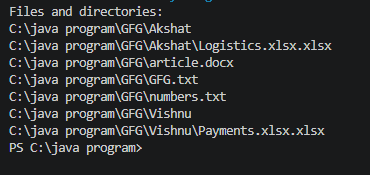
Explanation: The isDirectory() method checks whether the current File object represents a directory. If it is a directory, displayFiles() is called recursively to traverse its contents. The listFiles() method returns the files and subdirectories inside the current directory, allowing the program to traverse the directory tree.
Method 2: Using walk() Method
Java 8 introduced Files.walk(), which recursively traverses a directory tree and returns a Stream<Path> containing its files and directories. Unlike listFiles(), it handles recursion automatically.
Approach
- Specify the directory path using Paths.get().
- Use Files.walk() to create a stream of paths.
- Traverse the stream using forEach().
- Print the complete path of each file and directory.
- Handle IOException if the directory cannot be accessed.
import java.io.IOException;
import java.nio.file.Files;
import java.nio.file.Path;
import java.nio.file.Paths;
import java.util.stream.Stream;

public class TraverseDirectoryUsingWalk {

    public static void main(String[] args) {

        Path path = Paths.get("C:\\java program\\GFG");

        if (!Files.exists(path)) {
            System.out.println("Directory does not exist: " + path);
            return;
        }

        if (!Files.isDirectory(path)) {
            System.out.println("The specified path is not a directory.");
            return;
        }

        System.out.println("Files and directories:");

        try (Stream<Path> paths = Files.walk(path)) {

            paths.forEach(System.out::println);

        } catch (IOException e) {

            System.out.println("Unable to traverse the directory.");
            e.printStackTrace();
        }
    }
}
Output
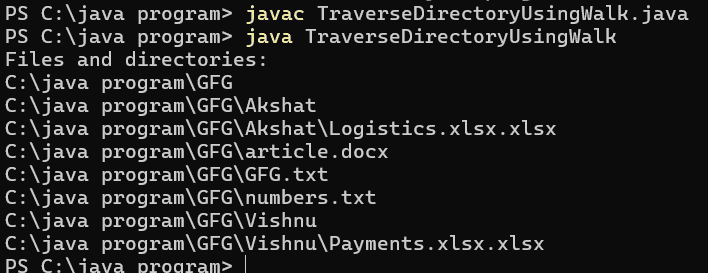
Explanation: The Files.walk() method recursively traverses the specified directory and returns a Stream<Path> containing the starting directory and its files and subdirectories. The forEach() method prints each path from the stream.
