

The isAlive() method of the Java Thread class is used to check whether a thread is currently active. A thread is considered alive after it has been started and before it has terminated.
- Returns true if the thread has been started and has not yet terminated.
- Returns false if the thread has not started or has already completed.
Thread Life Cycle
A thread passes through different states during its execution. The isAlive() method helps determine whether a thread is still active during this life cycle.
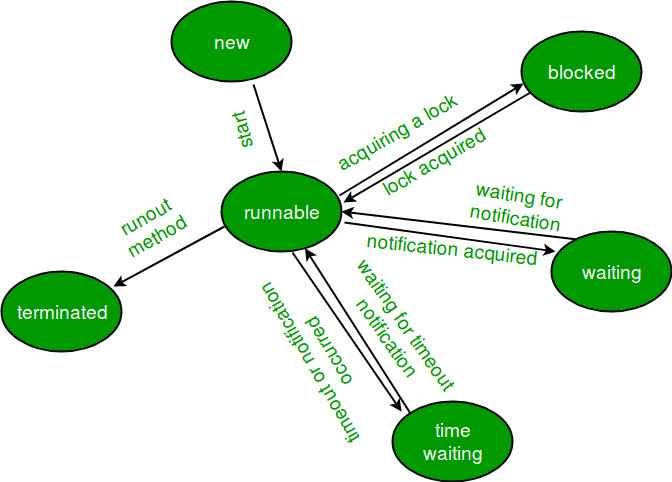
Syntax
final boolean isAlive()
class IsAliveDemo extends Thread {

    @Override public void run()
    {

        System.out.println("Thread is running");

        try {
            Thread.sleep(300);
        }
        catch (InterruptedException e) {
            System.out.println("Thread interrupted");
        }

        System.out.println("Thread has completed");
    }

    public static void main(String[] args)
    {

        IsAliveDemo t1 = new IsAliveDemo();
        IsAliveDemo t2 = new IsAliveDemo();

        // Check before starting the threads
        System.out.println("Before start:");
        System.out.println("t1 alive: " + t1.isAlive());
        System.out.println("t2 alive: " + t2.isAlive());

        // Start the threads
        t1.start();
        t2.start();

        // Check whether threads are alive
        System.out.println("After start:");
        System.out.println("t1 alive: " + t1.isAlive());
        System.out.println("t2 alive: " + t2.isAlive());

        try {
            t1.join();
            t2.join();
        }
        catch (InterruptedException e) {
            System.out.println("Main thread interrupted");
        }

        // Check after completion
        System.out.println("After completion:");
        System.out.println("t1 alive: " + t1.isAlive());
        System.out.println("t2 alive: " + t2.isAlive());
    }
}
Output
Before start:
t1 alive: false
t2 alive: false
Thread is running
After start:
Thread is running
t1 alive: true
t2 alive: true
Thread has completed
Thread has completed
After completion:
t1 alive: false...
Explanation: Initially, both threads have not been started, so isAlive() returns false. After calling start(), the threads begin execution and isAlive() can return true. After the run() method finishes, the threads terminate and isAlive() returns false.
Note: The output of multithreaded programs can vary depending on the scheduling of threads. Therefore, messages printed by different threads may appear in a different order on different runs.
