

The CHAR_LENGTH() function in SQL is an inbuilt string function used to return the number of characters in a string. It counts each character in the given string, including spaces.
- Used to find the length of a string.
- Useful for validating and analyzing text data in databases.
- Data analysts and administrators can use it to check the number of characters stored in text values.
Syntax
CHAR_LENGTH(Input_String)- Input_String: The string or column for which you want to find the number of characters.
Note: The CHAR_LENGTH() function counts the number of characters in a string, including spaces.
Working
Now let us see some examples of the CHAR_LENGTH() function in different use cases to understand its working better:
Example 1: Find the Length of a String Using CHAR_LENGTH()
In this example, we will find the number of characters in a string using the CHAR_LENGTH() function.
Query:
SELECT CHAR_LENGTH('GeeksforGeeks') AS string_length;Output:

- Counts the number of characters in the string.
- Returns the result as string_length.
Example 2: CHAR_LENGTH() with Spaces
In this example, we will see how CHAR_LENGTH() counts spaces in a string.
Query:
SELECT CHAR_LENGTH('Hello World') AS string_length;Output:
- Counts all characters in the string.
- The space between Hello and World is also counted.
Example 3: Use CHAR_LENGTH() on a Table Column
Let us create a table where the names of users are stored.
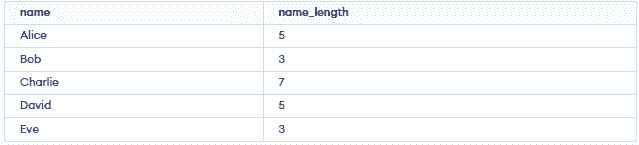
Now, to find the number of characters in each name, we can use the following SQL query:
Query:
SELECT name,CHAR_LENGTH(name) AS name_lengthFROM users;
Output:
Note: MySQL, SQL Server and PL/SQL support character-length functions, but the function name differs. MySQL uses CHAR_LENGTH(), SQL Server uses LEN() and Oracle PL/SQL uses LENGTH().
