

An API (Application Programming Interface) is a mechanism that allows different software systems to interact with each other. It defines how a client can request data or services from a server without needing to know its internal implementation.
- Provides a standard way for applications to interact.
- Supports integration between different systems and services.
- Controls access to specific data or functionality.
Example: When a food delivery app displays a map, it can use a Maps API to request location and map data from a mapping service.
API Working Process
An API acts as an interface between a client and a server, allowing them to communicate and exchange data. It receives a request from the client, processes it, and returns an appropriate response.
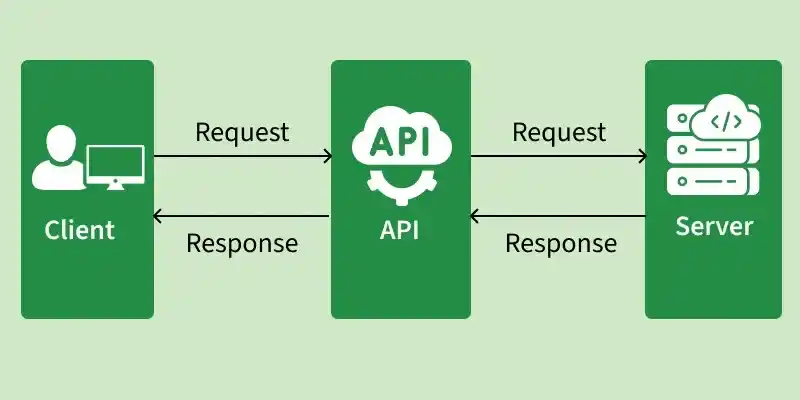
- Client sends a request to the API: The client sends a request to an API endpoint with information such as the HTTP method, parameters, headers, and request body.
- API processes the request: The API validates the request and determines the required operation based on the provided information.
- API communicates with the backend: The API interacts with application logic, databases, or other services to process the request and obtain the required data.
- API sends a response to the client: The API returns the result to the client, usually with an HTTP status code and response data in a format such as JSON or XML.
Components of an API
An API consists of several key elements that define how clients communicate with servers and exchange data. These elements specify where requests are sent, how they are structured, and how responses are returned.
- API Endpoint: A specific URL through which clients access a particular resource or service.
- HTTP Methods: Define the operation performed by a request, such as retrieving, creating, updating, or deleting data.
- Headers: Provide additional information about a request or response, such as content type and authentication details.
- Parameters: Provide additional information required to process a request, such as resource identifiers or filtering criteria.
- Request Body: Contains data sent by the client to the server, commonly in JSON or XML format.
- Response: Contains the result returned by the server after processing the request.
- HTTP Status Codes: Indicate the outcome of a request, such as success, client error, or server error.
Types of API Architectures
API architectures define the approaches and technologies used to design communication between applications. Different approaches provide different ways for clients and servers to exchange data and perform operations.
- REST (Representational State Transfer): REST is an architectural style that uses HTTP methods and resources to enable communication between clients and servers.
- SOAP (Simple Object Access Protocol): SOAP is a protocol that uses XML-based messages and follows standardized rules for communication between applications.
- GraphQL: GraphQL is a query language and API specification that allows clients to request only the data they need.
- gRPC (Google Remote Procedure Call): gRPC is a high-performance RPC framework that enables communication between distributed services using Protocol Buffers (Protobuf).
Note: REST, SOAP, GraphQL, and gRPC are commonly used approaches for building APIs, but they differ in their design, communication methods, and use cases.
Types of APIs Based on Accessibility and Usage
APIs can be categorized based on who can access them and how they are used. The main types are:
- Public APIs: APIs that are available to external developers or users, often with specific usage policies or access requirements.
- Private APIs: APIs designed for use within an organization to connect internal applications and services.
- Partner APIs: APIs shared with selected external partners to support business-to-business integration.
- Composite APIs: APIs that combine multiple API operations or services into a single request to perform a complete business process.
API Integration
API integration is the process of connecting two or more applications or systems through APIs so they can exchange data and work together.
Examples:
- Connecting an e-commerce application to a payment gateway using a payment API.
- Connecting a CRM system with a marketing platform to synchronize customer data.
- Integrating a mapping service into a mobile application to provide location-based features.
API integration helps automate processes, connect services, and enable interoperability between different systems.
API Versioning
API versioning is the process of managing changes to an API while maintaining compatibility with existing clients. It allows developers to introduce new features or modify existing functionality without unexpectedly affecting applications that use an older version.
- Maintains Compatibility: Allows existing clients to continue using older API versions.
- Supports API Evolution: Makes it possible to introduce new features and changes without disrupting existing integrations.
- Manages Breaking Changes: Provides separate versions when changes could affect existing clients.
Example: An API may use
/api/v1/usersfor the first version and/api/v2/usersfor a newer version with updated functionality.
Restrictions of Using APIs
APIs often have certain restrictions and usage policies that control how they can be accessed and used. These restrictions help maintain security, performance, reliability, and fair usage.
- Rate Limits: Restrict the number of API requests that can be made within a specific time period.
- Authentication Requirements: Require API keys, access tokens, or OAuth credentials to access protected resources.
- Access Permissions: Limit which resources or operations a user or application can access or perform.
- Usage Quotas: Limit total API usage based on subscription plans, service tiers, or daily or monthly limits.
- Version Restrictions: Older API versions may be deprecated or discontinued, requiring clients to migrate to supported versions.
Popular API Testing Tools
- Postman: A popular tool used to send API requests, test endpoints, and automate API test cases.
- Swagger / OpenAPI: Used for designing, documenting, and testing REST APIs through interactive API documentation.
- REST Assured: A Java-based library used for automating REST API testing and validating responses.
- SoapUI: A testing tool for SOAP and REST APIs that supports functional, security, and load testing.
- Apache JMeter: An open-source tool used for API performance, load, and stress testing.
- Insomnia: An API client used for testing, debugging, and designing REST and GraphQL APIs.
Advantages of APIs
APIs provide several benefits by making software systems easier to integrate, maintain, and extend. They help organizations build applications efficiently while enabling reliable communication between different systems.
- APIs improve development efficiency by providing reusable functionality.
- APIs simplify system integration between different applications and services.
- APIs support scalability by enabling applications to use independent services as needed.
- APIs improve maintainability by separating application components and their responsibilities.
- APIs enable automation by allowing systems to exchange data and perform operations programmatically.
Limitations of APIs
Although APIs provide many benefits, they also have certain limitations that can affect application performance, security, and maintenance.
- APIs can introduce security risks if authentication, authorization, and input validation are not implemented properly.
- API performance can be affected by network latency, high traffic, or slow backend services.
- APIs require ongoing maintenance to handle updates, changes, and compatibility issues.
- API dependencies on external services can cause failures when those services are unavailable or changed.
- Poorly designed APIs can make integration and troubleshooting more difficult.
