

The SPACE() function in SQL is a string function used to return a string containing a specified number of spaces.
- It is useful for formatting text output.
- The number of spaces returned depends on the specified argument.
Syntax
SPACE(number_of_spaces)- number_of_spaces: Specifies the number of spaces to return.
Note: The SPACE() function is supported by SQL Server and some other SQL database systems. SQLite does not support the SPACE() function.
Working
Below are some examples of the SPACE() function to understand how it is used to add spaces and format string values.
Example 1: Add Spaces Between Strings
SELECT CONCAT('Hello', SPACE(3), 'World') AS result;Output:
Hello World- SPACE(3) adds three spaces between Hello and World.
- The result is displayed as result.
Example 2: Use SPACE() with a Table Column
Let us create an employees table containing employee names and departments.
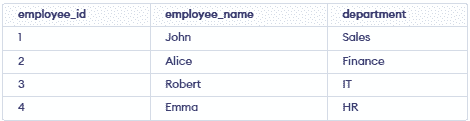
Now, we can use SPACE() to add spaces between the employee name and department.
SELECT CONCAT(employee_name, SPACE(5), department) AS employee_details
FROM employees;
Output:

- Adds five spaces between the employee name and department.
- Returns the formatted result as employee_details.
